Outline ·
[ Standard ] ·
Linear+
AMDŽ Socket-AM2 Overclocking thread, discuss our setup/overclocking issues
|
Seventh
|
 Sep 21 2006, 12:26 AM Sep 21 2006, 12:26 AM
|
New Member


|
hi guys been reading all posting here..cant believe read all 49pages alrdy..add me to am2 clan..just bought my budget rig:
Sempron64 3000+ manila stock 1.6Ghz
Biostar Tforce 6100..onboard gpu..i no use gc
1X Kingston 512mb value ram DDR667 5-5-5-15
done sum oc with infeneon 512mb ram to run dual channel and got my 3ram slot burn..only 1dimm left..god this mobo is so sensitive..luckily still got warranty..use cap ayam mATX psu..
looks like me n cyclone only use sempron here..so cant refer so much how to oc dis proc..
btw i did oc ram set to 2T and lower it to 533mhz and 233htt now at 1864ghz n can run superpi..temp around 45-47c..y so hot er?
from here on i dunno wat to do..i scare to oc higher afraid will burn my psu..with stock cooling n cap kuda psu how far u guys think i`ll go?wat really affect superpi..beside htt..?i run it got 51sec. with 1800ghz ;(
i no idea how pcmodding n cyclone oc their manila with dis mobo..my bios ver. is the old one dated 5/5/2006..i know there sum ppl use dis mobo but all with athlon64..care sum1 to help me here..is manila 3000 core got different stepping?like d one tht can oc high anot?
|
|
|
|
|
|
TSsoulfly
|
Sep 21 2006, 10:14 AM
|
revving towards 10,000 rpm

|
i suggest that u send it for warranty first. it's no fun to OC with a crippled mobo.
|
|
|
|
|
|
Seventh
|
Sep 21 2006, 02:13 PM
|
New Member
|
oh ok..i`ll get done
|
|
|
|
|
|
Complete
|
Sep 21 2006, 04:14 PM
|
New Member
|
|
|
|
|
|
|
pcmoddingmy
|
Sep 21 2006, 07:04 PM
|
|
|
QUOTE(Seventh @ Sep 21 2006, 12:26 AM) hi guys been reading all posting here..cant believe read all 49pages alrdy..add me to am2 clan..just bought my budget rig: Sempron64 3000+ manila stock 1.6Ghz Biostar Tforce 6100..onboard gpu..i no use gc 1X Kingston 512mb value ram DDR667 5-5-5-15 done sum oc with infeneon 512mb ram to run dual channel and got my 3ram slot burn..only 1dimm left..god this mobo is so sensitive..luckily still got warranty..use cap ayam mATX psu.. looks like me n cyclone only use sempron here..so cant refer so much how to oc dis proc.. btw i did oc ram set to 2T and lower it to 533mhz and 233htt now at 1864ghz n can run superpi..temp around 45-47c..y so hot er? from here on i dunno wat to do..i scare to oc higher afraid will burn my psu..with stock cooling n cap kuda psu how far u guys think i`ll go?wat really affect superpi..beside htt..?i run it got 51sec. with 1800ghz ;( i no idea how pcmodding n cyclone oc their manila with dis mobo..my bios ver. is the old one dated 5/5/2006..i know there sum ppl use dis mobo but all with athlon64..care sum1 to help me here..is manila 3000 core got different stepping?like d one tht can oc high anot? Dude, looks like you did not completely power off when swapping RAMs. Its sad to hear that 3 out of the 4 DIMM slots got burned. Any pictures of that? Maybe I can help you fwd it to Biostar FAE guys. FYI, I didn't even own a Sempron (Manila). All my tests with the TForce 6100-AM2 board was done using Athlon 64 3000+ (Orleans). |
|
|
|
|
|
beetle_larvae
|
Sep 21 2006, 09:01 PM
|
|
|
QUOTE(the_kid @ Sep 19 2006, 09:45 AM) i need help please. i'm new in the computer world. but i have done some research myself for the past year. two days ago i bought me a new rig am2 x2 3600+ and gigabyte ga-m51gm-s2g. i want to overclock it by upto 30% only coz i feel my previos rig is much faster than this inspite of being a dual core cpu. my problem is i cant seem to find anything in the bios to help me overclock it even a little. the only thing i can find is the memory timings which only appears after pressing CTRL+F1. other than that, no more. can anyone help me? which bios has the option on increasing the fsb, multiplier setting, memory timing adjustment and so on? currently my bios version if F5. thanks! Update ur bios f6/f7 can change fsb,vga speed,and ram timing in bios. |
|
|
|
|
|
mzms
|
Sep 21 2006, 09:10 PM
|
Getting Started
|
QUOTE(the_kid @ Sep 19 2006, 09:45 AM) i need help please. i'm new in the computer world. but i have done some research myself for the past year. two days ago i bought me a new rig am2 x2 3600+ and gigabyte ga-m51gm-s2g. my problem is i cant seem to find anything in the bios to help me overclock it even a little. the only thing i can find is the memory timings which only appears after pressing CTRL+F1. other than that, no more. can anyone help me? thanks! my brother has the S2. sorry to inform you that there is absolutely no OC in bios (except the memory stuff u mentioned). The shop guy said yes yes there is but i knew he was full of sh*t cos i already researched this board before we went to buy it. my bro doesn't oc so he's ok with it. the cheap biostar Geforce 6100 AM2 has far more OC stuff in bios than the gigabyte (which really has none!). |
|
|
|
|
|
TSsoulfly
|
Sep 21 2006, 11:20 PM
|
revving towards 10,000 rpm
|
2550MHz prime stable (finish at least 1 round) @ 1.375V bios set  previously does not pass SuperPi 32M, after some burn-in process it was a success..... |
|
|
|
|
|
ambayah
|
Sep 21 2006, 11:58 PM
|
New Member
|
Biostar Geforce 6100 AM2
What are your views of this board? Is it good? I'm not into gaming, but I'd like to atleast OC my sempron 2800+ to 2.0 GHz.
Thanks all.
This post has been edited by ambayah: Sep 21 2006, 11:59 PM
|
|
|
|
|
|
lucklyghost
|
Sep 22 2006, 01:36 AM
|
|
|
why Biostar TF550 can not lock PCI frequency ?
coz i planing to buy a Networkcard, so if i oc but can not lock pci , i scare the card will burn
and i saw a setting in Bios there, but i duno wat is for....
Bios -->Advanced Chipset Features---> Cpu feuture -->k8 NPT CIE support ----> 1. Software SMI
2. Hardware CIE
this setting is for wat?
and if we do overclock , do we want to enable AMD k8 cool & quiet at bios there?
This post has been edited by lucklyghost: Sep 22 2006, 01:36 AM
|
|
|
|
|
|
mzms
|
Sep 22 2006, 06:48 AM
|
Getting Started
|
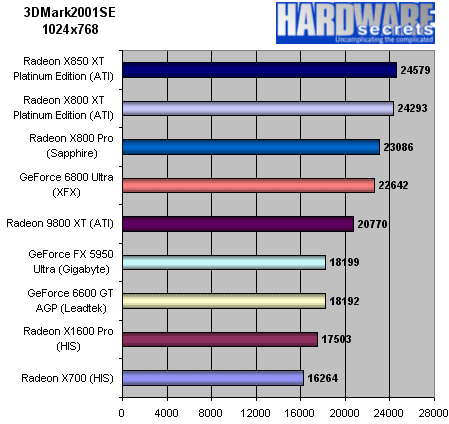
QUOTE(ambayah @ Sep 21 2006, 11:58 PM) Biostar Geforce 6100 AM2 What are your views of this board? Is it good? I'm not into gaming, but I'd like to atleast OC my sempron 2800+ to 2.0 GHz. Thanks all. for RM270 it's great value imo. I actually asked for kurang and can have it for RM260 but that is older revision 1.1. The one now selling I think is revision 1.3. make sure you get that one. if the gigabyte s2 can OC with the new bios update like the previous poster said, then maybe that one better value especially if you want some features like gigabit lan... however, it does not have a parallel port so if you need one, then get something else (it has a parallel header only for you to plug in port). also no gigabit lan only 10/100 and no firewire 1394. if you don't need all that, this is the greatest value with build in GF so far. the gf6100 score in 3Dmark01 is about 4800 - 5500++ depending on your system. on mine, it's about 5100+ and 5600+ when overclocked. okay for games like generals (medium setting, 1024 x 767very smooth). also have the sempron 2800 running on it and can overclock to about 1900 stable only. didn't try any other combinations though, like increase or lower this and that. you have to try it yourself. |
|
|
|
|
|
mzms
|
Sep 22 2006, 06:53 AM
|
Getting Started
|
QUOTE(Seventh @ Sep 21 2006, 12:26 AM) hi guys been reading all posting here..cant believe read all 49pages alrdy..add me to am2 clan..just bought my budget rig: Sempron64 3000+ manila stock 1.6Ghz Biostar Tforce 6100..onboard gpu..i no use gc 1X Kingston 512mb value ram DDR667 5-5-5-15 done sum oc with infeneon 512mb ram to run dual channel and got my 3ram slot burn..only 1dimm left..god this mobo is so sensitive..luckily still got warranty..use cap ayam mATX psu.. looks like me n cyclone only use sempron here..so cant refer so much how to oc dis proc.. btw i did oc ram set to 2T and lower it to 533mhz and 233htt now at 1864ghz n can run superpi..temp around 45-47c..y so hot er? from here on i dunno wat to do..i scare to oc higher afraid will burn my psu..with stock cooling n cap kuda psu how far u guys think i`ll go?wat really affect superpi..beside htt..?i run it got 51sec. with 1800ghz ;( i no idea how pcmodding n cyclone oc their manila with dis mobo..my bios ver. is the old one dated 5/5/2006..i know there sum ppl use dis mobo but all with athlon64..care sum1 to help me here..is manila 3000 core got different stepping?like d one tht can oc high anot? i don't have the tforce, i have the gforce but i also put together a sempron manila core 2800+. i oc'ed it to 1900 only (only a 300mhz increase) and didn't try anything else higher but that was the highest i could go without adjusting any things out of spec, maybe just a small vcore increase. but i feel that the manila is poor for o'clocking because at 236 x 8 it seemed it maxed out with stock vcore . it started having stability problems after that unless you bump up the vcore. i don't think it's my board as i can get my 2ghz 3200+ to 2.6++ with no problems at all (orleans core). 2.7 also possible with higher vcore but gets hotter (diminishing returns kicks in) so I just clock it at 2.6gig. BTW what exactly did you do to burn the three ram slots?!! *shocked* This post has been edited by mzms: Sep 22 2006, 06:54 AM |
|
|
|
|
|
Syfq
|
Sep 22 2006, 07:14 AM
|
|
|
QUOTE(mzms @ Sep 22 2006, 07:48 AM) for RM270 it's great value imo. I actually asked for kurang and can have it for RM260 but that is older revision 1.1. The one now selling I think is revision 1.3. make sure you get that one. if the gigabyte s2 can OC with the new bios update like the previous poster said, then maybe that one better value especially if you want some features like gigabit lan... however, it does not have a parallel port so if you need one, then get something else (it has a parallel header only for you to plug in port). also no gigabit lan only 10/100 and no firewire 1394. if you don't need all that, this is the greatest value with build in GF so far. the gf6100 score in 3Dmark01 is about 4800 - 5500++ depending on your system. on mine, it's about 5100+ and 5600+ when overclocked. okay for games like generals (medium setting, 1024 x 767very smooth). also have the sempron 2800 running on it and can overclock to about 1900 stable only. didn't try any other combinations though, like increase or lower this and that. you have to try it yourself. i think ver 1.1 better one for me  QUOTE(mzms @ Sep 22 2006, 07:53 AM) i don't have the tforce, i have the gforce but i also put together a sempron manila core 2800+. i oc'ed it to 1900 only (only a 300mhz increase) and didn't try anything else higher but that was the highest i could go without adjusting any things out of spec, maybe just a small vcore increase. but i feel that the manila is poor for o'clocking because at 236 x 8 it seemed it maxed out with stock vcore . it started having stability problems after that unless you bump up the vcore. i don't think it's my board as i can get my 2ghz 3200+ to 2.6++ with no problems at all (orleans core). 2.7 also possible with higher vcore but gets hotter (diminishing returns kicks in) so I just clock it at 2.6gig. BTW what exactly did you do to burn the three ram slots?!! *shocked* that is geForce6100 , and ..better if the mobo support T-series , Tforce410 |
|
|
|
|
|
mzms
|
Sep 22 2006, 07:57 AM
|
Getting Started
|
QUOTE(NavigatorŽ @ Sep 22 2006, 07:14 AM) i think ver 1.1 better one for me care to share more? why do you feel the older revision is better? (the poster was asking about Gforce not Tforce). BTW the older rev 1.1 has no heatsink on southbridge and gets very very hot reading from older reviews on newegg.com. even with heatsink it's quite warm so imagine without. |
|
|
|
|
|
Syfq
|
Sep 22 2006, 08:04 AM
|
|
|
QUOTE(mzms @ Sep 22 2006, 08:57 AM) care to share more? why do you feel the older revision is better? (the poster was asking about Gforce not Tforce). BTW the older rev 1.1 has no heatsink on southbridge and gets very very hot reading from older reviews on newegg.com. even with heatsink it's quite warm so imagine without. are you sure ma? my mobo ver.1.1 , both all cipset got heatsink, the big one for geforce6100 LOL |
|
|
|
|
|
TSsoulfly
|
Sep 22 2006, 09:10 AM
|
revving towards 10,000 rpm
|
QUOTE(lucklyghost @ Sep 22 2006, 01:36 AM) why Biostar TF550 can not lock PCI frequency ?
coz i planing to buy a Networkcard, so if i oc but can not lock pci , i scare the card will burn
and i saw a setting in Bios there, but i duno wat is for....
Bios -->Advanced Chipset Features---> Cpu feuture -->k8 NPT CIE support ----> 1. Software SMI
2. Hardware CIE
this setting is for wat?
and if we do overclock , do we want to enable AMD k8 cool & quiet at bios there?
The latest BIOS fixes PCI frequency lock. I bet you still use the old one. If you overclock, disable Cool n Quiet in BIOS. Disable K8 NPT C1E as well... the function works together with Cool n Quiet. |
|
|
|
|
|
mzms
|
Sep 22 2006, 12:15 PM
|
Getting Started
|
QUOTE(NavigatorŽ @ Sep 22 2006, 08:04 AM) are you sure ma? my mobo ver.1.1 , both all cipset got heatsink, the big one for geforce6100 LOL ya la, no heatsink on southbridge unless you're talking about your TFORCE in your sig, i am talking about revision 1.1 GeFORCE 6100 which the poster asked about (Biostar Geforece 6100 AM2). the rev 1.3 one has heatsink. the older users of rev 1/1.1 in the US (read at newegg.com) say the southbridge gets very very hot without heatsink. there's a new bios out for this board in biostar USA but cannot download, very slow lah this biostar website. |
|
|
|
|
|
Syfq
|
Sep 22 2006, 03:53 PM
|
|
|
owhhh you talk about normal 6100 ^^
|
|
|
|
|
|
lucklyghost
|
Sep 22 2006, 09:10 PM
|
|
|
can help me c c my result .. still can go ? but run superpi run 1M ...= 38sec..so slow.. This post has been edited by lucklyghost: Sep 22 2006, 10:17 PM Attached thumbnail(s)
|
|
|
|
|
|
mruzian
|
Sep 22 2006, 09:50 PM
|
|
|
QUOTE(lucklyghost @ Sep 22 2006, 09:10 PM) can help me c c my result .. still can go ? try to bumb up the core see if the proc can go up sumore  last time my x2 3600+ can go to 2.6@1.4 |
|
|
|
|



 Quote
Quote






 0.0303sec
 0.40
0.40
 6 queries
 GZIP Disabled