

 Jan 13 2014, 10:36 PM, updated 12y ago


Welcome to the LYN Samsung Galaxy Note 3 thread - v14
===========================================
CAUTION ON KITKAT
FIRST SIDE EFFECT
Flashing kitkat now will render the external SD almost useless for some apps. This is a new feature of kitkat where each app will need an extra permission for external sd. As such you will need an update from the app creator. Nevertheless, Samsung stock apps are working fine.
The is a fix for rooted user as we can change some permission stuff with root. ROOTING WILL TRIP KNOX ON KITKAT.
Please be warned on this new permission issue with kitkat before flashing.
Rooted user can flash this to FIX EXTERNAL SD
SECOND SIDE EFFECT
KitKat ROM is detecting S View Cover Chipset, only Genuine Samsung S View Flipcover will working now.
All counterfeit or any branded casing including Spigen SlimArmor View - S View function will stop working once update to KitKat ROM."
The is a fix for rooted user using exposed framework and the xposed app from here S cover Xposed Fix.
ROOTING WILL TRIP KNOX ON KITKAT.
Please be warned on this issue with kitkat before flashing.
THIRD SIDE EFFECT
There will be no downgrading back to 4.3 roms anymore so the 2 above side effects is here to stay until someone fixes it.
Only flash Kitkat if you have understood the above 2 side effects.
ANNOUNCEMENTS / WARNINGS
ANNOUNCEMENT: ABOUT the Knox "Prevention Information" Message
You can do 2 things, either tick the box and be reminded every 30 days, or root and freeze all Knox related apps/services. See post 7, issue 17 for more information
WARNING: ENSURE YOU DO NOT FLASH BOOTLOADERS OF ROMS newer than MJ1!!! IN OTHER WORDS, AVOID OTA, KIES AND ODIN ALL TOGETHER
READ POST 9 ABOUT ROOTING AND FLASHING CUSTOM ROM WITHOUT TRIPPING KNOX
INFORMATION
Here attached scenario on when the knox get trip or not courtesy of Andrewtst with minor amendments.
QUOTE
Flash any stock ROM including Kitkat officially or not with odin without rooting - won't trip knox.
Officially phone came with MJ1 or older - root with URDLV won't trip knox.
Officially phone came with MJ7 or later - root with any method will trip knox.
Officially phone came with MJ1 but later updates to MJ7 with OTA/KIES/Odin and later - root with any method will trip knox.
Officially at MJ1 and rooted and update to any firmware excluding KitKat ROM using Mobile Odin Pro only - root will remain and won't trip the knox.
KitKat cannot update via Mobile Odin as new bootloader required and will trip the knox once you root it only.
Install any custom recovery and custom kernel will trip the knox.
Officially phone came with MJ1 or older - root with URDLV won't trip knox.
Officially phone came with MJ7 or later - root with any method will trip knox.
Officially phone came with MJ1 but later updates to MJ7 with OTA/KIES/Odin and later - root with any method will trip knox.
Officially at MJ1 and rooted and update to any firmware excluding KitKat ROM using Mobile Odin Pro only - root will remain and won't trip the knox.
KitKat cannot update via Mobile Odin as new bootloader required and will trip the knox once you root it only.
Install any custom recovery and custom kernel will trip the knox.
Type *#1234# to get the following information from your phone:
AP: N9005XXUDMJ7
CP: N9005XXUDMJ7
CSC: N9005OLBDML1
***THIS IS THE LATEST FIRMWARE FOR MALAYSIA*** as of 2013-12-12
WARNING THIS FIRMWARE IF FLASH THROUGH KIES OR ODIN OR OTA WILL TRIP KNOX IF YOU ROOT IT WITH URDLV
To turn off AUTO UPDATE OF FIRMWARE : settings>general>about>update>software updates. Uncheck Auto Update
Manual Download
N9005XXUDMJ7 - XME - Thanks to nazeeman
===========================================
officially announced on 04 September 2013 at IFA 2013 Berlin.
"The official language of Lowyat.NET is the English language. All threads and posts must be in English, with the exception of specific, designated threads in the Kopitiam, and limited use to convey a specific expression or interjection."
NO "First post" type posts. Such posts are counted as spam by the Mods and will be warned.
You may get a chance to go Bora-Bora as they say in these parts:
» Click to show Spoiler - click again to hide... «

 I will NOT correct your grammar and semantics
  LINK:Want To Be Taken Seriously? Become a Better Writer - 2013-02-21 - David Kerpen, LinkedIn author - Legacy of Previous TSLINK:My little post about non-verbal communication - More Legacy of Previous TS
===========================================
RRP RM2399 for N9005 LTE (4G, 32GB) MODEL. AVAILABLE NOW !!
GET YOUR RM 1,500 FREEBIES WITH THIS OFFICIAL APP
link credits to confuzan
===========================================
Thread Rules
1. Strictly no discussions on warez/cracks or pirated apps. Please keep the thread CLEAN from such illegal stuff
2. Do NOT ask for links to such apps or links to get free apps which need to be paid for
3. Do NOT post links or references to such sites that promote downloads of pirated, cracked, warez apps
4. Any requests or demands for apps specified under points 1 to 3 will be outright ignored and will attract warning and suspensions from the mods. The community will help in the policing.
5. Please be civil and polite in your posts. Saying "Please" goes a long way.
6. Posts / assistance given in this thread are on a voluntary basis by the members and please respect that.
7. Readers are advised to try out any suggestions at their own risk.
8. Learn to use "Search Topic" at bottom left of each page before asking. Do not blame others if you don't know how to form a search term.
9. Read the first page if you have a question. Then read for 10 pages, AND the last 10 pages of a thread BEFORE YOU ASK ANYTHING.
10. READ UP THE BASICS BEFORE YOU START ASKING HERE!! BASIC QUESTIONS WILL BE POLITELY DIRECTED TO PAGE 1, or not so politely directed elsewhere...
*However, if, after reading Page 1, the first and last 10 pages, or simply lurking, has helped you solve your problem, it will be appreciated if you can post a "Thank you" in the forum since we do not have a "Like" button or "Thanks" button*
===========================================
Mini Directory
Post 01: This post - Announcements, Rules, How to get Help, Mini Directory
Post 02: CHANGELOG for page 1 - easier to track what's been updated. *CHECK HERE* first !!
Post 03: General overview, Key features, Reviews
Post 04: Owners' lists, Review/Testimonies by Owners, Confessions, SCAM Alerts
Post 05: Note 3 Operations Part 1 (A-S)
Post 06: Note 3 Operations Part 2 (T-Z)
Post 07: Note 3 Common Issues
Post 08: Rooting and Advanced Part 1 - Intro
Post 09: Rooting and Advanced Part 2 - Steps
Post 10: Photography
Post 11: Resident Experts
Post 12: Records (Battery, Stable OC, etc) + Hall of Fame
Post 13: Useful Applications + Tutorials
Post 14: Peripheral stuff (Accessories, Cases, Homescreens, Themes etc)
Post 15: Mods, Tips & Tricks
Post 16: Reserved for alexng2208
===========================================
When you get your NEW TOY
On the dialer, dial *#0*#. You will see the following screen:
» Click to show Spoiler - click again to hide... «


Apart from this, please go thru the Issues/Defects list in POST 6 below for other reported defects.
GETTING A 2nd HAND NOTE 3 - IMPORTANT STEP !!!!
Make sure the seller has done this !!!!
» Click to show Spoiler - click again to hide... «
===========================================
For the Note series, the main differentiator is the S-Pen using a Wacom active digitizer, and Samsung's nicely packaged software to take advantage of it across the OS. I personally like the workflow enhancement you get when your device can actually replace the paper notebook, so I am very keen for active digitizer devices, of which currently only the Note series has it in the smartphone/phablet form factor. Larger devices with active digitizers (Wacom or N-Trig) tend to be very expensive (RM5k++) tablets/convertibles from notebook manufacturers.
First off, I want to put things in perspective. I must state that we can no longer think of our devices as "phones" but COMPUTERS. Therefore, since computers have been around for the last 60 years or so, there is nothing "new" or "innovative" to expect from our devices, except for "faster, better, cheaper". Maybe not cheaper but we have seen ASP (Average Selling Price) falling across the board.
In 2002 - it was already speculated that your phone will become your computer:
The Economist - 2002-11-21 - Computing's new shape
And because it is a computer, you have to treat it as such, ie regular backups, some periodic cleansing/factory reset and practice safe computing habits.
Note that of course it is not to be compared with the CISC type computers of the Intel x86 desktop/notebook genre, but it is still a computer nonetheless of the RISC variety, specifically the ARM family, with a huge number of variations across manufacturers. The focus of ARM is for performance per watt, which allows low power computing on the go which has been the dream of computing since its dawn.
Anything else, feel free to contribute.
Information will be added as it becomes available.
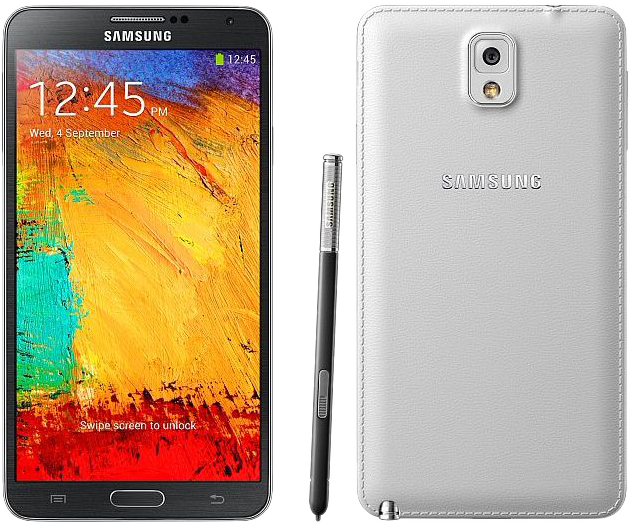
*credits to Andrewtst for merging and adding background transparency to the main pic.
None of us is as smart as all of us
Errare humanum est perseverare diabolicum
Have fun everyone

This post has been edited by antt00: Jan 25 2014, 09:40 AM
 Quote
Quote






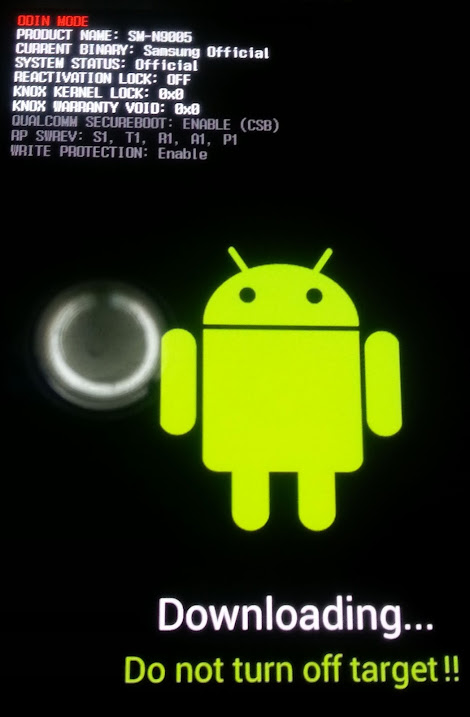
 It work finally after change to another USB port. Thanks so much Benny for help. Appreciate that.





 )
)





 0.0527sec
 0.44
0.44
 6 queries
 GZIP Disabled