


Samsung Galaxy Note 3 - Official v14, KitKat is Here But with Side Effects
Samsung Galaxy Note 3 - Official v14, KitKat is Here But with Side Effects
|
|
 Jan 13 2014, 10:51 PM Jan 13 2014, 10:51 PM
Return to original view | Post
#1
|
 
Senior Member
1,338 posts Joined: Sep 2012 
|
Wa...New home...good good
|
|
|
|
|
|
Jan 15 2014, 07:34 PM
Return to original view | Post
#2
|
|
Senior Member
1,338 posts Joined: Sep 2012
|
QUOTE(destEX @ Jan 15 2014, 06:47 PM) Virgin lipoting in me still Virgin too  |
|
|
Jan 17 2014, 07:26 AM
Return to original view | Post
#3
|
|
Senior Member
1,338 posts Joined: Sep 2012
|
Flashing KitKat using MOP and retain knox 0x0
http://forum.xda-developers.com/showpost.p...9&postcount=380 |
|
|
Jan 17 2014, 12:30 PM
Return to original view | Post
#4
|
|
Senior Member
1,338 posts Joined: Sep 2012
|
QUOTE(clfoong @ Jan 17 2014, 12:27 PM) Just flashed CSC..it's full wipe data...start from fresh phone knox 0x0 and root still intact? keyboard problem fixed? |
|
|
Jan 17 2014, 12:56 PM
Return to original view | Post
#5
|
|
Senior Member
1,338 posts Joined: Sep 2012
|
QUOTE(antt00 @ Jan 17 2014, 12:54 PM) Kitkat file structure changed a little. A portion of system apps is now in /system/priv-app Can tell me which file to extract and how to do it? thanksThe structure of main system apk had also changed. Take caution if you make any changes within the apk. I will do it later. Am outside now. |
|
|
Jan 17 2014, 12:57 PM
Return to original view | Post
#6
|
|
Senior Member
1,338 posts Joined: Sep 2012
|
QUOTE(Andrewtst @ Jan 17 2014, 12:56 PM) Having fun with LG G2 Launcher. no more tsf?  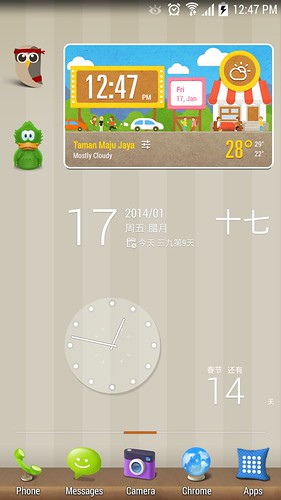  |
|
|
|
|
|
Jan 17 2014, 01:06 PM
Return to original view | Post
#7
|
|
Senior Member
1,338 posts Joined: Sep 2012
|
QUOTE(antt00 @ Jan 17 2014, 12:57 PM) cache.img.ext4 I've extracted it. Here it is:You can just flash it straight with odin or mobile Odin. https://db.tt/UacGMVfk |
|
|
Jan 17 2014, 01:51 PM
Return to original view | Post
#8
|
|
Senior Member
1,338 posts Joined: Sep 2012
|
QUOTE(clfoong @ Jan 17 2014, 10:41 AM) I skip the step 3, not flashing CSC......Knox 0x0, MicroSD card ok......just got problem with Samsung keyboard crashed. everything still intact.....so this 2 step with MOP & PC-Odin for Bootloader is working! I flashed using your steps and skipped step 3 and everything is working fine here...csc is there and no keyboard crash  How to solve keyboard crashing? |
|
|
Jan 17 2014, 02:22 PM
Return to original view | Post
#9
|
|
Senior Member
1,338 posts Joined: Sep 2012
|
QUOTE(clfoong @ Jan 17 2014, 02:10 PM) Huh...after flashed bootloader, you do normal reboot or reboot into recovery? I'm doing normal reboot. normal reboot and I flashed using the bootloader hereBut im using separated bootloader file from other link, not from OXX or XEO. http://forum.xda-developers.com/showpost.p...3&postcount=352 |
|
|
Jan 17 2014, 03:38 PM
Return to original view | Post
#10
|
|
Senior Member
1,338 posts Joined: Sep 2012
|
QUOTE(waveweaver @ Jan 17 2014, 03:11 PM) Gratz..glad I can help. 1. Update MOP to latest version Flashing csc normally will wipe clean your phone. And you need stock 3e recovery intact. If you have custom recovery..you might getting a bootloop or soft brick. Can you please tell us the actual step by step on how you flashing the KitKat firmware without tripping Knox...so it can be use to guide others for their KitKat flashing.  Can you please tell us on your actual step by step.. in flashing the KitKat firmware  2. Load N9005XXUENA6_N9005OXXENA5_N9005XXUENA2_HOME.tar.md5 in MOP 3. Enable EverRoot, Choose option "Download mode" in After flashing. Start flashing. 4. After booted into Download Mode, connect your phone to your computer and run Odin 3.09. 5. Load N9005XXUENA6_BL-Only.tar.md5 in the BL section 6. Check Phone Bootloader Update and F.Reset.time, uncheck Auto Reboot and Start Flashing. 7. When Odin says RESET!, switch off your phone and reboot normally. |
|
|
Jan 17 2014, 05:46 PM
Return to original view | Post
#11
|
|
Senior Member
1,338 posts Joined: Sep 2012
|
QUOTE(clfoong @ Jan 17 2014, 03:48 PM) My step is almost same as your step except: Hmm..I'm thinking maybe manual reboot won't give you keyboard fc problem? And my CSC is not missing6. Check Phone Bootloader Update and F.Reset.time & also check Auto Reboot and press START 7. Phone auto reboot normally, no wipe. No MicroSD card issue but CSC is missing, facing Samsung keyboard issue, Knox 0x0 & System Status : Custom After reflash OXX's CSC thru MOP under cache...Full wipe internal memory, MicroSD still intact, Knox 0x0, System Status: Official (Before I restored back Wanam xposed & Wanam xposed Fake system status is not working on Kitkat) |
|
|
Jan 17 2014, 06:19 PM
Return to original view | Post
#12
|
|
Senior Member
1,338 posts Joined: Sep 2012
|
QUOTE(waveweaver @ Jan 17 2014, 03:11 PM) Gratz..glad I can help. What is stock 3e recovery?Flashing csc normally will wipe clean your phone. And you need stock 3e recovery intact. If you have custom recovery..you might getting a bootloop or soft brick. |
|
|
Jan 17 2014, 08:42 PM
Return to original view | Post
#13
|
|
Senior Member
1,338 posts Joined: Sep 2012
|
QUOTE(samsungXP @ Jan 17 2014, 08:37 PM) [attachmentid=3820238][attachmentid=3820239][attachmentid=3820240] maybe not supported for 4.4.2 yet?All is latest version but still cant change the battery icon and time color |
|
|
|
|
|
Jan 18 2014, 08:56 AM
Return to original view | Post
#14
|
|
Senior Member
1,338 posts Joined: Sep 2012
|
QUOTE(waveweaver @ Jan 18 2014, 08:00 AM) Ooo..goody I extracted from official Poland. Kena poison to flash 4.4.2 ady? Btw..the previous link for the KitKat bootloader was from the leaked firmware or the official one..? |
|
|
Jan 18 2014, 09:22 AM
Return to original view | Post
#15
|
|
Senior Member
1,338 posts Joined: Sep 2012
|
QUOTE(alexng2208 @ Jan 18 2014, 09:03 AM) Can root without tripping Knox ka can  |
|
|
Jan 18 2014, 09:33 AM
Return to original view | Post
#16
|
|
Senior Member
1,338 posts Joined: Sep 2012
|
QUOTE(Seng89 @ Jan 18 2014, 12:57 AM) i following this method : In the same folder with your Odin3.09, look for a file called Odin3.ini. Open it and under "[ButtonOption]", change Bootloader=0 to Bootloader=1 and save it1. Download the custom rom zip file. 2. Copy the zip file to the root of your phone's internal SD 3. Disable reactivation lock under settings > security 4. Run Mobile Odin Pro. Allow SU access if prompted. 5. Mobile odin pro will ask you to update some stuff if it is run for the first time. Just update it and do not ask in the forum if it is safe. 6. There will also be a standard warning that it will trip knox. Knox will not be trip and just press OK. Do not ask in the forum if it is safe. 7. Load N9005XXUENA6_N9005OXXENA5_N9005XXUENA2_HOME.tar.md5 in MOP 8. Enable EverRoot, Choose option "Download mode" in After flashing. Start flashing. 9. After booted into Download Mode, connect your phone to your computer and run Odin 3.09. 10. Load N9005XXUENA6_BL-Only.tar.md5 in the BL section 11. Check Phone Bootloader Update and F.Reset.time, uncheck Auto Reboot and Start Flashing. 12. When Odin says RESET!, switch off your phone and reboot normally. 13. Reflash CSC with odin or MOP to avoid any further issue with keyboard or auto restart 14. DONE But when i open the odin 3.09, i can't load BL section, refer my attached photo. anyone know what going wrong ? Btw, waveweaver, what's the purpose of CSC? I froze it with TiBu and everything still works fine so far This post has been edited by ohcipala: Jan 18 2014, 09:36 AM |
|
|
Jan 18 2014, 01:04 PM
Return to original view | Post
#17
|
|
Senior Member
1,338 posts Joined: Sep 2012
|
Can anyone screen shot their keyboard? Wanna see if I have the updated keyboard. Thanks
|
|
|
Jan 18 2014, 02:42 PM
Return to original view | Post
#18
|
|
Senior Member
1,338 posts Joined: Sep 2012
|
QUOTE(((Xa))0102 @ Jan 18 2014, 02:37 PM) Welcome me to the club, been waiting for the Blush Pink for ages Welcome welcome  I thought note 2 has pink version too? Why did you get black? QUOTE(samsungXP @ Jan 18 2014, 02:19 PM) [attachmentid=3821070] No offense but I think stock theme is still better than how you themed your icons. Probably to each his ownNew status bar.too bad battery icon and time cant modified This post has been edited by ohcipala: Jan 18 2014, 02:45 PM |
|
|
Jan 18 2014, 08:49 PM
Return to original view | Post
#19
|
|
Senior Member
1,338 posts Joined: Sep 2012
|
QUOTE(clfoong @ Jan 18 2014, 04:23 PM) I just tried reflash it... still no FB in my magazine I just checked my magazine and facebook is there..not sure what's wrong with urs  |
|
|
Jan 18 2014, 08:53 PM
Return to original view | Post
#20
|
|
Senior Member
1,338 posts Joined: Sep 2012
|
QUOTE(samsungXP @ Jan 18 2014, 08:28 PM) [attachmentid=3821509] Don't think so..maybe you can try to decompile framework-res.apk and replace all the icons in there lolThis page cannot modified with wanam xposed? |
|
Topic ClosedOptions
|
| Change to: |  0.0448sec 0.0448sec
 0.33 0.33
 7 queries 7 queries
 GZIP Disabled GZIP Disabled
Time is now: 15th December 2025 - 07:44 AM |
 Quote
Quote