Welcome Guest ( Log In | Register )

205 Pages « < 120 121 122 123 124 > » Bottom

Outline · [ Standard ] · Linear+

 Your Home Theater Setup.. v2, Let's share..

views
     
Skylinestar
post Apr 15 2017, 07:54 PM

Mega Duck
********
All Stars
10,472 posts

Joined: Jan 2003
From: Sarawak
QUOTE(jdgobio @ Apr 7 2017, 09:55 AM)
I'm currently using the thin white speaker cables which I had for a long time (came with Yamaha package speakers). Any tips on where to get good speaker cables which are reasonably priced? 16 AWG should be good enough right? Maximum run will be 30 feet for rear surrounds. Not looking for fancy stuff but something that has a decent amount of copper.
*
Make sure you read this:
https://en.wikipedia.org/wiki/Speaker_wire#Wire_gauge
Wire size depends on length.

SUSjdgobio
post Apr 16 2017, 10:04 AM

Regular
******
Senior Member
1,010 posts

Joined: Jan 2011
QUOTE(Skylinestar @ Apr 15 2017, 07:54 PM)
Make sure you read this:
https://en.wikipedia.org/wiki/Speaker_wire#Wire_gauge
Wire size depends on length.
*
Thanks have seen that before but wasn't convinced that there is a significant difference. Trying to make marginal improvements now to my system and will try changing to better cables.
stilo10
post Apr 16 2017, 11:42 AM

Getting Started
**
Junior Member
266 posts

Joined: Mar 2008
QUOTE(jdgobio @ Apr 16 2017, 10:04 AM)
Thanks have seen that before but wasn't convinced that there is a significant difference.  Trying to make marginal improvements now to my system and will try changing to better cables.
*
You can try Qed 42 strand for surround spk at RM9-10/m I supposed...
SSJBen
post Apr 16 2017, 08:17 PM

Stars deez nuts.
*******
Senior Member
4,522 posts

Joined: Apr 2006


QUOTE(jdgobio @ Apr 16 2017, 10:04 AM)
Thanks have seen that before but wasn't convinced that there is a significant difference.  Trying to make marginal improvements now to my system and will try changing to better cables.
*
As it has been repeated over a million times regarding cables... all I will say is: "make sure you know how to get out of the rabbit hole before you dig too deep".
SUSjdgobio
post Apr 16 2017, 08:49 PM

Regular
******
Senior Member
1,010 posts

Joined: Jan 2011
QUOTE(stilo10 @ Apr 16 2017, 11:42 AM)
You can try Qed 42 strand for surround spk at RM9-10/m I supposed...
*
Sure, will check it out. Thanks.
SUSjdgobio
post Apr 16 2017, 09:33 PM

Regular
******
Senior Member
1,010 posts

Joined: Jan 2011
QUOTE(SSJBen @ Apr 16 2017, 08:17 PM)
As it has been repeated over a million times regarding cables... all I will say is: "make sure you know how to get out of the rabbit hole before you dig too deep".
*
Hahaha. Thanks for the advice. Will stay disciplined.
jamesleetech
post Apr 17 2017, 06:39 PM

On my way
****
Senior Member
684 posts

Joined: Apr 2010


QUOTE(SSJBen @ Apr 13 2017, 12:50 AM)
I'm using MPC-HC Black, with madvr + LAV filters. I focus on absolute quality, of which requires a pretty beefy GPU especially when upscaling 720p > 4k using madvr.

Most of my bluray discs, I remux them myself into .mkv container. I leave the lossless audio intact, deleting all the lossy ones and of course I do not touch the video portion at all. Also, since I remux - it is simple to just combine all separated .m2ts files into one file, so no playlist required. So far there's only one movie that has a minor issue being remuxed and that's Mad Max Fury Road, the black/white (chrome) edition.

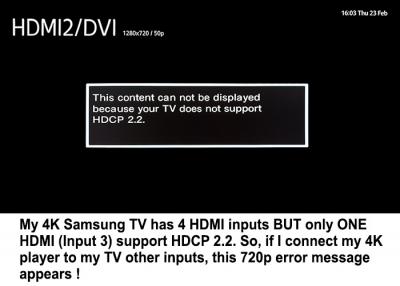
As for 4k blu-ray discs, I still don't have a 4k blu-ray player yet as I'm waiting for the Oppo 203d - one with darbee. Right now, there exists ONE blu-ray 4k player for PC - but since HDCP 2.2 hasn't been cracked yet, it's difficult to rip and remux them. However, the scene releases are getting sort of close to breaking HDCP 2.2. Also, since madvr's next major release will support the proper passthrough of HDR10/HLG content, no issues on that front for me. Dolby Vision is another matter though but that's a problem to worry about like.. 2 years from now or something.

I'm not condoning piracy, but cinavia is stupid and region locking is idiotic. So ways of stripping off HDCP is a welcome thing in my book, even if it leads to piracy. At the end of the day, what's made by men can and will be broken by men. I don't know why both parties are running around in circles chasing their own tails.

Yeah, my receiver has no issues receiving Atmos/DTS:X bitstreamed from the HTPC with remux mkv files. All I need to do is right-click on the movie > audio > select Dolby TrueHD/Atmos/DTSMA/DTSX.
*
Yeah, the MADvr DirectShow video renderer plugin. I haven't fiddle with it for many years. Will MADvr be just moot point since the already excellent 4K quality with HDR don't necessarily need further tweaking and "enhancements"? I do agree that MADvr does make sense for 1080p and lower resolutions.

The "ONE blu-ray 4k player for PC" mentioned by you is... yes, you were referring to the internal Pioneer UHD Bluray Drive.

http://www.theverge.com/circuitbreaker/201...ray-drive-4k-pc

Just for ripping purposes, what must be cracked is not HDCP 2.2 but its the AACS 2.0 protection in the 4K discs. Unfortunately AACS 2.0 has not been cracked yet, maybe in the future.

Even when my bluray drive can read BD25/BD50 1080p bluray discs, I still need AACS Copy Protection to be removed by DVDFab or RedFox in order to be able to "rip or remux" it.

HDCP 2.2 output can already be "removed" by using HDFury hardware such as the "Linker 4K60 4:4:4 600MHz".

https://www.hdfury.com/shop/videoprocessors...k60-444-600mhz/

Ripping To PC Using Direct Video Streaming
Ya... its possible to "rip" 4K blurays to PC by using a combination of compatible 4K encoding HDMI card for PC and HDFury so the AV can actually be played by the 4K Bluray Player (Oppo UDP-203) and then streamed to the PC to be "recorded" as a single AV file. Removing HDCP 2.2 by HDFury enables recording. Ya, its time consuming to do such recordings.

Computer Internal/External 4K BLu-ray Drives
https://www.reddit.com/r/Piracy/comments/5q...r_future_or_do/
https://forum.redfox.bz/threads/anydvd-redf...-is-hope.68358/

It IS really ironic for Pioneer and any other companies to produce such drives that support playing 4K Bluray Discs. That's because PC hardware and software support for HDCP 2.2 and AACS 2.0 is not yet available or may not even be allowed. Also, PC ripping requires additional software such as RedFox to be able to remove AACS. A BDXL Bluray drive supporting reading of disc capacities above BD50 is just not enough. .

My old bluray drive bought around 2015 is marked BDXL in the front so it should support reading BD66, BD100 and BD200 discs. When I tried to insert my 4K bluray disc... cannot read and just ejects it !! Well... that soon-to-be released Pioneer drive is expected to read those discs.

» Click to show Spoiler - click again to hide... «


I can understand the purpose of implementing AACS, HDCP, Cinavia and Region Code but whatever the reasons, people who supported genuine are being punished for not being able to make a "legal" backup copy and have to endure the numerous bluray trailers and other "unnecessary features". I also do NOT condone piracy BUT I should be legally allowed to make a backup copy of my genuine discs. It happened once for one of my SACD disc which got scratched on the data layer when I took it out to test audition new speakers at a few showrooms. Furious because I could not make a backup copy. What happens when that disc is no longer available for sale? I don't have the old Sony Playstation (with old firmware) to rip it. I have learned from my lesson... use a CD backup copy for audition tests.

» Click to show Spoiler - click again to hide... «

» Click to show Spoiler - click again to hide... «


Therefore ...
AACS 2.0 Copy Protection needs to be cracked for ripping/remuxing.
For direct playback of 4K BD discs... PC software player & GPU must both support HDCP 2.2... and AACS 2.0

ADDITION
More interesting links...
https://www.hdfury.com/tag/hdcp-remove/
https://arstechnica.com/tech-policy/2016/01...-copy-4k-video/
https://www.tweaking4all.com/home-theatre/r...cp-hdmi-signal/

This post has been edited by jamesleetech: Apr 18 2017, 07:01 AM

sonerin
post Apr 18 2017, 08:14 AM

Look at all my stars!!
*******
Senior Member
8,739 posts

Joined: Aug 2009
QUOTE(jdgobio @ Apr 16 2017, 09:33 PM)
Hahaha.  Thanks for the advice. Will stay disciplined.
*
Do keep an open mind and of course mind your wallet. Don't just read. Listen with your ear to know
SUSjdgobio
post Apr 18 2017, 05:17 PM

Regular
******
Senior Member
1,010 posts

Joined: Jan 2011
QUOTE(sonerin @ Apr 18 2017, 08:14 AM)
Do keep an open mind and of course mind your wallet. Don't just read. Listen with your ear to know
*
Ok, will do. Thanks for the avice smile.gif
sonerin
post Apr 18 2017, 05:31 PM

Look at all my stars!!
*******
Senior Member
8,739 posts

Joined: Aug 2009
QUOTE(jdgobio @ Apr 18 2017, 05:17 PM)
Ok, will do. Thanks for the avice  smile.gif
*
Happy hunting
stilo10
post Apr 18 2017, 09:11 PM

Getting Started
**
Junior Member
266 posts

Joined: Mar 2008
QUOTE(sonerin @ Apr 18 2017, 08:14 AM)
Do keep an open mind and of course mind your wallet. Don't just read. Listen with your ear to know
*
+2

Agreed, most important is to enjoy listening to it by ourselves rather than just reading and getting opinions. To indulge in this hobby you need to experience it yourself by listening more and more... that's the beauty of it!

This post has been edited by stilo10: Apr 18 2017, 09:26 PM
Skylinestar
post Apr 21 2017, 01:54 PM

Mega Duck
********
All Stars
10,472 posts

Joined: Jan 2003
From: Sarawak
QUOTE(stilo10 @ Apr 18 2017, 09:11 PM)
+2

Agreed, most important is to enjoy listening to it by ourselves rather than just reading and getting opinions. To indulge in this hobby you need to experience it yourself by listening more and more... that's the beauty of it!
*
+1
ignorance is bliss. better don't dig too deep devil.gif
SSJBen
post Apr 21 2017, 04:43 PM

Stars deez nuts.
*******
Senior Member
4,522 posts

Joined: Apr 2006


QUOTE(jamesleetech @ Apr 17 2017, 06:39 PM)
» Click to show Spoiler - click again to hide... «
Appreciate the comment James.

And yes +200000 on genuine buyers not being able to make a copy for themselves. It's freaking silly!
jamesleetech
post Apr 27 2017, 03:33 PM

On my way
****
Senior Member
684 posts

Joined: Apr 2010


QUOTE(SSJBen @ Apr 21 2017, 04:43 PM)
Appreciate the comment James.

And yes +200000 on genuine buyers not being able to make a copy for themselves. It's freaking silly!
*
My pleasure.

Even the so-called "Digital HD Copy" found in various blurays are ridiculous in my opinion. Download the Digital HD Copy to the PC or a mobile device and its DRM LOCKED there, cannot copy it out to other device to play ! And the quality is obviously below the actual bluray. I think its just an "excuse" for them to increase the bluray price a bit more to "include" such additional "features" which is really pretty useless for me.

I wonder why they still include double discs into a 4K Bluray... where one is the "normal" 1080p Bluray? I don't know about others but for me... if I buy a 4K bluray, I don't need 1080p bluray and forced to pay "extra". When I can already watch 4K bluray, why should I still watch 1080p? If I just want the 1080p bluray, I would not buy the 4K bluray. Yes, there are 1 disc 4K bluray available BUT some are only available as double disc (4K and 1080p) so we end up paying extra. Well... its a business and consumers will always be taken advantage of, as long as there are people who are gullible enough to still buy so its a harsh fact.

3D HD/4K TV is no longer produced so will 3D blurays still continue to be released? When 3D bluray is dead, it means people with "older" 3D TVs will no longer have such blurays to play with.
CoffeeDude
post Apr 27 2017, 04:10 PM

Regular
******
Senior Member
1,609 posts

Joined: Sep 2005
From: KL


QUOTE(SSJBen @ Apr 13 2017, 12:50 AM)
I'm using MPC-HC Black, with madvr + LAV filters. I focus on absolute quality, of which requires a pretty beefy GPU especially when upscaling 720p > 4k using madvr.

How to setup MPC-HC Black, with madvr + LAV filters?

Do you have any guide?

Thanks in advance notworthy.gif
SSJBen
post Apr 27 2017, 04:36 PM

Stars deez nuts.
*******
Senior Member
4,522 posts

Joined: Apr 2006


QUOTE(jamesleetech @ Apr 27 2017, 03:33 PM)
My pleasure.

Even the so-called "Digital HD Copy" found in various blurays are ridiculous in my opinion. Download the Digital HD Copy to the PC or a mobile device and its DRM LOCKED there, cannot copy it out to other device to play ! And the quality is obviously below the actual bluray. I think its just an "excuse" for them to increase the bluray price a bit more to "include" such additional "features" which is really pretty useless for me.

I wonder why they still include double discs into a 4K Bluray... where one is the "normal" 1080p Bluray? I don't know about others but for me... if I buy a 4K bluray, I don't need 1080p bluray and forced to pay "extra". When I can already watch 4K bluray, why should I still watch 1080p? If I just want the 1080p bluray, I would not buy the 4K bluray. Yes, there are 1 disc 4K bluray available BUT some are only available as double disc (4K and 1080p) so we end up paying extra. Well... its a business and consumers will always be taken advantage of, as long as there are people who are gullible enough to still buy so its a harsh fact.

3D HD/4K TV is no longer produced so will 3D blurays still continue to be released? When 3D bluray is dead, it means people with "older" 3D TVs will no longer have such blurays to play with.
*
The "digital HD copy" from most Blu-ray now a days are basically just web-DL versions. A lot of "scene" rips are actually even higher quality than them (you know the "ahem" 9-15gb h264 rips), 99% of the time.


QUOTE(CoffeeDude @ Apr 27 2017, 04:10 PM)
How to setup MPC-HC Black, with madvr + LAV filters?

Do you have any guide?

Thanks in advance  notworthy.gif
*
Err... no way am I going to list a step-by-step guide here, way too long.

Maybe follow this or something: https://imouto.my/tutorials/madvr/
I find it pretty extensive for most people.
mattalex
post Apr 29 2017, 11:05 AM

Getting Started
**
Junior Member
50 posts

Joined: Aug 2014
Hi,

What AVR would you recommend (from power standpoint) for an SVS Prime 5.1 set-up - floor standing mains, center, bookshelf rears?

I read in an earlier post that Yamaha RXV 681 is underpowered for some set-ups. So would like to avoid getting into such situation.

Thanks.
SSJBen
post Apr 29 2017, 01:31 PM

Stars deez nuts.
*******
Senior Member
4,522 posts

Joined: Apr 2006


QUOTE(mattalex @ Apr 29 2017, 11:05 AM)
Hi,

What AVR would you recommend (from power standpoint) for an SVS Prime 5.1 set-up - floor standing mains, center, bookshelf rears?

I read in an earlier post that Yamaha RXV 681 is underpowered for some set-ups. So would like to avoid getting into such situation. 

Thanks.
*
How loud do you often listen, how big is your room and how far do you sit from your speakers? 3 important questions to determine the power you need.

Truth be told however, most mainstream AVRs will not have much issue to drive the Primes really loud. And I mean loud enough to damage your hearing. You are mistaken that AVRs do not have enough power, they do. Rather they don't have the capability to uphold their power with enough headroom if you listen at reference volume regularly and your room is huge (over 4000 cu.ft). They also don't have the balls to drive 4ohms loads without clipping/overheating.

Also speaker efficiency matters. The Primes are average efficiency but they are rated at a 300hz-3khz band, which compared to many other companies that doesn't.

The v681 should be okay. But there are certainly other choices as well - Denon x1300w, Marantz SR5011, or perhaps go a bit higher if you need more features.

This post has been edited by SSJBen: Apr 29 2017, 01:33 PM
saitong09
post May 1 2017, 10:22 AM

10k Club
********
All Stars
10,820 posts

Joined: Jan 2010
From: KL/PJ


UDP-205 double the price of UDP-203 sweat.gif
https://www.oppodigital.com/blu-ray-udp-205/
sonerin
post May 1 2017, 12:01 PM

Look at all my stars!!
*******
Senior Member
8,739 posts

Joined: Aug 2009
As expected

205 Pages « < 120 121 122 123 124 > » Top
 

Change to:
| Lo-Fi Version
0.0389sec    0.58    6 queries    GZIP Disabled
Time is now: 1st December 2025 - 10:42 PM