

Perhaps picture will be easier
Your Home Theater Setup.. v2, Let's share..
Your Home Theater Setup.. v2, Let's share..
|
|
 Jun 5 2017, 02:38 PM Jun 5 2017, 02:38 PM
|
 
Senior Member
8,739 posts Joined: Aug 2009 
|
Perhaps picture will be easier
|
|
|
|
|
|
Jun 5 2017, 03:24 PM
|

Senior Member
4,522 posts Joined: Apr 2006 
|
QUOTE(Dickong @ Jun 5 2017, 02:27 PM) i am using front B&W 683 S2, Center B&W htm61 S2 surround monitor audio sub SVS PB2000 n atmos in ceiling spk. My front spk is around 8ft apart n 2.5 feet away from wall surround 12ft apart n sub is about 15 feet from listening position.Any commend about the placing.tq According to this measurement from stereophile;  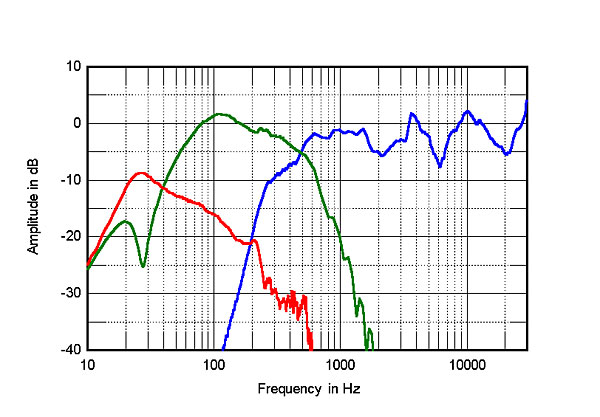 Your 683s -3db point is around 50hz. It rolls off to -6db at 33hz. A picture of your room would be best to illustrate your placement though. 2.5ft from a wall boundary doesn't actually mean much, because 2.5ft may not actually be the minimum 1/4 wave length of your entire room. An example; If a room's length is 18 feet, then the wave cycles is approx 60. So if we take 18ft and divide it by 4 as per the 1/4 rule, the result is 4.5 ft. So you need to calculate your room's wavelength first before you actually place your speakers. If you are very anal retentive about the placement, then next you will have to calculate the cancellation notch for your speakers. The formula is dmin (feet) = 1.4(1125) / 4f-3dB. The f3 point is the -3db point of your speakers, which is around 50hz there are or so. Generally people always recommend to have about 2-3 ft of space from the front wall and around 3 - 4ft off the side walls. This is just a very vague, general recommendation. Often times, it can be wrong because people generally forget that we don't all have the same room dimensions. |
|
|
Jun 5 2017, 04:14 PM
|
|
Senior Member
1,689 posts Joined: Jan 2003
|
QUOTE(SSJBen @ Jun 5 2017, 03:24 PM) According to this measurement from stereophile; Thanks bro. very detail infoYour 683s -3db point is around 50hz. It rolls off to -6db at 33hz. A picture of your room would be best to illustrate your placement though. 2.5ft from a wall boundary doesn't actually mean much, because 2.5ft may not actually be the minimum 1/4 wave length of your entire room. An example; If a room's length is 18 feet, then the wave cycles is approx 60. So if we take 18ft and divide it by 4 as per the 1/4 rule, the result is 4.5 ft. So you need to calculate your room's wavelength first before you actually place your speakers. If you are very anal retentive about the placement, then next you will have to calculate the cancellation notch for your speakers. The formula is dmin (feet) = 1.4(1125) / 4f-3dB. The f3 point is the -3db point of your speakers, which is around 50hz there are or so. Generally people always recommend to have about 2-3 ft of space from the front wall and around 3 - 4ft off the side walls. This is just a very vague, general recommendation. Often times, it can be wrong because people generally forget that we don't all have the same room dimensions. |
|
|
Jun 5 2017, 09:19 PM
|
|
Senior Member
8,739 posts Joined: Aug 2009
|
Again the the "master" has spoken 😆😂😜
|
|
|
Jun 7 2017, 06:17 PM
|
|
Senior Member
1,689 posts Joined: Jan 2003
|
Any news when is yammy A 3070 avr coming to malaysia
|
|
|
Jun 7 2017, 06:25 PM
|
|
Senior Member
8,739 posts Joined: Aug 2009
|
QUOTE(Dickong @ Jun 7 2017, 06:17 PM) Any news when is yammy A 3070 avr coming to malaysia most likely end of the year as usual. |
|
|
|
|
|
Jun 8 2017, 09:43 AM
|

All Stars
10,472 posts Joined: Jan 2003 From: Sarawak
|
The only item lacking behind is projector. Probably have to wait a decade for consumer friendly Dolby Vision projectors.
|
|
|
Jun 10 2017, 09:30 AM
|
|
Senior Member
8,739 posts Joined: Aug 2009
|
QUOTE(Skylinestar @ Jun 8 2017, 09:43 AM) The only item lacking behind is projector. Probably have to wait a decade for consumer friendly Dolby Vision projectors. Faster get one |
|
|
Jun 10 2017, 01:00 PM
|
|
All Stars
10,820 posts Joined: Jan 2010 From: KL/PJ
|
QUOTE(sonerin @ Jun 10 2017, 09:30 AM) Faster get one +1 buy buy  This post has been edited by saitong09: Jun 10 2017, 01:00 PM |
|
|
Jun 10 2017, 05:41 PM
|
|
All Stars
10,472 posts Joined: Jan 2003 From: Sarawak
|
QUOTE(sonerin @ Jun 10 2017, 09:30 AM) Faster get one how to buy when there's none?  |
|
|
Jun 10 2017, 05:59 PM
|
|
Senior Member
8,739 posts Joined: Aug 2009
|
Ask master max
|
|
|
Jun 23 2017, 06:20 PM
|
|
Senior Member
3,294 posts Joined: Dec 2005
|
Where can I buy fixed or roll-up projector screen ?
|
|
|
Jun 23 2017, 09:52 PM
|
|
Senior Member
8,739 posts Joined: Aug 2009
|
Lowyat
|
|
|
|
|
|
Jun 24 2017, 06:08 PM
|
|
All Stars
10,472 posts Joined: Jan 2003 From: Sarawak
|
QUOTE(echoesian @ Jun 23 2017, 06:20 PM) Where can I buy fixed or roll-up projector screen ? what brand do you want? |
|
|
Jul 4 2017, 07:00 PM
|

Junior Member
171 posts Joined: Apr 2008
|
Hi all,
I have a query about setting up a Panasonic DVD Home Theater System to my Windows PC. Is it possible? My PC specs should be able to handle it (i5 processor and GTX1060). Will I need any additional hardware/ software to make this work? This is the home theater system that I have (quite an old one): https://www.manualslib.com/manual/118193/Panasonic-Sc-Pt560.html Hope to get surround sound on my PC using this setup. Thanks in advance!! |
|
|
Jul 4 2017, 09:16 PM
|
|
All Stars
10,820 posts Joined: Jan 2010 From: KL/PJ
|
QUOTE(Justeafy @ Jul 4 2017, 07:00 PM) Hi all, Your Panasonic do not have HDMI input so might not able to enjoy HD audio. What you can do is to pass through the digital signal from PC to your Panasonic via optical cable (DTS and DD up to 5.1 channel only) if your PC have the optical out (most gaming mobo or high end system should have). If not the last option is audio output from PC to RCA input of your Panasonic, but you will have stereo sound only.I have a query about setting up a Panasonic DVD Home Theater System to my Windows PC. Is it possible? My PC specs should be able to handle it (i5 processor and GTX1060). Will I need any additional hardware/ software to make this work? This is the home theater system that I have (quite an old one): https://www.manualslib.com/manual/118193/Panasonic-Sc-Pt560.html Hope to get surround sound on my PC using this setup. Thanks in advance!! |
|
|
Jul 4 2017, 10:13 PM
|
|
Junior Member
171 posts Joined: Apr 2008
|
QUOTE(saitong09 @ Jul 4 2017, 09:16 PM) Your Panasonic do not have HDMI input so might not able to enjoy HD audio. What you can do is to pass through the digital signal from PC to your Panasonic via optical cable (DTS and DD up to 5.1 channel only) if your PC have the optical out (most gaming mobo or high end system should have). If not the last option is audio output from PC to RCA input of your Panasonic, but you will have stereo sound only. Thanks for the reply.My mobo is this: http://www.gigabyte.us/Motherboard/GA-B150M-D3H-rev-10#ov I don't think it has the optical out needed. What do I need to buy to add to my mobo to get 5.1 surround? A sound card? Sorry for the noob questions haha... |
|
|
Jul 4 2017, 10:23 PM
|
|
All Stars
10,820 posts Joined: Jan 2010 From: KL/PJ
|
QUOTE(Justeafy @ Jul 4 2017, 10:13 PM) Thanks for the reply. If you can get an add on sound card will be nice. You may upgrade the mobo with optical without changing your CPU, GPU and Ram.My mobo is this: http://www.gigabyte.us/Motherboard/GA-B150M-D3H-rev-10#ov I don't think it has the optical out needed. What do I need to buy to add to my mobo to get 5.1 surround? A sound card? Sorry for the noob questions haha... |
|
|
Jul 14 2017, 10:09 AM
|

Junior Member
89 posts Joined: Jul 2005 
|
Hi, sorry noob question here, where to get samsung speaker cable for home theatre? been searching everywhere online, closest i get is from ebay which is too expensive if including the postage
|
|
|
Jul 15 2017, 04:41 AM
|
|
Senior Member
8,739 posts Joined: Aug 2009
|
Why not just call Samsung and ask
|
| Change to: |  0.0265sec 0.0265sec
 0.76 0.76
 6 queries 6 queries
 GZIP Disabled GZIP Disabled
Time is now: 1st December 2025 - 04:10 PM |
 Quote
Quote