

It seems ok for me again tonite.
Attached thumbnail(s)

Unifi TMnet Streamyx/Unifi & IPv6, Now live!
|
|
 Mar 7 2016, 10:07 PM Mar 7 2016, 10:07 PM
|
 
Senior Member
1,230 posts Joined: Oct 2005 
|
I think you should double check the IPV6 setting.
It seems ok for me again tonite. Attached thumbnail(s)
|
|
|
|
|
|
Mar 8 2016, 03:53 PM
|

Junior Member
14 posts Joined: Feb 2016
|
QUOTE(wahizul @ Dec 28 2015, 01:57 AM) me too.. im using Archer C7 and im unable to switch on my ipv6. Really need help. I also not able to get IPV6 connection for my Archer C7. (I follow TP-Link setting guide). Does anyone here done the Archer C7 Iv6 setting and able to get connection? |
|
|
Mar 9 2016, 11:41 PM
Show posts by this member only | IPv6 | Post
#1083
|

Senior Member
1,393 posts Joined: Aug 2006 From: Sungai Petani 
|
QUOTE(nyunyu @ Mar 7 2016, 07:54 PM) update 1: update 2: yep, gone again. It was a known issue with Bitdefender blocking ipv6 icmp. Uninstalled BD on both of our PC and all good and dandy. Damn you BD! Back to kaspersky for me. This post has been edited by nyunyu: Mar 9 2016, 11:42 PM |
|
|
Mar 15 2016, 07:34 PM
|
|
Junior Member
13 posts Joined: Feb 2015
|
someone know how to setup on asus rt-n16 i cant get ipv6
|
|
|
Mar 15 2016, 07:40 PM
|
|
Junior Member
123 posts Joined: Jun 2005
|
QUOTE(loh31128 @ Mar 15 2016, 07:34 PM) someone know how to setup on asus rt-n16 i cant get ipv6 I know how if you use TomatoUSB but it won't work properlylike FB the picture won't load. |
|
|
Mar 15 2016, 07:42 PM
|
|
Junior Member
13 posts Joined: Feb 2015
|
QUOTE(Kanuki @ Mar 15 2016, 07:40 PM) I know how if you use TomatoUSB but it won't work properly i using stock firmlike FB the picture won't load. |
|
|
|
|
|
Mar 15 2016, 08:00 PM
|
|
Junior Member
13 posts Joined: Feb 2015
|
QUOTE(Kanuki @ Mar 15 2016, 07:40 PM) I know how if you use TomatoUSB but it won't work properly bro you try already ipv6?? work??like FB the picture won't load. |
|
|
Mar 15 2016, 11:17 PM
|
|
Junior Member
123 posts Joined: Jun 2005
|
QUOTE(loh31128 @ Mar 15 2016, 08:00 PM) bro you try already ipv6?? work?? yup.. but not properly. better disable it. |
|
|
Mar 16 2016, 04:32 AM
|
|
Junior Member
13 posts Joined: Feb 2015
|
QUOTE(Kanuki @ Mar 15 2016, 11:17 PM) yup.. but not properly. better disable it. Why? Any problem? |
|
|
Mar 17 2016, 03:00 PM
|
|
Junior Member
123 posts Joined: Jun 2005
|
QUOTE(loh31128 @ Mar 16 2016, 04:32 AM) Why? Any problem? It won't load any pictures on Facebook. |
|
|
Mar 22 2016, 12:48 PM
|
|
Junior Member
14 posts Joined: Feb 2016
|
Dear All Archer C7 v2 User,
Good news from TP-Link Support China. Yesterday i finally update new firmware for Archer C7 V2 from TP-Link support China and able to connect IPv4 & IPv6 but i can get IPTV connection (Maybe my IPTV box got problem due to few years never use it. Anyway IPTV is not important to me. If you guys need to update this Archer C7 v2 3.14.3 Build 150827 Rel.58738n and setting guide can download from my dropbox link as below. (Note: This firmware is direct from TP-Link support center China and you not able to download from TP-Link Malaysia homepage yet). www.dropbox.com/s/hzozb6ukrhdlxer/Archer%20C7%20v2%20wifi%20router%20setting%20guide.pdf?dl=0 www.dropbox.com/s/yotr15y06xiale6/ArcherC7v2_HttpSession_en_up.bin?dl=0 (Note: After i updated this firmware i can get 10/10 IPv6 test connection but still have some problem which is i cannot browse facebook, low yat forum and i do ask TP-Link support China and they ask me to check with Unifi because they suppect Unifi still not fully support IPv6 yet). For Maxis user maybe you guys can try this firmware too. Have a nice day. Kwan Hoe |
|
|
Mar 22 2016, 05:38 PM
|

Senior Member
4,583 posts Joined: Oct 2006 From: ... suddenly 1 week
|
How much for the new installation of Streamyx 1M? Sarawak
|
|
|
Apr 1 2016, 05:23 PM
|

Senior Member
668 posts Joined: Nov 2011 From: Malaysia
|
Anyone know how to setup ipv6 on DLINK DIR-850L ?
|
|
|
|
|
|
Apr 2 2016, 08:21 AM
|
|
Junior Member
104 posts Joined: Mar 2014
|
what to expect IPv6 over IPv4? more stable? faster speed?
|
|
|
Apr 2 2016, 02:06 PM
|

Senior Member
3,669 posts Joined: Apr 2006
|
QUOTE(wdc @ Apr 2 2016, 08:21 AM) what to expect IPv6 over IPv4? more stable? faster speed? You can expect 50kb/s on youtube.  |
|
|
Apr 14 2016, 08:42 PM
|

Senior Member
2,348 posts Joined: Apr 2008
|
I was made sure all the settings are done well as same as the tutorial but why my IPv6 is still not detected?
I'm using Asus RT-AC55UHP with Unifi Advance 30mbps. 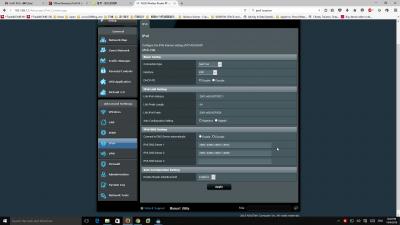
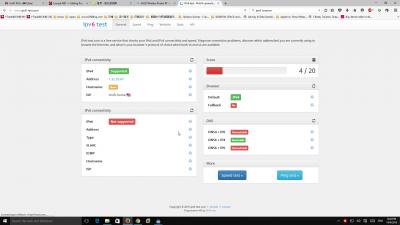
This post has been edited by junclj: Apr 14 2016, 08:45 PM |
|
|
Apr 14 2016, 09:00 PM
|
|
Senior Member
2,348 posts Joined: Apr 2008
|
QUOTE(junclj @ Apr 14 2016, 08:42 PM) I was made sure all the settings are done well as same as the tutorial but why my IPv6 is still not detected? nvm, fixed alreadyI'm using Asus RT-AC55UHP with Unifi Advance 30mbps.
|
|
|
Apr 15 2016, 03:26 AM
|

Junior Member
176 posts Joined: Dec 2008
|
For those who have had the right settings for IPV6 on their routers but couldn't figure out why their ipv6 is still not working, check your PC dns server setting. A lot of you have enabled custom dns to bypass geo-restricted sites like Netflix, Hulu etc. You need to clear this and switch back to your ISP dos or Google dns etc for IPV6 to work.
|
|
|
Apr 15 2016, 08:51 AM
|
|
Senior Member
2,348 posts Joined: Apr 2008
|
QUOTE(Orpheus1120 @ Apr 15 2016, 03:26 AM) For those who have had the right settings for IPV6 on their routers but couldn't figure out why their ipv6 is still not working, check your PC dns server setting. A lot of you have enabled custom dns to bypass geo-restricted sites like Netflix, Hulu etc. You need to clear this and switch back to your ISP dos or Google dns etc for IPV6 to work. It works for a while when I reconnect my LAN cable, after few minutes, my IPv6 turn back to "no internet access".Just successfully connect to IPv6 after replug my LAN cable/restart PC/disable then enable again IPv6 in configuration but after few minutes, it turn back to "no internet access".  This post has been edited by junclj: Apr 15 2016, 09:30 AM |
|
|
Apr 18 2016, 09:34 PM
Show posts by this member only | IPv6 | Post
#1100
|

Senior Member
1,217 posts Joined: Mar 2016
|
I have no problems with IPv6 even on a wireless connection.
  |
| Change to: |  0.0239sec 0.0239sec
 0.25 0.25
 6 queries 6 queries
 GZIP Disabled GZIP Disabled
Time is now: 6th December 2025 - 05:03 AM |
 Quote
Quote