Outline ·
[ Standard ] ·
Linear+
Unifi TMnet Streamyx/Unifi & IPv6, Now live!
|
nikrizal
|
 Feb 16 2016, 01:29 PM Feb 16 2016, 01:29 PM
|

|
Hi guys, I'm still using the stock D-Link by TM, and I bridge my existing TP-Link TD-W8970 for additional gigabite ports.
IPv6 works fine for the D-Link, passing the test. But the TP-Link fails in IPv6 test, whatever setting I alter.
If anyone knows how to do it, would u share? Thanks
|
|
|
|
|
|
nikrizal
|
Feb 16 2016, 02:00 PM
|
|
|
QUOTE(wKkaY @ Feb 16 2016, 01:59 PM) Sounds like you are not bridging. Did you connect the TP-Link's WAN or LAN port to the D-Link? Hmm...not sure now...I'll tell u once I get back home later |
|
|
|
|
|
nikrizal
|
Feb 16 2016, 03:34 PM
|
|
|
Ok, the connection is between Lan D-Link and WAN TP-Link..
|
|
|
|
|
|
nikrizal
|
Feb 16 2016, 04:48 PM
|
|
|
ok thanks...will do & update the results later
|
|
|
|
|
|
nikrizal
|
Feb 16 2016, 06:27 PM
|
|
|
the current setting now (Lan to Wan) is called Cascading, as oppose to Bridging (Lan to Lan).
all work well for me now except no IPv6 from the TP-Link, which I do not really worry about..
any significant advantage of bridging. or vice versa?
|
|
|
|
|
|
nikrizal
|
Feb 16 2016, 08:56 PM
|
|
|
I have changed the setting into Lan to Lan, and now IPv6 works well for both routers  Thanks! |
|
|
|
|
|
nikrizal
|
Mar 2 2016, 08:41 AM
|
|
|
QUOTE(nyunyu @ Mar 2 2016, 01:51 AM) Guys and sifus. I'm aware TM is having network problem, probably underwater cabling issues. Just curious if it is just me having problem with no ipv6 or all of you also not getting ipv6? I'm on Unifi50. Ipv6 still working for me |
|
|
|
|
|
nikrizal
|
Mar 7 2016, 10:07 PM
|
|
|
I think you should double check the IPV6 setting. It seems ok for me again tonite. Attached thumbnail(s)
|
|
|
|
|
|
nikrizal
|
Jun 18 2017, 07:00 AM
|
|
|
TM provided me TP-Link Archer C1200 couple months ago. I jusy realised that IPV6 is not working. I've set to DHCPV6 or SLAAC without any success. Anyone using similar router can share the settings? Thanks
|
|
|
|
|
|
nikrizal
|
Jun 19 2017, 06:30 AM
|
|
|
QUOTE(jimmy.soo @ Jun 18 2017, 11:14 PM) you may try using the above settings, which is what I'm using right now, but not sure what happened today as those blocked sites no longer accessible. ok, will try. tq  |
|
|
|
|
|
nikrizal
|
Jun 20 2017, 04:16 PM
|
|
|
Finally it works with Archer C1200, I need to use SLAAC for getting the IPV6, and SLAAC + Stateless DHCP for LAN. Attached thumbnail(s)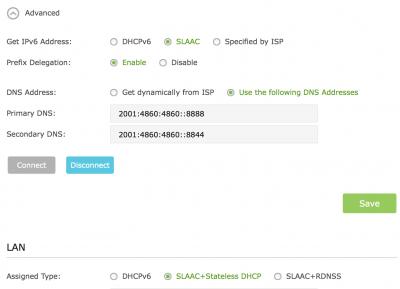
|
|
|
|
|
|
nikrizal
|
Jun 20 2017, 11:01 PM
|
|
|
QUOTE(jimmy.soo @ Jun 20 2017, 08:42 PM) so restricted sites can access without issue as well? What do u mean by restricted sites? So far so good 😊 |
|
|
|
|



 Quote
Quote

 1.1061sec
 0.37
0.37
 7 queries
 GZIP Disabled