Welcome Guest ( Log In | Register )

Bump Topic Topic Closed RSS Feed
126 Pages « < 15 16 17 18 19 > » Bottom

Outline · [ Standard ] · Linear+

 The Official Nikon Discussion Thread Ver.21, D610 and D5300 kambing soon!?

views
     
mingyuyu
post Aug 1 2013, 12:02 AM

B A N N E D
Group Icon
Elite
3,249 posts

Joined: Oct 2011


Or there could be some PS presets where you just click the Action and everything will be edited automatically. I also can't get such tones in LR too, but with PS I can achieve something more similar.
alpha001
post Aug 1 2013, 12:07 AM

On my way
****
Senior Member
686 posts

Joined: Jun 2012
From: Egypt


QUOTE(mingyuyu @ Aug 1 2013, 01:02 AM)
Or there could be some PS presets where you just click the Action and everything will be edited automatically. I also can't get such tones in LR too, but with PS I can achieve something more similar.
*
i dont know much photoshop preset...
but i do know lightroom preset = vsco film pack
just click and there you go
it for simulating film (kodak,fuji etc), i do have it, but rarely use it

edit: lightroom is oso photoshop tongue.gif

This post has been edited by alpha001: Aug 1 2013, 12:07 AM
f5calvin
post Aug 1 2013, 12:12 AM

starsssss
Group Icon
Elite
1,557 posts

Joined: Dec 2011


QUOTE(alpha001 @ Jul 31 2013, 11:36 PM)
i dont really know if it answer ur question,
by using lightroom i will bump the shadow lil bit in Tone Curve and change shadow color to brownish in Split Toning
here the example:
before:
user posted image
after:
user posted image
note the shadows area colour...
it isnt exact settings with the ur example in the link...but you can play with split toning
happy trying smile.gif
*
user posted image
Trying colour by Calvin Kohlz, on Flickr

Close?
mingyuyu
post Aug 1 2013, 12:16 AM

B A N N E D
Group Icon
Elite
3,249 posts

Joined: Oct 2011


QUOTE(alpha001 @ Aug 1 2013, 12:07 AM)
i dont know much photoshop preset...
but i do know lightroom preset = vsco film pack
just click and there you go
it for simulating film (kodak,fuji etc), i do have it, but rarely use it

edit: lightroom is oso photoshop tongue.gif
*
eh eh eh you can't really say lightroom is also photoshop, but you can say photoshop is also lightroom.

lightroom is more like a simplified version of photoshop or adobe camera raw (not really sure), but photoshop contains a lot more functions than lightroom.
alpha001
post Aug 1 2013, 12:18 AM

On my way
****
Senior Member
686 posts

Joined: Jun 2012
From: Egypt


QUOTE(f5calvin @ Aug 1 2013, 01:12 AM)
user posted image
Trying colour by Calvin Kohlz, on Flickr

Close?
*
rclxms.gif rclxms.gif rclxms.gif
btw this is my settings...
user posted image
alpha001
post Aug 1 2013, 12:19 AM

On my way
****
Senior Member
686 posts

Joined: Jun 2012
From: Egypt


QUOTE(mingyuyu @ Aug 1 2013, 01:16 AM)
eh eh eh you can't really say lightroom is also photoshop, but you can say photoshop is also lightroom.

lightroom is more like a simplified version of photoshop or adobe camera raw (not really sure), but photoshop contains a lot more functions than lightroom.
*
doh.gif
f5calvin
post Aug 1 2013, 12:35 AM

starsssss
Group Icon
Elite
1,557 posts

Joined: Dec 2011


QUOTE(alpha001 @ Aug 1 2013, 12:18 AM)
rclxms.gif  rclxms.gif  rclxms.gif
btw this is my settings...
user posted image
*
user posted image
Settings by Calvin Kohlz, on Flickr

i just adjusted the Curves of RGB..kill the shadows..
then increased green's hue a little, decrease saturation n luminousity of green a little..
No split toning done..

VSCO presets i found(those that are free) sucks a lot..each photo each lighting really needs different twitching. so in the end, i tried it without those presets still in vain..

This post has been edited by f5calvin: Aug 1 2013, 12:36 AM
gunzerdude
post Aug 1 2013, 01:31 AM

On my way
****
Senior Member
693 posts

Joined: Dec 2007


QUOTE(Pro3363 @ Jul 31 2013, 08:17 PM)
Bro gunzerdude have it laugh.gif
*
Mine is VC version lehh, brows.gif but I used the old one before it got stolen la.

The old one is fine la, just that the extending tube is seriously annoying when doing macro. Both new and old versions are crazy sharp even wide open.
Btw new one the USD motor is fast enough for sports tracking also thumbup.gif
jchue73
post Aug 1 2013, 02:53 AM

Look at all my stars!!
*******
Senior Member
2,496 posts

Joined: Nov 2006
QUOTE(Everdying @ Jul 31 2013, 05:45 PM)
ya, but if you're carrying with mounted 70-200, at least when you walk its not irritating with the body + lens banging around on your body tongue.gif
Give me a 70-200 and I'll give a go. biggrin.gif

QUOTE(Everdying @ Jul 31 2013, 05:45 PM)
the new one never tried.
if the older one, i much prefer the nikon macro ones...either 40mm or 60mm.
I actually have the older Tamron 90mm f/2.5 (not f/2.8) 52EN lens. It's not 1:1 macro. Only 1:2. Very smooth buttery bokeh.

QUOTE(celciuz @ Jul 31 2013, 09:11 PM)
Seems like my choice would be the Optech, only complain about it is the clip ._. a bit paranoid about it.
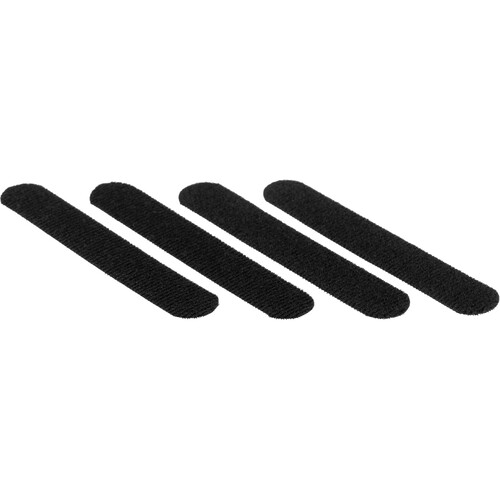
Best is Carry Speed's 3 button snap clip. Else, get this accessory from Optech or mod yourself a velcro to secure the clip.

user posted image
amduser
post Aug 1 2013, 04:50 AM

Look at all my stars!!
*******
Senior Member
5,542 posts

Joined: Dec 2006


QUOTE(f5calvin @ Aug 1 2013, 12:12 AM)
» Click to show Spoiler - click again to hide... «


Close?
*
not sure if it is a good or bad thing, but please dont take other people picture(s) and edit it then put it on your flickr, even though you credit them it doesn't look nice doing so
razuryza
post Aug 1 2013, 05:42 AM

\('o')/~fewwwiitttt~\("0")/
*******
Senior Member
5,515 posts

Joined: Jan 2006


QUOTE(amduser @ Aug 1 2013, 04:50 AM)
not sure if it is a good or bad thing, but please dont take other people picture(s) and edit it then put it on your flickr, even though you credit them it doesn't look nice doing so
*
Yes.do agree

Some people do crop the watermark n reupload to their flickr.as if their photo.so unethical shakehead.gif
celciuz
post Aug 1 2013, 07:20 AM

10k Club
********
All Stars
14,037 posts

Joined: Nov 2004
QUOTE(jchue73 @ Aug 1 2013, 02:53 AM)
Give me a 70-200 and I'll give a go.  biggrin.gif
I actually have the older Tamron 90mm f/2.5 (not f/2.8) 52EN lens. It's not 1:1 macro. Only 1:2. Very smooth buttery bokeh.
Best is Carry Speed's 3 button snap clip. Else, get this accessory from Optech or mod yourself a velcro to secure the clip.

user posted image
*
Saw that option too, overpriced velcro tongue.gif Only reason why I'm looking at alternative way to mount the Black Rapid is because the Black Rapid dual harness can detach and use each strap individually! The Optech can't but I saw the video can sling to each side instead so...hmm
gnome
post Aug 1 2013, 08:29 AM

- We game, do you? -
*******
Senior Member
4,925 posts

Joined: Jan 2003
Spam a pic

user posted image

Konon-konon nak tiru gaya abang razuryza tongue.gif laugh.gif
ongdennis
post Aug 1 2013, 09:13 AM

Enthusiast
*****
Senior Member
762 posts

Joined: Jan 2007
From: Melaka


QUOTE(mingyuyu @ Aug 1 2013, 12:16 AM)
eh eh eh you can't really say lightroom is also photoshop, but you can say photoshop is also lightroom.

lightroom is more like a simplified version of photoshop or adobe camera raw (not really sure), but photoshop contains a lot more functions than lightroom.
*
this is what i summary in between lightroom, photo elements and photoshop

lightroom - photo organizer with light editing
photoshop - powerfull and purely photo editing

photo elements - in between lightroom and photoshop.
[PF] T.J.
post Aug 1 2013, 09:34 AM

20k VIP Club
Group Icon
Elite
24,193 posts

Joined: Feb 2010
From: Perak
QUOTE(ongdennis @ Aug 1 2013, 09:13 AM)
this is what i summary in between lightroom, photo elements and photoshop

lightroom - photo organizer with light editing
photoshop - powerfull and purely photo editing

photo elements - in between lightroom and photoshop.
*
Just curious sifu, what do you guys really do to your photos via Photoshop? notworthy.gif
So far I only know how to use spot healing and patch tool... and not to mention generating some very fake sunrays LOL sweat.gif sweat.gif
gunzerdude
post Aug 1 2013, 10:16 AM

On my way
****
Senior Member
693 posts

Joined: Dec 2007


QUOTE(celciuz @ Aug 1 2013, 07:20 AM)
Saw that option too, overpriced velcro tongue.gif Only reason why I'm looking at alternative way to mount the Black Rapid is because the Black Rapid dual harness can detach and use each strap individually! The Optech can't but I saw the video can sling to each side instead so...hmm
*
I just took the velcro from laptop power bricks for mine, it's slightly thinner but works just fine icon_rolleyes.gif
razuryza
post Aug 1 2013, 10:27 AM

\('o')/~fewwwiitttt~\("0")/
*******
Senior Member
5,515 posts

Joined: Jan 2006


QUOTE(gnome @ Aug 1 2013, 08:29 AM)
Spam a pic

user posted image

Konon-konon nak tiru gaya abang razuryza tongue.gif laugh.gif
*
gaye apo?
Everdying
post Aug 1 2013, 11:00 AM

Two is One and One is None.
Group Icon
Staff
30,735 posts

Joined: Jan 2003
QUOTE(jchue73 @ Aug 1 2013, 02:53 AM)
Give me a 70-200 and I'll give a go.  biggrin.gif
can.
we trade with your 300/2.8...you got one right? tongue.gif
jchue73
post Aug 1 2013, 11:24 AM

Look at all my stars!!
*******
Senior Member
2,496 posts

Joined: Nov 2006
QUOTE(gunzerdude @ Aug 1 2013, 10:16 AM)
I just took the velcro from laptop power bricks for mine, it's slightly thinner but works just fine  icon_rolleyes.gif
Yeah, that would work fine. Some people use zip tie but that would mean that difficult to detach in the field without physically cutting it.

QUOTE(Everdying @ Aug 1 2013, 11:00 AM)
can.
we trade with your 300/2.8...you got one right? tongue.gif
LOL No. I have the 400mm f/2.8. rolleyes.gif laugh.gif
gunzerdude
post Aug 1 2013, 01:48 PM

On my way
****
Senior Member
693 posts

Joined: Dec 2007


Baboi!! laugh.gif

user posted image

126 Pages « < 15 16 17 18 19 > » Top
Topic ClosedOptions
 

Change to:
| Lo-Fi Version
0.0271sec    0.51    6 queries    GZIP Disabled
Time is now: 17th December 2025 - 08:57 AM