

Im about to buy a 256Gb OCZ Vector. Anyone here already experience the SSD? Had any major issue? Thanks
The SSD Thread V4, Solid State Drive
The SSD Thread V4, Solid State Drive
|
|
 Dec 23 2013, 04:43 PM Dec 23 2013, 04:43 PM
Return to original view | Post
#1
|
 
Junior Member
215 posts Joined: Aug 2013  
|
Im about to buy a 256Gb OCZ Vector. Anyone here already experience the SSD? Had any major issue? Thanks
|
|
|
|
|
|
Dec 23 2013, 06:07 PM
Return to original view | Post
#2
|
|
Junior Member
215 posts Joined: Aug 2013
|
QUOTE(1024kbps @ Dec 23 2013, 05:37 PM) Not sure if it's a good timing to buy OCZ products since it's already filled bankruptcy, Although Toshiba agreed to acquires its assets, RMA is going to have a lot of hassle i think.  QUOTE(horns @ Dec 23 2013, 05:39 PM) from what i have read, it has a high return rate (http://www.hardware.fr/articles/911-7/ssd.html) though its back with 5 yrs warranty, u guys still not recommending it?anyone else have hands on to this model? Thanks for you input |
|
|
Dec 23 2013, 06:50 PM
Return to original view | Post
#3
|
|
Junior Member
215 posts Joined: Aug 2013
|
Really? Damn easy for me to be tricked like that. lol.
For normal user, does 120gb enough? sweet spot for price/performance/capacity. |
|
|
Dec 23 2013, 08:05 PM
Return to original view | Post
#4
|
|
Junior Member
215 posts Joined: Aug 2013
|
Looks like 240/250/256 gb is the sweet spot for me as a boot drive and to install a few games in it. But is it a good time to buy an ssd The price fluctuate a lot. It keep rising since August? Should I buy now or wait till new year?
|
|
|
Dec 24 2013, 11:02 AM
Return to original view | Post
#5
|
|
Junior Member
215 posts Joined: Aug 2013
|
Thanks to all sifus for your inputs.
 With my budget limitation, I think Im gonna opt for 256gb SanDisk Ultra Plus instead of the OCZ Vector. Cant wait to feel the performance of SSD.  |
|
|
Dec 24 2013, 09:04 PM
Return to original view | Post
#6
|
|
Junior Member
215 posts Joined: Aug 2013
|
QUOTE(kimsim @ Dec 24 2013, 12:14 PM) I would prefer u go for extreme II, or intel 530 for save place. Extreme II is beyond my budget and I opt not to choose SandForce controller. Its either Ultra Plus or M5S 256gb. |
|
|
|
|
|
Dec 24 2013, 10:53 PM
Return to original view | Post
#7
|
|
Junior Member
215 posts Joined: Aug 2013
|
So which one is better?
|
|
|
Jan 8 2014, 09:04 AM
Return to original view | Post
#8
|
|
Junior Member
215 posts Joined: Aug 2013
|
Am using 840 Evo 250GB now and happy with it.
 I think I wont miss my old HDD. Lol. |
|
|
Jan 22 2014, 09:14 AM
Return to original view | Post
#9
|
|
Junior Member
215 posts Joined: Aug 2013
|
QUOTE(sasuketaichou @ Jan 21 2014, 11:56 PM) m5s, v1.05 if im correct, my hdd is seagate baracuda 7200 rpm, dont know what coz it, last time ive try irst method, disable lpm and so on, didnt work What is your SATA setting? Do you run in AHCI mode? To my knowledge, some HDD (older model) only able run in IDE mode. Maybe thats the cause of the problem. |
|
|
Feb 3 2014, 09:46 AM
Return to original view | Post
#10
|
|
Junior Member
215 posts Joined: Aug 2013
|
QUOTE(bad melatonin @ Jan 30 2014, 09:25 PM) hi guys. tot of upgrading my current Crucial M4 128gb x 2 @ RAID0 to slightly bigger size ssd preferably 256gb x 2 @ RAID0. be needing some recommendation for: If you search for reviews, most site will pointing it to Samsung 840 Evo for their price and performance. Thats why Im choosing it too. 1) best performance ssd? 2) best performance & price ratio ssd? need to narrow down my ssd selection. tengs guys!  You can get the 250GB version around RM 580 now. Just my 2 cents!  |
|
|
Feb 4 2014, 08:55 AM
Return to original view | Post
#11
|
|
Junior Member
215 posts Joined: Aug 2013
|
QUOTE(Dickong @ Feb 3 2014, 09:33 PM) Ya its window 8, at first i though something wrong becos boot so fast n try several also same as fast. LOL at the something wrong part. For those who don't believe it, you can try to upgrade your HDD to SSD. You won't regret and miss your old HDD.  |
|
|
Feb 5 2014, 09:21 AM
Return to original view | Post
#12
|
|
Junior Member
215 posts Joined: Aug 2013
|
QUOTE(Chew Yongxian @ Feb 4 2014, 06:48 PM) If you bought a high end OCZ product, you dodged a major bullet. Of you didn't and bought cheaper end ones, I'm sorry, but Toshiba just canceled your warranty. Wah so bad luck to those. http://forum.overclock3d.net/showthread.php?t=60077  But OCZ SSD's have quite high failure rate compared to other manufacturers eventhough it was the flagship model. So avoid it if you can. QUOTE(-kytz- @ Feb 4 2014, 09:38 PM) Nobody is doubting your claim, we all have achieved such boot time speeds also what Yep. When its in a clean state everything is smooth and silky.  I'm using a Pro version and I remember having such speeds when I first installed the OS and some programs/etc but fast forward 7 months and the speeds drop quite a bit. I'm using a Pro version and I remember having such speeds when I first installed the OS and some programs/etc but fast forward 7 months and the speeds drop quite a bit. My Samsung Evo going in the 2 month, still doing OK. |
|
|
Feb 19 2014, 01:38 PM
Return to original view | Post
#13
|
|
Junior Member
215 posts Joined: Aug 2013
|
QUOTE(Jyi @ Feb 18 2014, 05:06 PM) Hi all, hope everyone is doing fine. 1TB! I just benchmarked my 840 Evo with Rapid enabled. Got it from ronaldjoe last night, great seller. Here's a screenshot of crystaldiskmark: 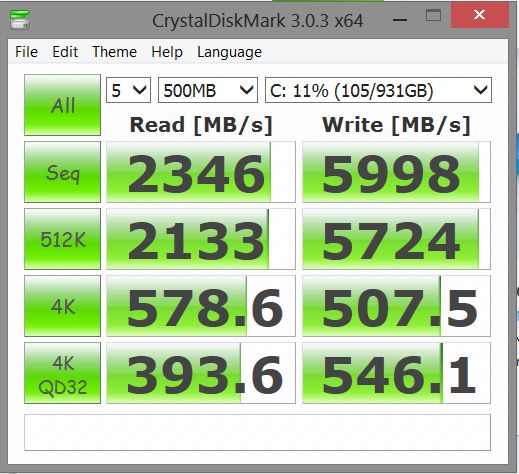 Let me know what you think!  First time I saw a user using 1TB SSD. No wonder the benchmark is so high. Lol by the way enjoy your Evo. You wont regret it! |
|
|
|
|
|
Feb 20 2014, 12:32 PM
Return to original view | Post
#14
|
|
Junior Member
215 posts Joined: Aug 2013
|
QUOTE(Uncle Ron @ Feb 20 2014, 10:00 AM) Can i know do u also turn on ur Rapid Mode on ur Samsung 840 Evo? Nope. Rapid Mode disable. Using only AHCI configuration. Why? |
|
|
Feb 20 2014, 01:45 PM
Return to original view | Post
#15
|
|
Junior Member
215 posts Joined: Aug 2013
|
QUOTE(Uncle Ron @ Feb 20 2014, 12:41 PM) Owh, juz wanna ask so many ppl got probs when enabling that's Rapid Mode so scared to do... Is it?? if thats the case lucky me and you. Lol. The performance already good even Rapid mode disable. Been using for 2 months already and happy with its silky smooth.  |
|
|
Feb 20 2014, 04:53 PM
Return to original view | Post
#16
|
|
Junior Member
215 posts Joined: Aug 2013
|
QUOTE(1024kbps @ Feb 20 2014, 03:12 PM) RAPID mode use your RAM to cache the hot data, RAM caching tend to be risky as our system ram are volatile memory, power loss may result in data corruption. Then is there a way to overcome the problem? A firmware update by Samsung is possible to solve it??  |
|
|
Feb 21 2014, 09:08 AM
Return to original view | Post
#17
|
|
Junior Member
215 posts Joined: Aug 2013
|
QUOTE(1024kbps @ Feb 20 2014, 09:25 PM) If i have the EVO SSD i'd enable it, i mean, why not? extra performance that utilize the excessive system resource, that's smart actually, and they claim otherwise it's safe to use, it wotn be as fragile as RAM disk cache Ahh nice information. Thanks! http://www.samsung.com/global/business/sem..._Whitepaper.pdf Will try to enable it later. |
|
Topic ClosedOptions
|
| Change to: |  0.0651sec 0.0651sec
 0.38 0.38
 7 queries 7 queries
 GZIP Disabled GZIP Disabled
Time is now: 7th December 2025 - 08:20 AM |
 Quote
Quote