Welcome Guest ( Log In | Register )

33 Pages « < 16 17 18 19 20 > » Bottom

Outline · [ Standard ] · Linear+

PC Audio Creative GigaWorks S750 7.1 speaker repair, A short guide and info with pictures...

views
     
asenrzhang
post Sep 10 2016, 10:51 PM

Getting Started
**
Junior Member
68 posts

Joined: Apr 2015
From: China
QUOTE(jsmars @ Sep 9 2016, 04:57 AM)
Just wanted to give an update on my progress. Got both sets working now! One has been running for a week, and the other just got finished and has been running for a half an hour or so, so it seems like they both got at least a bit more life!

Huge thanks and appreciation to everyone helping out in this thread! It's amazing that there are people like you smile.gif

It will be interesting to see if this "double click at start" error comes back, I've had it on both. So it will be interesting to see if the 63V instead of 25V helps as asenrzhang mentioned it could be.
*
Congratulations for the revival of your two sets! rclxms.gif

About the "double click" issue, I hope that article I mentioned is right. "double click" issue of my subwoofer get worse now, it happened almost each time on power resume operation in the past week. So, please let me know if the "double click" issue of your two sets does not happen anymore after 3 month using, so that I will replace it with a higher voltage rating capacitor.
jsmars
post Sep 14 2016, 02:29 PM

New Member
*
Junior Member
8 posts

Joined: Aug 2016
I guess my victory was short lived. I revived both sets and they worked fine for a few weeks now under continuous use of many hours every day. I unplugged first set and mainly used the second after I fixed the second one. Then today I hooked in the first set where it's meant to be set up. The green light turns on, standby on the control pad, powers on, everything seems fine, except that no sound is coming through at all. No noise or anything can be heard even if you turn up the volume a lot, and nothing is heard even if touching the input cables (usually some static can be heard).

I opened up the set and looked it over, but I can't find any damaged components at all. I changed pretty much all recommended components (all cheapo brand stuff, except the smallest ones which there are like 50 of on the amp boards).
The only thing I noticed is that the bigger heatsink on the powersupply (connected to the mosfets that I changed) was quite hot even after only testing out the system to try and get sound for a few minutes. Is this normal?

Any ideas on what is wrong and what I can do to fix it?
asenrzhang
post Sep 14 2016, 06:19 PM

Getting Started
**
Junior Member
68 posts

Joined: Apr 2015
From: China
QUOTE(jsmars @ Sep 14 2016, 02:29 PM)
I guess my victory was short lived. I revived both sets and they worked fine for a few weeks now under continuous use of many hours every day. I unplugged first set and mainly used the second after I fixed the second one. Then today I hooked in the first set where it's meant to be set up. The green light turns on, standby on the control pad, powers on, everything seems fine, except that no sound is coming through at all. No noise or anything can be heard even if you turn up the volume a lot, and nothing is heard even if touching the input cables (usually some static can be heard).

I opened up the set and looked it over, but I can't find any damaged components at all. I changed pretty much all recommended components (all cheapo brand stuff, except the smallest ones which there are like 50 of on the amp boards).
The only thing I noticed is that the bigger heatsink on the powersupply (connected to the mosfets that I changed) was quite hot even after only testing out the system to try and get sound for a few minutes. Is this normal?

Any ideas on what is wrong and what I can do to fix it?
*
Sorry to hear that. I actually have same issue before, see my posts
https://forum.lowyat.net/index.php?showtopi...post&p=80007050
https://forum.lowyat.net/index.php?showtopi...post&p=80199476

When this issue happened, I can't hear the click sound of the relay, so, definitely no main power.
But if I plug the earphone to the control pod, I CAN hear the music, so standby part works.

It seems been self-healed now, but I don't know what caused this,
I just leave it for several days with power cord unplugged, then plug the power cord and then repeatedly power on / off.

This post has been edited by asenrzhang: Sep 14 2016, 07:05 PM
jsmars
post Sep 15 2016, 01:26 PM

New Member
*
Junior Member
8 posts

Joined: Aug 2016
QUOTE(asenrzhang @ Sep 14 2016, 11:19 AM)
Sorry to hear that. I actually have same issue before, see my posts
https://forum.lowyat.net/index.php?showtopi...post&p=80007050
https://forum.lowyat.net/index.php?showtopi...post&p=80199476

When this issue happened, I can't hear the click sound of the relay, so, definitely no main power.
But if I plug the earphone to the control pod, I CAN hear the music, so standby part works.

It seems been self-healed now, but I don't know what caused this,
I just leave it for several days with power cord unplugged, then plug the power cord and then repeatedly power on / off.
*
Interesting! I will have to try this as well. In the same way you describe it having self healed - mine stopped working after being unplugged a few days, if something did not pop when I started it after plugging it in of course, but I had turned it on off atleast once or twice per day for a week or so. So hopefully mine will follow the same path as yours! Fingers crossed!
asenrzhang
post Sep 16 2016, 05:05 PM

Getting Started
**
Junior Member
68 posts

Joined: Apr 2015
From: China
QUOTE(jsmars @ Sep 15 2016, 01:26 PM)
Interesting! I will have to try this as well. In the same way you describe it having self healed - mine stopped working after being unplugged a few days, if something did not pop when I started it after plugging it in of course, but I had turned it on off atleast once or twice per day for a week or so. So hopefully mine will follow the same path as yours! Fingers crossed!
*
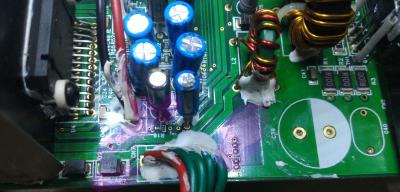
After I repaired the second power amplifier board (the one with 3 STA575 chips), and reviewed this phenomenon, it reminded me that there's a sign of capacitor leaking on one photo.
Attached Image
(I had replaced all electrolytic capacitors on this power amplifier board)

I don't know if it's the cause. Maybe, leave the issue there with back plate opened for several days, the leaked liquid may dry in those days, and hence self-healed? I don't know, just wild guess...

If my guess is right, maybe you can try
  • Unplug the CN4 & CN5 connector on power supply board (unload the load), they try power on to see if you can hear the click sound of relay. If you can hear the click sound, then the cause is located on power amplifier board(s).
  • Check signs of capacitor leaking on power amplifier boards like mine (It's hard to see these signs in dark environment, even in bright environment, you still need a angle of view to see it). If there's any sign, clean it, plug the power cord of AMP boards to PSU board, and try power on to see if you can hear the click sound of relay.


This post has been edited by asenrzhang: Sep 16 2016, 09:50 PM
jsmars
post Sep 18 2016, 02:31 PM

New Member
*
Junior Member
8 posts

Joined: Aug 2016
Thanks for the tips! I tried leaving it unplugged for a few days now and plugging it back in, at first again I was overjoyed - it worked! This time I was sure I had music streaming directly and heard it came through nicely, but after about 30 seconds there was same in-out fading, like a soft flicker, the music turned low for a half second or so, then dissapeared, then came back a second later, it did maybe 3-4 times before dissapearing completely.

I do hear the clicking noise when turning on & off, but I couldn't find any leakage on the amp boards.. but it's probably quite hard to see as you say, should I do a more throughout search maybe or what do you think it could be?
asenrzhang
post Sep 19 2016, 02:45 AM

Getting Started
**
Junior Member
68 posts

Joined: Apr 2015
From: China
QUOTE(jsmars @ Sep 18 2016, 02:31 PM)
Thanks for the tips! I tried leaving it unplugged for a few days now and plugging it back in, at first again I was overjoyed - it worked! This time I was sure I had music streaming directly and heard it came through nicely, but after about 30 seconds there was same in-out fading, like a soft flicker, the music turned low for a half second or so, then dissapeared, then came back a second later, it did maybe 3-4 times before dissapearing completely.

I do hear the clicking noise when turning on & off, but I couldn't find any leakage on the amp boards.. but it's probably quite hard to see as you say, should I do a more throughout search maybe or what do you think it could be?
*
Sound fading in/out is new to me, I never heard this before.

I don't know if you should do a throughout search for leakage, because I'm just guessing here. (By the way, I leaved it unplugged for not just 3 days, but more, say one week or ten days or two weeks.)
But you can check the voltage of CN4 & CN5 connector to make it clear that which board is not working well.
  1. Unplug power cord
  2. Unplug the power cable from the CN4 & CN5, this make the power amplifier boards unloaded
  3. Plug power cord
  4. Power on, and as you say, you can hear the click sound of relay.
  5. Measure the voltage of CN4 & CN5
(1) (2) (3) (4) (5)RED wire
V21 should around 70V (or -70V, I don't remember which pin is high voltage)
V43 should around -24V
V53 should around 24V
  • If the reading values are all okay, it means the PSU board is okay.
    Then measure again after the power cable of AMP boards plugged to CN4 & CN5.
    • If the new reading values are all okay too, then I'm lost too. rclxub.gif
    • If the new reading values are not okay, it means the AMP board(s) is/are not working well
  • If the reading values are not okay, it means the PSU board does not work well.


This post has been edited by asenrzhang: Sep 30 2016, 01:39 AM
KrazeyKami
post Sep 27 2016, 12:44 AM

New Member
*
Newbie
4 posts

Joined: Sep 2016


Hi all!

First of all, @Lex (If you still watch this post after nearly 14 years wink.gif), MANY MANY thanks for your guide.
It helped me to fix my almost 14 year old 750, as it was having the greenlight problem, followed by no power to the unit. After replacing the modules, it works again beautifully, still thinking this is one of the best sets ever.

Well... almost beautifully.

I noticed after hooking everything back up and testing it, I no longer have sound coming from the center speaker. Bass and all other satellites work, and the center speaker itself works when connecting to a different output.

My question:
What could it be? Where exactly is the connection pin for this center speaker?

I *think* it has to do with 'a' connection on the board (biggrin.gif) , but I'm open for suggestions laugh.gif

Many thanks in advance all!

Kind regards,
Kami.

P.S.,
I'm certain it isn't muted or anything wink.gif

asenrzhang
post Sep 27 2016, 01:28 AM

Getting Started
**
Junior Member
68 posts

Joined: Apr 2015
From: China
QUOTE(KrazeyKami @ Sep 27 2016, 12:44 AM)
Where exactly is the connection pin for this center speaker?
*
It's located on audio I/O board, there're seven connectors in a row for audio output on audio I/O board, and the center one is for center speaker. See my photo:
Attached Image

By the way, the age of this thread is actually 3+ years, not fourteen years.
KrazeyKami
post Sep 28 2016, 05:40 PM

New Member
*
Newbie
4 posts

Joined: Sep 2016


QUOTE(asenrzhang @ Sep 26 2016, 07:28 PM)
It's located on audio I/O board, there're seven connectors in a row for audio output on audio I/O board, and the center one is for center speaker. See my photo:
Attached Image

By the way, the age of this thread is actually 3+ years, not fourteen years.
*
Hero! smile.gif You've made my day. Many thanks for this!! rclxm9.gif
KrazeyKami
post Sep 28 2016, 05:41 PM

New Member
*
Newbie
4 posts

Joined: Sep 2016


QUOTE(asenrzhang @ Sep 26 2016, 07:28 PM)
By the way, the age of this thread is actually 3+ years, not fourteen years.
*
Lol, you are totally right!! biggrin.gif Looked at the wrong fields... whistling.gif
kotek34
post Sep 28 2016, 09:02 PM

New Member
*
Junior Member
16 posts

Joined: Sep 2016
Hello,

I would like to ask for help with my Gigaworks S750.

I try to repair PSU but there is a problem and I dont know what I need to check/replace. There is no blowing fuse but the green LED doesnt light.

I replaced all electrolytic capacitors to new ones. Also I replaced D9 (shorted) and C62 (broken "leg") but when I checking the C62 solder points I got "short" I have mean the capacitor is shorted to ground. I tried to traced this short and the 1 leg of TOP 243Y (Control pin) has shorted to GND...

Do I need to replace TOP 243Y to new one?

Sorry for my bad english, I hope You understand me.

This post has been edited by kotek34: Sep 28 2016, 09:06 PM
asenrzhang
post Sep 30 2016, 01:06 AM

Getting Started
**
Junior Member
68 posts

Joined: Apr 2015
From: China
QUOTE(kotek34 @ Sep 28 2016, 09:02 PM)
I replaced all electrolytic capacitors to new ones. Also I replaced D9 (shorted) and C62 (broken "leg") but when I checking the C62 solder points I got "short" I have mean the capacitor is shorted to ground. I tried to traced this short and the 1 leg of TOP 243Y (Control pin) has shorted to GND...

Do I need to replace TOP 243Y to new one?
May I ask where exactly you checked and got the short circuit to GND result?
And, do you follow @lex's guide to clean all degraded glues, especially the hard glue arround C62 & C7 in your case?
And the result you got is after you replaced C62, or before?
kotek34
post Sep 30 2016, 01:21 AM

New Member
*
Junior Member
16 posts

Joined: Sep 2016
Hi again

I replaced the TOP 243Y and now there is no short and looks good. I connected power cord to PSU seems to be fine, green LED light, no blowing fuse. But I have measured the Voltage on C4 and C5 and I get abou 90V, Ithink this is too high because on the scheme is 70V.

I am not connecting the amplifier boards yet.

What do You think about this?

I have measured Voltage on:
CN4 = 90V
CN5 = 90V

So its identical..

kotek34
post Sep 30 2016, 01:25 AM

New Member
*
Junior Member
16 posts

Joined: Sep 2016
@asenrzhang

Thanks for answer.

I have cleaned all degraded glue and replaced all capacitors, and PSU is working now (green LED on sub and green LED on POD also - no blowing fuse) but there is something wrong with output voltages :/
asenrzhang
post Sep 30 2016, 01:44 AM

Getting Started
**
Junior Member
68 posts

Joined: Apr 2015
From: China
QUOTE(kotek34 @ Sep 30 2016, 01:21 AM)
Hi again

I replaced the TOP 243Y and now there is no short and looks good. I connected power cord to PSU seems to be fine, green LED light, no blowing fuse. But I have measured the Voltage on C4 and C5 and I get abou 90V, Ithink this is too high because on the scheme is 70V.

I am not connecting the amplifier boards yet.

What do You think about this? 

I have measured Voltage on:
CN4 = 90V
CN5 = 90V

So its identical..
*
I guess you're measuring the voltage between the left(1) & right(5) pins of CN4 / CN5? If so, then it should be okay (mine is only 86.xV.

CN4 & CN5 should only be measured and get the reading values like the following:

(1) (2) (3) (4) (5 RED)
V21 should around 70V (or -70V, I don't remember which pin is high voltage)
V43 should around -24V
V53 should around 24V

This post has been edited by asenrzhang: Sep 30 2016, 02:02 AM
kotek34
post Sep 30 2016, 01:50 AM

New Member
*
Junior Member
16 posts

Joined: Sep 2016
QUOTE
I guess you're measuring the voltage between the left & right pins?

CN4 & CN5 should only be measured and get the reading values like the following
(1) (2) (3) (4) (5)RED wire
V21 should around 70V (or -70V, I don't remember which pin is high voltage)
V43 should around -24V
V53 should around 24V[list]


Yes, I am measuring between first and second pin (1,2) and with unloaded board I get 90V..

I did not replace the diacs (D6 and D7) and transistor (Q6), maybe there is a fault?

The diods (D2, D3, D4, D5) are ok - I have checked.

This post has been edited by kotek34: Sep 30 2016, 04:13 AM
asenrzhang
post Sep 30 2016, 02:27 AM

Getting Started
**
Junior Member
68 posts

Joined: Apr 2015
From: China
QUOTE(kotek34 @ Sep 30 2016, 01:50 AM)
Yes, I am measuring between first and second pin (1,2) and with unloaded board I get 90V..

I dont replace the diacs (D6 and D7) and transistor (Q6), maybe there is a fault?

The diods (D2, D3, D4, D5) are ok - I have checked.
*
V21 = 90V? hmm, that's not seems right. I don't know the reason either rclxub.gif , sorry.

kotek34
post Sep 30 2016, 04:14 AM

New Member
*
Junior Member
16 posts

Joined: Sep 2016
QUOTE(asenrzhang @ Sep 30 2016, 02:27 AM)
V21 = 90V? hmm, that's not seems right. I don't know the reason either  rclxub.gif , sorry.
*
I will check with another multimeter, maybe I am doing something wrong. Will be post the results. Thanks for reply anyway smile.gif
tezro
post Sep 30 2016, 04:53 PM

New Member
*
Junior Member
30 posts

Joined: Oct 2009


Hi.

Anyone has old faulty S750 subwoofer for sale?

I would like to buy one to get parts for my faulty S750 subwoofer. rclxms.gif

Thank you.

This post has been edited by tezro: Sep 30 2016, 04:54 PM

33 Pages « < 16 17 18 19 20 > » Top
 

Change to:
| Lo-Fi Version
0.0265sec    0.38    6 queries    GZIP Disabled
Time is now: 15th December 2025 - 04:40 AM