Outline ·
[ Standard ] ·
Linear+
PC Audio Creative GigaWorks S750 7.1 speaker repair, A short guide and info with pictures...
|
kotek34
|
 Sep 28 2016, 09:02 PM Sep 28 2016, 09:02 PM
|
New Member


|
Hello,
I would like to ask for help with my Gigaworks S750.
I try to repair PSU but there is a problem and I dont know what I need to check/replace. There is no blowing fuse but the green LED doesnt light.
I replaced all electrolytic capacitors to new ones. Also I replaced D9 (shorted) and C62 (broken "leg") but when I checking the C62 solder points I got "short" I have mean the capacitor is shorted to ground. I tried to traced this short and the 1 leg of TOP 243Y (Control pin) has shorted to GND...
Do I need to replace TOP 243Y to new one?
Sorry for my bad english, I hope You understand me.
This post has been edited by kotek34: Sep 28 2016, 09:06 PM
|
|
|
|
|
|
kotek34
|
Sep 30 2016, 01:21 AM
|
New Member
|
Hi again
I replaced the TOP 243Y and now there is no short and looks good. I connected power cord to PSU seems to be fine, green LED light, no blowing fuse. But I have measured the Voltage on C4 and C5 and I get abou 90V, Ithink this is too high because on the scheme is 70V.
I am not connecting the amplifier boards yet.
What do You think about this?
I have measured Voltage on:
CN4 = 90V
CN5 = 90V
So its identical..
|
|
|
|
|
|
kotek34
|
Sep 30 2016, 01:25 AM
|
New Member
|
@asenrzhang
Thanks for answer.
I have cleaned all degraded glue and replaced all capacitors, and PSU is working now (green LED on sub and green LED on POD also - no blowing fuse) but there is something wrong with output voltages :/
|
|
|
|
|
|
kotek34
|
Sep 30 2016, 01:50 AM
|
New Member
|
QUOTE I guess you're measuring the voltage between the left & right pins?
CN4 & CN5 should only be measured and get the reading values like the following
(1) (2) (3) (4) (5)RED wire
V21 should around 70V (or -70V, I don't remember which pin is high voltage)
V43 should around -24V
V53 should around 24V[list] Yes, I am measuring between first and second pin (1,2) and with unloaded board I get 90V.. I did not replace the diacs (D6 and D7) and transistor (Q6), maybe there is a fault? The diods (D2, D3, D4, D5) are ok - I have checked. This post has been edited by kotek34: Sep 30 2016, 04:13 AM |
|
|
|
|
|
kotek34
|
Sep 30 2016, 04:14 AM
|
New Member
|
QUOTE(asenrzhang @ Sep 30 2016, 02:27 AM) V 21 = 90V? hmm, that's not seems right. I don't know the reason either  , sorry. I will check with another multimeter, maybe I am doing something wrong. Will be post the results. Thanks for reply anyway  |
|
|
|
|
|
kotek34
|
Oct 1 2016, 01:11 AM
|
New Member
|
Hey, I took another multimeter from friend and checked again - is good now. I have connected the amplifiers boards and... the S750 is working Thanks again This post has been edited by kotek34: Oct 1 2016, 01:12 AM |
|
|
|
|
|
kotek34
|
Jun 3 2018, 10:20 PM
|
New Member
|
Hello again
About 2 years ago I have sucessfuly repaired my S750 Creative. I removed the glue and replaced all capacitors. You can check my older posts. Yesterday my S750 died again.. but this time there is no blowing fuse, but it is green LED blinking issue.
First I tried to disconnet the AMP boards to check where is the problem, but even if I discoennect two boards and leave only control board connected the green light still blinking, so there is a problem probablby on PSU board.
After this I removed the PSU and checked it very carefully. I saw bad capacitors on STANDBY side, I have mean C64, C73, C74, C75, C76 capacitors. I have replaced all but there is still nothing, my speakers still doesnt work.
So my next step was went to bathroom and got the hairdryier, I heated up the big 450V capacitor near D9 diode and... voila - PSU went back to live, so I have to buy new capacitor. I didnt try to connect AMP boards yet but I think it will be good. I hope this will be helping for someone.
|
|
|
|
|
|
kotek34
|
Jun 6 2018, 03:32 AM
|
New Member
|
I replaced C61 and C62. The speakers back to work. Cheers |
|
|
|
|
|
kotek34
|
Jun 7 2018, 12:20 AM
|
New Member
|
QUOTE Congratulations! rclxms.gif
By the way, which model of replacement for C61 did you choose ?
A long life one will save your time, such as
- Rubycon TXW 450V 82uF (or 68uF), which has 12000 hours lifetime.
- Nichicon CS 450V 68uF, which has 10000 hours lifetime. Unfortunately at the store where I buy electronic components they don't have good quality capacitors so I had to buy the worse ones. Probably this was a reason why speakers have been damaged only two years after repair. I should order better capacitors from online store, thanks for advice The brands of my capacitor are: Jackcon Sinecon I dont recommended it. This post has been edited by kotek34: Jun 7 2018, 12:23 AM |
|
|
|
|
|
kotek34
|
Feb 16 2020, 05:31 AM
|
New Member
|
Hello to everyone
After 2 years for my last repair the speakers again stop working. This time there is no blown fuse or any "boom". I didnt off my speakers for about 3 months, always stay on, I didnt have any problems with it, speakers worked well. But yesterday I had to to unplug it from power source and after reconnect speakers not working. The green LED light doesnt work, no blinking, no blown fuse.. nothing. I took off the power board but there is no any visual damage, capacitors are looking good. I disconnected AMP boards but nothing change.. PSU standby section is dead.
I have checked D9 - ok
D1 Voltage - 337V
Voltage between C and S on TOP243Y - 5,38V
This post has been edited by kotek34: Feb 16 2020, 05:42 AM
|
|
|
|
|
|
kotek34
|
Feb 16 2020, 05:49 AM
|
New Member
|
Hi MichalD
I bought these speakers damaged and first time I have repaired it on my own hand. I have changed all electrolic capacitors to new ones, removed the glue and also replaced D9 (shorted) and TOP243Y. I have replaced it and speakers back to work. For now I dont have idea whats is wrong, because all compnents lookin good, fuse is not blowing but there is no power, green LED not showing.
This post has been edited by kotek34: Feb 16 2020, 05:52 AM
|
|
|
|
|
|
kotek34
|
Feb 16 2020, 06:08 AM
|
New Member
|
Thank You for answer.
Yes, standby mode doesnt work at all. I have checked D9 and D10 (its ok). I had similiar problem some time ago and there was a problem with one capacitor. The speakers also didnt work and green LED was blinking. I have used hairdryer to test and after heated up capacitor the LED stopped blinkiing and speakers alive. I have replaced this capacitor and didnt have any problems.. to yesterday.
This post has been edited by kotek34: Feb 16 2020, 06:10 AM
|
|
|
|
|
|
kotek34
|
Feb 16 2020, 06:45 AM
|
New Member
|
Yeah I am also thinking about TOP243Y because this is main IC of standby circuit. I have a queston, does heat treatment only work for bad capacitors or there is anoother element which can be "activated" by heat like IC's, transformators or optocouplers?
|
|
|
|
|
|
kotek34
|
Feb 16 2020, 10:05 PM
|
New Member
|
Hello again,
Today I did again test with hairdryer, after solid heat up C62 area the green LED start blinking and finally light on. Unfortunately I dont have new one capacitor to replace it, but I desoldered it and used old one to check it. After replace and power on speakers the green light blinking and with little hot air stay light on, so I need to get new capactor and hope this will working.
If Yours spekaers not work at all (no green LED, no blowing fuse) please check C62 because from my experiences its very often problem. I have replaced this capacitor two times and this will be third time. Maybe I am using bad quality capacitor and this the reason why my speakers cannot work more than 2 years without damage.
|
|
|
|
|
|
kotek34
|
Feb 18 2020, 12:06 AM
|
New Member
|
QUOTE(MichalD @ Feb 16 2020, 11:41 PM) Hm great knowledge, i wasn't thinking that the capacitor will be totaly dead and it will cause this problem. Maybee capacitor's ESR dramatically increases and it's capacity dramaticly decreses, so there is no power for standby section at all. Try to use Rubycon's BXW capacitor. I replaced bad capacitor to new one and speakers working but there is a problem with stability of standby circuit and speakers reset.. AMP boards are good, still problem on PSU board. In meantime I have pruchased another damaged S750 subwoofer and will try repair PSU on it. I also checked capitance C62 with multimeter. Here is my results. On this capacitor the standby section not working at all, no LED: 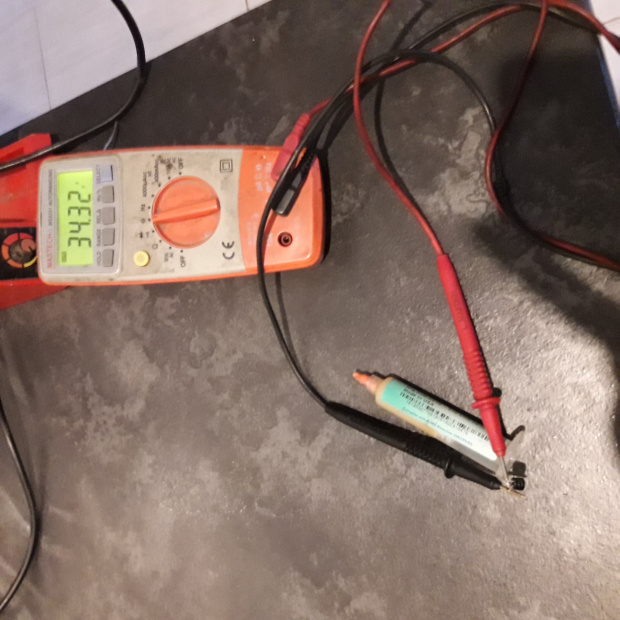 On this capacitor standby section still not working and green light blinking:  And this is new one:  |
|
|
|
|
|
kotek34
|
Feb 21 2020, 11:58 PM
|
New Member
|
I've got another damaged set. The fuse is good, the green LED slowly blinking. I dissasemblied sub and first tried to discoennt AMP boards. After this the green LED is solid green. The PSU board it is very good condition, capacitors are not bulged and glue didnt damage the PCB (color of glue its almost white, not brown). I connected the POD and standy mode working great, no issue. After this I measured voltage on CN4 and CN5. There are about 95V (unload) so it is also good. My next step I tried to connect first AMP board only (board with three IC) but with connected board the green light slowly blinking. I disconnected AMP1 and connected AMP2 only. With second AMP speakers are working, I can power on it and after connecting music source and satellite I can hear the music from it (working front and rear channels) without subwoofer speaker. I think there are a problem with AMP1 board and PSU is good. I took AMP1 board off and check the capacitors (C39, C40, C41) but there is no fault, pins of STA are good too (no cracks). I didnt replace any capcitors on PSU (only removed the glue right now). Do You think is possible that PSU can power up second AMP board well but there is no enough juice to power first AMP? What else can be checked or measurment on AMP board?
This post has been edited by kotek34: Feb 22 2020, 12:00 AM
|
|
|
|
|



 Quote
Quote

 0.0491sec
 0.43
0.43
 7 queries
 GZIP Disabled