Welcome Guest ( Log In | Register )

33 Pages « < 14 15 16 17 18 > » Bottom

Outline · [ Standard ] · Linear+

PC Audio Creative GigaWorks S750 7.1 speaker repair, A short guide and info with pictures...

views
     
jsmars
post Aug 24 2016, 01:04 AM

New Member
*
Junior Member
8 posts

Joined: Aug 2016
Hey there! I'm extremely impressed by this thread! I've had it open in my browser since forever checking it over and over again.
I've got two Gigaworks S750 sets that I'd like to repair. I really like these sets and have used them alot, but sadly they are both broken now. I tried replacing some of the components when the first one broke, but it wasn't enough and it broke again immediately.

I've read through this entire post, trying to pick up as much as I can. I don't know much about electronics as I would like to, but I think I can manage to clean and replace the components required, or get a friend to help me out.

I've created a list which I think is complete of all the parts suggested by OP and I'd like to make an order, but I'd really like to get all the needed parts in the order the first time so I don't need to make multiple orders. I need to order from the US and live in europe and shipping is quite high.

What I'm really wondering is, if you could check the list included in this post and see if I've added all the correct components and correct quantities, and if I'm missing any other ones that could be required for one complete repair job? I'm thinking I might as well replace all the old cheap brand capacitors so that these will last as long as possible when I've repaired both of them. I will order 2x the amounts ofcourse since I have two sets and probably a few extra of most of them just in case.

My list can be seen directly at DigiKey by this link: http://www.digikey.se/short/3ht51q

And here is the list in text:
2 1189-1042-ND CAP ALUM 330UF 20% 100V RADIAL
1 478-5096-ND CAP CER 0.1UF 50V X8R RADIAL
10 100QBK-ND RES 100 OHM 1/4W 5% AXIAL
1 IRF740PBF-ND MOSFET N-CH 400V 10A TO-220AB
10 A106002CT-ND RES 10.0 OHM 2W 5% AXIAL
4 493-7851-ND CAP ALUM 470UF 20% 200V SNAP
1 P13680-ND CAP ALUM 68UF 20% 450V RADIAL (Not sure about size of this one?)
3 1189-1019-ND CAP ALUM 1000UF 20% 100V RADIAL (These might not be needed, but good for long life, correct?)
5 UPM1V221MPD6-ND CAP ALUM 220UF 20% 35V RADIAL
2 493-1547-ND CAP ALUM 47UF 20% 25V RADIAL

Really appreciate the help!

This post has been edited by jsmars: Aug 24 2016, 01:18 AM
asenrzhang
post Aug 24 2016, 02:44 AM

Getting Started
**
Junior Member
68 posts

Joined: Apr 2015
From: China
QUOTE(jsmars @ Aug 24 2016, 01:04 AM)
...
What I'm really wondering is, if you could check the list included in this post and see if I've added all the correct components and correct quantities, and if I'm missing any other ones that could be required for one complete repair job? I'm thinking I might as well replace all the old cheap brand capacitors so that these will last as long as possible when I've repaired both of them. I will order 2x the amounts ofcourse since I have two sets and probably a few extra of most of them just in case.

My list can be seen directly at DigiKey by this link: http://www.digikey.se/short/3ht51q

And here is the list in text:
...
2 1189-1042-ND CAP ALUM 330UF 20% 100V RADIAL
Okay, Rubycon ZLJ series is what @lex used as replacement.

1 478-5096-ND CAP CER 0.1UF 50V X8R RADIAL
Okay, This is what @lex used as replacement.

10 100QBK-ND RES 100 OHM 1/4W 5% AXIAL
I never replaced a resistor, so I don't know if it's okay.

1 IRF740PBF-ND MOSFET N-CH 400V 10A TO-220AB
There're 4 IRF740 MOSFETs on PSU board, if you only need one, then it's okay.

10 A106002CT-ND RES 10.0 OHM 2W 5% AXIAL
I never replaced a resistor, so I don't know if it's okay.

4 493-7851-ND CAP ALUM 470UF 20% 200V SNAP
Okay, I bought exactly same part number as yours.

1 P13680-ND CAP ALUM 68UF 20% 450V RADIAL (Not sure about size of this one?)
Height=42mm is little bit higher, the original one is about 30mm.
What I bought is Nichicon UCS2W680MHD.

3 1189-1019-ND CAP ALUM 1000UF 20% 100V RADIAL (These might not be needed, but good for long life, correct?)
This one is for two power amplifier boards. Size is okay. But it said it's for "General Purpose" application, I'm not sure if it's okay.
What I bought is Nichicon UPW2A102MHD

5 UPM1V221MPD6-ND CAP ALUM 220UF 20% 35V RADIAL
Height is a little big higher, but I think it's okay. But it's for "General Purpose" application, I'm not sure if it's okay.
What I bought is Nichicon UHE1V221MPD6

2 493-1547-ND CAP ALUM 47UF 20% 25V RADIAL
Size if okay. But it said it's for "General Purpose" application, I'm not sure if it's okay.
What I bought is Panasonic EEU-FR1E470

=======

Looks like you forgot five 110μF 35V capacitors. I bought Nichicon UPW1V101MPD as replacement, not perfect, because it only has 3000 hours life.

This post has been edited by asenrzhang: Aug 24 2016, 02:49 AM
rsseco
post Aug 24 2016, 03:37 AM

New Member
*
Junior Member
33 posts

Joined: Jul 2016


Here I am again. And here are the today's results (and a lot of results !)

First, I began to remove Q3 and Q4, with the heatsink.

user posted image
Q3 and Q4 broken !

I took an another multimeter to do this series of tests :
user posted image
I used the "sound" parameter to check shortcircuits, Diode for diodes, Ohm for resistors (and sometimes to check shortcircuits) and V continious for voltage. The Diod gaves me values in V...

So, here's a look of the board without Q3 and Q4 :

user posted image

user posted image
Closer to Q3

user posted image
And closer to Q4
jsmars
post Aug 24 2016, 03:54 AM

New Member
*
Junior Member
8 posts

Joined: Aug 2016
QUOTE(asenrzhang @ Aug 23 2016, 07:44 PM)
......

Looks like you forgot five 110μF 35V capacitors. I bought Nichicon UPW1V101MPD as replacement, not perfect, because it only has 3000 hours life.
*
Thanks a lot of checking my list! I've replaced the components with your suggestions, since I'm a novice I'd rather go with the safer bet. I've made an updated list here (containing enough for 3 subs), the customer reference is the amount needed for each sub. I'm not sure if I got those resistors from this thread or a friend of mine who looked at the sub, since they aren't that much I'll get them and see if I need to change them or not. All should be covered now right?
http://www.digikey.se/short/3htn1f

Also for the part I missed, is there any part that would have longer than 3000 hours? The other parts I have range between 5000-1000. Would for example this part work?
http://www.digikey.se/product-detail/en/ni...16-1-ND/4320150
It's a bit bigger and has a different ripple current and impendence, but the rest is the same. Not sure this moment where on the board they fit and if there is space and if those attribute differences are ok?

This post has been edited by jsmars: Aug 24 2016, 03:45 PM
rsseco
post Aug 24 2016, 03:54 AM

New Member
*
Junior Member
33 posts

Joined: Jul 2016


Following results are without Q3 and Q4, PSU board alone (not connected) and no powered.
= means conductive, or shortcircuit.

Q3(S) = Q4(S)
Q3(D) = Q4(D)
Q3(G) -> Q4(G) = 1.19 kOhm

Q4(S) = C69(-)/C70(+)/C60(+)/C59(-)
Q4(D) = C69(+)/C59(+)
Q3(S) = C70(+)/C69(-)/C60(+)/C59(-)
Q3(D) = C69(+)/C59(+)

Q3(G) : N/A to all +/- capacitors C70/C69/C60/59
Q4(G) : N/A to all +/- capacitors C70/C69/C60/59


Values :


- R37 : 5.1 Ohm
- R29 : 98.1 Ohm
- D6 : + -> - or - -> + : N/A
- D7 : + -> - or - -> + : N/A
- D14 : - -> + : 0.47V (conductive) / + -> - : N/A
- R16 : 98.6 kOhm
- D14 : - -> + : 0.47V / + -> - : N/A
- D10 : - -> + : 0.56V / + -> - : N/A
- C54 seems to be OK
- C15 seems to be OK

user posted image
Values in "normal" use of diods (- -> +)

user posted image
Values in other way (+ -> -)

Values of Q6 (compared to Q5) :

user posted image

rsseco
post Aug 24 2016, 04:19 AM

New Member
*
Junior Member
33 posts

Joined: Jul 2016


Some other results :

user posted image
Values in "normal" use of diods (- -> +)

user posted image
Values in other way (+ -> -)

- D8 : - -> + : 0.11V / + -> - : 0.11V

So, going now to test bench : Control pod in, AC inlet (new fuse), PSU board not screwed to back plate, no heatsink on Qx and no Aluminium "L" plate, no DASH amplifier board connected.

user posted image
user posted image

And main switch on 1 :
user posted image

And finally, powered on :
user posted image

And, yes, despite Q3 and Q4 are left, it's alive ! And keeps alive for minutes, without any fuse blown ! And I powered off and on twice, no problems !

Here's the measurement :
user posted image

Results :

- D1 : 323.6V !

- R2 : 157V

- Q3(S) - Q3(D) : values changing / -/+ values (alternative voltage ?)
- Q3(S) - Q3(G) : 285mV

- Q4(S) - Q4(D) : values changing / then seems to stop at +147V
- Q4(S) - Q4(G) : 287mV

- Q1(S) - Q1(D) : 168V
- Q1(S) - Q1(G) : values changing

- Q2(S) - Q2(D) : 173.5V
- Q2(S) - Q2(G) : 0V

- C70 : 172V
- C69 : 150V
- C60 : 172V
- C59 : Values changing / +/- mV and V

That's it... one thing is good, that it hold "on" for these tests of measurments. I haven't soldered any new IRF740 on Q3 and Q4 again yet, wainting for your analytics !

And to respond you (your last question), I check if I hadn't any shortcircuit between Dx and Ux and heatsink : negative !


rsseco
post Aug 24 2016, 05:08 PM

New Member
*
Junior Member
33 posts

Joined: Jul 2016


This night I thought about a thing I didn't tell before, because for me, it was "normal" (as I had this symptom often by the past) :

My S750 had this annoying "problem" (as said, before it does break and was working perfectly) on power on : often (not always) when I powered on the set via control pod, my set powered on and immediatly off. You could hear the relay "clicking twice" shortly.
It's as I "double press" the button, but I didn't do. A new press powered it on "normally".

After I repaired (also I thought it was repaired), it does the same thing on the first start...

But yesterday, as said, I powered it on 3 times, and never I had this symptom.
And what I found bizarre too, is after powering off/down, the relay takes longer to "click" (5 to 10s after red led is showing the off status). On power on, no problem, the relay clicks immediatly.
I don't remember anymore if on power off it should do the same or not. Or, perhaps it's as Q3 or Q4 are left, so it takes longer ?

If it can help...

This post has been edited by rsseco: Aug 24 2016, 05:10 PM
asenrzhang
post Aug 24 2016, 05:56 PM

Getting Started
**
Junior Member
68 posts

Joined: Apr 2015
From: China
QUOTE(rsseco @ Aug 24 2016, 05:08 PM)
This night I thought about a thing I didn't tell before, because for me, it was "normal" (as I had this symptom often by the past) :

My S750 had this annoying "problem" (as said, before it does break and was working perfectly) on power on : often (not always) when I powered on the set via control pod, my set powered on and immediatly off. You could hear the relay "clicking twice" shortly.
It's as I "double press" the button, but I didn't do. A new press powered it on "normally".

After I repaired (also I thought it was repaired), it does the same thing on the first start...
Mine has this symptom too, one post in this thread said D6&D7 need to be replaced. I replaced them, but this does not fixed the issue.
And if you read posts in this thread one by one, you may found others have same symptom too.

I leaved this issue there, because I can still power on the woofer.

By the way, let me gather the description said by others about this symptom

  • Power on twice
  • Power reset / Power off immediately / Power flash off
  • Lost remembered volume on control pod


QUOTE(rsseco @ Aug 24 2016, 05:08 PM)
But yesterday, as said, I powered it on 3 times, and never I had this symptom.
And what I found bizarre too, is after powering off/down, the relay takes longer to "click" (5 to 10s after red led is showing the off status). On power on, no problem, the relay clicks immediatly.
I don't remember anymore if on power off it should do the same or not. Or, perhaps it's as Q3 or Q4 are left, so it takes longer ?

If it can help...
*
Yes, it only happened on the first time, if you power off then on several times after that, it does not "reset" anymore.
And yes, there's a delay to hear the 'click' sound (I guess it's the sound of relay switched to OFF position).

What I'm guessing (just guess, and it could be totally wrong!!!) here is
1. When power is ON, capacitors may absorbing lots power, and make some other components can't get enough power?
2. The delay time of hearing the 'click' sound after power off, I don't think it's related to the missing of Q3 and Q4, it could be the capacitors still have remaining power to hold the relay at ON position.
The following power off and then on actions does not trigger the "reset" symptom, could also because of the remaining power in capacitors. I mean they does not absorbing power hardly.

This post has been edited by asenrzhang: Aug 25 2016, 02:18 AM
asenrzhang
post Aug 24 2016, 07:39 PM

Getting Started
**
Junior Member
68 posts

Joined: Apr 2015
From: China
QUOTE(rsseco @ Aug 24 2016, 03:37 AM)
...
I used the "sound" parameter to check shortcircuits, Diode for diodes, Ohm for resistors (and sometimes to check shortcircuits) and V continious for voltage. The Diod gaves me values in V...
I guess it could be/mean 'K' instead of 'V', maybe low half of 'K' is not visible or does not exists.

QUOTE(rsseco @ Aug 24 2016, 03:37 AM)
So, here's a look of the board without Q3 and Q4 :
user posted image

Closer to Q3
And closer to Q4
I noticed you're using Rubycon MXR series. I checked the datasheet, found that it's height is 50mm, it's too high, that could make the top of capacitors too close to the heat sink. Or worse, it could touch the heat sink.
Attached Image

lex's second fix had shown this mistake made in the owner's self-repairing.
user posted image

Also, I found something strange about the plastic wrapper of these capacitors
  • The top hole size of plastic wrapper are not equal
  • The vertical white line of negative sign is skewed to left a little bit. Maybe it's just the angle when you took the photo caused this, but I'm not sure.

Maybe it's not a big deal, but I worried about their genuine.

This post has been edited by asenrzhang: Aug 24 2016, 09:42 PM
asenrzhang
post Aug 24 2016, 09:09 PM

Getting Started
**
Junior Member
68 posts

Joined: Apr 2015
From: China
excl.gif Disclaimer: I'm not a professional electronic engineer, not even an amateur, so, take the advice at your own risk.

QUOTE(rsseco @ Aug 24 2016, 03:54 AM)
Following results are without Q3 and Q4, PSU board alone (not connected) and no powered.
= means conductive, or shortcircuit.

Q3(S) = Q4(S) = C59(-)/C69(-)/C70(+)/C60(+)
Q3(D) = Q4(D) = C59(+)/C69(+)
Q3(G) -> Q4(G) = 1.19 kOhm

Q3(G) : N/A to all +/- capacitors C70/C69/C60/59
Q4(G) : N/A to all +/- capacitors C70/C69/C60/59
I rephrased/rearrange your test results to make it simpler.
Resistance between Q3(G) and Q4(G) is irrelevant here.
✓ Other results are as expected.

QUOTE(rsseco @ Aug 24 2016, 03:54 AM)
Values :

- R37 : 5.1 Ohm
- R29 : 98.1 Ohm
- D6 : + -> - or - -> + : N/A
- D7 : + -> - or - -> + : N/A
- D14 : - -> + : 0.47V (conductive) / + -> - : N/A
- R16 : 98.6 kOhm
- D14 : - -> + : 0.47V / + -> - : N/A
- D10 : - -> + : 0.56V / + -> - : N/A
- C54 seems to be OK
- C15 seems to be OK

user posted image
Values in "normal" use of diods (- -> +) the direction is actually '+' to '-'

user posted image
Values in other way (+ -> -) the direction is actually '-' to '+'

Values of Q6 (compared to Q5) :

user posted image
*
D6 & D7 are DIAC, which I don't how to check it, but it should be non-conductive in both direction, as expected.

Part number of Q6 and Q5 are not same, and they are used in different application, so I don't think they are comparable.

About results of D10 D14 and other diodes, I think you made a mistake about the '-' electrode and '+' electrode of diodes, the side with a mark is '-' electrode.

About the result of D22 & D23 & D24 & D25, there're parallel circuit between their legs, so the result are not trusted.

This post has been edited by asenrzhang: Aug 25 2016, 05:28 PM
rsseco
post Aug 24 2016, 09:46 PM

New Member
*
Junior Member
33 posts

Joined: Jul 2016


QUOTE(asenrzhang @ Aug 24 2016, 12:39 PM)
I guess it could be/mean 'K'  instead of 'V', maybe low half of 'K' is not visible or does not exists.
I noticed you're using Rubycon MXR series. I checked the datasheet, found that it's height is 50mm, it's too high, that could make the top of capacitors too close to the heat sink. Or worse, it could touch the heat sink.
Attached Image

lex's second fix had shown this mistake
user posted image

Also, I found something strange about the plastic wrapper of these capacitors


  • The top hole size of plastic wrapper are not equal

  • The vertical white line of negative sign is skewed to left a little bit. Maybe it's just the angle when you took the photo caused this, but I'm not sure.


Maybe it's not a big deal, but I worried about their genuine.
*
Mine are not so high, they measure 22x40mm ; here was the link where I bought it : https://fr.aliexpress.com/item/Free-shippin...08.0.124.KGRgpw
After, I don't know if they are "real" or not ! Could it be an old series ? Or as you expected, they could be contrefacted ?!?

This post has been edited by rsseco: Aug 24 2016, 10:08 PM
rsseco
post Aug 24 2016, 10:21 PM

New Member
*
Junior Member
33 posts

Joined: Jul 2016


QUOTE(asenrzhang @ Aug 24 2016, 02:09 PM)
About results of D10 D14 and other diodes, I think you made a mistake about the '-' electrode and '+' electrode of diodes, the side with a mark is '-' electrode.
My terms are wrong ? Sorry.
But my thoughts are true to say marked side is - pole ? So, normally I always put the Black - pad on this side to have the normal behaviour of the diode, or am I completly wrong ?
Are some of my measurments totally wrong then ?

What should I do next ? Could be I must buy some other capacitors if they are "false" ones ?

EDIT :The fault can be mine too, as I want to buy as cheap as I can... I do it this way, as I doesn't want to spend too much in case my repair will not work.
I know it's a risk by having some bad quality product, and it's a dilemma : Low price = bad quality = perhaps repair will not work because of that ; instead of more expensive = best quality = can work better !
If I was sure to be able to repair it by myself, I would buy things of higher quality, of course ! rolleyes.gif
Because usually, I always buy the best things...

This post has been edited by rsseco: Aug 24 2016, 11:04 PM
asenrzhang
post Aug 24 2016, 11:48 PM

Getting Started
**
Junior Member
68 posts

Joined: Apr 2015
From: China
excl.gif Disclaimer: I'm not a professional electronic engineer, not even an amateur, so, take the advice at your own risk.

QUOTE(rsseco @ Aug 24 2016, 04:19 AM)
Some other results :
Values in "normal" use of diods (- -> +)
Values in other way (+ -> -)

- D8 : - -> + : 0.11V / + -> - : 0.11V
Those are standby part, since your standby power works okay, so no need to check them.

By the way, as I said before, the direction of your diodes testing is actually reversed

QUOTE(rsseco @ Aug 24 2016, 04:19 AM)
So, going now to test bench : Control pod in, AC inlet (new fuse), PSU board not screwed to back plate, no heatsink on Qx and no Aluminium "L" plate, no DASH amplifier board connected.
And main switch on 1 :
user posted image

And finally, powered on :
user posted image
✓ The standby part works okay.

QUOTE(rsseco @ Aug 24 2016, 04:19 AM)
And, yes, despite Q3 and Q4 are left, it's alive ! And keeps alive for minutes, without any fuse blown ! And I powered off and on twice, no problems !
So, if you
(1) put new Q3 & Q4 back
(2) put hint sink back
(3) mount Q3 & Q4 to the heat sink
(4) put the power supply unit board back to the 'L' shape aluminum board
then power on, you got Q3 & Q4 burned/cracked.

Then there's something happened in these steps caused Q3 & Q4 burned/cracked.

If you still have enough IRF740 and fuses, maybe you can try the above steps one by one, and after each step is done, power on for testing. If Q3 & Q4 burn again, recheck what special you've done.
If nothing special, then could be other components failed caused Q3 & Q4 burned.

QUOTE(rsseco @ Aug 24 2016, 04:19 AM)
Here's the measurement :
user posted image

Results :

- D1 : 323.6V !

- R2 : 157V

- Q3(S) - Q3(D) : values changing / -/+ values (alternative voltage ?)
- Q3(S) - Q3(G) : 285mV

- Q4(S) - Q4(D) : values changing / then seems to stop at +147V
- Q4(S) - Q4(G) : 287mV

- Q1(S) - Q1(D) : 168V
- Q1(S) - Q1(G) : values changing

- Q2(S) - Q2(D) : 173.5V
- Q2(S) - Q2(G) : 0V

- C70 : 172V
- C69 : 150V
- C60 : 172V
- C59 : Values changing / +/- mV and V

That's it... one thing is good, that it hold "on" for these tests of measurments. I haven't soldered any new IRF740 on Q3 and Q4 again yet, wainting for your analytics !

And to respond you (your last question), I check if I hadn't any shortcircuit between Dx and Ux and heatsink : negative !
*
Do you remember the lowest reading value and highest reading value of those changing values?

I think you need to measure Vgs and Vds of Q3 & Q4: Black probe of multimeter always on Source, Red probe on Gate to measure Vgs, then Drain to measure Vds.

One thing strange is you got a negative reading in the changing values. To my understanding, that can't be right.
rsseco
post Aug 25 2016, 01:09 AM

New Member
*
Junior Member
33 posts

Joined: Jul 2016


QUOTE(asenrzhang @ Aug 24 2016, 04:48 PM)
If you still have enough IRF740 and fuses, maybe you can try the above steps one by one, and after each step is done, power on for testing. If Q3 & Q4 burn again, recheck what special you've done.
OK, I will check this with only Q3 and Q4 soldered. Do I need to try with only one first or can I put the twice together ?

QUOTE(asenrzhang @ Aug 24 2016, 04:48 PM)
If nothing special, then could be other components failed caused Q3 & Q4 burned.
And how will we find what ?

QUOTE(asenrzhang @ Aug 24 2016, 04:48 PM)
Do you remember the lowest reading value and highest reading value of those changing values?
No, values fluctuated to fast ! I can try the "A-Hold" mode of the multimeter

QUOTE(asenrzhang @ Aug 24 2016, 04:48 PM)
I think you need to measure Vgs and Vds of Q3 & Q4: Black probe of multimeter always on Source, Red probe on Gate to measure Vgs, then Drain to measure Vds.
This is not what I already done yet ? Or you mean with some IRF740 in place ? Or in the order you wrote it : first V(G-S) and then V(D-S) ?

QUOTE(asenrzhang @ Aug 24 2016, 04:48 PM)
One thing strange is you got a negative reading in the changing values. To my understanding, that can't be right.
*
I don't know what to say, the "-" sign appears sometimes...

asenrzhang
post Aug 25 2016, 01:10 AM

Getting Started
**
Junior Member
68 posts

Joined: Apr 2015
From: China
QUOTE(rsseco @ Aug 24 2016, 09:46 PM)
Mine are not so high, they measure 22x40mm ; here was the link where I bought it : https://fr.aliexpress.com/item/Free-shippin...08.0.124.KGRgpw
After, I don't know if they are "real" or not ! Could it be an old series ? Or as you expected, they could be contrefacted ?!?
*
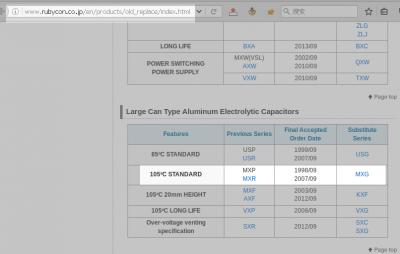
Rubycon website said MXG series is substitution of MXR series, and size of 470μF 250V in new MXG series is 22x40mm, not MXR series. So, it could be faked.
Attached Image

There's a question "How to tell if an electronic component is counterfeit?", and one answer of this question said:
QUOTE
The best way to avoid this problem is to use reputable suppliers, like Mouser, DigiKey, Element-14, etc.


QUOTE(rsseco @ Aug 24 2016, 10:21 PM)
My terms are wrong ? Sorry.
But my thoughts are true to say marked side is - pole ? So, normally I always put the Black - pad on this side to have the normal behaviour of the diode, or am I completly wrong ?
Are some of my measurments totally wrong then ?
I think what you know about positive & negative pole of diode is right, it's just typo in your posts. No need to measure them again.

QUOTE(rsseco @ Aug 24 2016, 10:21 PM)
What should I do next ? Could be I must buy some other capacitors if they are "false" ones ?

EDIT :The fault can be mine too, as I want to buy as cheap as I can... I do it this way, as I doesn't want to spend too much in case my repair will not work.
I know it's a risk by having some bad quality product, and it's a dilemma : Low price = bad quality = perhaps repair will not work because of that ; instead of more expensive = best quality = can work better !
If I was sure to be able to repair it by myself, I would buy things of higher quality, of course !  rolleyes.gif
Because usually, I always buy the best things...
*
It's a dilemma, absolutely. I bought from mouser.cn at 2015-05, at that time, mouser.cn need to place order at least ¥150 RMB (China Yuan) if I choose RMB as currency. Now, the minimal total price to place order had increased to ¥175 RMB.
Attached Image

Minimal total price to place order in DigiKey using RMB as currency is ¥500 RMB, which is far more than Mouser, so I choosed Mouser. But DigiKey seems have more choices, for example, Mouser don't have Rubycon capacitors.

Because the quantity is too small, so the single price is too high for me, plus the tax and long time shipping/waiting, makes it unacceptable to me, so I may not buy from them again.

By the way, I never know Mouser & DigiKey & other professional electronic suppliers until I read this thread.

This post has been edited by asenrzhang: Aug 25 2016, 01:31 AM
asenrzhang
post Aug 25 2016, 02:03 AM

Getting Started
**
Junior Member
68 posts

Joined: Apr 2015
From: China
excl.gif Disclaimer: I'm not a professional electronic engineer, not even an amateur, so, take the advice at your own risk.

QUOTE(jsmars @ Aug 24 2016, 03:54 AM)
Thanks a lot of checking my list! I've replaced the components with your suggestions, since I'm a novice I'd rather go with the safer bet. I've made an updated list here (containing enough for 3 subs), the customer reference is the amount needed for each sub. I'm not sure if I got those resistors from this thread or a friend of mine who looked at the sub, since they aren't that much I'll get them and see if I need to change them or not. All should be covered now right?
http://www.digikey.se/short/3htn1f
If your subwoofer symptom is as same as the OP's, the list should covered all now.
But some other people in this thread also replaced other parts because they encountered different problems.
So, if your subwoofer symptom is different, maybe you can post here to see if someone can help identified which parts need to be replaced, then you can place a different order, only buy necessary parts, that could save a lot money.

QUOTE(jsmars @ Aug 24 2016, 03:54 AM)
Also for the part I missed, is there any part that would have longer than 3000 hours? The other parts I have range between 5000-1000. Would for example this part work?
http://www.digikey.se/product-detail/en/ni...16-1-ND/4320150
It's a bit bigger and has a different ripple current and impendence, but the rest is the same. Not sure this moment where on the board they fit and if there is space and if those attribute differences are ok?
*
Yes, UPX1V101MPD1TD is a little big larger than UPW1V101MPD,
- lead space is 1.5mm larger
- dimension is 2mm larger
- height is 10mm larger
There're plenty spaces on the 100μF capacitors position, I guess (just guess) this one can fit 3.5mm lead spacing solder pad because bottom of these capacitors does not need to be touch the board, but I'm not sure.

You can filter 3.5mm lead spacing in DigiKey search forms. Example filter (100μF, 35V, 3.5mm lead spacing, 5000-10000 hour life):
http://www.digikey.se/product-search/en/ca...d=0&pageSize=25
rsseco
post Aug 25 2016, 02:08 AM

New Member
*
Junior Member
33 posts

Joined: Jul 2016


QUOTE(asenrzhang @ Aug 24 2016, 06:10 PM)
Rubycon website said MXG series is substitution of MXR series, and size of 470μF 250V in new MXG series is 22x40mm, not MXR series. So, it could be faked.
OK. And so could be my IRF740 too... and perhaps what I doubt before, could be faulty or fragile too (that's why they broke as easily ?!? ; and could confirm my guess about why 2 IRF740 broke as before, only one was really out of order).
But, my fluctuate values without any IRF740 in place could reveal any other problem anyway ?


asenrzhang
post Aug 25 2016, 03:44 AM

Getting Started
**
Junior Member
68 posts

Joined: Apr 2015
From: China
excl.gif Disclaimer: I'm not a professional electronic engineer, not even an amateur, so, take the advice at your own risk.

QUOTE(rsseco @ Aug 25 2016, 01:09 AM)
OK, I will check this with only Q3 and Q4 soldered. Do I need to try with only one first or can I put the twice together ?
Try one by one, or try both of them at same time, are all acceptable.
But I may test like this:
1. solder new IRF740 on Q4, test only Q4 first, because it survived in the first time
2. if step 1 passed, then solder new IRF740 on Q3, test Q4 & Q3 simultaneously
3. if step 2 passed, then put heat sink back, mounted Q3 & Q4 to heat sink, test again


QUOTE(rsseco @ Aug 25 2016, 01:09 AM)
And how will we find what ?
Not sure, the unknown reason is what you need to discovered.

QUOTE(rsseco @ Aug 25 2016, 01:09 AM)
This is not what I already done yet ? Or you mean with some IRF740 in place ? Or in the order you wrote it : first V(G-S) and then V(D-S) ?
What you wrote is
>> - Q3(S) - Q3(D) : values changing / -/+ values (alternative voltage ?)
>> - Q3(S) - Q3(G) : 285mV
I thought you mean S(red) to D(black) voltage and S(red) to G(black). I always write red probe side first, then black probe side, so for Vgs I will write as "Q3(G) - Q3(S)" instead of "Q3(S) - Q3(G)", so when I saw "Q3(S) - Q3(G)", I thought you put RED probe on S, BLACK probe on G. I misunderstand what you wrote?

The testing order of Vgs & Vds is not important.


QUOTE(rsseco @ Aug 25 2016, 01:09 AM)
No, values fluctuated to fast ! I can try the "A-Hold" mode of the multimeter
QUOTE(rsseco @ Aug 25 2016, 01:09 AM)
I don't know what to say, the "-" sign appears sometimes...
*
I want to make sure no negative voltage happened

QUOTE(rsseco @ Aug 25 2016, 02:08 AM)
OK. And so could be my IRF740 too... and perhaps what I doubt before, could be faulty or fragile too (that's why they broke as easily ?!? ; and could confirm my guess about why 2 IRF740 broke as before, only one was really out of order).
It could be IRF740's fault, but I don't suspect it at this time. The IRF740 seller got more positive feedbacks than the capacitors seller.

QUOTE(rsseco @ Aug 25 2016, 02:08 AM)
But, my fluctuate values without any IRF740 in place could reveal any other problem anyway ?
*
Could be capacitor's fault which doesn't shape the waveform well.


This post has been edited by asenrzhang: Aug 25 2016, 03:14 PM
rsseco
post Aug 25 2016, 02:41 PM

New Member
*
Junior Member
33 posts

Joined: Jul 2016


QUOTE(asenrzhang @ Aug 24 2016, 08:44 PM)
1. solder new IRF740 on Q4, test only Q4 first, because it survived in the first time
In fact, I don't know which was OK at the first time, as I remove twice at a time to check them. I only know one was defective and the other no
To remember :
QUOTE(rsseco @ Jul 24 2016, 12:59 PM)
Hi  ! 
Some news after testing the things.
R2 seems to be OK after Q3 and Q4 were removed.
And yes, one of both is NOK, S-D and D-S are conductive, the other one is good (conductive in one way only)
Unfortunately, I can't say which one was defective, as I removed twice before testing each.
QUOTE(asenrzhang @ Jul 24 2016, 06:22 PM)
Well, it's doesn't matter now, just throw the failed one away biggrin.gif
QUOTE(asenrzhang @ Aug 24 2016, 08:44 PM)
I thought you mean S(red) to D(black) voltage and S(red) to G(black). I always write red probe side first, then black probe side, so for Vgs I will write as "Q3(G) - Q3(S)" instead of "Q3(S) - Q3(G)", so when I saw "Q3(S) - Q3(G)", I thought you put RED probe on S, BLACK probe on G. I misunderstand what you wrote?
Yes and no ! In fact, I've done it by putting the black pad as you wrote me before.
You can see it on this picture (S is written in black, D and G in red) ; I've tested it this way.
user posted image
Okay, G seems to be written in black... but in fact, it's red !

QUOTE(asenrzhang @ Aug 24 2016, 08:44 PM)
Could be capacitor's fault which doesn't shape the waveform well.
I have an additionnal cap leaving (as I bought 5) ; should I try to replace C59 in order to see if I have stable value ?

asenrzhang
post Aug 25 2016, 10:30 PM

Getting Started
**
Junior Member
68 posts

Joined: Apr 2015
From: China
excl.gif Disclaimer: I'm not a professional electronic engineer, not even an amateur, so, take the advice at your own risk.

QUOTE(rsseco @ Aug 25 2016, 02:41 PM)
In fact, I don't know which was OK at the first time, as I remove twice at a time to check them. I only know one was defective and the other no
To remember :
Sorry, my memory got corrupt.

Before testing, please make sure the components voltage with varying reading value does not encounter a negative reading value.
Professional engineer may use oscilloscope to check these signals, that's beyond my knowledge and skills.
QUOTE(rsseco @ Aug 24 2016, 04:19 AM)
...
- D1 : 323.6V !    Okay

- R2 : 157V    Okay

- Q3(S) - Q3(D) : values changing / -/+ values (alternative voltage ?)          Vds of Q3 should closed to voltage on C59/C69.
- Q3(S) - Q3(G) : 285mV

- Q4(S) - Q4(D) : values changing / then seems to stop at +147V
- Q4(S) - Q4(G) : 287mV

- Q1(S) - Q1(D) : 168V
- Q1(S) - Q1(G) : values changing

- Q2(S) - Q2(D) : 173.5V
- Q2(S) - Q2(G) : 0V

- C70 : 172V
- C69 : 150V
- C60 : 172V          Voltage on C60 equals voltage C70, as expected.
- C59 : Values changing / +/- mV and V          Voltage on C59 should equals voltage on C69, like Vc60 = Vc70
If no negative voltage encountered, then test like the following
0. discharge C59 C60 C69 C70 capacitors first (or unplug power cord and leave it there for one day)
1. solder new IRF740 on Q3, power on to test Q3
2. if step 1 passed, then unsolder Q3, solder it on Q4, power on to test Q4
3. if step 2 passed, then solder new IRF740 on Q3, power on to test Q3 & Q4 simultaneously
4. if step 3 passed, then put heat sink back, mounted Q3 & Q4 to heat sink, power on and test again

QUOTE(rsseco @ Aug 25 2016, 02:41 PM)
Yes and no ! In fact, I've done it by putting the black pad as you wrote me before.
You can see it on this picture (S is written in black, D and G in red) ; I've tested it this way.
user posted image
Okay, G seems to be written in black... but in fact, it's red !
So you wrote "Q3(S) - Q3(G) : 285mV" to log the voltage reading value between G(red) and S(black)?
It's okay, I guess it's just a matter of different convention/habit/taste.

QUOTE(rsseco @ Aug 25 2016, 02:41 PM)
I have an additionnal cap leaving (as I bought 5) ; should I try to replace C59 in order to see if I have stable value ?
*
I'm not really sure if it's capacitors' guilt.
Also, if capacitors are faked, there's no point to replace just one of them with another faked one.
If capacitors are genuine, you may need to replace both C59 and C69 because of their parallel circuit, which means you don't have enough capacitors.
(By the way, genuine Rubycon MXR series only have 3000 hours life.)

====

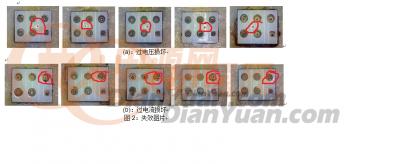
Just found one interesting article about MOSFET failure pattern and analysis (Chinese), the OP post an image which shows over-voltage and over-current failure.
(images only shown to registered user on that forum, so I posted it here)
Attached Image
Over-voltage failure (top row) all have a dot/hole in it.
Over-current failure (bottom row) usually happened on Source side.

So, you may check the cracked one to see which failure pattern it is. The OP use chemical way to disassemble MOSFET, he use something called '氰氟酸'(or 'Hydrofluoric acid' by google translate).

====

You may also want to see this article: Why MOSFETs fail in Solid State TC duty .
"Insufficient gate drive, (incomplete turn on)" section attract me, if I understand that section correctly, because you got 0.285V Vgs on Q3 and Q4, that seems like insufficient Vgs, and could lead to a high resistance (Rds) and generate much heat and burned them.

This post has been edited by asenrzhang: Aug 28 2016, 01:39 AM

33 Pages « < 14 15 16 17 18 > » Top
 

Change to:
| Lo-Fi Version
0.0185sec    1.01    6 queries    GZIP Disabled
Time is now: 15th December 2025 - 12:46 AM