

now manage to get same 4.5g prime stable with lower vcore, 1.195v with higher dram speed, 2133MHz @ 10-12-10-27, 1T, 1.525vdimm.

Haswell, Devil's Canyon, Pentium G3258 OC V1, 4790K/4760K/4770K/4670K/G3258 | LGA1150
|
|
 Jul 29 2014, 01:09 PM Jul 29 2014, 01:09 PM
|
 
Senior Member
2,471 posts Joined: Jan 2003  
|
some update
now manage to get same 4.5g prime stable with lower vcore, 1.195v with higher dram speed, 2133MHz @ 10-12-10-27, 1T, 1.525vdimm.
|
|
|
|
|
|
Jul 30 2014, 08:34 PM
|
|
Senior Member
2,471 posts Joined: Jan 2003
|
QUOTE(owikh84 @ Jul 27 2014, 11:59 AM) 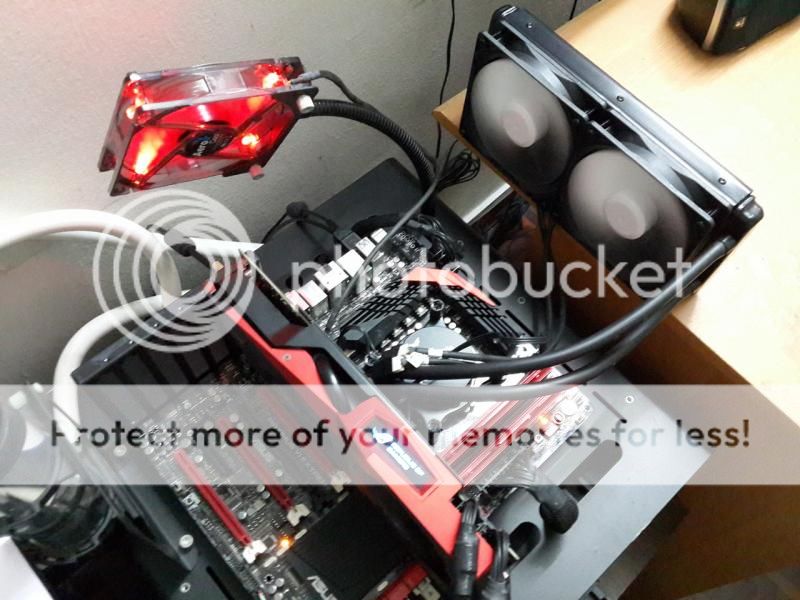 Initial test of i7-4790K OC @ 4.6GHz @ 1.216v with Prime95 27.9 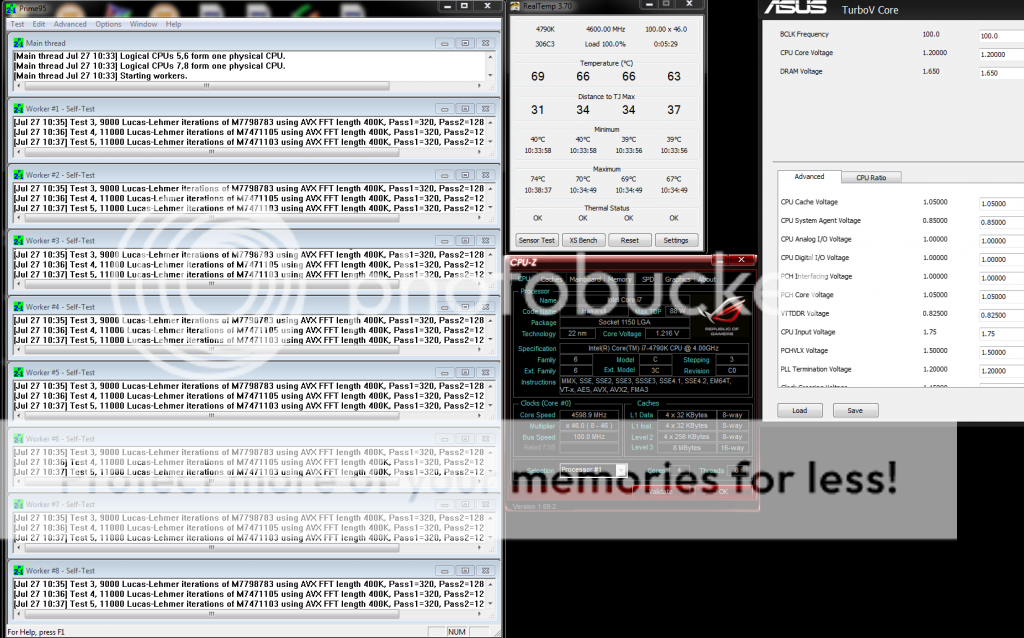 4.7GHz @ 1.28v 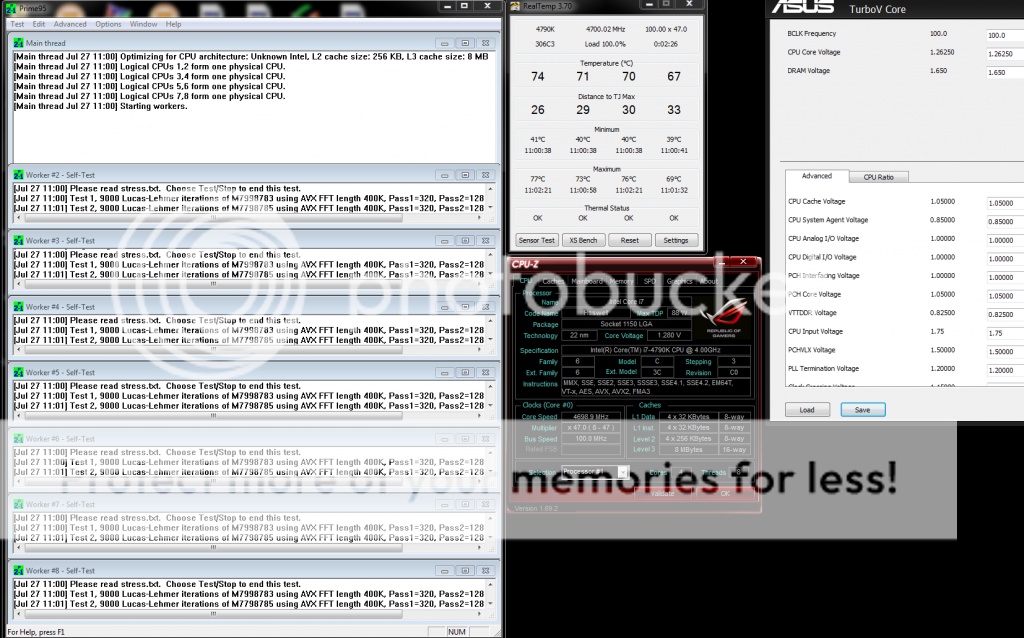 More to go...  |
|
|
Aug 1 2014, 12:24 AM
|
 
Elite
8,711 posts Joined: Nov 2007 From: Butterworth, PG / Machang, Kelantan 
|
QUOTE(gsan @ Jul 30 2014, 08:34 PM) why not prime 95 28.5? actually whats the correct stressing tool for haswell? its kinda hard to pass stability test on haswell with 28.5 Right now I really have no idea which is the best stressing app for Haswell/DC etc.Newer Prime95 version might require higher vCore but it doesn't seem to stress other stuffs such as IMC, RAM etc. LinX is good because from the GFlops values you would know that your OC is not "underperformed" than it should be but until now I'm still not sure whether the current version shows the correct GFlops. It may not stress the HT correctly. I believe it's been debated until now. Some say the best stressing tool is the one which is causing the vCore to drop to the lowest point under load. Hmm... |
|
|
Aug 1 2014, 02:24 PM
|

Senior Member
3,669 posts Joined: Jan 2003 From: ze deep blue ocean 
|
Hi bros,
Just wondering.. you guys use offset or fixed vcore method for 24/7 usage? I'm planning to get at least 4.7g or 4.8g for 24/7 use. I don't really want to manually feed 1.25-1.27v static vcore for a prolonged period as it might just kill the proc prematurely. any ideas ? |
|
|
Aug 1 2014, 02:29 PM
|

Elite
6,799 posts Joined: Jan 2003
|
QUOTE(owikh84 @ Aug 1 2014, 12:24 AM) Right now I really have no idea which is the best stressing app for Haswell/DC etc. yup. Newer Prime95 version might require higher vCore but it doesn't seem to stress other stuffs such as IMC, RAM etc. LinX is good because from the GFlops values you would know that your OC is not "underperformed" than it should be but until now I'm still not sure whether the current version shows the correct GFlops. It may not stress the HT correctly. I believe it's been debated until now. Some say the best stressing tool is the one which is causing the vCore to drop to the lowest point under load. Hmm... over the years i had many so call prime stable, linx stable etc all fail when i do long encodes.. the issue is always not the vcore or cpu on high clocks. as cpu goes up, other factors come in and mainly its pll, switching frequency etc etc especially with high dram speeds, low timings, low imc timings overvolting vcore will mask this instability but true colors will be shown in encoding etc especially with avx instructions etc. or even chrome on its mem paging and swapping. hence i just run a few test but more importantly is always imc/ram stability rather than cpu vcore. and always check scaling. for me its 3dmark11 physx. each multi must increase atleast 200-250 points and must be consistent after 10 runs. if not than theres some issue. gsan so 3dmark physx for 4790k should be. 4.5ghz 13000, 4.6ghz 13250, 4.7 13500, 4.8 13750 etc. it will be sweet to get a 14k on everyday running comp. estimated 4.9ghz. but i forsee not possible atm with the current cooling or just some limitation somewhere. it could be even the bios was designed for a specific type of cpu scaling voltage etc. high dram speeds will show more instability and not necessary its always vcore. hence the initial guides of haswell are all wrong. owikh test may not be so vcore prone but its more stressfull as its stressing all the other voltages together. heat and thermal limits also test cpu leakages etc and hence with the inbuilt IMC u may see other failures that are not vcore related. its very vague but ultimately all test can only be perform on better cooling. Even phase has its own issue with haswell. This post has been edited by cstkl1: Aug 1 2014, 02:30 PM |
|
|
Aug 2 2014, 03:33 AM
|

All Stars
18,505 posts Joined: Oct 2007 From: P.Jaya
|
Easy......(bootable)
 This post has been edited by stasio: Aug 2 2014, 03:38 AM |
|
|
|
|
|
Aug 2 2014, 09:58 AM
|
|
Senior Member
2,471 posts Joined: Jan 2003
|
QUOTE(nicotine @ Aug 1 2014, 02:24 PM) Hi bros, 24/7 usage mean full load all the time? if your proc need 1.25-1.27v for 4.7/4.8g stable, there is no other way to lower down the vcore.Just wondering.. you guys use offset or fixed vcore method for 24/7 usage? I'm planning to get at least 4.7g or 4.8g for 24/7 use. I don't really want to manually feed 1.25-1.27v static vcore for a prolonged period as it might just kill the proc prematurely. any ideas ? |
|
|
Aug 3 2014, 10:07 PM
|

Junior Member
13 posts Joined: Oct 2013
|
Hi guys. i'm new here. Making new friends sharing the same interest. I'm in the level of beginners of overclocking..
And all experts advice is very much appreciated.  Currently using MSI's Z97 board and pentium G3258 and i'm indeed surprise how well it performs. For only two cores can performs very well when overclock over 4GHz. Especially in gaming. I'm looking forward for my 4790k to arrive and see how well the devil's canyon performs against haswell's 4770k. i can only manage to overclock the G3258 to 4.3GHz on air. i'll try to push harder and see how it goes. Thanks. 
|
|
|
Aug 4 2014, 10:38 AM
|
|
Elite
8,711 posts Joined: Nov 2007 From: Butterworth, PG / Machang, Kelantan
|
My G3258 ES is able to overclock to 4.6GHz only, stable @ 1.488v!
4.7 onwards is unbootable Max clock is 4.8 in OS but at excessive voltage 
Anyway it inherits the Haswell’s strong IMC 2800c9 is easy with Samsung kit 
Things going nuts at 4.6GHz when I had to bump the VCCIN up to 2.2v jn order to pass x264 benchmark lol Lemon chip is everywhere especially the ES lol This post has been edited by owikh84: Aug 4 2014, 10:41 AM |
|
|
Aug 6 2014, 12:46 AM
|
|
Elite
6,799 posts Joined: Jan 2003
|
Maximus Vi Price all dropped at czone
go grab ppl. M6e now Rm1099 out now is M7F at RM1720. |
|
|
Aug 6 2014, 11:53 AM
|

Elite
5,602 posts Joined: Jul 2007 From: The Holiest Of Hole
|
cstkl1
i've been having 0x101 BSOD at 4.7ghz @ 1.295v running Cinebench R15 it passed AIDA for 30 minutes tho what do u think is the culprit?  |
|
|
Aug 6 2014, 04:14 PM
|
|
Elite
8,711 posts Joined: Nov 2007 From: Butterworth, PG / Machang, Kelantan
|
QUOTE(hilmiangah @ Aug 6 2014, 11:53 AM) cstkl1 Tried upping the VCCIN already? 1.9v etci've been having 0x101 BSOD at 4.7ghz @ 1.295v running Cinebench R15 it passed AIDA for 30 minutes tho what do u think |
|
|
Aug 6 2014, 04:58 PM
|
|
Elite
5,602 posts Joined: Jul 2007 From: The Holiest Of Hole
|
QUOTE(owikh84 @ Aug 6 2014, 04:14 PM) Tried upping the VCCIN already? 1.9v etc already at 1.9v and i start from 1.7v |
|
|
|
|
|
Aug 6 2014, 06:43 PM
|
|
All Stars
18,505 posts Joined: Oct 2007 From: P.Jaya
|
Read on OCN and hwbot......"Suggestions for DC overclocking"==> LOWER VCCIN....
http://forum.hwbot.org/showthread.php?t=108373 Edit: 4.9GHz with 1.50 VCCIN....... 
This post has been edited by stasio: Aug 6 2014, 06:52 PM |
|
|
Aug 6 2014, 08:57 PM
|
|
Elite
8,711 posts Joined: Nov 2007 From: Butterworth, PG / Machang, Kelantan
|
QUOTE(stasio @ Aug 6 2014, 06:43 PM) Read on OCN and hwbot......"Suggestions for DC overclocking"==> LOWER VCCIN.... Just curious, would that 1.5v VCCIN stable for X264 benchmarkhttp://forum.hwbot.org/showthread.php?t=108373 Edit: 4.9GHz with 1.50 VCCIN.......
|
|
|
Aug 6 2014, 08:57 PM
|
|
Elite
6,799 posts Joined: Jan 2003
|
hilmiangah
i've been having 0x101 BSOD at 4.7ghz @ 1.295v running Cinebench R15 it passed AIDA for 30 minutes tho what do u think is the culprit? Change the CPU pwm frequency and dram to be the same, try 300,300 and keep increasing till u see a difference in stability. Retest with 3dmark11 performance Physx. Lower the PPL voltage to 1v. 4.7ghz physx score should be 13500 atleast. but hilmi i can only stipulate until my wc setup is done. So far got everything except for tubing and fans. Still hitting my head sometimes as could have bought two more titan blacks for all this wc gear. whats ure cpu vid?? (asus to check, go into bios, load optimize, save and reboot. enter into bios and see whats the vcore is running at) up to 4.7ghz a decent 4790k.. the variance on benching and actual stable voltage can be up to 0.07v stasio i do that on one 4770k when i first got it. but after it died.. i didnt try that anymore. hmm intel must have a reason for the +0.4v difference. but its a good idea to find out why after 1.3v onwards the issue seems to be vccin related always. when i reduce my x-talk i get better stability at 5ghz. and when i say reduce.. its a ridiculous number that a 4770k would most probably die. also this suggestion .. like a hole.. like how pll voltage between 1.25v to vccin .. its unstable. hmm come to think of it.. pll and vccin.....i think the vccin lowering it makes the pll stable. theory This post has been edited by cstkl1: Aug 6 2014, 09:14 PM |
|
|
Aug 6 2014, 11:41 PM
|
|
Elite
5,602 posts Joined: Jul 2007 From: The Holiest Of Hole
|
cstkl1
Here's the vid from initial installation  will try out your suggestion and report back here soon |
|
|
Aug 7 2014, 01:18 AM
|
|
Elite
6,799 posts Joined: Jan 2003
|
QUOTE(hilmiangah @ Aug 6 2014, 11:41 PM) cstkl1 eh bro.. ure gonna need more than 1.28v.Here's the vid from initial installation will try out your suggestion and report back here soon i estimate u need 1.175v for 4.4ghz ( btw check using hwinfo64 on the vid for all core later on after u set it manually) so by that estimate.. 1.225 for 4.5ghz and 1.275v for 4.6ghz and 4.7 should be 1.325v. 4.7 in DC.. can run at lower voltage .. infact DC only shows its true colors of difficult clocking from 4.8 onwards. |
|
|
Aug 7 2014, 12:51 PM
|
|
All Stars
18,505 posts Joined: Oct 2007 From: P.Jaya
|
QUOTE(hilmiangah @ Aug 6 2014, 11:41 PM) Here's the vid from initial installation Turbo (4.4 GHz) must be enabled, then you will know your real VID.This post has been edited by stasio: Aug 7 2014, 12:52 PM |
|
|
Aug 7 2014, 05:41 PM
|
|
Elite
5,602 posts Joined: Jul 2007 From: The Holiest Of Hole
|
QUOTE(stasio @ Aug 7 2014, 12:51 PM) Turbo (4.4 GHz) must be enabled, then you will know your real VID. Turbo is enabled |
| Change to: |  0.0375sec 0.0375sec
 0.57 0.57
 6 queries 6 queries
 GZIP Disabled GZIP Disabled
Time is now: 16th December 2025 - 06:38 AM |
 Quote
Quote