

QUOTE(jusbella @ Mar 2 2018, 08:08 PM)
U should use lan to test first.

Yes my first post, first paragraph already told tested using Lan is fine. 
Home Networking ASUS Malaysia Networking User & Technical Support, Managed by ASUS Malaysia Representative
|
|
 Mar 2 2018, 08:31 PM Mar 2 2018, 08:31 PM
|
 
Senior Member
669 posts Joined: Sep 2015 
|
QUOTE(jusbella @ Mar 2 2018, 08:08 PM) U should use lan to test first. Yes my first post, first paragraph already told tested using Lan is fine. |
|
|
|
|
|
Mar 2 2018, 08:33 PM
Show posts by this member only | IPv6 | Post
#7969
|

Senior Member
3,669 posts Joined: Apr 2006
|
QUOTE(Alex9182 @ Mar 2 2018, 08:23 PM) Using wifi analyser app found the signal gone missing few moments then come back. I would propose you to try those settings adjustment right away.This never happen to C1200. I will give it a try later, if does not work as it should then i let know. Ps... I already posted at Asus link, should continue discuss there as this is tp-link thread. It should fix your slowdown problem.  |
|
|
Mar 2 2018, 08:35 PM
|
|
Senior Member
669 posts Joined: Sep 2015
|
May i ask. RT-N12HP default wireless setting will give those problems i listed in my first post? Or default wireless will work fine?
Maybe need to try only can know but if need to tweak, i will not accept the product. It is not as advertised, easy and simple setup. This post has been edited by Alex9182: Mar 2 2018, 08:40 PM |
|
|
Mar 2 2018, 08:43 PM
Show posts by this member only | IPv6 | Post
#7971
|
|
Senior Member
3,669 posts Joined: Apr 2006
|
QUOTE(Alex9182 @ Mar 2 2018, 08:35 PM) May i ask. RT-N12HP default wireless setting will give those problems i listed in my first post? Or default wireless will work fine? Answer is YES.Maybe need to try only can know but if need to tweak, i will not accept the product. It is not as advertised, easy and simple setup. Enable Wireless Multicast Forwarding. ---> https://routerguide.net/how-to-adjust-optim...-network-speed/ Disable Enable WMM ASPD ---> https://routerguide.net/wmm-apsd-on-or-off/ Disable Enhanced interference management ---> Will force 40Mhz to 20Mhz + channel hopping around in congested environment. ---> Probably this explain your wifi signal gone missing few moments then come back. Set Tx Power adjustment to 200 mW ---> default 80mw is too low. C1200 for instance transmit at 100mW It is as advertised, easy and simple setup, no?  |
|
|
Mar 2 2018, 08:46 PM
|
|
Senior Member
669 posts Joined: Sep 2015
|
Not simple,
|
|
|
Mar 2 2018, 08:51 PM
Show posts by this member only | IPv6 | Post
#7973
|
|
Senior Member
3,669 posts Joined: Apr 2006
|
QUOTE(Alex9182 @ Mar 2 2018, 08:46 PM) Not simple,  Report back here after you make those changes with your speedtest. Would like to see if the changes works for yours. (It works for mine) |
|
|
|
|
|
Mar 2 2018, 08:53 PM
|
|
Senior Member
669 posts Joined: Sep 2015
|
Deleted due to double post
This post has been edited by Alex9182: Mar 2 2018, 08:55 PM |
|
|
Mar 2 2018, 08:54 PM
|
|
Senior Member
669 posts Joined: Sep 2015
|
QUOTE(JohnLai @ Mar 2 2018, 08:51 PM) Report back here after you make those changes with your speedtest. Would like to see if the changes works for yours. (It works for mine) Now need to go d. |
|
|
Mar 2 2018, 09:03 PM
|

Senior Member
3,008 posts Joined: Sep 2005 From: T.T.D.I, Bukit Damansara 
|
QUOTE(Alex9182 @ Mar 2 2018, 07:26 PM) Need some help here: - Really strange results there. I bought RT-N12HP at Lazada, received today and after setup, i found that the speed test on PC connected using Lan cable is normal (Ping 15ms, Download 33mbps, Upload 10Mbps). But to my surprise, WiFi connection tested on multiple android phone has below problem: - 1) Wireless connection unstable, some time disconnected. 2) Range is less then my Tp-Link Archer C1200 (Tm unit), around 50% less. 3) Speed test is inconsistent on multiple android phone. (see attached capture) this must be a faulty unit unless some one can tell me simple solution to it. I plan to return the unit to Lazada for full refund on Monday if no solution for it by then. **Ps.. all setting default, only put in Pppoe setting and WiFi setting.  After receiving the unit, you straightaway flashed to the latest firmware right? Other than tweaking the settings as suggested by someone, there is something simple that you can try.. if you haven't done this, that is - reset the router to factory defaults by pressing the reset button for about 5 seconds (instead of resetting using the GUI), reconfigure and do the tests again. btw is your wireless on B/G/N mode? If yes change it to N only |
|
|
Mar 2 2018, 09:34 PM
|
|
Senior Member
669 posts Joined: Sep 2015
|
QUOTE(JohnLai @ Mar 2 2018, 08:51 PM) Report back here after you make those changes with your speedtest. Would like to see if the changes works for yours. (It works for mine) Actually i watch Blacktubi video how to setup before i decide to purchase Asus because it is so easy to setup. |
|
|
Mar 2 2018, 09:52 PM
Show posts by this member only | IPv6 | Post
#7978
|
|
Senior Member
3,669 posts Joined: Apr 2006
|
QUOTE(Alex9182 @ Mar 2 2018, 09:34 PM) Is there a YouTube video i can follow as per your method? Read the manual?Actually i watch Blacktubi video how to setup before i decide to purchase Asus because it is so easy to setup. http://dlcdnet.asus.com/pub/ASUS/wireless/...12HP_Manual.pdf Page 31?  |
|
|
Mar 2 2018, 11:21 PM
|
|
Senior Member
3,008 posts Joined: Sep 2005 From: T.T.D.I, Bukit Damansara
|
QUOTE(Alex9182 @ Mar 2 2018, 09:34 PM) Is there a YouTube video i can follow as per your method? I'm currently posting from my in laws place, they are using RT-N12HP B1 as main router that I set up previouslyActually i watch Blacktubi video how to setup before i decide to purchase Asus because it is so easy to setup. firmware is not the latest: 3.0.0.4.380_3479 speedtest via wifi is normal. unifi 50Mbps, with 2 android boxes currenty streaming illegal iptv content and some smart phones probably running whatsapp xD  Wireless settings:  bandwidth is set at 20/40MHz because one of their devices last time had issues with the wifi when set at 40MHz  |
|
|
Mar 3 2018, 12:55 AM
|

Senior Member
1,082 posts Joined: Dec 2010
|
Hello all,
Recently I bought an Asus RT-AC1300UHP router (well not so recent, was already using about 3 months or so). I'm using the cable connection between router and my PC. One thing I noticed was that when I play games, the connection keeps on dropping out of sudden. This has never happened when I use my old TM stock router. Cable is fine, WiFi is also fine. Firmware is also up to date. Problem : Internet connection out of sudden drop in middle of games. Troubleshooting: - State of cable - OK - WiFi - OK - Firmware - Up to date Is there anything else that I could check to fix this issue? |
|
|
|
|
|
Mar 3 2018, 10:04 AM
|
|
Senior Member
669 posts Joined: Sep 2015
|
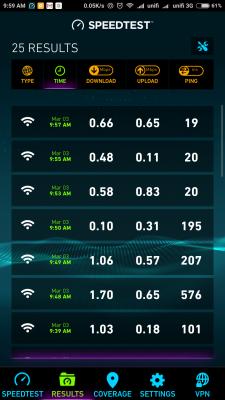
QUOTE(JohnLai @ Mar 2 2018, 08:43 PM) Answer is YES. Enable Wireless Multicast Forwarding. ---> can not find where to do this settingEnable Wireless Multicast Forwarding. ---> https://routerguide.net/how-to-adjust-optim...-network-speed/ Disable Enable WMM ASPD ---> https://routerguide.net/wmm-apsd-on-or-off/ Disable Enhanced interference management ---> Will force 40Mhz to 20Mhz + channel hopping around in congested environment. ---> Probably this explain your wifi signal gone missing few moments then come back. Set Tx Power adjustment to 200 mW ---> default 80mw is too low. C1200 for instance transmit at 100mW It is as advertised, easy and simple setup, no? Disable Enable WMM ASPD ---> Disabled (default is enable ) Disable Enhanced interference management ---> Disabled (default is enable ) Set Tx Power adjustment to 200 mW ---> default is performance, (power saving, fair, balance, good, performance) setting done and apply and rebooted then test. Hyppe working normally tested using lan connected notebook, speed is normal. (see attached) tested with android mobile phone, Ping, UL, DL - all not normal (see attached) disappointing result. the router WiFi not working normally. Attached thumbnail(s) 
|
|
|
Mar 3 2018, 10:12 AM
|

Senior Member
4,787 posts Joined: Jan 2003
|
QUOTE(Alex9182 @ Mar 3 2018, 10:04 AM) setting done and apply and rebooted then test. Try this - set no password for your wifi SSID and test again.Hyppe working normally tested using lan connected notebook, speed is normal. (see attached) tested with android mobile phone, Ping, UL, DL - all not normal (see attached) disappointing result. the router WiFi not working normally. Many years ago had encountered an issue between wifi security settings and my old android phone. Something about the key settings or other. If still same then maybe router is a lemon and needs to be sent to the shop. This post has been edited by kmrdeva: Mar 3 2018, 10:18 AM |
|
|
Mar 3 2018, 10:22 AM
|
|
Senior Member
669 posts Joined: Sep 2015
|
QUOTE(kmrdeva @ Mar 3 2018, 10:12 AM) Try this - set no password for your wifi SSID and test again. tested. Many years ago had encountered an issue between wifi security settings and my old android phone. Something about the key settings or other. If still same then maybe router is a lemon and needs to be sent to the shop. Ps.. today i added 1 device to the test (Samsung Tab S), the Tablet not able to get connected, it say something like "Authentication failed"  This post has been edited by Alex9182: Mar 3 2018, 10:31 AM |
|
|
Mar 3 2018, 10:23 AM
|
|
Senior Member
669 posts Joined: Sep 2015
|
TQVM to all for helping,
i have done enough setup, twicking and testing, the result is disappointing and i have concluded the device is faulty. i have call up Lazada and CS has ask me to return the product with original packing with all item and accessory to them for a full refund. case closed. This post has been edited by Alex9182: Mar 3 2018, 10:24 AM |
|
|
Mar 3 2018, 10:23 AM
Show posts by this member only | IPv6 | Post
#7985
|
|
Senior Member
3,669 posts Joined: Apr 2006
|
QUOTE(Alex9182 @ Mar 3 2018, 10:22 AM) tested. Our condolence to you  We tried our best to help. We tried our best to help. |
|
|
Mar 3 2018, 10:28 AM
|
|
Senior Member
669 posts Joined: Sep 2015
|
QUOTE(JohnLai @ Mar 3 2018, 10:23 AM) Our condolence to you Special thanks to JohnLai who take a lot of time and effort to help me. We tried our best to help.now put back Archer C1200 TM unit back to work. |
|
|
Mar 3 2018, 10:38 AM
|

All Stars
24,456 posts Joined: Nov 2010
|
QUOTE(Puteih @ Mar 3 2018, 12:55 AM) Hello all, u may want put back the tm router, play the same game and reconfirm if it is tm incoming or asus router problem.Recently I bought an Asus RT-AC1300UHP router (well not so recent, was already using about 3 months or so). I'm using the cable connection between router and my PC. One thing I noticed was that when I play games, the connection keeps on dropping out of sudden. This has never happened when I use my old TM stock router. Cable is fine, WiFi is also fine. Firmware is also up to date. Problem : Internet connection out of sudden drop in middle of games. Troubleshooting: - State of cable - OK - WiFi - OK - Firmware - Up to date Is there anything else that I could check to fix this issue? what about other uses... online streaming, torrent..? last 2 days, i notice intermittent slowdowns. and several people reported line down in pj, shah alam, subang, seremban.... in unifi thread. |
| Change to: |  0.0239sec 0.0239sec
 0.65 0.65
 6 queries 6 queries
 GZIP Disabled GZIP Disabled
Time is now: 13th December 2025 - 06:31 AM |
 Quote
Quote