Outline ·
[ Standard ] ·
Linear+
Home Networking ASUS Malaysia Networking User & Technical Support, Managed by ASUS Malaysia Representative
|
unique-collection
|
 Jun 27 2013, 05:46 PM Jun 27 2013, 05:46 PM
|
New Member


|
QUOTE(ASUSmy @ Jun 21 2013, 04:50 PM) Hi brucesss, The router listed below already can support. But you need to update the latest firmware from our website. RT-AC66U (Broadcom) - RM739 RT-N66U (Broadcom) - RM639 RT-N65U (Ralink) - RM539 RT-N56U (Ralink) - RM439 RT-N53 (Broadcom) - RM309 RT-N16 (Broadcom) - RM339 RT-N15U (Broadcom) - RM199 RT-N14U (Ralink) - RM185 RT-N12HP (Broadcom) - RM229 RT-N12 (Broadcom) - RM139 Thank you Any router with telephone port for VoIP? I want to get rid the lousy Thompson router provide by maxis. |
|
|
|
|
|
Garena
|
Jun 28 2013, 11:55 AM
|
|
|
ASUSmy please feedback to ASUS to provide datasheets for your networking products. Even though you have the specifications, but some details are missing. D-Link and TP-Link they both have provide datasheet for their products. Thanks.
This post has been edited by Garena: Jun 28 2013, 11:59 AM
|
|
|
|
|
TSASUSmy
|
Jun 28 2013, 01:54 PM
|
|
|
QUOTE(unique-collection @ Jun 27 2013, 05:46 PM) Any router with telephone port for VoIP? I want to get rid the lousy Thompson router provide by maxis. Hi unique-collection, Nope, currently we don't have yet. Thank you |
|
|
|
|
|
TSASUSmy
|
Jun 28 2013, 02:04 PM
|
|
|
QUOTE(Without @ Jun 27 2013, 12:34 PM) Hi, Currently using RT-N56U for 20Mbps Unifi. I've upgrade to ASUS RT-N56U Firmware Version 3.0.0.4.360. The router is working great for more than 48 hours, but out of sudden every page couldn't reach, but ping to IP is fine, DNS error. The logs stated unable to access /etc/resolv.conf. After reboot the modem, everything back to normal. Any permanent solution for this? as i don't wish to restart my router when the issue occurs. Hi Without, Will get our RD to have a check on this, and if your would be able to provide the configuration/setting and the log file, it will be easy to let our RD to have a check on it. Thank you |
|
|
|
|
|
yhsiau
|
Jun 28 2013, 11:00 PM
|
|
|
hi, I think my rt-n66 has a faulty LAN port, may I know the address of the service centre in KL area? I bought this router in April last year. There is something funny about asus account site, I did register my router as rt-n66 but, it display that the product which I registered is rt-n56u..  Thanks. |
|
|
|
|
|
tan1975
|
Jun 29 2013, 11:36 AM
|
New Member
|
Hi AsusMy Asus RT-N16 Firmware: RT-N16_3.0.0.4_354 Issue: No Internet Access via manual DNS Please refer to attached PIC 1. PIC 1 - manual DNS via Open DNS 2. PIC 2 - When connected via Manual DNS, No DNS shown 3. PIC 3 - Use Auto DNS, DNS is shown This post has been edited by tan1975: Jun 29 2013, 11:38 AM Attached thumbnail(s)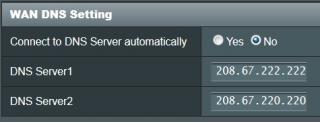


|
|
|
|
|
|
TSASUSmy
|
Jul 1 2013, 10:04 AM
|
|
|
QUOTE(yhsiau @ Jun 28 2013, 11:00 PM) hi, I think my rt-n66 has a faulty LAN port, may I know the address of the service centre in KL area? I bought this router in April last year. There is something funny about asus account site, I did register my router as rt-n66 but, it display that the product which I registered is rt-n56u.. Thanks. Hi yhsiau, You need to send back to the place you bought to claim the warranty. And may I know what Internet package you using and which LAN port is faulty. Thank you |
|
|
|
|
|
th3.h04rd3r
|
Jul 1 2013, 03:45 PM
|
Getting Started
|
Hi,
I had just sent back my RT-N66U to the shop I bought after it went off and then no longer power up. Took less than 4 months to kill it.
Shop (in Lowyat Plaza) says that it would take about 2-3 weeks till I get a replacement, is that the best turnaround time for ASUS to fix/replace network devices?
And why ASUS Authorised Service Centres only open on weekdays 9am-6pm? People do have to work at those hours.
And why doesn't the ASUS Service Centre at Lowyat Plaza accept network devices?
Thank you.
|
|
|
|
|
|
TSASUSmy
|
Jul 1 2013, 04:06 PM
|
|
|
QUOTE(th3.h04rd3r @ Jul 1 2013, 03:45 PM) Hi, I had just sent back my RT-N66U to the shop I bought after it went off and then no longer power up. Took less than 4 months to kill it. Shop (in Lowyat Plaza) says that it would take about 2-3 weeks till I get a replacement, is that the best turnaround time for ASUS to fix/replace network devices? And why ASUS Authorised Service Centres only open on weekdays 9am-6pm? People do have to work at those hours. And why doesn't the ASUS Service Centre at Lowyat Plaza accept network devices? Thank you. Hi th3.h04rd3r, The replacement sometime is fast but sometime is long also, and I think this also apply to other brands. And Low Yat Plaze service center only accept notebook, tablet, EEEPC, and LCD monitor. All the networking and DIY component are to send back to the place you bought. Thank you |
|
|
|
|
|
whtan2000
|
Jul 1 2013, 04:52 PM
|
Getting Started
|
Just bought a n66u and I can't connect to the Unifi now. Double checked the password from Unifi and its correct. Help guys
|
|
|
|
|
|
TSASUSmy
|
Jul 1 2013, 06:41 PM
|
|
|
QUOTE(whtan2000 @ Jul 1 2013, 04:52 PM) Just bought a n66u and I can't connect to the Unifi now. Double checked the password from Unifi and its correct. Help guys Hi whtan2000, Try follow the youtube below and see whether it work or not. https://www.youtube.com/watch?v=TfEVAlxxjBYThank you |
|
|
|
|
|
whtan2000
|
Jul 1 2013, 07:08 PM
|
Getting Started
|
i cant c the side selection isp profile..i am updated to newest firmware...
which is 3.0.0.4.370_172. still unable connect it...
|
|
|
|
|
|
TSASUSmy
|
Jul 2 2013, 09:34 AM
|
|
|
QUOTE(whtan2000 @ Jul 1 2013, 07:08 PM) i cant c the side selection isp profile..i am updated to newest firmware... which is 3.0.0.4.370_172. still unable connect it... Hi whtan2000, If you are using QIS(Quick Internet Setup), you need to tick the Special Requirement from ISP. If you already inside the main page, you can go to LAN->IPTV to select your ISP. Thank you |
|
|
|
|
|
jyth_82
|
Jul 2 2013, 09:40 AM
|
|
|
Hi Asusmy,
I just bought the N66U and would like to set the QOS function.
I'm using the 5Mb/s from Unifi and would like to focus heavily on the usual websurfing/youtube/filecopy stuff during the time when i'm at home while leaving the torrent to run max during the midnight. Based on the guide (wasn't helpful), is to set the QOS - on and the priority setting as accordingly to the priorities (highest > mid). However, upon turning on this, the websurfing/youtube is slow and at the same time the torrent is slow too.
Would like some guide from the users as well if they are using the same on how to setup the QOS or a template. Please advise, thanks!
|
|
|
|
|
|
whtan2000
|
Jul 2 2013, 08:15 PM
|
Getting Started
|
QUOTE(ASUSmy @ Jul 2 2013, 09:34 AM) Hi whtan2000, If you are using QIS(Quick Internet Setup), you need to tick the Special Requirement from ISP. If you already inside the main page, you can go to LAN->IPTV to select your ISP. Thank you got it working...thanks a lot.. |
|
|
|
|
|
iraz
|
Jul 3 2013, 02:51 PM
|
New Member
|
Hi Asus
Just bought n66u for better coverage for my 2-storey house but a bit disappointed that the coverage is only sightly better than the stock router. Is there something i need to tune in the set-up?
Thanks
|
|
|
|
|
|
TSASUSmy
|
Jul 3 2013, 03:27 PM
|
|
|
QUOTE(iraz @ Jul 3 2013, 02:51 PM) Hi Asus Just bought n66u for better coverage for my 2-storey house but a bit disappointed that the coverage is only sightly better than the stock router. Is there something i need to tune in the set-up? Thanks Hi iraz, You can try update the firmware to the latest from our website and you also can have a look on the link below to know more about positioning the router. http://compnetworking.about.com/cs/wireles...te_aprouter.htm Latest firmware is 3.0.0.4.370 http://www.asus.com/Networking/RTN66U/#support_Download_35Thank you |
|
|
|
|
|
iraz
|
Jul 3 2013, 03:30 PM
|
New Member
|
Thanks Asusmy. I will look into this
|
|
|
|
|
|
widesky867
|
Jul 4 2013, 04:24 PM
|
New Member
|
Hello,
I just bought the ASUS RTN53 router and I am trying to set it up with unifi. The setup fails to detect connection. Any help regarding this matter?
I have updated the firmware to 3.0.0.4_264.
Thank you.
|
|
|
|
|
|
TSASUSmy
|
Jul 4 2013, 04:46 PM
|
|
|
QUOTE(widesky867 @ Jul 4 2013, 04:24 PM) Hello, I just bought the ASUS RTN53 router and I am trying to set it up with unifi. The setup fails to detect connection. Any help regarding this matter? I have updated the firmware to 3.0.0.4_264. Thank you. Hi widesky867, Can try on the firmware below? 3.0.0.4.342. https://www.asuswebstorage.com/navigate/s/8...36A93EFE53787EYLet me know if you still unable to connect to the UNIFI. Thank you |
|
|
|
|




 Quote
Quote





 0.0220sec
 0.74
0.74
 6 queries
 GZIP Disabled