Welcome Guest ( Log In | Register )

Outline · [ Standard ] · Linear+

Home Networking ASUS Malaysia Networking User & Technical Support, Managed by ASUS Malaysia Representative

views
     
tan1975
post Mar 19 2013, 08:12 PM

New Member
*
Junior Member
15 posts

Joined: Apr 2006
Hi, my unit is RT-N16 with Firmware 3.0.0.4.260, i am using Maxis Home Fiber.

Requirement: LAN1,2,3 and 4 to behave like a standard LAN port

Issue
1. Only LAN1 and LAN2 behaving like standard LAN port.
2. Disabled IPTV and VOIP port by choosing "None" in "LAN - IPTV", Internet will disconnect as i cannot configure VID (VLAN)

Please feedback soonest. Thank you.


tan1975
post Mar 20 2013, 10:14 PM

New Member
*
Junior Member
15 posts

Joined: Apr 2006
Hi

Attached Image


i can only connect internet using the above setting.

If i choose "NONE" option in the ISP Profile, LAN3-4 became normal but NO Internet as i cannot input VLAN

QUOTE(ASUSmy @ Mar 20 2013, 06:06 PM)
Hi tan1975,

May I ask at the IPTV there, where you able to select Manual setting at the "Select ISP Profile". If yes, please select Manual, you will be able to see Internet, VOIP and IPTV where you can input value.

Remain the VID value for Internet, and erase other VID value and then apply.

And then try see you able to use the LAN 3 and LAN 4 or not.

If you cannot see the Manual at the "Select ISP Profile", mean you unable to change it to be normal LAN port.

Thank you
*
tan1975
post Mar 21 2013, 09:41 AM

New Member
*
Junior Member
15 posts

Joined: Apr 2006
Hi,

let me clarify, if i chose the "None" option in the LAN-IPTV, all LAN3-4 will become normal LAN port.

However, i CANNOT connect to internet anymore via LAN1-4 as i need VLAN621 tagging for Internet access for Maxis Home via TM HSBB infrastructure.

Hence, what is my solution for me to use LAN1-4 as NORMAL LAN port with INTERNET access?

Thanks


QUOTE(ASUSmy @ Mar 21 2013, 09:33 AM)
Hi tan1975, yes can online only if you want to use LAN 3 and LAN 4 as normal LAN port.

Thank you
*
tan1975
post Mar 21 2013, 09:57 AM

New Member
*
Junior Member
15 posts

Joined: Apr 2006
Hi,

i need all ports for Internet, pc, NAS and Mediabox.

How can Asus resolve this?

Thanks


QUOTE(ASUSmy @ Mar 21 2013, 09:48 AM)
Hi tan1975,

If you choose None, there is no place for you to put VLAN. No VLAN no Internet.

Thank you
*
tan1975
post Mar 21 2013, 10:48 AM

New Member
*
Junior Member
15 posts

Joined: Apr 2006
Hi,

i am using Maxis Home 5Mbps package with VoIP

i do not need VoIP

Thanks


QUOTE(ASUSmy @ Mar 21 2013, 10:28 AM)
Hi tan1975,

Before that may I know what Internet package are your using?

Thank you
*
tan1975
post Mar 21 2013, 12:26 PM

New Member
*
Junior Member
15 posts

Joined: Apr 2006
Once i select "Manual" (per attached image) i can connect to Internet but i CANNOT access any NAS i connected to LAN3-4.

Once i select "None", NO internet.

Thanks


QUOTE(ASUSmy @ Mar 21 2013, 10:57 AM)
Hi tan1975,

By using the Manual setting that I have provided, if you leave the VOIP and IPTV text box empty, you can use the LAN 3 and LAN 4 normally.

Thank you
*


Attached thumbnail(s)
Attached Image
tan1975
post Mar 21 2013, 01:03 PM

New Member
*
Junior Member
15 posts

Joined: Apr 2006
If the NAS connected to LAN1 or 2, it can accessed. Any devices connected to LAN3-4, it cannot be accessed

My NAS is synology ds412+


QUOTE(ASUSmy @ Mar 21 2013, 12:37 PM)
Hi tan1975, got few question want to ask, if connect the NAS to LAN 1 and LAN 2 will it work? And beside NAS does other device also facing this problem? And do you mind share what model of NAS you using?

Thank you
*
tan1975
post Mar 23 2013, 08:57 PM

New Member
*
Junior Member
15 posts

Joined: Apr 2006
Hi,

tested firmware 3.0.0.4.354

1. All LAN port can be accessed using "Manual" option in LAN-IPTV

Issues:
1. Internet -Connected BUT CANNOT Browse (CBCB)
2. Tried "Maxis Fiber" and "Maxis Fiber Special" same result.

Suggestion
1. Let user tag Internet VLAN on the WAN port under WAN option
2. Individual LAN port with individual VLAN taging and Trunk mode option for IPTV and VoIP in "Manual" mode under LAN-IPTV (this allow user to maximise their router usage)
3. Maxis Fiber Special renamed Maxis Fiber (HSBB)

For now, back to 3.0.0.4.260 for Internet access

by the way, does Asus have 8x GE port AP Router?

Thanks

Attached Image

QUOTE(ASUSmy @ Mar 21 2013, 06:07 PM)
Hi tan1975, thank you for the information. Will ask our RD to check and let you know ASAP.

Thank you
*
This post has been edited by tan1975: Mar 24 2013, 06:27 PM
tan1975
post Mar 26 2013, 01:39 PM

New Member
*
Junior Member
15 posts

Joined: Apr 2006
i am on Maxis Fiber over HSBB (TM infra)

QUOTE(ASUSmy @ Mar 26 2013, 11:41 AM)
Hi tan1975,

May I know what is the Internet package that your friend is using?

Thank you
*
tan1975
post Mar 27 2013, 10:14 PM

New Member
*
Junior Member
15 posts

Joined: Apr 2006
Any updates?

Same issue if i get the N66 as well?

QUOTE(ASUSmy @ Mar 26 2013, 11:41 AM)
Hi tan1975,

May I know what is the Internet package that your friend is using?

Thank you
*
tan1975
post Mar 28 2013, 05:55 PM

New Member
*
Junior Member
15 posts

Joined: Apr 2006
same as 3.0.0.4.354


QUOTE(ASUSmy @ Mar 28 2013, 05:18 PM)
Hi tan1975,

Can you try on this beta firmware?

9.0.0.4.353

https://www.asuswebstorage.com/navigate/s/7...9048617FCC117FY

Thank you
*
tan1975
post Mar 28 2013, 09:01 PM

New Member
*
Junior Member
15 posts

Joined: Apr 2006
Yep,

same issues as 3.0.0.4.354

once in manual, connected but cannot browse.

appreciate your help to resolve this soonest as i would like to fire up my NAS.

QUOTE(ASUSmy @ Mar 28 2013, 06:29 PM)
Hi tan1975,

Same as 3.0.0.4.354, you mean LAN 3 & 4 cannot use as normal LAN if you set the ISP manually?

Thank you
*
tan1975
post Mar 29 2013, 10:15 PM

New Member
*
Junior Member
15 posts

Joined: Apr 2006
i can use LAN3-4 to log into the router but no internet

the Internet will just keep on "Renewing"

What can be done???

http://www.klseet.com/index.php/tl-wr1043n...unifi-10031-rc6

maybe the above link can help your R&D, it is based on OPENWRT configuration for UniFi

Attached Image


QUOTE(ASUSmy @ Mar 29 2013, 11:43 AM)
Hi tan1975,

May I know were you able to log in to the router using LAN cable to LAN port 3 or 4 without setting the ISP or after you do a factory reset?

Thank you
*
This post has been edited by tan1975: Mar 30 2013, 06:07 AM
tan1975
post Jun 29 2013, 11:36 AM

New Member
*
Junior Member
15 posts

Joined: Apr 2006
Hi AsusMy

Asus RT-N16
Firmware: RT-N16_3.0.0.4_354

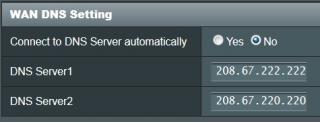
Issue: No Internet Access via manual DNS
Please refer to attached PIC
1. PIC 1 - manual DNS via Open DNS
2. PIC 2 - When connected via Manual DNS, No DNS shown
3. PIC 3 - Use Auto DNS, DNS is shown

This post has been edited by tan1975: Jun 29 2013, 11:38 AM


Attached thumbnail(s)
Attached Image Attached Image Attached Image


Change to:
| Lo-Fi Version
0.0365sec    0.33    7 queries    GZIP Disabled
Time is now: 6th December 2025 - 10:19 AM