

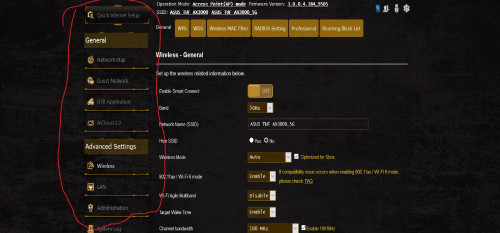
just bought asus tuf ax3000 yesterday just only saw limited setting in web ui.i need to use multiple vpn feature.anything i missed to unlock other option setting? now using latest firmware
Home Networking ASUS Malaysia Networking User & Technical Support, Managed by ASUS Malaysia Representative
|
|
 Sep 13 2020, 10:14 PM Sep 13 2020, 10:14 PM
Return to original view | IPv6 | Post
#1
|
 
Junior Member
321 posts Joined: Aug 2008 
|
just bought asus tuf ax3000 yesterday just only saw limited setting in web ui.i need to use multiple vpn feature.anything i missed to unlock other option setting? now using latest firmware |
|
|
|
|
|
Sep 13 2020, 10:36 PM
Return to original view | IPv6 | Post
#2
|
|
Junior Member
321 posts Joined: Aug 2008
|
QUOTE(blacktubi @ Sep 13 2020, 10:23 PM) I own the MiBox S, it is a known issue with MiBox. There are a ton of complain about this on reddit as well. so in AP mode i just get less feature rite...im using with huawei b818 4g modem and set as an AP mode to help distribute wifi..One of the software update fixed it but the issue is back in another update. I couldn't remember which version it is but perhaps you can try performing a system update first. I ended up buying a cheap Ugreen USB Ethernet adapter as the Wi-Fi on that cheap Xiaomi box is just too glitchy. VPN feature not available in access point mode. VPN is only available in router mode.  |
|
|
Sep 25 2020, 09:22 AM
Return to original view | Post
#3
|
|
Junior Member
321 posts Joined: Aug 2008
|
QUOTE(ASUSmy @ Sep 23 2020, 04:40 PM) Hi kenlui, Thinking to do same setup buy with tuf ax3000 as main router and ac86u as a node.any compatibility issue if i combine both ac and ax router?the ssid will combined become 1 ssid which is wifi 5 or wifi 6?You still can get the AX connectivity from the RT-AX86U if you set it as node. Thank you |
|
|
Mar 19 2021, 06:05 AM
Return to original view | Post
#4
|
|
Junior Member
321 posts Joined: Aug 2008
|
QUOTE(kenlui @ Sep 23 2020, 07:26 PM) Thank you for your reply. So in this situation, the AC5300U is better suited to be the main router due to it's triband feature right? Hi bro..any speed drop when you combine your ac5300u with ax86u from device connected to node ax86u?im thinking to buy ac5300u as i can get cheap unit from friend.for now i owned tuf ax3000.is it more suitable for ac5300u for main router and tuf ax3000 as node?scared got bottleneck speed when my wifi 6 device connected to tuf ax3000 as node.what your suggestion? |
|
|
Jul 2 2021, 04:32 PM
Return to original view | Post
#5
|
|
Junior Member
321 posts Joined: Aug 2008
|
Hi guys..i owned a ax11000 as main router and tuf ax3000+ax55 as node in wireless aimesh system.thinking to buy any triband router which is xt8 or ax92u 2packs and sell both dual band router.which triband router you guys prefer from this two triband router as a node.
|
|
|
Jul 17 2021, 10:06 PM
Return to original view | Post
#6
|
|
Junior Member
321 posts Joined: Aug 2008
|
Hi ASUSmy.mind to ask why i still can see client device online which already out from aimesh system 3 days ago in Asus Router apps.And many times i saw connection status error the device use wifi it shown using wired connection.its happen since 2-3 version of apps and router firmware before.fyi im on my ax11000+2pck xt8 aimesh system.all latest firmware inc asus apps in latest update Attached thumbnail(s) 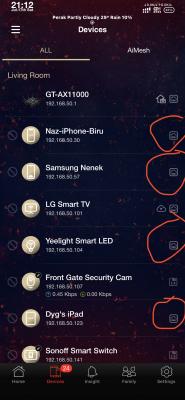
|
|
|
|
|
|
Jul 18 2021, 09:52 PM
Return to original view | Post
#7
|
|
Junior Member
321 posts Joined: Aug 2008
|
QUOTE(blacktubi @ Jul 18 2021, 05:46 PM) Refresh this page to see the latest connected device list. already refresh that page many times but i still saw old connected device connected.its even 3 days old device connected.when i open webui i saw the same.and got other device wrongly connected either in wired or wirelessPull down the page from the top to refresh it. |
|
|
Jul 19 2021, 11:11 PM
Return to original view | Post
#8
|
|
Junior Member
321 posts Joined: Aug 2008
|
QUOTE(Aspick @ Jul 19 2021, 11:42 AM) I am also having this same issue when I login to the Asus app. I'm running 2 RT-AC68 on latest AImesh firmware. it also happen in webui.after around 3 days the old connected device go away.but wire/wireless error still got issue.Can @Asusmy explain? |
|
|
Jul 21 2021, 08:18 AM
Return to original view | Post
#9
|
|
Junior Member
321 posts Joined: Aug 2008
|
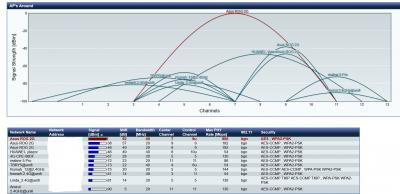
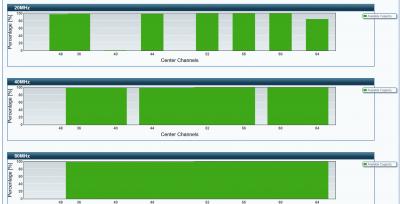
guys..or anyone care to help me determine which is right bandwith or channel i can use?fyi im using gt-ax11000 as main router and 2 nodes zenwifi xt8 and using UNIFI 300Mbps
1.btw why my nodes doesnt follow my main router center channel?its supposely follow main router channel rite? 2. how come in lan port 2 and lan port 3 i can saw only 100Mbps?i got wan port connected to BTU,lan port 2 connected to LG Smart TV and Lan port 3 connected at Astro Ultrabox.does their network port suppoerted to 100Mbps only?im using cat 6 cable for all those 3. 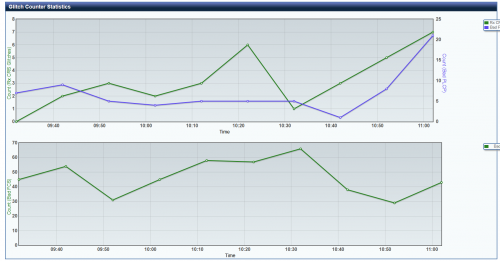 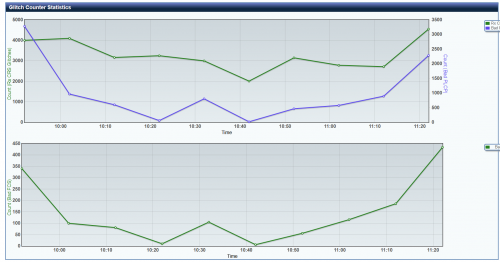 This post has been edited by Reyz: Jul 21 2021, 08:37 AM Attached thumbnail(s) 
Attached image(s)  |
|
|
Jul 21 2021, 05:18 PM
Return to original view | Post
#10
|
|
Junior Member
321 posts Joined: Aug 2008
|
QUOTE(ASUSmy @ Jul 21 2021, 02:49 PM) Hi Reyz, i already use channel 48 at main router it seems the nodes doesnt follow.it still stuck at old channel 40.The XT8 5GHz-1 only support the channel 36, 40, 44, 48. You can used the LAN cable provided in the box and test it with your laptop or your nodes(LAN backhaul) and check the ethernet status again. Thank you |
|
|
Jul 21 2021, 05:24 PM
Return to original view | Post
#11
|
|
Junior Member
321 posts Joined: Aug 2008
|
QUOTE(ASUSmy @ Jul 21 2021, 02:43 PM) Hi Reyz & Aspick, done send feedback from web GUI and pm you my email.Can you send a feedback using the router GUI at Administration->Feedback and PM me your email address used once done? Will request RD to have a look. Thank you |
|
|
Jul 25 2021, 01:18 AM
Return to original view | Post
#12
|
|
Junior Member
321 posts Joined: Aug 2008
|
QUOTE(radiohead @ Jul 24 2021, 12:01 PM) tqvrm . just done it if we already setup the router with unifi-home do we need to reset the router to change to unifi-bussiness? 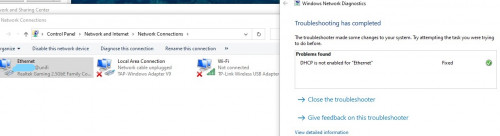 |
|
|
Jul 25 2021, 08:10 PM
Return to original view | Post
#13
|
|
Junior Member
321 posts Joined: Aug 2008
|
QUOTE(yongtjunkit @ Jul 22 2021, 01:11 PM) Lan Port 4 for unifi-home profile is for unifi TV, you should plug in your computer to lan 1-3 only, plug in your unifi tv box(not the unifi tv plus box) into lan port 4 Yeah i know.im already on unifi home profile.do i need to reset and start from scratch to setup unifi bussines profile?To use lan port 4 for computer, you’ll need to select the unifi-business profile under lan>IPTV |
|
|
|
|
|
Jul 26 2021, 08:23 AM
Return to original view | Post
#14
|
|
Junior Member
321 posts Joined: Aug 2008
|
QUOTE(blacktubi @ Jul 25 2021, 08:55 PM) No need, just change it on setting page and click apply 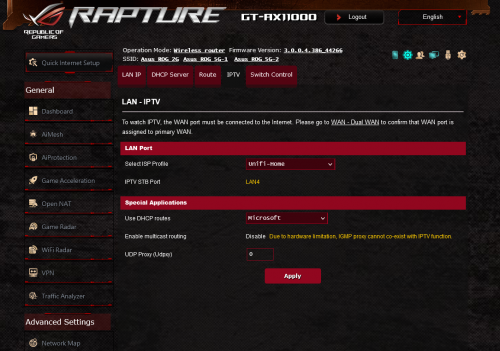 is it in here? |
|
|
Jul 26 2021, 08:28 AM
Return to original view | Post
#15
|
|
Junior Member
321 posts Joined: Aug 2008
|
QUOTE(afif92 @ Jul 26 2021, 08:26 AM) yes.. just change to unifi- business profile.. thanks a lot @blacktubi @afif92 afif92 liked this post
|
|
|
Jul 27 2021, 06:14 PM
Return to original view | Post
#16
|
|
Junior Member
321 posts Joined: Aug 2008
|
QUOTE(tyja @ Jul 27 2021, 02:28 PM) device is connected to first floor Me too..its hard for me to name for all 20-30 devices after reset and start from scratch😅but mine 5ghz2 is visible. try using third band, but the speed is much slower or par than 5ghz1 then i do some changes like universal beamforming turn off, ofdma+mumimo turn on, change rssi from -70 to -60, then only my laptop can get around 470mbps another thing, i have like 50 device connected, and I have named it all base on location and use. is there anyway to retain all the name for device if i do factory reset? cause base i read here and everywhere, after update firmware, you must do factory reset. Attached thumbnail(s) 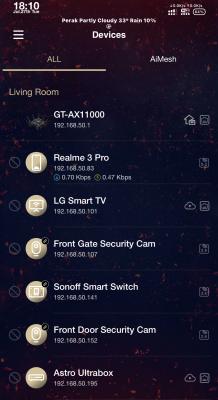
|
|
|
Jul 28 2021, 01:47 PM
Return to original view | Post
#17
|
|
Junior Member
321 posts Joined: Aug 2008
|
@ASUSmy mind to ask you.what effect we will get with mixing wifi 6 with wifi 5 and triband with dual band router in aimesh mode?
|
|
|
Jul 28 2021, 05:06 PM
Return to original view | Post
#18
|
|
Junior Member
321 posts Joined: Aug 2008
|
QUOTE(ASUSmy @ Jul 28 2021, 03:19 PM) Hi Reyz, im now using the ax11000 as main router and couple of zenwifi xt8 as a node in wireless aimesh setup.planning to add another one asus rog rapture ac2900 due to the rog aesthetic appearance in my game room. The WiFi 5 router won't have the features WiFi 6 have. For best performance in term of bandwidth, having triband router will be the best due to the dedicated WiFi backhaul. This also depend on your Internet speed and number of devices when deciding whether you really need a triband router. If you are using ethernet backhaul then both the triband or dualband will have the best bandwidth. Thank you  . im not in the middle of wired all router and nodes.is it a bad decision if i mix those dual band and wifi 5 with my currenct setup?beside of OFDMA and higher bandwith feature does this mixing with ac2900 rog will greatly lower down my perfomance setup? . im not in the middle of wired all router and nodes.is it a bad decision if i mix those dual band and wifi 5 with my currenct setup?beside of OFDMA and higher bandwith feature does this mixing with ac2900 rog will greatly lower down my perfomance setup?This post has been edited by Reyz: Jul 28 2021, 05:06 PM |
|
|
Jul 28 2021, 07:07 PM
Return to original view | Post
#19
|
|
Junior Member
321 posts Joined: Aug 2008
|
QUOTE(firdausbhari @ Jul 28 2021, 05:55 PM) AFAIK, wireless backhaul works best with tri band. Rapture ac2900 is only dual band. My guess is that it will work but not seamlessly. Yes i know but the power of ROG aesthetic value in ac2900 really tempting me to complete my setup of my gaming pc😂 i hope one day Asus will produce ax version for this router.im not concern mixing triband with dual band since im in middle of wired all my router and nodes but mixing wifi 5 with wifi 6 is more issue as i know we can assume all this setup for aimesh wifi 5 setup |
|
|
Aug 3 2021, 10:06 PM
Return to original view | Post
#20
|
|
Junior Member
321 posts Joined: Aug 2008
|
hi guys i just bought this asus gt-ac2900 and make it as node in aimesh system.may i know is true we cant change the rgb lightning effect when press the rog button beside if this router in aimesh node?
https://youtu.be/R96tyR7VUAs 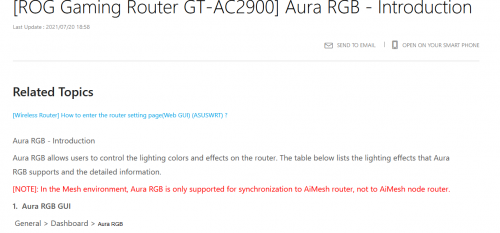 This post has been edited by Reyz: Aug 3 2021, 10:07 PM |
| Change to: |  0.0533sec 0.0533sec
 0.84 0.84
 7 queries 7 queries
 GZIP Disabled GZIP Disabled
Time is now: 9th December 2025 - 05:18 PM |
 Quote
Quote