Welcome Guest ( Log In | Register )

Outline · [ Standard ] · Linear+

Home Networking ASUS Malaysia Networking User & Technical Support, Managed by ASUS Malaysia Representative

views
     
tudor_kg
post Sep 24 2020, 06:50 PM

New Member
*
Newbie
33 posts

Joined: May 2017
QUOTE(sHawTY @ Sep 7 2020, 12:46 PM)
No. The issue with my father's AX56U is about not being able to get an IP address when you are trying to connect to 5GHz. And I'm not the only one having this issue. Tons of complaints all over the internet

Never had this issue with RT-N16, AC68U, AC88U, AC86U & GT-AC5300

My anger with ASUS is that they refused to admit that the AX56U is a problematic model and their refusal to pull it back from sales seeing just how many complaints about it in this forum itself
Itu belum campur those people who doesn't know about our forum, perhaps there are hundreds or maybe thousands out there that had issues with their AX56U as well but don't know where to complain publicly
*
hi shawty, i have this exact problem with my ax56u. requires restart daily. if not multiple devices in my home wont be able to connect. sometimes happen on both 2.4 and 5G. but most of the time 5G. tried both official firmware and merlin, it happening on both version.

it wont happen immediately after restart but sooner or later, whether a few hours later or next day, it will happen.

this is my first asus router. i hope asus will fix this very very soon. already considering TP Link AX20 but havent bought it yet. came from Dlink before Asus so i am not considering going back to Dlink. plenty buggy as well.
tudor_kg
post Sep 25 2020, 05:00 PM

New Member
*
Newbie
33 posts

Joined: May 2017
QUOTE(ASUSmy @ Sep 25 2020, 10:09 AM)
Hi tudor_kg,

You may try the beta firmware below and feedback to us if you still got the WiFi disconnection.

https://drive.google.com/file/d/1BlAehhTnXO...rqd09p2iDw/view

Thank you
*
yes trying it already. thanks. will feedback next week if still happening
tudor_kg
post Sep 29 2020, 01:27 PM

New Member
*
Newbie
33 posts

Joined: May 2017
QUOTE(cwl_ykh @ Sep 26 2020, 06:37 AM)
This is really PAIN IN THE A*S issue when it happen to mine as well, but this seems to be fixed on latest official firmware ended with 9424.

But there is another problem on 9424 firmware,  once reboot the router will tell you that you isp account information is wrong!!!
You will need to reboot for more than twice in order to reconnect, this is 1 freaking pain in the a*s router i ever used, even tm lousy router also perform better.
*
hi cwl_wkh, i dont have the problem u are describing though. but 9424 didnt fix the IP prob for me.

This post has been edited by tudor_kg: Sep 29 2020, 01:33 PM
tudor_kg
post Sep 29 2020, 01:30 PM

New Member
*
Newbie
33 posts

Joined: May 2017
QUOTE(ASUSmy @ Sep 25 2020, 10:09 AM)
Hi tudor_kg,

You may try the beta firmware below and feedback to us if you still got the WiFi disconnection.

https://drive.google.com/file/d/1BlAehhTnXO...rqd09p2iDw/view

Thank you
*
Hi ASUSmy,

i tried the beta firmware so far so good. already 4d uptime without losing IP/ requiring restarts. can u feedback to your R&D team and implement as fix in official firmware.

happy with this beta firmware so far.

This post has been edited by tudor_kg: Sep 29 2020, 01:31 PM
tudor_kg
post Sep 29 2020, 03:04 PM

New Member
*
Newbie
33 posts

Joined: May 2017
QUOTE(Kuddo Sachi @ Sep 29 2020, 01:42 PM)
This new update for beta Asus Ax56u ? is it okay ? everyday i have to restart because it losing speed so much.
*
Yes for ax56u. So far so good and stable. Will not go back to 9424 until a new firmware is released. No other issues seen with the beta but then again i was using basic features only. No ddns/vpn/dual wan/port fwd etc. Just 2.4g and 5g, smart connect disabled, Wifi AX enabled, default setting most of the settings.
tudor_kg
post Oct 7 2020, 12:49 PM

New Member
*
Newbie
33 posts

Joined: May 2017
QUOTE(cwl_ykh @ Oct 7 2020, 07:14 AM)
Alright!! Will give it a try!
Yeapp every firmware will always having 1  or more issue, I'm on beta fw before 9424 and it fixed my connected but no internet issue but it was not for long until 9424 came out.

The most annoying part is we need to restart and restart almost everyday to fixed all this issue!!!
*
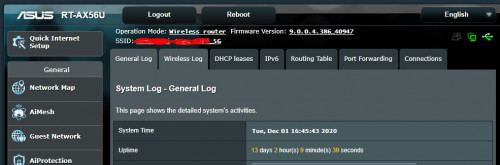
try the current beta bro. im already 12 days without restarts

Attached Image
tudor_kg
post Nov 30 2020, 11:25 AM

New Member
*
Newbie
33 posts

Joined: May 2017
hi all. calling Ax56u users. have u tried the newest firmware? how is the stability of this new firmware?

Version 3.0.0.4.384.9428
2020/11/26

https://www.asus.com/my/Networking/RT-AX56U...pDesk_Download/
tudor_kg
post Dec 1 2020, 08:38 AM

New Member
*
Newbie
33 posts

Joined: May 2017
Thanks Tharmaraj and ideaplus. Thinking of installing it this weekend. So any issues, i will revert back to beta. tharmaraj, do update here if you see any issues. Thanks!
tudor_kg
post Dec 2 2020, 11:50 AM

New Member
*
Newbie
33 posts

Joined: May 2017
QUOTE(pl95077 @ Dec 2 2020, 12:48 AM)
Preferred FW version 386, it made a lot changes, running with 2 units RT-AX56U (AiMesh)
No issue so far for 13 days
user posted image
*
is that a beta firmware also? my beta is different version 9.0.2.4.384_9427 but running quite stable. where did u get that version from?
tudor_kg
post Feb 9 2021, 11:07 AM

New Member
*
Newbie
33 posts

Joined: May 2017
QUOTE(bobowyc @ Feb 7 2021, 12:36 PM)
May i ask why my router, Asus RT-AX56U on 5Ghz sometimes display no internet connected? It used to be 5Ghz, now 2.4Ghz also same. Then after awhile it will have internet again. Any ideas why this happens? Now its affecting my other router, Asus RT-AC86U also..
*
which firmware? latest Version 3.0.0.4.384.10290?

i havent updated to that. the previous Version 3.0.0.4.384.9428 is quite stable. try rolling back to 9428
tudor_kg
post Apr 18 2021, 08:25 AM

New Member
*
Newbie
33 posts

Joined: May 2017
Hi Asus Support,

For RT-AX56U, firnware Version 3.0.0.4.384.10290 is still buggy. At times unable to provide ip address and happens on 2.4 and 5 Ghz wifi. Need restart and things will occur again after that.

I had to revert back to beta 9428. Please fix it.
tudor_kg
post May 8 2021, 02:29 PM

New Member
*
Newbie
33 posts

Joined: May 2017
QUOTE(rgchai @ May 7 2021, 08:49 PM)
Hi,

Wondering how stable is the firmware 9428? Any wifi issue on this version? Like can't get IP Address, or can connect but no internet connection at all?

My firmware version is 8986, just bought and installed it 2 weeks ago, and found out having these wifi issues intermittently. Think I saw someone having similar issue as well on ax56u at earlier thread. Now start to wondering am I choosing the wrong router, over trusted ASUS brand...  sad.gif
*
Very stable bro, have gone up to 3 weeks without restarting. Cant say the same for later2 official firmware. This was my first asus router too, was disappointed at first with all the issues similar like yours, but after few months, 9428 was issued and did solve those issues. Only thing i dont understand is why with newer version firmware those ip address issues reoccur. Why cant they bring the improvement from 9428 to newer firmware?
tudor_kg
post May 8 2021, 06:49 PM

New Member
*
Newbie
33 posts

Joined: May 2017
QUOTE(rgchai @ May 8 2021, 06:03 PM)
Thanks for your help. I managed to download the firmware now. But when try to update firmware, this message made me confused:

[attachmentid=10873224]

The manual firmware update seemed is used for airmesh router, but I didn't setup any airmesh current. But apart from that, I can't find any other place for me to upload firmware file. So just need to confirm if that Upload link is used for manual firmware update?
*

Just proceed to update. Thats the standard message.


Change to:
| Lo-Fi Version
0.0389sec    0.34    7 queries    GZIP Disabled
Time is now: 10th December 2025 - 02:03 AM