

QUOTE(hairul @ Nov 27 2012, 03:48 PM)
Alhamdullilah..
Thanks Kharil, Its alive again :-p

ur welcome.. dont know if its our fault or a bug in the openwrt firmware..Thanks Kharil, Its alive again :-p
gonna try compile my own image after this..
Tp LInk TL-MR3420 Owner CLub V2
|
|
 Nov 27 2012, 04:23 PM Nov 27 2012, 04:23 PM
|
 
Junior Member
406 posts Joined: Sep 2010 From: Papar, Sabah  
|
QUOTE(hairul @ Nov 27 2012, 03:48 PM) Alhamdullilah.. ur welcome.. dont know if its our fault or a bug in the openwrt firmware..Thanks Kharil, Its alive again :-p gonna try compile my own image after this.. |
|
|
|
|
|
Nov 27 2012, 04:53 PM
|
 
Elite
6,931 posts Joined: Apr 2011 From: Bolehland for sure ^_^
|
QUOTE(khairilyazit @ Nov 27 2012, 04:23 PM) ur welcome.. dont know if its our fault or a bug in the openwrt firmware.. wish i know how to compile my own image for sure gonna try compile my own image after this..  |
|
|
Nov 27 2012, 05:21 PM
|

Junior Member
384 posts Joined: Jan 2006 From: Penang 
|
QUOTE(chuahcs79 @ Nov 27 2012, 04:53 PM) wish i know how to compile my own image for sure yeah, i'm interested to learn too. Please share the steps.  |
|
|
Nov 27 2012, 05:44 PM
|
|
Senior Member
1,019 posts Joined: Nov 2006
|
my 3420 back in action~
|
|
|
Nov 27 2012, 05:56 PM
|
|
Elite
6,931 posts Joined: Apr 2011 From: Bolehland for sure ^_^
|
QUOTE(chulk @ Nov 27 2012, 05:44 PM) my 3420 back in action~ it is alive again ?  |
|
|
Nov 27 2012, 06:20 PM
|
|
Junior Member
406 posts Joined: Sep 2010 From: Papar, Sabah
|
QUOTE(chuahcs79 @ Nov 27 2012, 04:53 PM) wish i know how to compile my own image for sure QUOTE(maxcheam @ Nov 27 2012, 05:21 PM) yeah, i'm interested to learn too. Please share the steps. i also learn from openwrt.. wanna try the image generator.. to include all the needed packages in the image so that no need internet for first time flashing.. |
|
|
|
|
|
Nov 27 2012, 06:29 PM
|

Senior Member
944 posts Joined: Jan 2003 From: SHAH ALAM 
|
QUOTE(chuahcs79 @ Nov 27 2012, 04:12 PM) currently i am using This is mysetup, not sure correct or not. V1 only do as Auto Ping job only. So, i need to communicate from PC to see whether V1 are connect to internet thru V2 or not because from PC , ping unable to respond. Maybe need to bridge?Panel antenna -> TS-9 (convertor ) -> ZTE MF680 -> V1 ( openwrt ) -> lan out ( yellow lan port ) -> V2 blue color wan port ( stock firmware set under web gui network = wan only ) -> lan out ( yellow color lan port ) -> PC/laptop Lan port your case usb modem -> V2 Off wifi ( stock firmware ) -> lan out ( yellow lan port ) -> V1 blue color wan port ( openwrt set under web gui network = DHCP protocol ) -> lan out ( yellow color lan port ) -> PC/laptop Lan port due to V1 = 192.168.1.1 V2 = 192.168.0.1 so both can combine,.u can open web gui for both , as long as second router is set to WAN only ( in stock firmware ) or DHCP protocol ( under openwrt ) just make sure u off the wifi on the router u are using to dial your usb modem, use the second router for lan / wifi out  maybe khairil can comment? This post has been edited by hairul: Nov 27 2012, 06:30 PM Attached thumbnail(s) 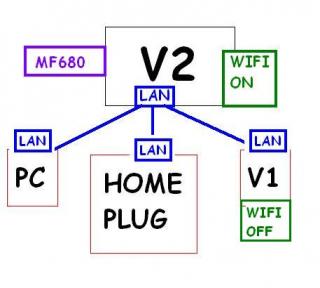
|
|
|
Nov 27 2012, 06:31 PM
|
|
Senior Member
1,019 posts Joined: Nov 2006
|
QUOTE(chuahcs79 @ Nov 27 2012, 05:56 PM) it is alive again ? tp link 1 to 1 exchange~~~~ |
|
|
Nov 27 2012, 06:36 PM
|
|
Junior Member
406 posts Joined: Sep 2010 From: Papar, Sabah
|
QUOTE(hairul @ Nov 27 2012, 06:29 PM) This is mysetup, not sure correct or not. V1 only do as Auto Ping job only. So, i need to communicate from PC to see whether V1 are connect to internet thru V2 or not because from PC , ping unable to respond. Maybe need to bridge? wifi v2 should be off, wifi v1 should be on, pc, homeplug, all lan to v1maybe khairil can comment?  i think.. how bout sifu chuahcs79? should be like this..  This post has been edited by khairilyazit: Nov 27 2012, 06:46 PM |
|
|
Nov 27 2012, 06:44 PM
|
|
Senior Member
944 posts Joined: Jan 2003 From: SHAH ALAM
|
QUOTE(khairilyazit @ Nov 27 2012, 06:36 PM) wifi v2 should be off, wifi v1 should be on, pc, homeplug, all lan to v1 So, V1 need to use WAN or LAN port to connect to V2?i think.. how bout sifu chuahcs79? |
|
|
Nov 27 2012, 06:47 PM
|
|
Junior Member
406 posts Joined: Sep 2010 From: Papar, Sabah
|
yeah.. edited my post with pics.. refer to above.. basically, V2 only connects to mf680 and lan to V1,
meanwhile V1 handle everything else such as wifi and lan connections.. |
|
|
Nov 27 2012, 06:53 PM
|
|
Elite
6,931 posts Joined: Apr 2011 From: Bolehland for sure ^_^
|
QUOTE(khairilyazit @ Nov 27 2012, 06:36 PM) wifi v2 should be off, wifi v1 should be on, pc, homeplug, all lan to v1 yeah, that's how i use, as long as openwrt router is in, no matter 1st or 2nd, it will confirm auto ping google i think.. how bout sifu chuahcs79? should be like this.. that is correct way khairil Added on November 27, 2012, 6:55 pm QUOTE(khairilyazit @ Nov 27 2012, 06:47 PM) yeah.. edited my post with pics.. refer to above.. basically, V2 only connects to mf680 and lan to V1, yeah, that way V2 will work better dialing mf680 alonemeanwhile V1 handle everything else such as wifi and lan connections.. and v1 will work better with wifi or lan alone,.. it is like 1 processor with 2 core compare with 1 processor with single core theory if the cpu of router loading very busy, it wont be good for the 3G dialing or wifi either one This post has been edited by chuahcs79: Nov 27 2012, 06:55 PM |
|
|
Nov 27 2012, 06:56 PM
|
|
Junior Member
406 posts Joined: Sep 2010 From: Papar, Sabah
|
QUOTE(chuahcs79 @ Nov 27 2012, 06:53 PM) yeah, that's how i use, as long as openwrt router is in, no matter 1st or 2nd, it will confirm auto ping google thanks sifu.. that is correct way khairil Added on November 27, 2012, 6:55 pm yeah, that way V2 will work better dialing mf680 alone and v1 will work better with wifi or lan alone,.. it is like 1 processor with 2 core compare with 1 processor with single core theory if the cpu of router loading very busy, it wont be good for the 3G dialing or wifi either one i'm thinking of getting a homeplug what model would u guys recommend? |
|
|
|
|
|
Nov 27 2012, 06:58 PM
|
|
Elite
6,931 posts Joined: Apr 2011 From: Bolehland for sure ^_^
|
QUOTE(khairilyazit @ Nov 27 2012, 06:56 PM) thanks sifu.. for homeplug i'm thinking of getting a homeplug what model would u guys recommend? better get aztech brand, model wise 200Mbps would be enough, unless u have higher budget then get 500Mbps noise filer type |
|
|
Nov 27 2012, 07:01 PM
|
|
Junior Member
406 posts Joined: Sep 2010 From: Papar, Sabah
|
QUOTE(chuahcs79 @ Nov 27 2012, 06:58 PM) for homeplug was thinking abt the 500mbps.. cos later wanna add a NAS.. so.. dont think 200mbps is gonna be enough..better get aztech brand, model wise 200Mbps would be enough, unless u have higher budget then get 500Mbps noise filer type sorry for Out of topic..  |
|
|
Nov 27 2012, 07:02 PM
|
|
Elite
6,931 posts Joined: Apr 2011 From: Bolehland for sure ^_^
|
QUOTE(khairilyazit @ Nov 27 2012, 07:01 PM) was thinking abt the 500mbps.. cos later wanna add a NAS.. so.. dont think 200mbps is gonna be enough.. remember to get those Noise filter enable model, it will really help when add NAS, sorry for Out of topic.. |
|
|
Nov 27 2012, 11:13 PM
|
|
Senior Member
944 posts Joined: Jan 2003 From: SHAH ALAM
|
Now my V1 (OpenWRT) connect to V2. V1 Running Auto ping.
Seems auto ping not running very well because sometimes MF680 LED turn to Blue Light. Try to connect MF680 Connect With V1, the Modem Always turn purple Light. It is v2 have some blocking? |
|
|
Nov 27 2012, 11:18 PM
|

Elite
8,415 posts Joined: Jul 2008 
|
QUOTE(hairul @ Nov 27 2012, 11:13 PM) Now my V1 (OpenWRT) connect to V2. V1 Running Auto ping. Router mistaken as SSYN floodSeems auto ping not running very well because sometimes MF680 LED turn to Blue Light. Try to connect MF680 Connect With V1, the Modem Always turn purple Light. It is v2 have some blocking? Disable firewall SPI firewall inside router and check again |
|
|
Nov 28 2012, 12:29 AM
|
|
Elite
6,931 posts Joined: Apr 2011 From: Bolehland for sure ^_^
|
Openwrt Altitude Adjustment 12.09 Beta currently have newer version RC1, no more beta
 http://downloads.openwrt.org/attitude_adju...hfs-factory.bin This post has been edited by chuahcs79: Nov 28 2012, 12:30 AM |
|
|
Nov 28 2012, 12:42 AM
|
|
Senior Member
944 posts Joined: Jan 2003 From: SHAH ALAM
|
QUOTE(chuahcs79 @ Nov 28 2012, 12:29 AM) Openwrt Altitude Adjustment 12.09 Beta currently have newer version RC1, no more beta The link are for MR3220, can use ke with MR3420? http://downloads.openwrt.org/attitude_adju...hfs-factory.bin |
|
Topic ClosedOptions
|
| Change to: |  0.0293sec 0.0293sec
 1.17 1.17
 6 queries 6 queries
 GZIP Disabled GZIP Disabled
Time is now: 13th December 2025 - 07:33 PM |
 Quote
Quote