

Check-In...
Chuah, semua orang tak nak bukak new thread. Tunggu you sahaja bukak.
Hahahahahahhaha
Tp LInk TL-MR3420 Owner CLub V2
Tp LInk TL-MR3420 Owner CLub V2
|
|
 Nov 20 2012, 08:18 AM Nov 20 2012, 08:18 AM
Return to original view | Post
#1
|
 
Senior Member
944 posts Joined: Jan 2003 From: SHAH ALAM   
|
Check-In...
Chuah, semua orang tak nak bukak new thread. Tunggu you sahaja bukak. Hahahahahahhaha |
|
|
|
|
|
Nov 20 2012, 09:06 AM
Return to original view | Post
#2
|
|
Senior Member
944 posts Joined: Jan 2003 From: SHAH ALAM
|
QUOTE(chulk @ Nov 20 2012, 08:32 AM) who dare and who qualify to buka? Everyone lazy hehehehe   |
|
|
Nov 20 2012, 08:16 PM
Return to original view | Post
#3
|
|
Senior Member
944 posts Joined: Jan 2003 From: SHAH ALAM
|
OpenWRT Report In :-)
This is easier way to upgrade Tools Needed 1) MR3420 2) 2nd Router + 3G Modem This is my step : - 1) Login Standard Firmware And Upgrade Openwrt Firmware. Then Reboot And Set Router Password (Dont Plug Any Network cable From Router No 2) 2) Plug Network Cable From 2nd Router with 3G Modem to MR3420 WAN Port 3) Ping 8.8.8.8 1st. When Internet Available (Ping Got Reply) ,Then Run Putty and Go to 192.168.1.1 4) Copy Paste this into Putty 1st Step opkg update 2nd Step opkg install chat comgt kmod-usb-acm kmod-usb-serial kmod-usb-serial-option kmod-usb-uhci libusb luci-proto-3g mini-sendmail usb-modeswitch usb-modeswitch-data kmod-usb2 kmod-usb-ohci kmod-usb-serial-wwan 5) Reboot And Login 6) Go To Network>Interface>Edit WAN 7) Switch Protocol And Choose UMTS/GORS/EV-DO and Fill-up APN & Others. 8) Setting WIFI ETC and Reboot Again 9) Use |
|
|
Nov 20 2012, 09:33 PM
Return to original view | Post
#4
|
|
Senior Member
944 posts Joined: Jan 2003 From: SHAH ALAM
|
QUOTE(digilife @ Nov 20 2012, 08:29 PM) Abang, where to download the necessary files and one more thing, if i wan to flash OpenWRT onto my WR1043ND, same steps too? Same step and using upgrade files for your Router |
|
|
Nov 20 2012, 11:28 PM
Return to original view | Post
#5
|
|
Senior Member
944 posts Joined: Jan 2003 From: SHAH ALAM
|
QUOTE(khairilyazit @ Nov 20 2012, 10:22 PM) modem update = done Dialer using OPenwrt very fast.. almost same like standard MR3040router update = done modem = Huawei E372 router = TL MR3420 V1.3 router detect modem, then identifying again.. detect again, identifying again.. haish |
|
|
Nov 23 2012, 08:56 AM
Return to original view | Post
#6
|
|
Senior Member
944 posts Joined: Jan 2003 From: SHAH ALAM
|
Already bought 2nd Router V2.1.
Why ah every 5-10 minute the modem (MF680) will off , no light. Need to on/off router. using july2012 firmware |
|
|
|
|
|
Nov 23 2012, 05:34 PM
Return to original view | Post
#7
|
|
Senior Member
944 posts Joined: Jan 2003 From: SHAH ALAM
|
QUOTE(localhost25 @ Nov 23 2012, 03:47 PM) how to setup this.. No need setting. Just plug-inalready flash back my MR3020 to original firmware so rite now connect MR3420 > MR3020 >E372 from image MR3420v1-LAN port to PC -WAN port to MR3420V2-USB modem any setting on OpenWRT MR3420 to enable internet connection or just plug in.. sorry noob question  |
|
|
Nov 26 2012, 08:31 AM
Return to original view | Post
#8
|
|
Senior Member
944 posts Joined: Jan 2003 From: SHAH ALAM
|
QUOTE(stevenlee @ Nov 26 2012, 07:36 AM) have u try move away the 3g modem from the router? Mine, if using USB extension, sometime the MODEM turn off about 15minute use. Sometimes after 30 minute. Router(V2) is still on. Need to on/off modem..use usb extension and move away the 3g from the router.. dont too long the usb extension, roughly 1 meter is enough..and test it out i face same problem like you, after i use usb extension move away the 3g modem..my speed went up to 5mbps stable Now direct plug MF680 > V2 |
|
|
Nov 26 2012, 08:23 PM
Return to original view | Post
#9
|
|
Senior Member
944 posts Joined: Jan 2003 From: SHAH ALAM
|
QUOTE(chuahcs79 @ Nov 26 2012, 03:29 PM) it turn off because not enough power, direct plug in is best My 3420 V1 brick already when i want to change DHCP to LAN connection. me too, zte mf680 direct plug in -> V2  Need to find Cheap Router just for Auto Ping (Can Support OpenWRT), any recomendation? Garage sales not available for cheap router right now |
|
|
Nov 26 2012, 09:09 PM
Return to original view | Post
#10
|
|
Senior Member
944 posts Joined: Jan 2003 From: SHAH ALAM
|
QUOTE(blacktubi @ Nov 26 2012, 08:58 PM) It should be still accesible right Already do reset, but still unable able to access webui...Since changing DHCP won't hard brick How about a simple reset I know its already reset because the wifi security change to OPEN... Added on November 26, 2012, 9:10 pm QUOTE(chuahcs79 @ Nov 26 2012, 08:49 PM) auto ping goole in computer with CMD ( command prompt ) is as photo below Im wonder DD-WRT able to auto ping?[attachmentid=3175490] so if u are using Openwrt COmpatible Router, u can set this Auto ping in router itself, to ping google every second, so your connection will be active at all time and it wont be IDLE  if u are using those router not support openwrt, then u have to set this auto ping in your computer, go to CMD -> type in : ping 8.8.8.8 -t -> enter or go to Notepad -> type in : ping 8.8.8.8 -t -> Save As -> Ping google.bat -> open the ping google.bat you save Use router at garage sales only have the expensive unit... This post has been edited by hairul: Nov 26 2012, 09:10 PM |
|
|
Nov 26 2012, 09:24 PM
Return to original view | Post
#11
|
|
Senior Member
944 posts Joined: Jan 2003 From: SHAH ALAM
|
QUOTE(blacktubi @ Nov 26 2012, 09:15 PM) Once you reset you will erase the luci webui so you see nothing Already try this method last time. not work. Connect to the WiFi, can you even able to SSH 192.168.1.1 Unable to connect. Try Ping the Router but Time Out. But i think still have comunication within router & pc because still have send & received (Local Area Connection Activities) |
|
|
Nov 26 2012, 09:32 PM
Return to original view | Post
#12
|
|
Senior Member
944 posts Joined: Jan 2003 From: SHAH ALAM
|
QUOTE(chuahcs79 @ Nov 26 2012, 09:27 PM) The link are DD-WRT, it is still same? WIth post related to my problem?Added on November 26, 2012, 9:39 pm QUOTE(blacktubi @ Nov 26 2012, 09:31 PM) Since it still DHCP to you, it should be all right Actually the problem start when i try to change from Static Ip to DHCP. Then busy box running (Circle Simbol Pusing2) and not responding.A faulty router won't DHCP to you anymore The only way for you now is Serial restore, I think some guy know how to do it Either it is rootlinux or someone else Yes, i want to use serial, need free time to solder the board and find the correct USB cable , mostly old type nokia cable.. This post has been edited by hairul: Nov 26 2012, 09:39 PM |
|
|
Nov 27 2012, 07:24 AM
Return to original view | Post
#13
|
|
Senior Member
944 posts Joined: Jan 2003 From: SHAH ALAM
|
QUOTE(rootlinux @ Nov 26 2012, 10:37 PM) I had debrick my MR3420 v1 using serial on board (soldered) with a USB to TTL connect to Windows laptop. I know this solution, but need to look up to correct USB cable . As soldering available at my workplace, need some free times to do it, means night shift Refer to http://wiki.openwrt.org/toh/tp-link/tl-mr3420 Run PuTTY with following: - Bits per second: 115200 Data bits: 8 Stop bits: 1 Parity: None Flow control: None As soon as the router is power on, you will see the booting text...I hit ENTER after the end of boot up. Then run: - mtd -r erase rootfs_data All settings are reset. Perform a reboot and its unbrick. That is for my case. It may be diff from urs. ..Preparing The Cable http://buffalo.nas-central.org/index.php/U...aring_the_Cable This post has been edited by hairul: Nov 27 2012, 07:26 AM |
|
|
|
|
|
Nov 27 2012, 12:08 PM
Return to original view | Post
#14
|
|
Senior Member
944 posts Joined: Jan 2003 From: SHAH ALAM
|
QUOTE(khairilyazit @ Nov 27 2012, 09:25 AM) i dont think u need to.. tried entering the failsafe? then ssh or telnet to the modem? Can guide me how to use failsafe. Confius how to use failsafe.mine worked, but u need to set a static ip for ur lan Already try to read, but not understand  |
|
|
Nov 27 2012, 03:36 PM
Return to original view | Post
#15
|
|
Senior Member
944 posts Joined: Jan 2003 From: SHAH ALAM
|
QUOTE(khairilyazit @ Nov 27 2012, 01:55 PM) urs pnya v1 or v2? if v1, power cycle the router, then repeatedly press the qss button until ur sys led blink fast2.. then.. connect lan, set ip, telnet or ssh to router.. for confirmation, ping the ip first if got response, ur safe.. Hi,I can only using telnet via putty. Than what should i do? just mount? What code to copy & paste for restoring back? Attached thumbnail(s) 
|
|
|
Nov 27 2012, 03:48 PM
Return to original view | Post
#16
|
|
Senior Member
944 posts Joined: Jan 2003 From: SHAH ALAM
|
QUOTE(khairilyazit @ Nov 27 2012, 03:41 PM) yes.. Alhamdullilah..just follow these codes CODE mount_root then CODE passwd change ur passwordthen CODE mtd -r erase rootfs_data (always work for me)if it didn't automatic reboot, use this. CODE reboot -f then u need to power cycle the router manually, an tadaa... ur presented with a clean openwrt... segar dari ladang!! Thanks Kharil, Its alive again :-p |
|
|
Nov 27 2012, 04:03 PM
Return to original view | Post
#17
|
|
Senior Member
944 posts Joined: Jan 2003 From: SHAH ALAM
|
QUOTE(chuahcs79 @ Nov 27 2012, 03:49 PM) on wireless broadband, it is all about "feng shui".. ( bests pot ) Chuah, how do you connect/comminucate to the second router (192.168.1.1) ? My case 2nd router is V1 (After alive again)if "feng shui" is good, the broadband will be good  V2 (192.168.0.1) - PC (LAN Port) & V1 (192.168.1.1) (LAN Port) ? This post has been edited by hairul: Nov 27 2012, 04:04 PM |
|
|
Nov 27 2012, 06:29 PM
Return to original view | Post
#18
|
|
Senior Member
944 posts Joined: Jan 2003 From: SHAH ALAM
|
QUOTE(chuahcs79 @ Nov 27 2012, 04:12 PM) currently i am using This is mysetup, not sure correct or not. V1 only do as Auto Ping job only. So, i need to communicate from PC to see whether V1 are connect to internet thru V2 or not because from PC , ping unable to respond. Maybe need to bridge?Panel antenna -> TS-9 (convertor ) -> ZTE MF680 -> V1 ( openwrt ) -> lan out ( yellow lan port ) -> V2 blue color wan port ( stock firmware set under web gui network = wan only ) -> lan out ( yellow color lan port ) -> PC/laptop Lan port your case usb modem -> V2 Off wifi ( stock firmware ) -> lan out ( yellow lan port ) -> V1 blue color wan port ( openwrt set under web gui network = DHCP protocol ) -> lan out ( yellow color lan port ) -> PC/laptop Lan port due to V1 = 192.168.1.1 V2 = 192.168.0.1 so both can combine,.u can open web gui for both , as long as second router is set to WAN only ( in stock firmware ) or DHCP protocol ( under openwrt ) just make sure u off the wifi on the router u are using to dial your usb modem, use the second router for lan / wifi out maybe khairil can comment? This post has been edited by hairul: Nov 27 2012, 06:30 PM Attached thumbnail(s) 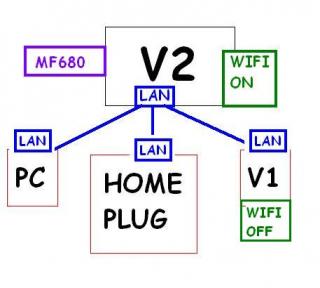
|
|
|
Nov 27 2012, 06:44 PM
Return to original view | Post
#19
|
|
Senior Member
944 posts Joined: Jan 2003 From: SHAH ALAM
|
QUOTE(khairilyazit @ Nov 27 2012, 06:36 PM) wifi v2 should be off, wifi v1 should be on, pc, homeplug, all lan to v1 So, V1 need to use WAN or LAN port to connect to V2?i think.. how bout sifu chuahcs79? |
|
|
Nov 27 2012, 11:13 PM
Return to original view | Post
#20
|
|
Senior Member
944 posts Joined: Jan 2003 From: SHAH ALAM
|
Now my V1 (OpenWRT) connect to V2. V1 Running Auto ping.
Seems auto ping not running very well because sometimes MF680 LED turn to Blue Light. Try to connect MF680 Connect With V1, the Modem Always turn purple Light. It is v2 have some blocking? |
|
Topic ClosedOptions
|
| Change to: |  0.0358sec 0.0358sec
 0.60 0.60
 7 queries 7 queries
 GZIP Disabled GZIP Disabled
Time is now: 8th December 2025 - 07:54 PM |
 Quote
Quote