

This result is zte mf680 + V1 ( openwrt alone ) with wireless on no star IP
[attachmentid=3172779]
This post has been edited by chuahcs79: Nov 24 2012, 08:17 PM
Tp LInk TL-MR3420 Owner CLub V2
Tp LInk TL-MR3420 Owner CLub V2
|
|
 Nov 24 2012, 08:14 PM Nov 24 2012, 08:14 PM
|
 
Elite
6,931 posts Joined: Apr 2011 From: Bolehland for sure ^_^  
|
This result is zte mf680 + V1 ( openwrt alone ) with wireless on no star IP
[attachmentid=3172779] This post has been edited by chuahcs79: Nov 24 2012, 08:17 PM |
|
|
|
|
|
Nov 24 2012, 10:08 PM
|
 
Junior Member
612 posts Joined: Mar 2008
|
chuahcs is there possible I upgrade openwrt from ddwrt? Coz I already flashed my TPLINK with ddwrt firmware, and I want to flashed it with openwrt, need your guide.
 |
|
|
Nov 24 2012, 10:43 PM
|
|
Elite
6,931 posts Joined: Apr 2011 From: Bolehland for sure ^_^
|
QUOTE(Gaara92 @ Nov 24 2012, 10:08 PM) chuahcs is there possible I upgrade openwrt from ddwrt? Coz I already flashed my TPLINK with ddwrt firmware, and I want to flashed it with openwrt, need your guide. just download the correct openwrt for your router model ,steps is the same like from tplink -> openwrt   |
|
|
Nov 24 2012, 10:46 PM
|

Junior Member
394 posts Joined: Jun 2012
|
QUOTE(chuahcs79 @ Nov 23 2012, 09:26 PM) ] If about wireless hacking ask me well i off my wifi because there is someone in my same block try to hack my wifi before,. my chinese anti virus alert me and i kick banned his mac id, from that day onwards i off my wifi, only use lan cable,. well i agree that router is built for 3G and wifi both, some user here believe that off wifi can give more power to 3G function   Im mod i Xiaopan.co, i help people to protect their own wifi Im mod i Xiaopan.co, i help people to protect their own wifi |
|
|
Nov 25 2012, 04:28 AM
|
|
Elite
6,931 posts Joined: Apr 2011 From: Bolehland for sure ^_^
|
QUOTE(wavezard @ Nov 24 2012, 10:46 PM) If about wireless hacking ask me i use chinese anti virus 360.cn to protect and banned Mac ID .. Im mod i Xiaopan.co, i help people to protect their own wifiand if he agreesive, i directly off the wifi on V2,.. MR3420 V2 wifi can direct off without reboot , not like V1  |
|
|
Nov 25 2012, 04:39 AM
|
|
Elite
6,931 posts Joined: Apr 2011 From: Bolehland for sure ^_^
|
My Latest New Setup :
Panel ANtenna -> TS-9 Connector -> ZTE MF680 ( 33tx ) -> MR3420 V2 -> Lan / Wifi -> PC / Phone / Laptop result : [attachmentid=3173167] Setup: [attachmentid=3173168] [attachmentid=3173169] Conclusion: V2 alone able to work dialing 3G connection as well as Wireless N 300Mbps too  |
|
|
|
|
|
Nov 25 2012, 12:37 PM
|

Junior Member
406 posts Joined: Sep 2010 From: Papar, Sabah
|
got question abt openwrt... i've setup correctly.. but when i connect with lan, i cant get inter.. but my wifi have internet.. anything wrong with my setting?
|
|
|
Nov 25 2012, 01:48 PM
|

Junior Member
34 posts Joined: Nov 2010
|
hey guys, any way for TL-MR3420 v2 to force connection on 3g 2100mhz only? I can't seem to find a openwrt custom firmware for this router~
oh yea, i'm running on a huawei e372 modem, with stock firmware on both router and modem~ any ideas~? This post has been edited by EnegueWeil: Nov 25 2012, 02:04 PM |
|
|
Nov 25 2012, 02:33 PM
|

Elite
8,413 posts Joined: Jul 2008 
|
QUOTE(EnegueWeil @ Nov 25 2012, 01:48 PM) hey guys, any way for TL-MR3420 v2 to force connection on 3g 2100mhz only? I can't seem to find a openwrt custom firmware for this router~ Just force it from your Windows in mdma and the settings will be savedoh yea, i'm running on a huawei e372 modem, with stock firmware on both router and modem~ any ideas~? |
|
|
Nov 25 2012, 02:49 PM
|

Senior Member
8,025 posts Joined: Feb 2005 From: Planet Boleland
|
QUOTE(blacktubi @ Nov 25 2012, 02:33 PM) Just force it from your Windows in mdma and the settings will be saved Bro, still using UM?I have some kangtau , PM me if interested |
|
|
Nov 25 2012, 02:58 PM
|
|
Elite
8,413 posts Joined: Jul 2008
|
QUOTE(digilife @ Nov 25 2012, 02:49 PM) Bro, still using UM? UM is my main SIM when going out and backup I have some kangtau , PM me if interested |
|
|
Nov 25 2012, 03:46 PM
|
|
Junior Member
34 posts Joined: Nov 2010
|
QUOTE(blacktubi @ Nov 25 2012, 02:33 PM) Just force it from your Windows in mdma and the settings will be saved tried that but its stuck at 4.92mpbs download when connected to router~ if my e372 is connected directly to the laptop its at 14.85mpbs stable~ any more ideas~? @@ |
|
|
Nov 25 2012, 04:22 PM
|
|
Elite
8,413 posts Joined: Jul 2008
|
QUOTE(EnegueWeil @ Nov 25 2012, 03:46 PM) tried that but its stuck at 4.92mpbs download when connected to router~ Try router put at same location with your laptop if my e372 is connected directly to the laptop its at 14.85mpbs stable~ any more ideas~? @@ |
|
|
|
|
|
Nov 25 2012, 04:37 PM
|
|
Junior Member
34 posts Joined: Nov 2010
|
QUOTE(blacktubi @ Nov 25 2012, 04:22 PM) Try router put at same location with your laptop D:gonna give it a try~ just tried tweaking the TX power on the e372, direct connection to laptop is super steady~ O_O! testing back again at tp link's router ok gave up~ routers max is now at 7mpbs while direct to laptop is at 16mpbs~ same location~ @@ p/s did the bandwidth 100000 limit also~ D: This post has been edited by EnegueWeil: Nov 25 2012, 04:58 PM |
|
|
Nov 25 2012, 09:42 PM
|
|
Elite
8,413 posts Joined: Jul 2008
|
QUOTE(EnegueWeil @ Nov 25 2012, 04:37 PM) D: Highly possible your router is connected to a different tower gonna give it a try~ just tried tweaking the TX power on the e372, direct connection to laptop is super steady~ O_O! testing back again at tp link's router ok gave up~ routers max is now at 7mpbs while direct to laptop is at 16mpbs~ same location~ @@ p/s did the bandwidth 100000 limit also~ D: Tried 2100Mhz Force? |
|
|
Nov 25 2012, 10:40 PM
|
|
Junior Member
34 posts Joined: Nov 2010
|
QUOTE(blacktubi @ Nov 25 2012, 09:42 PM) Highly possible your router is connected to a different tower aye mate, did that with 2100mhz tick only in MDMA~ ><!Tried 2100Mhz Force? |
|
|
Nov 25 2012, 10:55 PM
|

Senior Member
4,522 posts Joined: Jan 2009
|
Today don't know what happen, my TL-MR3420 V2.1 suddenly show out the signal strength, before that is maintain 0%
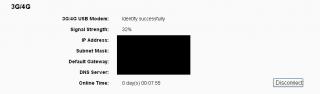
|
|
|
Nov 25 2012, 11:32 PM
|
|
Elite
6,931 posts Joined: Apr 2011 From: Bolehland for sure ^_^
|
QUOTE(EnegueWeil @ Nov 25 2012, 10:40 PM) aye mate, did that with 2100mhz tick only in MDMA~ ><! if u are using E372 with openwrt,then i guess u are same case like me,.. the openwrt always reset the Band config back to Automatic , then you are connected to UMTS900 tower,.. so far i haven't able to find any solution other than flash back to tplink stock firmware on router ,.. if u are using it with tp link stock firmware with your router, your UMTS2100 band config would be fine though  |
|
|
Nov 25 2012, 11:34 PM
|
|
Elite
6,931 posts Joined: Apr 2011 From: Bolehland for sure ^_^
|
QUOTE(bingozero @ Nov 25 2012, 10:55 PM) Today don't know what happen, my TL-MR3420 V2.1 suddenly show out the signal strength, before that is maintain 0% mine also suddenly can show signal % since last night, am shocked
 [attachmentid=3174294] |
|
|
Nov 25 2012, 11:55 PM
|
|
Junior Member
34 posts Joined: Nov 2010
|
QUOTE(chuahcs79 @ Nov 25 2012, 11:32 PM) if u are using E372 with openwrt, running all stock firmwares~ somehow there seems to be a bottle neck from the router~ ><!then i guess u are same case like me,.. the openwrt always reset the Band config back to Automatic , then you are connected to UMTS900 tower,.. so far i haven't able to find any solution other than flash back to tplink stock firmware on router ,.. if u are using it with tp link stock firmware with your router, your UMTS2100 band config would be fine though |
|
Topic ClosedOptions
|
| Change to: |  0.0259sec 0.0259sec
 0.55 0.55
 6 queries 6 queries
 GZIP Disabled GZIP Disabled
Time is now: 10th December 2025 - 10:06 AM |
 Quote
Quote