

QUOTE(chuahcs79 @ Nov 23 2012, 11:44 PM)
though u getting those home plug powerline lan cable version ? 

Nope, he got those Homeplug WiFi extender series 
Tp LInk TL-MR3420 Owner CLub V2
|
|
 Nov 23 2012, 11:55 PM Nov 23 2012, 11:55 PM
|
 
Elite
8,413 posts Joined: Jul 2008  
|
QUOTE(chuahcs79 @ Nov 23 2012, 11:44 PM) though u getting those home plug powerline lan cable version ? Nope, he got those Homeplug WiFi extender series |
|
|
|
|
|
Nov 23 2012, 11:57 PM
|

Elite
6,931 posts Joined: Apr 2011 From: Bolehland for sure ^_^ 
|
QUOTE(blacktubi @ Nov 23 2012, 11:55 PM) Nope, he got those Homeplug WiFi extender series guess if the wifi really needed for handheld device then no choices,otherwise home plug lan cable series would do a better job though |
|
|
Nov 23 2012, 11:58 PM
|
 
Junior Member
156 posts Joined: Feb 2005
|
hi fren,
i have 2 question here 1. this TL-MR3420 can use with modem e173? 2. can use VPN to bypass quota? if yes....get setting how? Thanks |
|
|
Nov 24 2012, 12:06 AM
|

Senior Member
1,019 posts Joined: Nov 2006
|
QUOTE(chuahcs79 @ Nov 23 2012, 11:57 PM) guess if the wifi really needed for handheld device then no choices, these are what i bought todayotherwise home plug lan cable series would do a better job though  mine network setup  This post has been edited by chulk: Nov 24 2012, 12:07 AM |
|
|
Nov 24 2012, 12:07 AM
|

Senior Member
1,016 posts Joined: Dec 2006
|
Hmm.. I've been following this thread since V1, I think this thread worth to be post at http://forum.lowyat.net/Hardware
Anyone? |
|
|
Nov 24 2012, 12:20 AM
|
|
Elite
6,931 posts Joined: Apr 2011 From: Bolehland for sure ^_^
|
QUOTE(chulk @ Nov 24 2012, 12:06 AM) these are what i bought today oh u pairing it with a wifi extender version,..mine network setup now i get it  but that wifi extender spread wifi signal weak though |
|
|
|
|
|
Nov 24 2012, 12:30 AM
|
|
Senior Member
1,019 posts Joined: Nov 2006
|
QUOTE(chuahcs79 @ Nov 24 2012, 12:20 AM) oh u pairing it with a wifi extender version,.. yeah is weak but good enough for ipad and iphone within 5-8 meter~ outside my room cover by 3420~now i get it but that wifi extender spread wifi signal weak though pc using LAN connection~~~  |
|
|
Nov 24 2012, 01:29 AM
|
|
Elite
6,931 posts Joined: Apr 2011 From: Bolehland for sure ^_^
|
QUOTE(chulk @ Nov 24 2012, 12:30 AM) yeah is weak but good enough for ipad and iphone within 5-8 meter~ outside my room cover by 3420~ well if u have handheld device then of course u need it,.. pc using LAN connection~~~ it best solution that pc can still use lan and handheld device all can wifi too,. speed should be as good as lan cable direct to mr3420 right with these home plug ? |
|
|
Nov 24 2012, 02:32 AM
|
|
Elite
6,931 posts Joined: Apr 2011 From: Bolehland for sure ^_^
|
my setup combination still stable
 but signal 0% & DNS both bug  ( as i am using google dns )  [attachmentid=3171888] This post has been edited by chuahcs79: Nov 24 2012, 02:33 AM |
|
|
Nov 24 2012, 02:40 AM
|

Senior Member
558 posts Joined: Jun 2006 From: Lowyat.Net 
|
Poisoned by so many router combinations. Will have to find time to dig up my old Aztech routers from the streamyx days...see got OpenWRT support or not
If can support, will try to setup a wifi network for whole house + print server package addon  |
|
|
Nov 24 2012, 02:57 AM
|
|
Elite
6,931 posts Joined: Apr 2011 From: Bolehland for sure ^_^
|
QUOTE(ibnuasad @ Nov 24 2012, 02:40 AM) Poisoned by so many router combinations. Will have to find time to dig up my old Aztech routers from the streamyx days...see got OpenWRT support or not If can support, will try to setup a wifi network for whole house + print server package addon  u get poison too from dual router setup ? yea it works great and prety convenien when second router is openwrt support, can add packages addon on what u need,.. |
|
|
Nov 24 2012, 08:00 AM
|

Senior Member
8,025 posts Joined: Feb 2005 From: Planet Boleland
|
QUOTE(chuahcs79 @ Nov 24 2012, 02:57 AM) u get poison too from dual router setup ? yea it works great and prety convenien when second router is openwrt support, can add packages addon on what u need,..  Chuah, you knew all the while that DDWRT have issues with 3G and yet you get butthurt that i dun dial in using it Same as my setup, you used Mr3420 V2 to dial in , then u used a Mr3420 with OpenWRT to rout out....... My difference is now i used a HW550 to dial in then LAN out to a DDWRT to do routing, This is my second DDWRT flashed router, an older version with less memory and a slower CPU but the connection is stable as a rock, called, Linksys WRT54G/GL/GS. This is my speedtest b4 a test download ( bull one la, not accurate at all, so dun trust Speedtest results )The tower/base stn is > 2km from my place ( Blacktubi checked it for me ady ) RSSI=93dBm.  And this is the real download data/stats. 
I need some sifu help ( bottom pics), pls scroll to the bottom part where i Red Arrow the part " Active IP Connections = 50" What does it mean, as i noticed that the figure change every now and then sometimes the value go as high as 130. Does it mean that there are 50 users using Maxis on that tower to go online? 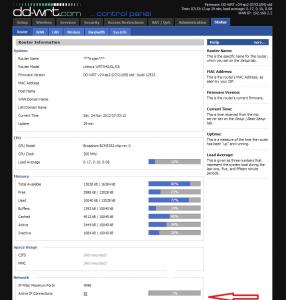
|
|
|
Nov 24 2012, 09:04 AM
|
|
Senior Member
8,025 posts Joined: Feb 2005 From: Planet Boleland
|
the Active Connections increased so much after 9am

now 10.27am, lagi banyak 
This post has been edited by digilife: Nov 24 2012, 10:27 AM |
|
|
|
|
|
Nov 24 2012, 10:36 AM
|
|
Senior Member
1,019 posts Joined: Nov 2006
|
QUOTE(blacktubi @ Nov 23 2012, 11:55 PM) Nope, he got those Homeplug WiFi extender series as promised.  wish no lightning strike.....  now i need to climb up each time for anything...  i really really need the L connector......sifu ~~~~~ |
|
|
Nov 24 2012, 10:57 AM
|

Junior Member
316 posts Joined: Oct 2009
|
QUOTE(chulk @ Nov 24 2012, 10:36 AM) as promised. how is the before and after speed , ping & etc ? maybe I should put my panel at rooftop like yours |
|
|
Nov 24 2012, 12:25 PM
|
|
Elite
8,413 posts Joined: Jul 2008
|
QUOTE(chulk @ Nov 24 2012, 10:36 AM) as promised. As promised. Next Friday wish no lightning strike..... now i need to climb up each time for anything... i really really need the L connector......sifu ~~~~~  Anyway, great job  Amazed such many drilling and DIY job  |
|
|
Nov 24 2012, 02:54 PM
|
|
Elite
6,931 posts Joined: Apr 2011 From: Bolehland for sure ^_^
|
QUOTE(digilife @ Nov 24 2012, 08:00 AM) i tot you dial-in using OpenWRT while you have been hammering me that i dun dial in using a DDWRT router ? current saturday very high speed Chuah, you knew all the while that DDWRT have issues with 3G and yet you get butthurt that i dun dial in using it Same as my setup, you used Mr3420 V2 to dial in , then u used a Mr3420 with OpenWRT to rout out....... My difference is now i used a HW550 to dial in then LAN out to a DDWRT to do routing, This is my second DDWRT flashed router, an older version with less memory and a slower CPU but the connection is stable as a rock, called, Linksys WRT54G/GL/GS. This is my speedtest b4 a test download ( bull one la, not accurate at all, so dun trust Speedtest results )The tower/base stn is > 2km from my place ( Blacktubi checked it for me ady ) RSSI=93dBm. And this is the real download data/stats. » Click to show Spoiler - click again to hide... « I need some sifu help ( bottom pics), pls scroll to the bottom part where i Red Arrow the part " Active IP Connections = 50" What does it mean, as i noticed that the figure change every now and then sometimes the value go as high as 130. Does it mean that there are 50 users using Maxis on that tower to go online? » Click to show Spoiler - click again to hide... « 1.9 ~ 2.05MB/s the test file finish less than 1 min for 100MB This post has been edited by chuahcs79: Nov 24 2012, 03:25 PM |
|
|
Nov 24 2012, 07:00 PM
|
|
Senior Member
1,019 posts Joined: Nov 2006
|
QUOTE(n0v1ce @ Nov 24 2012, 10:57 AM) how is the before and after speed , ping & etc ? maybe I should put my panel at rooftop like yours ping is more stable.previously speed test, 50% chance i get 40-60ms, 50% chances about 60-200ms. now 90% 40-50ms, 10% 50-200ms (3G isnt as stable as FO connection, deal with it) for the speed, dont hope too much. previously 50% chances i get bet 5-8mbps, 30% will get either 3-5mbps or 8-12mbps, sometime gone crazy 20% chances will get about 1-3mbps or 12-18mbps. now 60% chances i get 6-10mbps, 30% about 3-6mbps or 10-12mbps, 10% below 3mbps or above 12mbps. i hardly see huge improve only about 10-20%, the speed affected by many issue, signal strength only 1 of its. specially when my signal strength already 60% without antenna, with antenna it will improve to 80% but the speed wont be improve that much. however if without antenna the signal strength is below 40%, i believe the antenna will bring significant results. |
|
|
Nov 24 2012, 07:18 PM
|

Senior Member
3,158 posts Joined: Apr 2005 From: -Butterworth, Penang- 
|
QUOTE(digilife @ Nov 24 2012, 09:04 AM) the Active Connections increased so much after 9am not sure what it is...
now 10.27am, lagi banyak
last time i use this DDWRT on my 3020 i did not even pay attention on this it look like it can detect how many connection connected to a tower  but i not sure it is detect total connection to the tower... by the way..DDWRT is more user friendly compare to open wrt.. i still looking for DDWRT support for my TL 3420 |
|
|
Nov 24 2012, 07:35 PM
|
|
Senior Member
8,025 posts Joined: Feb 2005 From: Planet Boleland
|
QUOTE(stevenlee @ Nov 24 2012, 07:18 PM) not sure what it is... i hearsay that DDWRT have issues with 3G on "direct dial-in usage" meaning any 3G router , if flashed into DDWRT have some issues........and thats why i use a Default FW MR3420 to dial-in than LAN out to my DDWRT flashed router.last time i use this DDWRT on my 3020 i did not even pay attention on this it look like it can detect how many connection connected to a tower but i not sure it is detect total connection to the tower... by the way..DDWRT is more user friendly compare to open wrt.. i still looking for DDWRT support for my TL 3420 Yes, DDWRT have more options to play play.... |
|
Topic ClosedOptions
|
| Change to: |  0.0344sec 0.0344sec
 0.32 0.32
 6 queries 6 queries
 GZIP Disabled GZIP Disabled
Time is now: 9th December 2025 - 05:20 PM |
 Quote
Quote