Welcome Guest ( Log In | Register )

Bump Topic Topic Closed RSS Feed
44 Pages « < 8 9 10 11 12 > » Bottom

Outline · [ Standard ] · Linear+

 Tp LInk TL-MR3420 Owner CLub V2

views
     
digilife
post Nov 23 2012, 06:31 PM

The MNP guy, its me yeah.
*******
Senior Member
8,025 posts

Joined: Feb 2005
From: Planet Boleland


QUOTE(chuahcs79 @ Nov 23 2012, 06:05 PM)
if only act as a pure wireless router, any brand will do,. no need high power 2.5A anyway,.

unless u try your DDWRT with 3G then that's a whole different story,
*
Look at it this way, Your OpenWRT router+modem dial into maxis on a shared power of 1A, which I believe is "under power". I believe you should use the 2 Router way. .

Mine is a little bit different , the MF680+MR3420 combined as a "oversized modem" that is powered by a 1A adaptor dial into Maxis and supply the Internet signal into a DDWRT Dlink via a Cat6e LAN Cable. The "oversized modem is AC powered by a 1A adaptor ( converter that convert 240V of Alternate Current (AC) into 12V , 1A of Direct Current(DC).

The Dlink utilise it full power (2.5A) to process the Internet signal supported by the DDWRT Enhanced Firmware and release it via WiFi to my laptop. Hence i get a more stable and uniform WiFi signal.........and DDWRT have more options for you to tweak,play and modify although i dun exactly knoe what those extra functions are for doh.gif sweat.gif rclxub.gif


TSchuahcs79
post Nov 23 2012, 06:36 PM

Look at all my stars!!
Group Icon
Elite
6,931 posts

Joined: Apr 2011
From: Bolehland for sure ^_^


QUOTE(digilife @ Nov 23 2012, 06:31 PM)
Look at it this way, Your OpenWRT router+modem dial into maxis on a shared power of 1A, which I believe is "under power". I believe you should use the 2 Router way. .

Mine is a little bit different , the MF680+MR3420 combined as a "oversized modem" that is powered by a 1A adaptor dial into Maxis and supply the Internet signal into a DDWRT Dlink via a Cat6e LAN Cable. The "oversized modem is AC powered by a 1A adaptor ( converter that convert 240V of Alternate Current (AC) into 12V , 1A of Direct Current(DC).

The Dlink utilise it full power (2.5A) to process the Internet signal supported by the DDWRT Enhanced Firmware and release it via WiFi to my laptop. Hence i get a more stable and uniform WiFi signal.........and DDWRT have more options for you to tweak,play and modify although i dun exactly knoe what those extra functions are for  doh.gif  sweat.gif  rclxub.gif
*
unless u have try DDwrt with 3G, otherwise that will prove nothing much,

V2 alone can handle dialing + wifi N and still stable too ( which i tested before )


Added on November 23, 2012, 6:50 pmThis is Result of TL-MR3420 V2 alone

Connected to V2 Via Lan cable
user posted image

Connected to V2 Via Wireless N 300Mbps
user posted image


as u can see V2 alone can handle dialing usb modem + Wireless N both task together even without V1 act as wireless router too notworthy.gif


This post has been edited by chuahcs79: Nov 23 2012, 06:50 PM
digilife
post Nov 23 2012, 07:12 PM

The MNP guy, its me yeah.
*******
Senior Member
8,025 posts

Joined: Feb 2005
From: Planet Boleland


QUOTE(chuahcs79 @ Nov 23 2012, 06:36 PM)
unless u have try DDwrt with 3G, otherwise that will prove nothing much,

V2 alone can handle dialing + wifi N and still stable too ( which i tested before )
*
I already explained very clearly using MR3420+MF680 as a 3G source, you still can't read me? sweat.gif

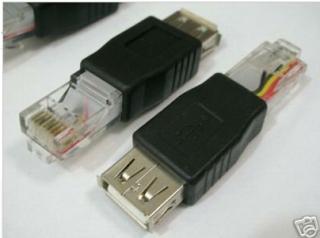
I guess i have to find this to plug it into my DDWRT's flashed Router's WAN port to see if it supports it.

LAN male to USB female adaptor

Modem on one end and WAN plug on the other, you never knoe DDWRT dun support tilll you tried.......

Attached Image

This post has been edited by digilife: Nov 23 2012, 07:14 PM
blacktubi
post Nov 23 2012, 07:16 PM

-
Group Icon
Elite
8,415 posts

Joined: Jul 2008

QUOTE(digilife @ Nov 23 2012, 05:36 PM)
For those of you who wan to use the 2 routers trick, make sure both router dun share the same log in IP

eg: MR3420 V1 log in IP is 192.168.1.1 and MR3420 V2 is 192.168.0.1 , this combo is fine  thumbup.gif

I tested MR3420 V1 and WR1043ND ( both shared the same log-in IP of 192.168.1.1)  , this wont work  doh.gif

I bought another used DDWRT Flashed Dlink , and it rocks as i use MR3420 V1 to dial in and LAN out into the Dlink (192.168.0.1) to wifi out.......~ this one more Geng as it have 32MB of flash memory , more options to tweak tweak , "damage to my wallet" = rm50  brows.gif
[attachmentid=3171135]

@Chuah, get one before its too late when everyone knoe how to sapu them them from garage sale.......

My second DDWRT router have newer FW compared to the first one......
*
Your router is running DD-WRT r14896 which is extremely old sweat.gif

It is very easy to upgrade actually, just upload something like a usual firmware upgrade


Added on November 23, 2012, 7:16 pm
QUOTE(digilife @ Nov 23 2012, 07:12 PM)
I already explained very clearly using MR3420+MF680 as a 3G source, you still can't read me?  sweat.gif

I guess i have to find this to plug it into my DDWRT's flashed Router's WAN port to see if it supports it.

LAN male to USB female adaptor

Modem on one end and WAN plug on the other, you never knoe DDWRT dun support tilll you tried.......
*
Didn't support sweat.gif

This post has been edited by blacktubi: Nov 23 2012, 07:16 PM
digilife
post Nov 23 2012, 07:21 PM

The MNP guy, its me yeah.
*******
Senior Member
8,025 posts

Joined: Feb 2005
From: Planet Boleland


QUOTE(blacktubi @ Nov 23 2012, 07:16 PM)
Your router is running DD-WRT r14896 which is extremely old sweat.gif

It is very easy to upgrade actually, just upload something like a usual firmware upgrade


Added on November 23, 2012, 7:16 pm
Didn't support  sweat.gif
*
Is it as simple as Upgrade it like TP Link stock FW?


btw, i wan to poison Chuah with this Super Channel brows.gif brows.gif

Attached Image


TSchuahcs79
post Nov 23 2012, 07:23 PM

Look at all my stars!!
Group Icon
Elite
6,931 posts

Joined: Apr 2011
From: Bolehland for sure ^_^


QUOTE(digilife @ Nov 23 2012, 07:12 PM)
I already explained very clearly using MR3420+MF680 as a 3G source, you still can't read me?  sweat.gif

I guess i have to find this to plug it into my DDWRT's flashed Router's WAN port to see if it supports it.

LAN male to USB female adaptor

Modem on one end and WAN plug on the other, you never knoe DDWRT dun support tilll you tried.......

Attached Image
*
since u are trying to compare DDwrt to Openwrt /stock firmware on lan/wifi,

until your try your DDwrt with 3G, otherwise it prove nothing

i try openwrt with 3G in 1 router and 2 router combination before,

doesnt make big different,

V1 alone also able to handle dialing 3G + wireless G stable too

your DDwrt only act as wireless router, if u want wireless router, better get sapido,.. 1000mW (30dBm) High Power Boosts WiFi Signal 10 Times Stronger, way better signal even

http://www.sapido.com.tw/EN/productrb1733o_35g.htm


Added on November 23, 2012, 7:25 pm
QUOTE(digilife @ Nov 23 2012, 07:21 PM)
Is it as simple as Upgrade it like TP Link stock FW?
btw, i wan to poison Chuah with this Super Channel brows.gif  brows.gif

Attached Image
*
no, your move is rclxub.gif , u wont be able to poison me unless u able to produce DDwrt dialing 3g and able to hit higher speed more than 10Mbps in your area

otherwise u are wasting your time biggrin.gif

This post has been edited by chuahcs79: Nov 23 2012, 07:25 PM
blacktubi
post Nov 23 2012, 07:25 PM

-
Group Icon
Elite
8,415 posts

Joined: Jul 2008

QUOTE(digilife @ Nov 23 2012, 07:21 PM)
Is it as simple as Upgrade it like TP Link stock FW?
btw, i wan to poison Chuah with this Super Channel brows.gif  brows.gif

Attached Image
*
ftp://ftp.dd-wrt.com/others/eko/BrainSlay...c1-firmware.bin

Download and flash it through firmware upgrade

As usual blacktubi stuff, try at your own risk tongue.gif

Yours is DIR-615 C1 right
TSchuahcs79
post Nov 23 2012, 07:28 PM

Look at all my stars!!
Group Icon
Elite
6,931 posts

Joined: Apr 2011
From: Bolehland for sure ^_^


QUOTE(blacktubi @ Nov 23 2012, 07:25 PM)
ftp://ftp.dd-wrt.com/others/eko/BrainSlay...c1-firmware.bin

Download and flash it through firmware upgrade

As usual blacktubi stuff, try at your own risk tongue.gif

Yours is DIR-615 C1 right
*
Digilife didnt flash the router himself, he buy ready flashed,..

not like us adventures trying an experiment all ourself,. sweat.gif
blacktubi
post Nov 23 2012, 07:29 PM

-
Group Icon
Elite
8,415 posts

Joined: Jul 2008

QUOTE(chuahcs79 @ Nov 23 2012, 07:28 PM)
Digilife didnt flash the router himself, he buy ready flashed,..

not like us adventures trying an experiment all ourself,.  sweat.gif
*
Oops hmm.gif
That's why I mentioned try at own risk. No warranty tongue.gif


Added on November 23, 2012, 7:30 pmI am inside a Kampung now

My E355 dialed with by my humble Power Bank

user posted image

This post has been edited by blacktubi: Nov 23 2012, 07:30 PM
digilife
post Nov 23 2012, 07:34 PM

The MNP guy, its me yeah.
*******
Senior Member
8,025 posts

Joined: Feb 2005
From: Planet Boleland


QUOTE(blacktubi @ Nov 23 2012, 07:29 PM)
Oops hmm.gif
That's why I mentioned try at own risk. No warranty tongue.gif


Added on November 23, 2012, 7:30 pmI am inside a Kampung now

My E355 dialed with by my humble Power Bank

user posted image
*
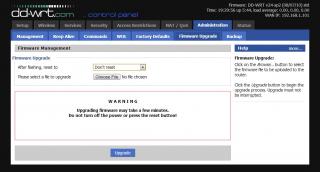
Thanks BT, its easy like you mentioned, i dare not flash from Custom > DDWRT cause scare headache as i am not good at these kind of stuff but as you mentioned, yeah its easy to upgrade the FW myself thumbup.gif

Attached Image

notworthy.gif notworthy.gif notworthy.gif

@Chuah, i dun need to convince you but i wan to make you lololuen , as i knoe your are like this now drool.gif

laugh.gif :
TSchuahcs79
post Nov 23 2012, 07:39 PM

Look at all my stars!!
Group Icon
Elite
6,931 posts

Joined: Apr 2011
From: Bolehland for sure ^_^


QUOTE(digilife @ Nov 23 2012, 07:34 PM)
Thanks BT, its easy like you mentioned, i dare not flash from Custom > DDWRT cause scare headache as i am not good at these kind of stuff but as you mentioned, yeah its easy to upgrade the FW myself  thumbup.gif

Attached Image

notworthy.gif  notworthy.gif  notworthy.gif

@Chuah, i dun need to convince you but i wan to make you lololuen , as i knoe your are like this now  drool.gif  

laugh.gif  :
*
sorry, no time to lololuen on your so called DDwrt,

unless you can use your so called gigabit lan port + DDwrt dial 3G to get 10~13Mbps in your area with your 42000/8640QoS in peak hour la,..

otherwise you are wasting your time doh.gif

i dont play online game, so 40~60ms ping is totally fine for me,.

as i only wanted to stable down the 13~16Mbps speed with capability to hold on the good IP longer hour than usual

my combination working amazing in : Online Time 2 day(s) 17:29:26

and result is

user posted image


Added on November 23, 2012, 7:46 pmone more thing facts about DDwrt:

if u did your homework,

DDwrt suitable for fibre/ADSL2+/wireless router effect = superb

DDwrt not suitable for 3G connection


This post has been edited by chuahcs79: Nov 23 2012, 07:46 PM
chulk
post Nov 23 2012, 08:50 PM

Regular
******
Senior Member
1,019 posts

Joined: Nov 2006
hey bro,

finally i got myself home plug with wireless now.

should i disable the router wifi?

if so, how can i disable it via webui?
blacktubi
post Nov 23 2012, 08:58 PM

-
Group Icon
Elite
8,415 posts

Joined: Jul 2008

QUOTE(chulk @ Nov 23 2012, 08:50 PM)
hey bro,

finally i got myself home plug with wireless now.

should i disable the router wifi?

if so, how can i disable it via webui?
*
No need disable, keep both of them so your WiFi signal better biggrin.gif
TSchuahcs79
post Nov 23 2012, 09:02 PM

Look at all my stars!!
Group Icon
Elite
6,931 posts

Joined: Apr 2011
From: Bolehland for sure ^_^


QUOTE(chulk @ Nov 23 2012, 08:50 PM)
hey bro,

finally i got myself home plug with wireless now.

should i disable the router wifi?

if so, how can i disable it via webui?
*
which version u are using ?

V1 ? V1.3 ? or V2 ? hmm.gif
chulk
post Nov 23 2012, 09:08 PM

Regular
******
Senior Member
1,019 posts

Joined: Nov 2006
QUOTE(chuahcs79 @ Nov 23 2012, 09:02 PM)
which version u are using ?

V1 ? V1.3 ? or V2 ?  hmm.gif
*
V2~~ biggrin.gif

whats the purpose to disable first router wifi?
TSchuahcs79
post Nov 23 2012, 09:14 PM

Look at all my stars!!
Group Icon
Elite
6,931 posts

Joined: Apr 2011
From: Bolehland for sure ^_^


QUOTE(chulk @ Nov 23 2012, 09:08 PM)
V2~~ biggrin.gif

whats the purpose to disable first router wifi?
*
if u want to disable the wireless

-> 192.168.0.1
-> sign in
-> wireless
-> untick the enable wireless router radio
-> click save


Added on November 23, 2012, 9:15 pmsome believe disable the wifi will give the router more power to dial the 3G modem and supply more power wor,..

This post has been edited by chuahcs79: Nov 23 2012, 09:16 PM
chulk
post Nov 23 2012, 09:21 PM

Regular
******
Senior Member
1,019 posts

Joined: Nov 2006
QUOTE(chuahcs79 @ Nov 23 2012, 09:14 PM)
if u want to disable the wireless

-> 192.168.0.1
-> sign in
-> wireless
-> untick the enable wireless router radio
-> click save


Added on November 23, 2012, 9:15 pmsome believe disable the wifi will give the router more power to dial the 3G modem and supply more power wor,..
*
well from my 3 years E&E experience, no such thing... i mean theoretical ~~~ biggrin.gif

thanks bro, now i know radio mean wifi signal~~~ icon_rolleyes.gif
TSchuahcs79
post Nov 23 2012, 09:26 PM

Look at all my stars!!
Group Icon
Elite
6,931 posts

Joined: Apr 2011
From: Bolehland for sure ^_^


QUOTE(chulk @ Nov 23 2012, 09:21 PM)
well from my 3 years E&E experience, no such thing... i mean theoretical ~~~ biggrin.gif

thanks bro, now i know radio mean wifi signal~~~ icon_rolleyes.gif
*
]
well i off my wifi because there is someone in my same block try to hack my wifi before,.

my chinese anti virus alert me and i kick banned his mac id,

from that day onwards i off my wifi, only use lan cable,.

well i agree that router is built for 3G and wifi both, some user here believe that off wifi can give more power to 3G function sweat.gif
chulk
post Nov 23 2012, 10:58 PM

Regular
******
Senior Member
1,019 posts

Joined: Nov 2006
QUOTE(chuahcs79 @ Nov 23 2012, 09:26 PM)
]
well i off my wifi because there is someone in my same block try to hack my wifi before,.

my chinese anti virus alert me and i kick banned his mac id,

from that day onwards i off my wifi, only use lan cable,.

well i agree that router is built for 3G and wifi both, some user here believe that off wifi can give more power to 3G function  sweat.gif
*
maybe he aware that you got god like internet connection ~~~ tongue.gif

anyway i turn my router wifi on again, home plug wifi signal not strong enough for whole house....(which is totally expectable...)
TSchuahcs79
post Nov 23 2012, 11:44 PM

Look at all my stars!!
Group Icon
Elite
6,931 posts

Joined: Apr 2011
From: Bolehland for sure ^_^


QUOTE(chulk @ Nov 23 2012, 10:58 PM)
maybe he aware that you got god like internet connection ~~~ tongue.gif

anyway i turn my router wifi on again, home plug wifi signal not strong enough for whole house....(which is totally expectable...)
*
though u getting those home plug powerline lan cable version ? hmm.gif

44 Pages « < 8 9 10 11 12 > » Top
Topic ClosedOptions
 

Change to:
| Lo-Fi Version
0.0173sec    0.72    6 queries    GZIP Disabled
Time is now: 12th December 2025 - 01:03 PM