Outline ·
[ Standard ] ·
Linear+
THE DD-WRT V1, For Linksys WRT54G/GL/GS Fans -ONLY-
|
sanosizo
|
 Jun 4 2006, 06:58 PM Jun 4 2006, 06:58 PM
|

|
im using the streamyx provided modem. its dsl600e if im not mistaken. so far no problem. btw i make sure during weekend both modem n router get a good 3 hour rest at least. machine need to rest too... right?
|
|
|
|
|
|
Criptonox89
|
Jun 5 2006, 01:19 PM
|
|
|
just bought a wrt54gs version 4.....haven't start using it yet...one question here......i'm using desktop now.....could i connect my computer to the net without using a LAN cable,that means using wireless connection without a network adapter?
|
|
|
|
|
|
prasys
|
Jun 5 2006, 01:49 PM
|
Heros Never Die

|
Huh...Without a Wireless Network Adapter....
Well you can connec tit wirelessly , all you need is a PCI/USB Wifi Network Adapter. If you're thinking of using BitTorrent on WiFi , Think again....
|
|
|
|
|
|
Criptonox89
|
Jun 5 2006, 03:40 PM
|
|
|
QUOTE(prasys @ Jun 5 2006, 01:49 PM) Huh...Without a Wireless Network Adapter.... Well you can connec tit wirelessly , all you need is a PCI/USB Wifi Network Adapter. If you're thinking of using BitTorrent on WiFi , Think again.... ic...Thanks.. hmm..any problem if i'm using WIFI on dl'ing using BT for 24/7? EDIT: i should buy 10/100MBs or 100/1000MBs network adaptors? This post has been edited by ANGELING: Jun 5 2006, 04:07 PM |
|
|
|
|
|
blaxez
|
Jun 5 2006, 04:41 PM
|
|
|
QUOTE(MX510 @ Jun 1 2006, 10:57 PM) Any snapshot for longest uptime for DD-WRT in here   18 days and still counting  |
|
|
|
|
|
ldragon
|
Jun 5 2006, 06:15 PM
|
|
|
i have been bt for a long time using USB Wi-Fi link to WRT54GSv4+Alcatel Speedtouch Pro ADSL Modem. 24x7 never off & no hang  This post has been edited by ldragon: Jun 5 2006, 06:20 PM This post has been edited by ldragon: Jun 5 2006, 06:20 PM |
|
|
|
|
|
Criptonox89
|
Jun 6 2006, 01:00 AM
|
|
|
faced a problem while installing my WRT54GS.....my modem(Aztech DSL305E) cannot detect my linksys router......anyone faced this problem before?
EDIT: i read start from 1st post.....is that the cd that comes with the router('run cd 1st' stick on it) is totally useless? i've to use dd-wrt to install my router?
Thanks in advanced...
This post has been edited by ANGELING: Jun 6 2006, 01:26 AM
|
|
|
|
|
|
blaxez
|
Jun 6 2006, 02:15 AM
|
|
|
QUOTE(ANGELING @ Jun 6 2006, 01:00 AM) faced a problem while installing my WRT54GS.....my modem(Aztech DSL305E) cannot detect my linksys router......anyone faced this problem before? EDIT: i read start from 1st post.....is that the cd that comes with the router('run cd 1st' stick on it) is totally useless? i've to use dd-wrt to install my router? Thanks in advanced... make sure you set your WRT54GS to router mode and plug your modem into the WAN port just flash your router with dd-wrt firmware and forget about the CD, it's just a wizard that helps you configure your network, that's all |
|
|
|
|
|
Criptonox89
|
Jun 6 2006, 08:41 AM
|
|
|
i found it's very hard to connect to www.dd-wrt.com since yesterday night until now.....maybe i'll try again after my vocation....
anyway...Thanks for ur all advices and helps....
|
|
|
|
|
|
blaxez
|
Jun 6 2006, 12:31 PM
|
|
|
I am wondering how can I access my modem's configuration page that is connected to my WRT54G's WAN port. Can you guys help me out?
|
|
|
|
|
|
jinaun
|
Jun 6 2006, 12:37 PM
|
where are my stars???

|
QUOTE(blaxez @ Jun 6 2006, 12:31 PM) I am wondering how can I access my modem's configuration page that is connected to my WRT54G's WAN port. Can you guys help me out? u can try this method.... technically it should work of coz if ur modem and the router uses the same IP, eg. 192.168.1.1 then you should configure either ur modem or router with anohter ip.. eg 192.168.1.2 after this u should be able to access ur modem (192.168.1.1) and ur router (192.168.1.2) This post has been edited by jinaun: Jun 6 2006, 12:40 PM Attached thumbnail(s)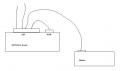
|
|
|
|
|
|
blaxez
|
Jun 6 2006, 01:04 PM
|
|
|
QUOTE(jinaun @ Jun 6 2006, 12:37 PM) u can try this method.... technically it should work of coz if ur modem and the router uses the same IP, eg. 192.168.1.1 then you should configure either ur modem or router with anohter ip.. eg 192.168.1.2 after this u should be able to access ur modem (192.168.1.1) and ur router (192.168.1.2) it seems like a short-circuit and I can't access dd-wrt's configuration page when I link my modem the way you mentioned, thanks anyway This post has been edited by blaxez: Jun 6 2006, 01:04 PM |
|
|
|
|
|
stmu
|
Jun 6 2006, 01:18 PM
|
Getting Started

|
oh yeah this is another way for the access to the modem if its plugged to ur internet port in ur WRT54G.
Oh this thing only work for those firmware like eg DD-WRT that can run command. in administrator ->diagnostics page
For Ur Modem configuration
You need to put ur modem in bridge mode
then just change ur aztech modem ip to 192.168.0.1 netmask 255.255.255.0
For Ur WRT54G configuration
Set ur router IP to 192.168.1.1
go to administrator ->diagnostics page
put this 2 command in the command box
ifconfig vlan1:0 192.168.0.2 netmask 255.255.255.0
iptables -t nat -I POSTROUTING -o vlan1 -d 192.168.0.0/24 -j SNAT --to-source 192.168.0.2
click save firewall
reboot router.
Then u can access ur modem via 192.168.0.1
then u can access ur router via 192.168.1.1
|
|
|
|
|
|
arcan8888
|
Jun 6 2006, 10:04 PM
|
Getting Started
|
Hi there, I'm using the WRTG54 v2.2, just installed this firmware. But I've encountered an error already.  Why does the firmware deny me access after I reboot it using the web GUI? Gives a password invalid error. L:root, P:admin doesnt work. And btw, any of u mind sharing your Router settings? It would be nice to have a reference. Thanx alot ya  This post has been edited by arcan8888: Jun 6 2006, 10:05 PM This post has been edited by arcan8888: Jun 6 2006, 10:05 PM |
|
|
|
|
|
TSMX510
|
Jun 6 2006, 10:13 PM
|
|
|
QUOTE(arcan8888 @ Jun 6 2006, 10:04 PM) Hi there, I'm using the WRTG54 v2.2, just installed this firmware. But I've encountered an error already. Why does the firmware deny me access after I reboot it using the web GUI? Gives a password invalid error. L:root, P:admin doesnt work. And btw, any of u mind sharing your Router settings? It would be nice to have a reference. Thanx alot ya PM me i set your router remotely f.o.c :-) |
|
|
|
|
|
prasys
|
Jun 6 2006, 10:14 PM
|
Heros Never Die
|
Username : root
password : <your old Password>
If else fails , just do a hard reboot , just hold the restart button and it should restart
|
|
|
|
|
|
arcan8888
|
Jun 7 2006, 12:01 AM
|
Getting Started
|
QUOTE(prasys @ Jun 6 2006, 11:14 PM) Username : root password : <your old Password> If else fails , just do a hard reboot , just hold the restart button and it should restart Thanx ya. Yea I tried the old password with the username:root as well. Didnt work. I had to restart. As a result all my settings were gone, I had either reset all my settings or use a .bin to restore my old settings. Mafan~! But that only happened twice.......so far. Hasnt occured since I used IE to set my router settings. Previously I was using Firefox to set my router.  This post has been edited by arcan8888: Jun 7 2006, 12:08 AM This post has been edited by arcan8888: Jun 7 2006, 12:08 AM |
|
|
|
|
|
arcan8888
|
Jun 7 2006, 12:08 AM
|
Getting Started
|
QUOTE(MX510 @ Jun 6 2006, 11:13 PM) PM me i set your router remotely f.o.c :-) UGPM Thx ya. |
|
|
|
|
|
arcan8888
|
Jun 7 2006, 11:26 AM
|
Getting Started
|
Ok, so far my connection's uptime is 8 hours. So I guess my settings should be ok. But could some1 tell me what are the necessary ports used for viewing video over the internet (eg. YouTube), or is this considered under HTTP (ports 0 - 80) ? Please post examples of your QoS settings if possible. Another quick question. Should I enable the 'Wireless Multimedia Support Settings' under Wireless\Advanced Settings if say I want to stream video from another PC within the next work via WiFi? Rather, what is the purpose of Wireless Multimedia Support? Thanx ya. This post has been edited by arcan8888: Jun 7 2006, 11:28 AM |
|
|
|
|
|
jeremy05
|
Jun 8 2006, 01:31 AM
|
|
|
QUOTE(prasys @ Dec 30 2005, 07:54 PM) It does not work on V5 , nor any other 3rd party frimware do , becuase V5 does not use Linux anymore..nor it uses the broadcom chip My one can flash or not??? Help me to look the attachment, thanks! Attached thumbnail(s)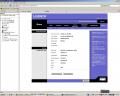
|
|
|
|
|



 Quote
Quote







 0.0186sec
 0.56
0.56
 6 queries
 GZIP Disabled