For those complaining about scroll lags and general UI lags on the MBP RD, the new Golden Master release of Mountain Lion just released yesterday to developers, have fixed that.
GM release is as close as the official release of Mountain Lion itself. Expect awesomeness for your new Retina Display MacBook Pro.
Thanks mate for this piece of info. I felt a sense of relief after seeing this. Guess ML has more support for Retina Display than Lion.
Was hoping them to update iBook Author and iWork to support Retina Display. Some of the apps that are not supporting retina yet.
I just got my Thunderbolt Display. With Apple wireless keyboard. Retina Display is still better, but I need the superb screen size.
I managed to keep my iPad, iPhone and RMBP charger in my travel bag. Thunderbolt display charges my iPad, iPhone and my RMBP now. Saved a few wall sockets as well.
External HDD for Time Machine is plugged to Thunderbolt display as well. Whenever I plugged in my TD, Time Machine backups my stuff.
Should say it is a good docking system for RMBP.
The GPU of my RMBP is driving at least 9 megapixels now.
Side note: Thunderbolt display comes with the Magsafe to Magsafe 2 adapter now. I bought additional adapter. The guys in Machines told me it is not included since it is "old stock". It is included.
Added on July 11, 2012, 3:06 am
QUOTE(-YS- @ Jul 11 2012, 01:27 AM)
Saw an interesting thread in Macrumors, those who ordered RMBP and got delayed in shipment, perhaps you guys should start calling Apple
It shows you which GPU are you using now. Some not-so-intensive apps are causing the GPU to switch from Intel HD 4000 to GT 650M which causes extra battery drain. You can switch it back to Intel HD 4000 manually. Or set the MBP to use Intel HD 4000 only if you are sure that you are just browsing and nothing too intensive.
This post has been edited by SurpriseZZZZZ: Jul 11 2012, 03:11 AM
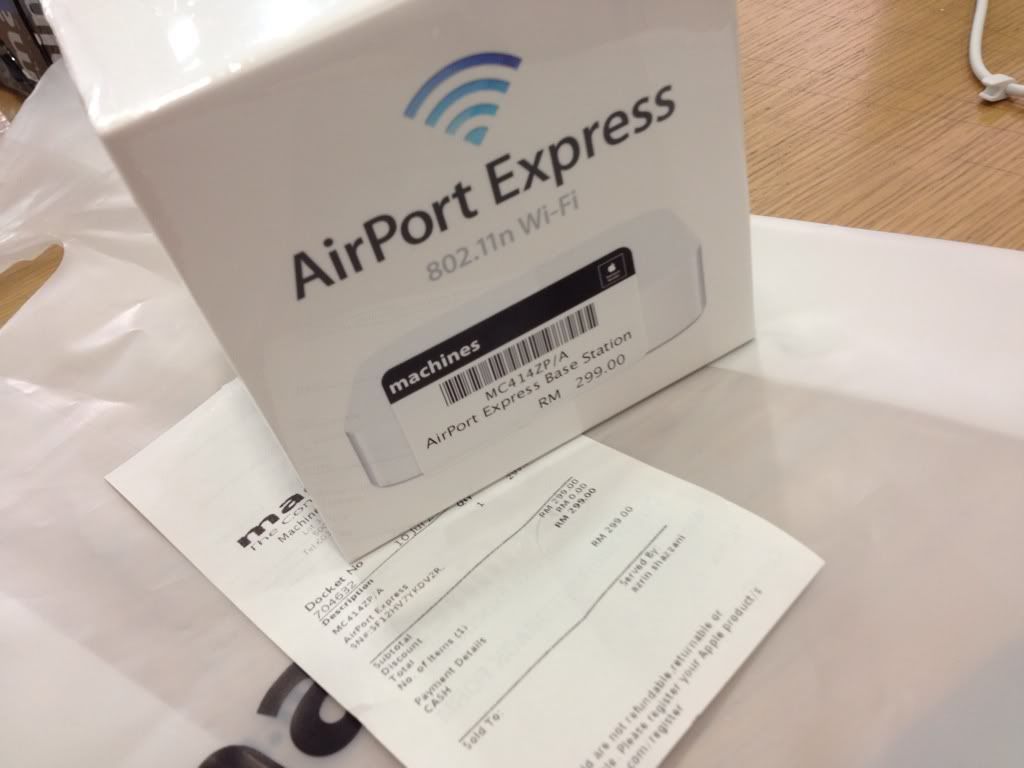
Apple's new Airport Express with ATV form factor is NOW AVAILABLE at Machines! I got mine at Machines KLCC. RM299.
» Click to show Spoiler - click again to hide... «
The unboxing:
I don't like the new form factor. I'm using Airport Express' all over my house to extend the WiFi range, and the previous direct-to-wall one suits me perfectly as I have one in the TV room, the kitchen, near my bedroom and the study room.
I can't imagine placing this new one in my kitchen and outside my bedroom
This post has been edited by Apple Fanboy: Jul 11 2012, 04:30 AM
I don't like the new form factor. I'm using Airport Express' all over my house to extend the WiFi range, and the previous direct-to-wall one suits me perfectly as I have one in the TV room, the kitchen, near my bedroom and the study room.
I can't imagine placing this new one in my kitchen and outside my bedroom
i second that, the older form factor does the job better
I don't like the new form factor. I'm using Airport Express' all over my house to extend the WiFi range, and the previous direct-to-wall one suits me perfectly as I have one in the TV room, the kitchen, near my bedroom and the study room.
I can't imagine placing this new one in my kitchen and outside my bedroom
You obviously don't travel much. If you do, you will come to a situation where hotels/locations have wall sockets that is too close to each other that using the Airport Express plugged into that socket blocks the other socket ports. OR in the case of the American wall ports, because of the thinness of the two prongs connected to the Airport Express, and the weight of the Airport Express itself, it will make the Airport Express droop out of the socket unless you prop its bottom with something.
The old AP may be perfect for certain situation, but it isn't for some other situation as well. The nature of Malaysian wall sockets where the ports are placed well far apart, you don't face the "ports blocked by the big body of the old AP" scenario. OR the drooping. Or if you've been to some European locations, the position of the wall sockets are not ideal to just use the prongs to hold up the weight of the AP by those prongs itself.
This post has been edited by stringfellow: Jul 11 2012, 01:28 PM
You obviously don't travel much. If you do, you will come to a situation where hotels/locations have wall sockets that is too close to each other that using the Airport Express plugged into that socket blocks the other socket ports. OR in the case of the American wall ports, because of the thinness of the two prongs connected to the Airport Express, and the weight of the Airport Express itself, it will make the Airport Express droop out of the socket unless you prop its bottom with something.
The old AP may be perfect for certain situation, but it isn't for some other situation as well. The nature of Malaysian wall sockets where the ports are placed well far apart, you don't face the "ports blocked by the big body of the old AP" scenario. OR the drooping. Or if you've been to some European locations, the position of the wall sockets are not ideal to just use the prongs to hold up the weight of the AP by those prongs itself.
I travel occasionally. I don't bring my Airport Express around with me though. So, yeah.
But I guess I see what you mean.
Added on July 11, 2012, 2:57 pm
QUOTE
Purported 13" Retina MacBook Pro benchmarks appear, launch rumored before Oct.
As benchmarks for an unreleased MacBook Pro running a previously unknown build of Mountain Lion have appeared, a new rumor suggests Apple could launch its 13-inch Retina display MacBook Pro before October of this year.
Test results for an unreleased "MacBookPro10,2" model first appeared in Geekbench logs in late June. The authenticity of the listing, which was brought to AppleInsider's attention on Tuesday, cannot be verified.
It shows that a MacBook Pro running OS X 10.8 Build 12A2056 uploaded Geekbench data on June 29. The machine was running an Intel Core i7-3520M Ivy Bridge processor clocked at 2.9 gigahertz.
The sole listing for the machine gives it a Geekbench score of 7806. That's below a score of 10999 earned by the new 15-inch Retina display MacBook Pro with an Intel Core i7-3615QM processor clocked at 2.3 gigahertz, but is higher than scores of around 5000 earned by early 2011 13-inch MacBook Pros.
The Geekbench listing also shows the unreleased MacBook Pro with an Apple-manufactured motherboard identified as "Mac-AFD8A9D944EA4843," while the BIOS is listed as "MBP102.88Z.00F2.B00.1206111035." The test machine had 4 gigabytes of 1600 megahertz DDR3 RAM.
Evidence of a new 13-inch MacBook Pro comes as a report from DigiTimes on Tuesday claimed that upstream component suppliers are preparing to provide parts to Apple for a 13-inch MacBook Pro with Retina display in the third quarter of 2012. Citing anonymous sources in the supply chain, the report said it is believed the new MacBook Pro could launch before October. Earlier reports had suggested the new 13-inch Retina MacBook Pro will be introduced by early October.
The Geekbench sighting is not the first instance of a "MacBookPro10,2" in the wild. Last month, an online battery test also potentially identified a 13-inch version of a MacBook Pro with Retina display.
The data discovered on Mini Battery Logger's website also showed a model with the "10,2" identifier, which is different from the "MacBookPro9,2" label Apple gave to its recently updated 13-inch MacBook Pro, which does not feature a Retina display. Currently, the Retina display is only available with a 15-inch MacBook Pro identified as "MacBookPro10,1," while the legacy 15-inch model is "MacBookPro9,1.
This post has been edited by Apple Fanboy: Jul 11 2012, 02:57 PM
A 13" Retina would kill either the 13" MBP, the 13" MBA or both. Doesn't make sense for Apple to cannibalize its own product lineup when it was just introduced. Even if they do end up releasing the 13" Retina, it'll be right after when the current 2012 model has run its course: its usual 12 month cycle.
It's not a far-fetched assumption to see Apple updating its entire lineup to Retina in the future, when the pricing and Retina display yield has improved.
This post has been edited by stringfellow: Jul 11 2012, 03:13 PM
Even if they do launch a retina-specced 13" in the next 6 months, expect it to be a top-of-the-line model only, with an RM600-700 premium over the top spec MBP/MBA 13".
Speaking of which, can't decide between base MBA vs MBP 13" now *pulls hair*
Even if they do launch a retina-specced 13" in the next 6 months, expect it to be a top-of-the-line model only, with an RM600-700 premium over the top spec MBP/MBA 13".
Speaking of which, can't decide between base MBA vs MBP 13" now *pulls hair*
The Last Word : Depends on what you want to do with it. For Light, on the Go, you need the 13" Air. The 11" is nice, but battery life is still around 5 hours only.
For multipurpose use, get the MBP 13". About the same battery life as the 13" Air, faster processor, upgradable RAM and HDD. Best all around, and not much heavier than the 13" Air. At least, when I am lugging it around.
The Last Word : Depends on what you want to do with it. For Light, on the Go, you need the 13" Air. The 11" is nice, but battery life is still around 5 hours only.
For multipurpose use, get the MBP 13". About the same battery life as the 13" Air, faster processor, upgradable RAM and HDD. Best all around, and not much heavier than the 13" Air. At least, when I am lugging it around.
not reli, depend on what you need the windows do from what i know the most stable booting in windows has 3 option:
1. Bootcamp Pros : your macbook can completely 100% become a window pc cons : must restart and choose to boot into windows, also means u cant use OS X in the same time until u reboot again. Have to isolate your hdd in to windows and Mac. example: total 250gb drive, u have to choose how much for OSX and how much for Windows, then both of them cant share the space after decided.
2. VMware fusion Pros : can use Windows and Mac togather without restarting, can share file at OS X desktop and other drive, use around 10gb space for windows only, good for testing stuff / light software only. Cons: will have slightly lag when loading stuff inside vm, eats lots of RAM (atleast 3.5gb), can run heavy application but will laggy, not every software from windows support vm (i heard from my colleague which use OSX too, i nvr encounter that yet)
3. Parellel desktop Pros : somthing like vmware fusion, but this application can run at background of ur OSX, means when u double click .exe those at OS X, it will straight promt out the window base installer etc to let u directly run those thing at OS X. Cons : I feel abit more laggy when opening and runing software in parellel then vmware fusion, so others i not reli sure..
anyway, above those is my personal experience, doesnt mean all is correct but that is my personal opinion only hehe. u may try ask other and see >.<
Correct me if I'm wrong, I was told that if we create a hard partition, say a 50GB size for Windows using Bootcamp, we can also access this partition directly from Parallels when using Mac OS X? Is this true? If this is true, then it can save a substantial disk space.
Correct me if I'm wrong, I was told that if we create a hard partition, say a 50GB size for Windows using Bootcamp, we can also access this partition directly from Parallels when using Mac OS X? Is this true? If this is true, then it can save a substantial disk space.
Yes, you can access. But that 50GB is still blocked for your windows which results in 50GB lesser for your OSX partition.


 Jul 11 2012, 12:33 AM


 Quote
Quote






 0.0331sec
 0.91
0.91
 6 queries
 GZIP Disabled