QUOTE(SurpriseZZZZZ @ Jul 9 2012, 03:29 PM)
Sounds pretty good for a USB 3 external HDD.

yes, and that is 2TB of juice inside 
Hardware 2012 NEW MacBook Pro | MacBook Air Users Thread, Version 9.0 - 95%/92% score on Gdgt.com!
|
|
 Jul 9 2012, 04:32 PM Jul 9 2012, 04:32 PM
|
 
Senior Member
988 posts Joined: Jul 2008  
|
QUOTE(SurpriseZZZZZ @ Jul 9 2012, 03:29 PM) Sounds pretty good for a USB 3 external HDD. yes, and that is 2TB of juice inside |
|
|
|
|
|
Jul 10 2012, 10:04 AM
|

Senior Member
7,924 posts Joined: Jul 2009
|
Mountain Lion Golden Master has been released to developers.
should be released to public in 2 weeks time |
|
|
Jul 10 2012, 02:35 PM
|

Junior Member
598 posts Joined: Oct 2008
|
Does anyone know if one is eligible for the Mountain Lion update if purchasing a "brand new" (read stock clearance) late-2011 MBP 13"
EDIT: Think I got my answer, so long as it's purchased on or after 11th June, I should be eligible irregardless of model. This post has been edited by tHe^CuLpRit: Jul 10 2012, 03:26 PM |
|
|
Jul 10 2012, 04:26 PM
|
 
Moderator
2,772 posts Joined: Apr 2009 
|
GUys, i wanna ask you all, if i purchase a Macbook Pro, can i install Windows 7 inside it ? I heard that we can boot windows 7 from an app which acts like VMWARE in Windows. Will i experience any lag if i do so ? I am planning to get the macbook pro with 8gb of RAM.
|
|
|
Jul 10 2012, 04:34 PM
|
|
Senior Member
7,924 posts Joined: Jul 2009
|
QUOTE(christcwl9 @ Jul 10 2012, 04:26 PM) GUys, i wanna ask you all, if i purchase a Macbook Pro, can i install Windows 7 inside it ? I heard that we can boot windows 7 from an app which acts like VMWARE in Windows. Will i experience any lag if i do so ? I am planning to get the macbook pro with 8gb of RAM. won't be laggy but not advisable if you're running heavy softwares |
|
|
Jul 10 2012, 04:35 PM
|

Senior Member
11,305 posts Joined: Jan 2003
|
QUOTE(christcwl9 @ Jul 10 2012, 04:26 PM) GUys, i wanna ask you all, if i purchase a Macbook Pro, can i install Windows 7 inside it ? I heard that we can boot windows 7 from an app which acts like VMWARE in Windows. Will i experience any lag if i do so ? I am planning to get the macbook pro with 8gb of RAM. 8GB RAM if you're using Bootcamp is plenty enough. Virtualization via VMWare/Parallels? Well, we've been through that debate/mess/arguments a few pages before, and I don't want to go there again. |
|
|
|
|
|
Jul 10 2012, 04:37 PM
|
|
Moderator
2,772 posts Joined: Apr 2009
|
QUOTE(BRY7 @ Jul 10 2012, 04:34 PM) won't be laggy but not advisable if you're running heavy softwares QUOTE(stringfellow @ Jul 10 2012, 04:35 PM) 8GB RAM if you're using Bootcamp is plenty enough. Virtualization via VMWare/Parallels? Well, we've been through that debate/mess/arguments a few pages before, and I don't want to go there again. If basic Microsoft office apps only it works flawless and smooth ? Ok thx for the input guys !  |
|
|
Jul 10 2012, 04:40 PM
|
|
Senior Member
11,305 posts Joined: Jan 2003
|
QUOTE(christcwl9 @ Jul 10 2012, 04:37 PM) If basic Microsoft office apps only it works flawless and smooth ? Ok thx for the input guys ! Word processing and productivity suite wouldn't tax the system much. Even via virtualization. I avoid Windows altogether. There's a Microsoft Office for Mac now. This post has been edited by stringfellow: Jul 10 2012, 04:40 PM |
|
|
Jul 10 2012, 04:51 PM
|
|
Senior Member
988 posts Joined: Jul 2008
|
QUOTE(christcwl9 @ Jul 10 2012, 04:37 PM) If basic Microsoft office apps only it works flawless and smooth ? Ok thx for the input guys ! basic work only should be ok for VM with windows installed, i have tried (just test) play diablo3 inside with everything set to the lowest so far still acceptable. anyway, for microsoft words those there is mac version.Better use bootcamp if wana use windows to play mid and heavy game / application. This post has been edited by FishnChipx: Jul 10 2012, 04:51 PM |
|
|
Jul 10 2012, 04:58 PM
|
|
Moderator
2,772 posts Joined: Apr 2009
|
QUOTE(FishnChipx @ Jul 10 2012, 04:51 PM) basic work only should be ok for VM with windows installed, i have tried (just test) play diablo3 inside with everything set to the lowest so far still acceptable. anyway, for microsoft words those there is mac version. So bootcamp is something like a must if we wan to boot windows in Mac ? hahaBetter use bootcamp if wana use windows to play mid and heavy game / application. Appreciate your reply bro |
|
|
Jul 10 2012, 05:22 PM
|
|
Senior Member
988 posts Joined: Jul 2008
|
QUOTE(christcwl9 @ Jul 10 2012, 04:58 PM) So bootcamp is something like a must if we wan to boot windows in Mac ? haha not reli, depend on what you need the windows do Appreciate your reply bro from what i know the most stable booting in windows has 3 option: 1. Bootcamp Pros : your macbook can completely 100% become a window pc cons : must restart and choose to boot into windows, also means u cant use OS X in the same time until u reboot again. Have to isolate your hdd in to windows and Mac. example: total 250gb drive, u have to choose how much for OSX and how much for Windows, then both of them cant share the space after decided. 2. VMware fusion Pros : can use Windows and Mac togather without restarting, can share file at OS X desktop and other drive, use around 10gb space for windows only, good for testing stuff / light software only. Cons: will have slightly lag when loading stuff inside vm, eats lots of RAM (atleast 3.5gb), can run heavy application but will laggy, not every software from windows support vm (i heard from my colleague which use OSX too, i nvr encounter that yet) 3. Parellel desktop Pros : somthing like vmware fusion, but this application can run at background of ur OSX, means when u double click .exe those at OS X, it will straight promt out the window base installer etc to let u directly run those thing at OS X. Cons : I feel abit more laggy when opening and runing software in parellel then vmware fusion, so others i not reli sure.. anyway, above those is my personal experience, doesnt mean all is correct but that is my personal opinion only hehe. u may try ask other and see >.< |
|
|
Jul 10 2012, 05:42 PM
|
|
Senior Member
11,305 posts Joined: Jan 2003
|
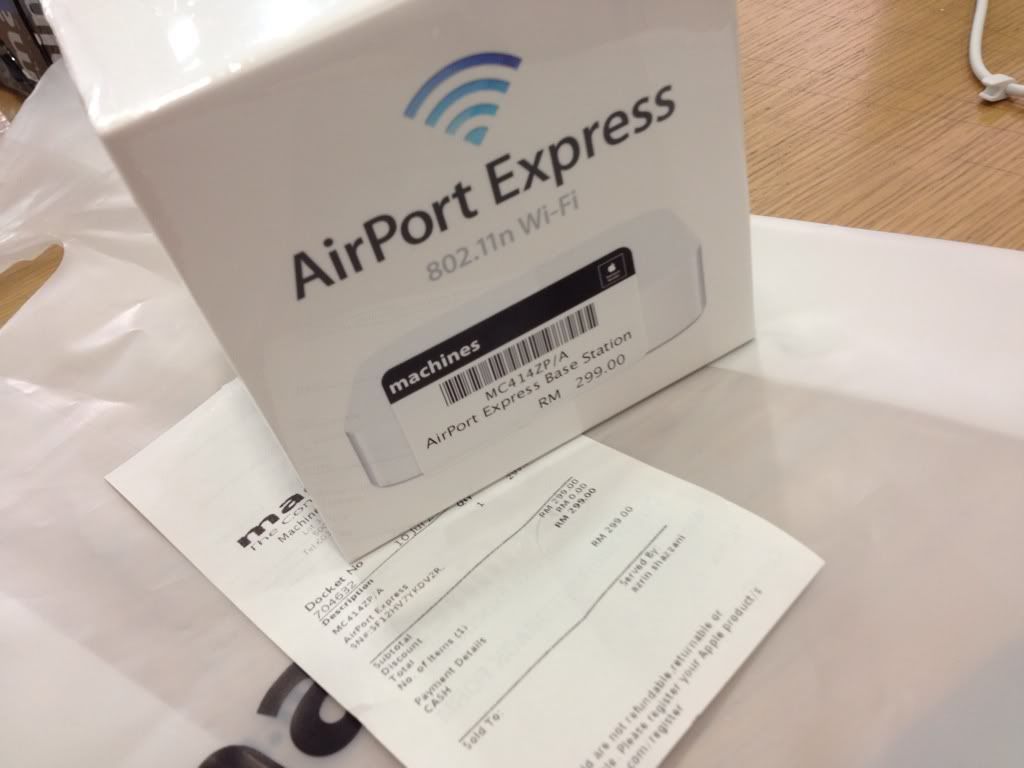
Apple's new Airport Express with ATV form factor is NOW AVAILABLE at Machines! I got mine at Machines KLCC. RM299.
» Click to show Spoiler - click again to hide... « The unboxing: This post has been edited by stringfellow: Jul 10 2012, 05:57 PM |
|
|
Jul 10 2012, 05:43 PM
|
|
Junior Member
356 posts Joined: Oct 2005
|
QUOTE(christcwl9 @ Jul 10 2012, 04:58 PM) So bootcamp is something like a must if we wan to boot windows in Mac ? haha if not wrong paralles can read windows from bootcamp partitionAppreciate your reply bro so you should install windows to bootcamp, use paralles to open windows by reading the bootcamp partition only restart and switch to windows when parallels cant handle the application 2 birds with one stone  |
|
|
|
|
|
Jul 10 2012, 06:30 PM
|

Junior Member
94 posts Joined: Feb 2008
|
planning to get a MacBook Air... Any comment about MacBook Air? 11" or 13" better?
|
|
|
Jul 10 2012, 06:38 PM
|
|
Junior Member
356 posts Joined: Oct 2005
|
QUOTE(jinwei83 @ Jul 10 2012, 06:30 PM) planning to get a MacBook Air... Any comment about MacBook Air? 11" or 13" better? well my personal preference would be the 13", 11" too small |
|
|
Jul 10 2012, 08:26 PM
|
|
Senior Member
11,305 posts Joined: Jan 2003
|
For those complaining about scroll lags and general UI lags on the MBP RD, the new Golden Master release of Mountain Lion just released yesterday to developers, have fixed that.
GM release is as close as the official release of Mountain Lion itself. Expect awesomeness for your new Retina Display MacBook Pro.  This post has been edited by stringfellow: Jul 10 2012, 08:28 PM |
|
|
Jul 10 2012, 08:30 PM
|
|
Moderator
2,772 posts Joined: Apr 2009
|
QUOTE(FishnChipx @ Jul 10 2012, 05:22 PM) not reli, depend on what you need the windows do Very detail explanation bro from what i know the most stable booting in windows has 3 option: 1. Bootcamp Pros : your macbook can completely 100% become a window pc cons : must restart and choose to boot into windows, also means u cant use OS X in the same time until u reboot again. Have to isolate your hdd in to windows and Mac. example: total 250gb drive, u have to choose how much for OSX and how much for Windows, then both of them cant share the space after decided. 2. VMware fusion Pros : can use Windows and Mac togather without restarting, can share file at OS X desktop and other drive, use around 10gb space for windows only, good for testing stuff / light software only. Cons: will have slightly lag when loading stuff inside vm, eats lots of RAM (atleast 3.5gb), can run heavy application but will laggy, not every software from windows support vm (i heard from my colleague which use OSX too, i nvr encounter that yet) 3. Parellel desktop Pros : somthing like vmware fusion, but this application can run at background of ur OSX, means when u double click .exe those at OS X, it will straight promt out the window base installer etc to let u directly run those thing at OS X. Cons : I feel abit more laggy when opening and runing software in parellel then vmware fusion, so others i not reli sure.. anyway, above those is my personal experience, doesnt mean all is correct but that is my personal opinion only hehe. u may try ask other and see >.< Thx for your info ^^ I think i will use bootcamp hahahaha |
|
|
Jul 10 2012, 08:38 PM
|
|
Senior Member
7,924 posts Joined: Jul 2009
|
QUOTE(stringfellow @ Jul 10 2012, 08:26 PM) For those complaining about scroll lags and general UI lags on the MBP RD, the new Golden Master release of Mountain Lion just released yesterday to developers, have fixed that. thats great!GM release is as close as the official release of Mountain Lion itself. Expect awesomeness for your new Retina Display MacBook Pro. all issues should be resolved with ML |
|
|
Jul 10 2012, 08:39 PM
|
|
Senior Member
988 posts Joined: Jul 2008
|
QUOTE(christcwl9 @ Jul 10 2012, 08:30 PM) Very detail explanation bro Glad that can be help Thx for your info ^^ I think i will use bootcamp hahahaha share with us once you get ur mbp sure no regret getting it |
|
|
Jul 10 2012, 08:43 PM
|
|
Moderator
2,772 posts Joined: Apr 2009
|
QUOTE(FishnChipx @ Jul 10 2012, 08:39 PM) Glad that can be help Hehe no prob bro! share with us once you get ur mbp sure no regret getting it  |
|
Topic ClosedOptions
|
| Change to: |  0.0210sec 0.0210sec
 0.66 0.66
 6 queries 6 queries
 GZIP Disabled GZIP Disabled
Time is now: 22nd December 2025 - 07:43 PM |
 Quote
Quote