Welcome Guest ( Log In | Register )

Bump Topic Topic Closed RSS Feed
7 Pages  1 2 3 > » Bottom

Outline · [ Standard ] · Linear+

Hardware 2012 NEW MacBook Pro | MacBook Air Users Thread, Version 9.0 - 95%/92% score on Gdgt.com!

views
     
TSstringfellow
post Jun 16 2012, 05:07 PM, updated 14y ago

Ultrawide | 4K | VR
********
Senior Member
11,305 posts

Joined: Jan 2003
user posted image

Rebuilt, coded from ground up, this is Version 9.0. Proclaim, explain and elaborate on your joy and sorrow, trials and tribulations of using your MacBooks(Pro *RETINA or Non-Retina* and Air)!


Current 2012 Lineup

user posted image

2012 MacBook Air

CODE
11.6/13.3" screen
1.7Ghz Core i5/1.8Ghz Core i5/ 2.0Ghz Core i7
4GB/8GB 1600Mhz DDR3 RAM
Intel HD4000 Graphics
64GB/128GB/256GB/512GB Flash Storage


A thorough review of the 2012 MacBook Air from a reviewer I like: Mike of DetroitBorg.

user posted image

*NEW!* Gdgt.com aggregated score for all online reviews for the new 2012 MacBook Air is here. 95% score out of 100! rclxms.gif

user posted image

2012 MacBook Pro & Retina Display Next-Generation MacBook Pro

CODE
13.3/15.4" screen/15.4" Retina Display screen
2.5GHz Core i5 Dual Core/ 2.9GHz Core i7 Dual Core/ 2.3Ghz Core i7 Quad Core/ 2.6Ghz Core i7 Quad Core/ 2.7Ghz Core i7 Quad Core
4GB/8GB/16GB 1600Mhz DDR3 RAM
Intel HD4000/ NVIDIA GeForce GT 650M 512GB GDDR5 VRAM/ NVIDIA GeForce GT 650M 1GB GDDR5 VRAM
500GB,750GB 5400rpm/7200rpm HDD/ 128GB,256GB,512GB,768GB SSD


A thorough review from a reviewer I like: Mike of DetroitBorg.


"The Man" himself, Anand Lal Shimpi of Anandtech.com speaks of his review of the next-generation MacBook Pro with Retina Display!

user posted image

user posted image


My own unboxing of the 2012 Retina Display Next Generation MacBook Pro!

*NEW!* Those interested to know how to unlock the 2880x1800 resolution on their Retina Display MBP, here is the link.

*NEW!* Gdgt.com aggregated score for all online reviews for the new Retina Display MacBook Pro 2012 is here. 92% score out of 100! rclxms.gif

For any other past Apple-related devices and/or Macs, download MacTracker for free.


RULES

I - NO SPAMMING ALLOWED!

- One-liners and posts like "<insert product> sucks!" without further elaborations on why it sucks will not be tolerated, and should not be entertained by others. At least be contentious and tell us why it sucks. There's a reason why this is called a forum, not a 140-characters social network outlet.

II - BE POLITE AND COURTEOUS

- Respect other member's opinions even it does not coincide with yours. Should you need to voice your disagreement, do so in an ambiance that foster discussions, not mudslinging or name-calling.

Version 5.0 http://forum.lowyat.net/topic/1391606
Version 6.0 http://forum.lowyat.net/topic/1513971
Version 7.0 http://forum.lowyat.net/topic/1756111
Version 8.0 http://forum.lowyat.net/topic/2064987

USEFUL LINKS

Online Apple Store Malaysia http://store.apple.com/my
Online Apple Education Store Malaysia http://store.apple.com/my-k12
MacBook Casing/Sleeves/Bags http://forum.lowyat.net/topic/994556
Should you buy your Mac now or wait? MacRumors Buyer's Guide http://buyersguide.macrumors.com/
General Mac Upgrade Discussion http://forum.lowyat.net/topic/990177
*NEW* 4K-resolution Retina Display test footages for new 2012 MacBook Pro Retina Display owners! http://www.gottabemobile.com/2012/03/27/10...2048-4k-videos/

Begin!


This post has been edited by stringfellow: Jun 25 2012, 11:46 PM
TSstringfellow
post Jun 16 2012, 07:06 PM

Ultrawide | 4K | VR
********
Senior Member
11,305 posts

Joined: Jan 2003
Congrats Edoras! brows.gif
TSstringfellow
post Jun 16 2012, 07:43 PM

Ultrawide | 4K | VR
********
Senior Member
11,305 posts

Joined: Jan 2003
You don't need to. The Display setting is set to "Automatic switching". I trust Apple is smart enough to switch between HD4000 and GT650M when the applications demands for it.

At "Best Retina" settings, scrolling iTunes and Safari is smooth. At the "Most space" setting emulating 1920x1200, even that is smooth as well, although the icons and texts starts to look tiny.

At the Display preference settings, Apple even warns that displaying setting at non-native a.k.a scaled resolution, it will cause performance degradation. I initially liked the "More Space"/1920x1200 setting, but have grown to love the ultra crispness of "Best Retina" setting.


Added on June 16, 2012, 7:45 pmAlso, to all new MBP RD owners, first thing you need to do (besides restoring from older backups) is install all the Software Updates. There is the important "Trackpad Update" that was reported to improve scrolling mechanism on Retina Display screen. Personally, I don't see any difference, since mine works buttery smooth.

This post has been edited by stringfellow: Jun 16 2012, 07:45 PM
TSstringfellow
post Jun 16 2012, 07:52 PM

Ultrawide | 4K | VR
********
Senior Member
11,305 posts

Joined: Jan 2003
Also, new MBP RD owners may wanna try Google Chrome Canary, the developer channel version of Google Chrome browser. Supports Retina Display, and ZERO lag on this one. Safari on Lion reportedly doesn't take advantage of any of the hardware capability of either the HD4000 or GT650M. Safari on Mountain Lion will fix that next month.
TSstringfellow
post Jun 16 2012, 08:23 PM

Ultrawide | 4K | VR
********
Senior Member
11,305 posts

Joined: Jan 2003
Stunning Retina-Ready wallpapers for your new MBP RD.

http://interfacelift.com/wallpaper/downloa...reen/2880x1800/

I'm still looking for that wallpaper of Okavango Zebras running on green grass on Apple.com webpage.
TSstringfellow
post Jun 17 2012, 12:49 PM

Ultrawide | 4K | VR
********
Senior Member
11,305 posts

Joined: Jan 2003
Good catch, Edoras! Holy shit, the Holy Grail of videos, 4K footages!

The Pixar test animation is so sharp my eyeballs bleed! Watching The Hobbit one now. The Transformers one nearly killed my MBP RD. The fan ran on overdrive on my MBP RD, and stutters like hell! Replayed it and then it because smooth. Good find, Edoras!

Adding that link on the first post for the benefit of new MBP RD owners.

This post has been edited by stringfellow: Jun 17 2012, 01:03 PM
TSstringfellow
post Jun 17 2012, 01:55 PM

Ultrawide | 4K | VR
********
Senior Member
11,305 posts

Joined: Jan 2003
Testing Diablo III now. 2880x1800. Who needs anti-aliasing at that resolution? tongue.gif
TSstringfellow
post Jun 17 2012, 02:15 PM

Ultrawide | 4K | VR
********
Senior Member
11,305 posts

Joined: Jan 2003
I got as far as the splash screen coz I installed the Starter Edition. No Starter game key yet, only be getting it later this evening. Starter Edition is the demo if anyone dont know what that is.

The splash screen is slick though at 2880x1800, and I dont see any lag. The splash screen is real time 3D anmation right?

This post has been edited by stringfellow: Jun 17 2012, 02:16 PM
TSstringfellow
post Jun 17 2012, 02:54 PM

Ultrawide | 4K | VR
********
Senior Member
11,305 posts

Joined: Jan 2003
LIke I said, I can't advance beyond the splash screen. No game key here.
TSstringfellow
post Jun 17 2012, 08:33 PM

Ultrawide | 4K | VR
********
Senior Member
11,305 posts

Joined: Jan 2003
Just tested Diablo 3 on 2880x1800, thanks to forum member Welwitchia for loaning his account. Jaw dropping doesn't begin to describe it. 2880x1800 at 25-30fps constant. Will drop to 15-17fps on heavier enemy scenes, but with shadows and high details. Drop it down further to 1680x1050 and its a solid 60fps. AWESOME, Blizzard!

Screenshots incoming. I had to upload it so a image sharing website that would not degrade the image quality down from its 2880x1800 quality. Stay tuned!

*gonna finally open that Diablo 3 LE that still shrink-wrapped at home*
TSstringfellow
post Jun 17 2012, 09:28 PM

Ultrawide | 4K | VR
********
Senior Member
11,305 posts

Joined: Jan 2003
Three screenshots when I remembered to wipe my drooling mouth, took my eyes off from the screen and screenshot it for reference. tongue.gif

Warning, image is SUPER LARGE. Diablo III in-game screenshots at 2880x1800. Framerates at top left corner.

» Click to show Spoiler - click again to hide... «


This post has been edited by stringfellow: Jun 17 2012, 11:11 PM
TSstringfellow
post Jun 17 2012, 11:13 PM

Ultrawide | 4K | VR
********
Senior Member
11,305 posts

Joined: Jan 2003
Image dimension corrected from previous upload to TinyPic to IMgur. Full res 2880x1800 now.

» Click to show Spoiler - click again to hide... «

TSstringfellow
post Jun 18 2012, 12:16 PM

Ultrawide | 4K | VR
********
Senior Member
11,305 posts

Joined: Jan 2003
I can't move my MacPro around.
TSstringfellow
post Jun 18 2012, 03:11 PM

Ultrawide | 4K | VR
********
Senior Member
11,305 posts

Joined: Jan 2003
A very thorough review by a reviewer I liked: DetroitBorg.


Going to the first page.

Also added DetroitBorg's thorough unboxing and review of the 2012 MacBook Air as well on the first post.

This post has been edited by stringfellow: Jun 18 2012, 03:15 PM
TSstringfellow
post Jun 18 2012, 08:12 PM

Ultrawide | 4K | VR
********
Senior Member
11,305 posts

Joined: Jan 2003
His words not mine, but from a person met at MacStudio yesterday who is used to working on the 17", and switched to my MBP RD, he says the experience is the same because of the resolution at negligible screen size difference. His words, not mine.

No surprises why Apple discontinued the 17" behemoth.
TSstringfellow
post Jun 19 2012, 12:02 AM

Ultrawide | 4K | VR
********
Senior Member
11,305 posts

Joined: Jan 2003
Present MBP RD owners looking for 4k footage, google "Timescapes: The Movie". The trailer of this movie is a WHOPPING 540MB on Youtube, which you can download using Youtube movie downloader app. 4096 x 2304 resolution, BEYOND the Retina Display, so your MBP RD will have to downsample the video to Retina resolution.

It's like looking out of the window!

Here is the Youtube link. http://www.youtube.com/watch?v=e-GYrbecb88


If you're using Chrome, you can get Chrome Extensions that'll allow you to download this at its WHOPPING 4096 x 2304! shocking.gif
TSstringfellow
post Jun 19 2012, 12:29 PM

Ultrawide | 4K | VR
********
Senior Member
11,305 posts

Joined: Jan 2003
QUOTE(shockk @ Jun 19 2012, 11:06 AM)
Does anyone know any shops that already have cases for the MBP Retina? like sleeves (that really fit it) and also cases (such as Speck SeeThru)
*
I'm stuck with a generic sleeve (gunmetal though) purchased from MacStudio. Criteria was slim and tight fitting so it satisfy both. Sleeve and zippered at the narrow end, and the zipper has this protective flap so tat when zippered it won't "bite" into the Retina Display MBP.

I'm thinking of getting a 15" Enevelope leather sleeve I used to have for my 13" Air last time.


Added on June 19, 2012, 12:35 pmI'll be dropping by KLCC, Low Yat Plaza and Pavilion with 4K footages to showcase how good they look on the MBP RD. Drop by if you have the chance. Details on my whereabouts are in my Twitter feed.

This post has been edited by stringfellow: Jun 19 2012, 12:35 PM
TSstringfellow
post Jun 19 2012, 02:46 PM

Ultrawide | 4K | VR
********
Senior Member
11,305 posts

Joined: Jan 2003
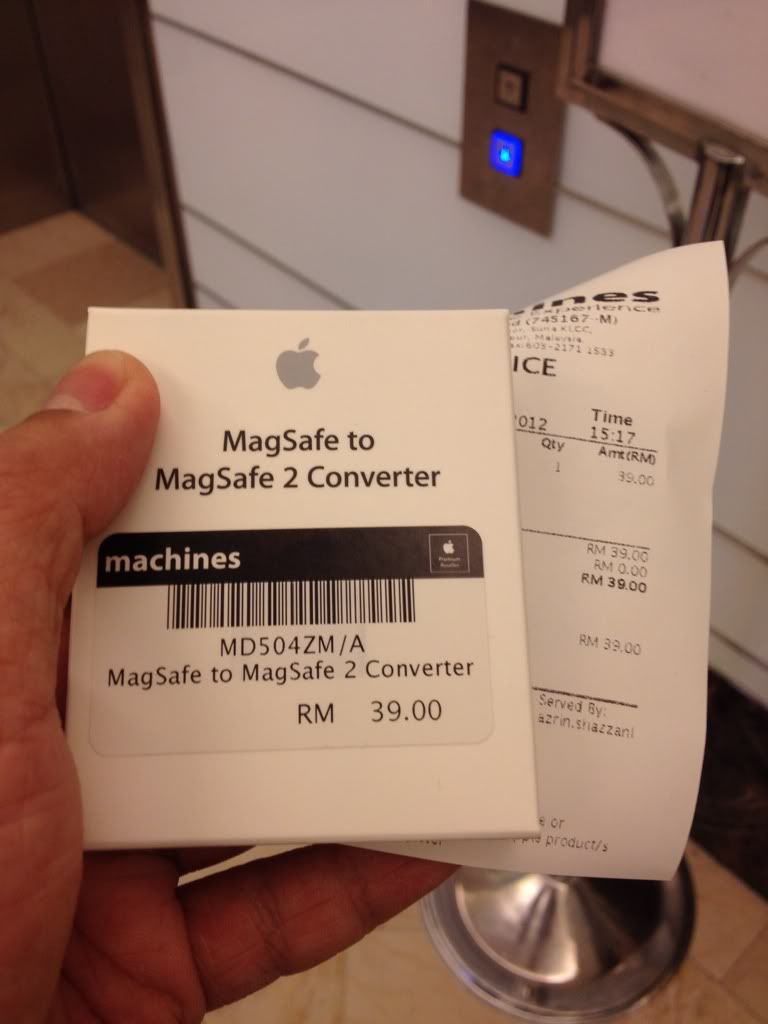
Those looking for official accessories for the new Retina Display MacBook Pro, some are available at Machines.

MagSafe 1 to MagSafe 2 adapter = RM39
Thunderbolt to Gigabit Ethernet adapter = RM99

I'm canceling my [WTS] HyperJuice 100Whr External Battery I have for my previous MacBook Air 11". With the MagSafe adapter, now can use with the HyperJuice battery! rclxms.gif
TSstringfellow
post Jun 19 2012, 03:30 PM

Ultrawide | 4K | VR
********
Senior Member
11,305 posts

Joined: Jan 2003
» Click to show Spoiler - click again to hide... «


MagSafe 1 to MagSafe 2 adapter from Machines. They also have the TB-to-GB Ethernet adapter for RM99.

This post has been edited by stringfellow: Jun 19 2012, 03:45 PM
TSstringfellow
post Jun 19 2012, 03:50 PM

Ultrawide | 4K | VR
********
Senior Member
11,305 posts

Joined: Jan 2003
As far as I know, only Machines chain of stores have display units. None at MacStudio. And I've not checked Pavilion's EpiCenter yet.


7 Pages  1 2 3 > » Top
Topic ClosedOptions
 

Change to:
| Lo-Fi Version
0.0505sec    0.29    7 queries    GZIP Disabled
Time is now: 21st December 2025 - 01:39 AM