

QUOTE(ahming888 @ Apr 15 2018, 11:14 PM)
3. Is ok connect multi phone to one output? So that several phone rings when incoming call
Yes, you can.Maxis Connect to Maxis using Custom Router!, Guidelines
|
|
 Apr 18 2018, 11:35 AM Apr 18 2018, 11:35 AM
|
 
Junior Member
529 posts Joined: Aug 2006 From: Oil Town (Miri)  
|
QUOTE(ahming888 @ Apr 15 2018, 11:14 PM) 3. Is ok connect multi phone to one output? So that several phone rings when incoming call Yes, you can. |
|
|
|
|
|
Apr 22 2018, 11:38 PM
|
|
Junior Member
529 posts Joined: Aug 2006 From: Oil Town (Miri)
|
For any user with Alcatel modem from TM.
Alcatel (LAN 2) > Thomson (WAN) Thomson (TEL 1) > Telephone Thomson (LAN) > Asus / TP_link / D-Link (WAN) *No VLAN needed Thomson (Maxis router) Disconnect from eInternet (Simply put any random username and password. Just make sure it don't connect using this router) Router (For Internet access) *No VLAN support needed Select PPPoE and key in your Maxis username and password |
|
|
May 20 2018, 09:51 PM
|

Junior Member
155 posts Joined: Jun 2009
|
Hello,
Switched to Maxis Hime Fiber from Unifi. Now the VDSL modem given by Maxis (ZTE-H268E) has gone kaput and the technician will only come in one week. I have previous Unifi VDSL modem (HUAWEI-HG655m) with me and I wanna use it as a temporary modem. Can anyone please share with me the configuration file so I can upload into the modem? Thank you in advance! |
|
|
May 21 2018, 12:18 PM
|

Junior Member
23 posts Joined: Jul 2011
|
QUOTE(poh880 @ Apr 22 2018, 11:38 PM) For any user with Alcatel modem from TM. Hey there, I'm using Maxis Aminia router, and also the Alcatel modem (I believe it's Alcatel, though it's TM logo on the front). I like to use the Maxis router for VoIP and TP-Link TL-WR1043N for WiFi. Can I use the same configuration you mentioned without tweaking the IP and LAN config on either the modem and router? Thanks. Alcatel (LAN 2) > Thomson (WAN) Thomson (TEL 1) > Telephone Thomson (LAN) > Asus / TP_link / D-Link (WAN) *No VLAN needed Thomson (Maxis router) Disconnect from eInternet (Simply put any random username and password. Just make sure it don't connect using this router) Router (For Internet access) *No VLAN support needed Select PPPoE and key in your Maxis username and password   |
|
|
May 25 2018, 07:02 AM
|

Junior Member
508 posts Joined: Mar 2005 From: KL/Cyberjaya.
|
Been using Asus RT N66U as my custom router foor the last 6 years I was on Maxis fiber. On Monday, I suddenly lost all Internet and had to make multiple reports to Maxis.
But somehow I fixed it today by changing the WAN port connection from LAN2 on the TM Huawei ONU to LAN3 port, does anyone know why this happening? It's always been on LAN2 all this time. Somehow suddenly only works on LAN3. |
|
|
May 25 2018, 10:14 AM
|

Senior Member
8,621 posts Joined: Nov 2004
|
QUOTE(kurogane @ May 25 2018, 07:02 AM) Been using Asus RT N66U as my custom router foor the last 6 years I was on Maxis fiber. On Monday, I suddenly lost all Internet and had to make multiple reports to Maxis. seem like maxis operator (or hacked?!) changed your huawei onu configurationBut somehow I fixed it today by changing the WAN port connection from LAN2 on the TM Huawei ONU to LAN3 port, does anyone know why this happening? It's always been on LAN2 all this time. Somehow suddenly only works on LAN3. |
|
|
|
|
|
May 25 2018, 08:27 PM
|
|
Junior Member
508 posts Joined: Mar 2005 From: KL/Cyberjaya.
|
QUOTE(iRonTech @ May 25 2018, 10:14 AM) seem like maxis operator (or hacked?!) changed your huawei onu configuration Wow, what. Is that possible?? |
|
|
May 26 2018, 06:06 PM
|
|
Junior Member
508 posts Joined: Mar 2005 From: KL/Cyberjaya.
|
QUOTE(kurogane @ May 25 2018, 07:02 AM) Been using Asus RT N66U as my custom router foor the last 6 years I was on Maxis fiber. On Monday, I suddenly lost all Internet and had to make multiple reports to Maxis. Replying to this as I had my problem fixed by the Maxpert that install my new 30 mbps package who came to collect the old Maxis Thomson router. But somehow I fixed it today by changing the WAN port connection from LAN2 on the TM Huawei ONU to LAN3 port, does anyone know why this happening? It's always been on LAN2 all this time. Somehow suddenly only works on LAN3. Background: Long-time 10 mbps RM118/mo customer, recently upgrade to the 30 mbps package due to the promo 139/mo. According to the Maxpert, on the TM ONU (Huawei HG8240w for me), port LAN2 is assigned to new Maxis customers. This is the port you connect the Maxis router to the ONU for internet. However for upgrade, or in my case apply for new package, TM assigned port LAN3 for that, as one ONU can accommodate multiple account in the same location. Until I cancel the old account, LAN2 port is still "open" and can use. So in my case, TM finally finish processing my cancellation of the old 10mbps account and they close the LAN2 port, so now I must use LAN3 port for the ONU->Router connection, instead of LAN2 port. Hope this can help anyone facing similar issue in the future.  |
|
|
May 26 2018, 07:49 PM
|

Senior Member
5,714 posts Joined: Mar 2007 
|
QUOTE(kurogane @ May 26 2018, 06:06 PM) Replying to this as I had my problem fixed by the Maxpert that install my new 30 mbps package who came to collect the old Maxis Thomson router. Thanks for the info bro. Good useful info for people.Background: Long-time 10 mbps RM118/mo customer, recently upgrade to the 30 mbps package due to the promo 139/mo. According to the Maxpert, on the TM ONU (Huawei HG8240w for me), port LAN2 is assigned to new Maxis customers. This is the port you connect the Maxis router to the ONU for internet. However for upgrade, or in my case apply for new package, TM assigned port LAN3 for that, as one ONU can accommodate multiple account in the same location. Until I cancel the old account, LAN2 port is still "open" and can use. So in my case, TM finally finish processing my cancellation of the old 10mbps account and they close the LAN2 port, so now I must use LAN3 port for the ONU->Router connection, instead of LAN2 port. Hope this can help anyone facing similar issue in the future. |
|
|
May 26 2018, 10:22 PM
Show posts by this member only | IPv6 | Post
#1150
|

Junior Member
63 posts Joined: May 2009
|
Hi all, have just signed hi Maxis home fibre 30mbps. But the connection is very unstable
 Not sure what’s the cause? and because it’s a 3 storey house, the signal is weak in other floor. Anyone has similar problem ? Any recommendation if we wan to change to a stronger router? |
|
|
May 28 2018, 10:18 AM
|
|
Junior Member
508 posts Joined: Mar 2005 From: KL/Cyberjaya.
|
QUOTE(Amsie @ May 26 2018, 10:22 PM) Hi all, have just signed hi Maxis home fibre 30mbps. But the connection is very unstable Highly recommend changing router. The Aminia router i got for signing up with the 30 mbps has such bad Wi-Fi that the room on the SAME FLOOR as the router can't get any more Wi-Fi if the room door is closed. Not sure what’s the cause? and because it’s a 3 storey house, the signal is weak in other floor. Anyone has similar problem ? Any recommendation if we wan to change to a stronger router? My 6 year old RT-N66U Asus router still performs much much better than what Maxis gives. Wld suggest looking in to an Asus replacement. Might be pricy but very worth in long run. |
|
|
May 29 2018, 12:27 AM
|

Junior Member
185 posts Joined: Dec 2008 From: Puchong
|
QUOTE(poh880 @ Apr 22 2018, 11:38 PM) For any user with Alcatel modem from TM. my also is alcatel ONTAlcatel (LAN 2) > Thomson (WAN) Thomson (TEL 1) > Telephone Thomson (LAN) > Asus / TP_link / D-Link (WAN) *No VLAN needed Thomson (Maxis router) Disconnect from eInternet (Simply put any random username and password. Just make sure it don't connect using this router) Router (For Internet access) *No VLAN support needed Select PPPoE and key in your Maxis username and password Alcatel(LAN2) > TPLINK 1043ND (WAN) TPlink (LAN123)> PC TPlink (LAN4) > Thomson(WAN) Thomson(TEL1) > phone phone can use, and use telnet disable thomson network This post has been edited by delaciox: May 29 2018, 12:28 AM |
|
|
Jun 1 2018, 10:59 PM
|

Senior Member
1,534 posts Joined: Jan 2003 From: 10110011001110 Status: Missing 
|
hi guys
i need help in configuring Asus RT-N16 - DD-WRT firmware to work with Maxis Fibre Really appreciate your kind help, I've attached the screenshot for ease of reference. p/s: VOIP is not compulsory to work as I dont need it. or shall i just revert to Asus RT-N16 original firmware, can it works with Maxis Fibre? Help me guys thx 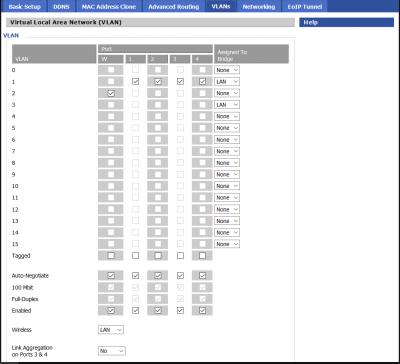

|
|
|
|
|
|
Jun 3 2018, 05:58 PM
Show posts by this member only | IPv6 | Post
#1154
|
|
Junior Member
203 posts Joined: Oct 2014
|
anyone know how to set up archer c1200 to huawei HG8240H (white color modem) for maxis fibre... can’t seem to connect to the internet!!:(
|
|
|
Jun 3 2018, 06:38 PM
|
|
Senior Member
5,714 posts Joined: Mar 2007
|
QUOTE(Addword @ Jun 3 2018, 05:58 PM) anyone know how to set up archer c1200 to huawei HG8240H (white color modem) for maxis fibre... can’t seem to connect to the internet!!:( Set the Archer C1200 to Maxis profile, and plug the router into LAN2 of the BTU. |
|
|
Jun 3 2018, 06:43 PM
|
|
Junior Member
203 posts Joined: Oct 2014
|
QUOTE(SilentVampire @ Jun 3 2018, 06:38 PM) Set the Archer C1200 to Maxis profile, and plug the router into LAN2 of the BTU. actually the maxis profile didn’t work. called tp-link support and they gave a custom settings. 11;14;17 and it finally works! |
|
|
Jun 3 2018, 08:05 PM
|
|
Senior Member
5,714 posts Joined: Mar 2007
|
QUOTE(Addword @ Jun 3 2018, 06:43 PM) actually the maxis profile didn’t work. called tp-link support and they gave a custom settings. 11;14;17 and it finally works! 11:14:17? Interesting. Where do you enter that? |
|
|
Jun 3 2018, 10:47 PM
|
|
Junior Member
203 posts Joined: Oct 2014
|
QUOTE(SilentVampire @ Jun 3 2018, 08:05 PM) 11:14:17? Interesting. Where do you enter that? VLAN ID. |
|
|
Jun 3 2018, 10:52 PM
|
|
Senior Member
5,714 posts Joined: Mar 2007
|
QUOTE(Addword @ Jun 3 2018, 10:47 PM) VLAN ID. That’s surprising, always thought VLAN for Maxis is 621. Thanks for that anyway. |
|
|
Jun 8 2018, 06:46 PM
|

Senior Member
3,158 posts Joined: Apr 2005 From: -Butterworth, Penang-
|
guy,
aminia router seem having QOS issue when heavy usage. I thinking to get a router connect to aminia router tru lan cable. all device will connect to my new router.. would you guy think this will hv more stable connection and better QOS with new router? |
| Change to: |  0.0334sec 0.0334sec
 0.46 0.46
 6 queries 6 queries
 GZIP Disabled GZIP Disabled
Time is now: 1st December 2025 - 08:44 PM |
 Quote
Quote