Welcome Guest ( Log In | Register )

27 Pages « < 21 22 23 24 25 > » Bottom

Outline · [ Standard ] · Linear+

Streamyx Streamyx Q&A Thread for Upgrades/Wrongly Capped, <cleanup> Wrong Capped ? Upgrade ? Ask !

views
     
Sib
post Sep 22 2012, 12:51 PM

#PasukanPenyelamatMalaysia
******
Senior Member
1,945 posts

Joined: Mar 2008
From: Malaya


ever since last 2 weeks i've upgraded my streamyx to 4MB from 1MB previously. even before the new modem is installed i've noticed TM alr upped the line to 2MB.

but until today, after 5 days from the date the technician came to install d new modem, my speed is still at 2MB.

i've called 100 once and they claimed that their side had already set my internet line to 4MB and recommended me to contact the previous technician and i've been doing it ever since these past few days.

any suggestions for me so they can hasten the process? unsure.gif


andyliew97
post Oct 4 2012, 01:03 AM

Casual
***
Junior Member
358 posts

Joined: Jul 2012
From: Wilayah Persekutuan Labuan


QUOTE(Sib @ Sep 22 2012, 12:51 PM)
ever since last 2 weeks i've upgraded my streamyx to 4MB from 1MB previously. even before the new modem is installed i've noticed TM alr upped the line to 2MB.

but until today, after 5 days from the date the technician came to install d new modem, my speed is still at 2MB.

i've called 100 once and they claimed that their side had already set my internet line to 4MB and recommended me to contact the previous technician and i've been doing it ever since these past few days.

any suggestions for me so they can hasten the process?  unsure.gif
*
report 1 more time to TM,if still same ... lodge report to SKMM (i did that previously)
Sib
post Oct 4 2012, 09:41 AM

#PasukanPenyelamatMalaysia
******
Senior Member
1,945 posts

Joined: Mar 2008
From: Malaya


thankfully, my problem has been solved after i pay a 'visit' to the tm point.

i had a long chat with the technician which is actually a subcontractor in charge of minor troubleshooting issues and modem installation. what i learn from him is that most of the time it is tm's own technician's problem for being such a lazy ass.

i hope tm's staffs would read this, just quit your job if you're incapable of solving the problem, please... doh.gif
jobok
post Oct 17 2012, 09:45 PM

Getting Started
**
Junior Member
188 posts

Joined: Nov 2008
guys sorry to bother....
just want to ask....
why my internet seems slow....

i notice when, i want to watch videos at youtube or movies online....
it always buffer

but 'm the only user in the house.....

need ur help how to check whether somebody steal my wifi.....or what's wrong with my internet......

tqvm
Trony
post Oct 28 2012, 04:10 PM

Getting Started
**
Junior Member
96 posts

Joined: Dec 2010
From: The Grid


QUOTE(piring @ Sep 2 2012, 10:12 AM)
Hi there. I want to ask something, regarding Streamyx subscription.
I would like to know if it is ever possible to have a Streamyx internet connection, however, without having the need to go to a TM Center, to obtain or register? meaning, I can just log on online elsewhere to register for a Streamyx Internet service and have it up and running at my house?

As right now, I do have a working telephone line and a working modem. So I would like to know if it is possible to get an internet line without having the need to go to TM Center.

Do enlighten me on this please smile.gif
*


Streamyx & Phone Packages
http://www.tm.com.my/shop/home/Pages/home_streamyx.aspx

Standard Packages
http://www.tm.com.my/ap/personal/internet/...rdpackages.aspx

Used to be a link to on-line registration for Standard Packages but gone! Anyway you can try ask any of your friends/bro/sis who has active streamyx home account to register as Introducer for Member Get Member Programme here, then he/she can register streamyx for you and get a rebate:
https://tmbill.tm.net.my/SelfCare/Maintenan...lfcareLogin.jsp

Cheers biggrin.gif
Trony
post Oct 28 2012, 04:40 PM

Getting Started
**
Junior Member
96 posts

Joined: Dec 2010
From: The Grid


QUOTE(jobok @ Oct 17 2012, 09:45 PM)
guys sorry to bother....
just want to ask....
why my internet seems slow....

i notice when, i want to watch videos at youtube or movies online....
it always buffer

but 'm the only user in the house.....

need ur help how to check whether somebody steal my wifi.....or what's wrong with my internet......

tqvm
*

What's your streamyx package/speed?

You need at least 1Mb for smooth SD videos & 4Mbit for HD videos.

Mostly evening time 6.00pm~12.00am traffic jam. sweat.gif

You can try switch off you router's wifi RF carrier & use direct LAN connection, if your speed recover then you have:
a) wifi theft - change your wifi security passkey with WPA/WPA2 setting.
or
b) poor wifi range - reduce your PC's distance.

smile.gif
jobok
post Oct 29 2012, 01:45 PM

Getting Started
**
Junior Member
188 posts

Joined: Nov 2008
QUOTE(Trony @ Oct 28 2012, 04:40 PM)
What's your streamyx package/speed?

You need at least 1Mb for smooth SD videos & 4Mbit for HD videos.

Mostly evening time 6.00pm~12.00am traffic jam. sweat.gif

You can try switch off you router's wifi RF carrier & use direct LAN connection, if your speed recover then you have:
a) wifi theft - change your wifi security passkey with WPA/WPA2 setting.
or
b) poor wifi range - reduce your PC's distance.

smile.gif
*
i'm using 1mb

previously last month youtube quite ok....

i did check for the wifi theft through cmd

but no other user

i'm not using wifi...i use LAN....just got splitter for phone.....

when i check speednet....i can see the upload / download quite low around 300kb....

is it i need to complain to Telekom? coz i knew that as a customer at least we entitle 500kb....correct me if i'm wrong
Trony
post Oct 30 2012, 11:10 AM

Getting Started
**
Junior Member
96 posts

Joined: Dec 2010
From: The Grid


QUOTE(jobok @ Oct 29 2012, 01:45 PM)
i'm using 1mb

previously last month youtube quite ok....

i did check for the wifi theft through cmd

but no other user

i'm not using wifi...i use LAN....just got splitter for phone.....

when i check speednet....i can see the upload / download quite low around 300kb....

is it i need to complain to Telekom? coz i knew that as a customer at least we entitle 500kb....correct me if i'm wrong
*

TM's "Best effort" service is at least 80% of the subscribed speed, you should get at least 819Kb.

Here's what you should check:
a) any big event/change since last month's OK condition?
e.g. phone line work, modem setting/location/splitter, lightning strike, wind storm etc...

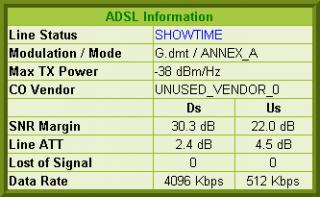
b) post your modem's status here during slow condition.
e.g. Attached Image

c) connect modem/router directly without splitter & do speed test using TM's speedometer
http://58.27.105.110/index2.php?1713166049

d) post your modem's status here again after c). smile.gif
jobok
post Oct 30 2012, 11:29 PM

Getting Started
**
Junior Member
188 posts

Joined: Nov 2008
QUOTE(Trony @ Oct 30 2012, 11:10 AM)
TM's "Best effort" service is at least 80% of the subscribed speed, you should get at least 819Kb.

Here's what you should check:
a) any big event/change since last month's OK condition?
e.g. phone line work, modem setting/location/splitter, lightning strike, wind storm etc...

b) post your modem's status here during slow condition.
e.g. Attached Image

c) connect modem/router directly without splitter & do speed test using TM's speedometer
http://58.27.105.110/index2.php?1713166049

d) post your modem's status here again after c). smile.gif
*
thank you for ur reply.

how to do the part (b)?

honestly, i'm not good with IT. but willing to learn.

tqvm
Trony
post Oct 31 2012, 08:57 AM

Getting Started
**
Junior Member
96 posts

Joined: Dec 2010
From: The Grid


QUOTE(jobok @ Oct 30 2012, 11:29 PM)
thank you for ur reply.

how to do the part (b)?

honestly, i'm not good with IT. but willing to learn.

tqvm
*
What's your modem's brand & model? smile.gif

jobok
post Oct 31 2012, 09:07 PM

Getting Started
**
Junior Member
188 posts

Joined: Nov 2008
QUOTE(Trony @ Oct 31 2012, 08:57 AM)
What's your modem's brand & model? smile.gif
*
TP-LINK
TD-W8901G

Trony
post Oct 31 2012, 11:07 PM

Getting Started
**
Junior Member
96 posts

Joined: Dec 2010
From: The Grid


QUOTE(jobok @ Oct 31 2012, 09:07 PM)
TP-LINK
TD-W8901G
*
OK, to see your modem's status, here goes:
a) Start web browser and type 192.168.1.1 in the URL field & press Enter.
b) Enter default User Name admin and default Password admin & click OK.
c) At main menu click Status & sub menu click Device Info.
d) Copy all info from ADSL section & post it here.
...you can copy paste as text or print screen as picture. smile.gif
jobok
post Nov 1 2012, 05:54 PM

Getting Started
**
Junior Member
188 posts

Joined: Nov 2008
QUOTE(Trony @ Oct 31 2012, 11:07 PM)
OK, to see your modem's status, here goes:
a) Start web browser and type 192.168.1.1 in the URL field & press Enter.
b) Enter default User Name admin and default Password admin & click OK.
c) At main menu click Status & sub menu click Device Info.
d) Copy all info from ADSL section & post it here.
    ...you can copy paste as text or print screen as picture. smile.gif
*
trony....why i cannot log in?

admin admin....

seems not working
miezaidin
post Nov 1 2012, 06:04 PM

Getting Started
**
Junior Member
119 posts

Joined: Nov 2008


QUOTE(jobok @ Oct 30 2012, 11:29 PM)
thank you for ur reply.

how to do the part (b)?

honestly, i'm not good with IT. but willing to learn.

tqvm
*
following your data...suppose be your line is 4mbps.....should no problem....
helob
post Nov 3 2012, 08:22 AM

Getting Started
**
Junior Member
265 posts

Joined: Jan 2003
I am currently on Lan Streamyx 1Mbps using Linksys WAG200G Wireless Router/Modem.
Wanted to upgrade to at least 5 Mbps.
Waited for ages for Unifi/Maxis Fibre optic but doesn't look like its coming soon as I am staying in Tg Bungah Penang. Been told it will be here next year but this was 2 years ago.
I am seriously thinking of upgrading to the Streamyx 4Mbps package but the problem is the poor SNR on my current Streamyx line. Its at only 11.0 dB. It takes more than a min for internet connection.
I have tried on another router/modem TP-Link TD-W8960N but SNR still show low at 11.0 dB.
Anything I can do to improve line SNR before upgrading to 4 Mbps?
What is a good and relaible Wireless router/modem to replace my Linksys WAG200G ?
Thank you

Trony
post Nov 3 2012, 12:51 PM

Getting Started
**
Junior Member
96 posts

Joined: Dec 2010
From: The Grid


QUOTE(helob @ Nov 3 2012, 08:22 AM)
I am currently on Lan Streamyx 1Mbps using Linksys WAG200G Wireless Router/Modem.
Wanted to upgrade to at least 5 Mbps.
Waited for ages for Unifi/Maxis Fibre optic but doesn't look like its coming soon as I am staying in Tg Bungah Penang. Been told it will be here next year but this was 2 years ago.
I am seriously thinking of upgrading to the Streamyx 4Mbps package but the problem is the poor SNR on my current Streamyx line. Its at only 11.0 dB. It takes more than a min for internet connection.
I have tried on another router/modem TP-Link TD-W8960N but SNR still show low at 11.0 dB.
Anything I can do to improve line SNR before upgrading to 4 Mbps?
What is a good and relaible Wireless router/modem to replace my Linksys WAG200G ?
Thank you
*
Your SNR is borderline but OK, that doesn't tell the real condition of your phone line quality, you should also check the Line ATT, for 1Mb you need <70dB, for 4Mb you need <50dB.

On your side you can check your wall phone line socket for loose wire or loose/dirty contact, change it if it's very old & dirty, sometimes it's just the phone cable plug not fully inserted into the wall socket especially those white square wall socket with spring latch protective cover covering the socket, for these sockets most people mistaken the 1st click when plug in as full insert which is not, the 1st click is just the plug's locking tab clearing the spring cover & the plug is just 2/3 into the socket with the conductor pins barely touching, if you stop here you will get no or poor connection with very high Line ATT, push the plug further & you should get the 2nd click which is the plug's locking tab fully locking/seating into the socket behind the spring cover.

Another thing the connection from wall socket to modem should be as short as possible without any excess bundle/roll of long phone cable lying on the floor.

As for the internal & external house copper wiring's quality, TM's will have to check & test it during installation before they approve your 4Mb subscription, if they found out poor wiring quality from pole until wall socket, you can ask them to change it but if your house is too far from CO/DSLAM, TM will reject your 4Mb subscription.

Asus or Belkin but they are bit pricey. biggrin.gif
xKeneshirox
post Nov 5 2012, 07:38 PM

Casual
***
Junior Member
338 posts

Joined: Jun 2010
Hi guys, got myself the 2Mbps package but currently trying to find out how to check bandwidth etc etc. Modem used is innacomm W3400V6, supplied by TM. Have not considered getting my own modem since I think it's unfair that we have to pay for something we are already entitled to.
Trony
post Nov 5 2012, 08:52 PM

Getting Started
**
Junior Member
96 posts

Joined: Dec 2010
From: The Grid


QUOTE(xKeneshirox @ Nov 5 2012, 07:38 PM)
Hi guys, got myself the 2Mbps package but currently trying to find out how to check bandwidth etc etc. Modem used is innacomm W3400V6, supplied by TM. Have not considered getting my own modem since I think it's unfair that we have to pay for something we are already entitled to.
*
Do speed test using TM's speedometer
http://58.27.105.110/index2.php?1713166049

TM's speedometer is good for checking local internet speed within Malaysia which TM guaranteed to give at least 80% of your subscribed speed, TM will only entertain you if you complain about slow speed using TM's speedometer.

Oversea speed you can only check by 3rd party such as Speedtest.net, the speed normally varied according to countries and TM's oversea bandwidth & it's not guaranteed by TM, anyway if no problem you can normally get full speed from most countries. biggrin.gif
xKeneshirox
post Nov 6 2012, 03:37 PM

Casual
***
Junior Member
338 posts

Joined: Jun 2010
QUOTE(Trony @ Nov 5 2012, 09:52 PM)
Do speed test using TM's speedometer
http://58.27.105.110/index2.php?1713166049

TM's speedometer is good for checking local internet speed within Malaysia which TM guaranteed to give at least 80% of your subscribed speed, TM will only entertain you if you complain about slow speed using TM's speedometer.

Oversea speed you can only check by 3rd party such as Speedtest.net, the speed normally varied according to countries and TM's oversea bandwidth & it's not guaranteed by TM, anyway if no problem you can normally get full speed from most countries. biggrin.gif
*
But that's rather unfair since the whole of Malaysia is essentially a LAN network belonging to TM D:
hpares
post Nov 10 2012, 11:15 PM

On my way
****
Junior Member
530 posts

Joined: Oct 2005
Guys just some simple question. About my streamyx, i am lagging on certain ip range. Since it is dynamic IP, i always need to reconnect till i get my desirable IP. So is it possible to set only to connect to certain IP range? For example i only want to connect to ip start with 124.xxx.xxx.xxx without keep reconnecting until i get?

27 Pages « < 21 22 23 24 25 > » Top
 

Change to:
| Lo-Fi Version
0.0236sec    0.23    6 queries    GZIP Disabled
Time is now: 7th December 2025 - 07:16 AM