Welcome Guest ( Log In | Register )

Bump Topic Topic Closed RSS Feed
126 Pages « < 103 104 105 106 107 > » Bottom

Outline · [ Standard ] · Linear+

 Ivy Bridge Overclocking V1 | 3770K/3570K | Z77, Torture Your CPU, Post It Here!

views
     
TSowikh84
post Apr 3 2013, 01:41 PM

i7 Clan
Group Icon
Elite
8,711 posts

Joined: Nov 2007
From: Butterworth, PG / Machang, Kelantan


QUOTE(codenamew @ Apr 3 2013, 01:22 PM)
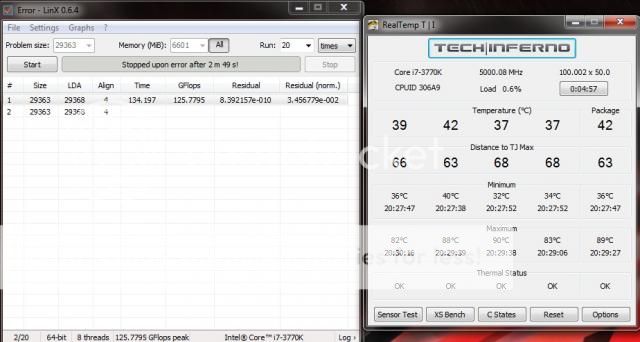
thanks for the info owikh. but i still have the error after getting the 1st gflops reading using default clock speed and settings. nth is overclock.
any idea?
*

Try run only one single module of RAM, and determine whether the RAM is faulty.

Pls share some screenshots of the LinX and CPU-Z tabs showing your current clocks and hardware specs.
spdboyz
post Apr 3 2013, 04:09 PM

Getting Started
**
Junior Member
164 posts

Joined: Dec 2005
From: Kajang, Selangor


QUOTE(codenamew @ Apr 3 2013, 01:22 PM)
thanks for the info owikh. but i still have the error after getting the 1st gflops reading using default clock speed and settings. nth is overclock.
any idea?
*
Are you using the LinX provided by stasio in previous thread?
spdboyz
post Apr 3 2013, 08:06 PM

Getting Started
**
Junior Member
164 posts

Joined: Dec 2005
From: Kajang, Selangor


QUOTE(spdboyz @ Apr 3 2013, 12:57 PM)
IBT result running on Windows 8.
*
LinX

I can't get both LinX & IBT to work using the one provided by stasio. It failed after the first pass. I re-download both from other website and it works.


Attached thumbnail(s)
Attached Image
TSowikh84
post Apr 3 2013, 09:08 PM

i7 Clan
Group Icon
Elite
8,711 posts

Joined: Nov 2007
From: Butterworth, PG / Machang, Kelantan


QUOTE(spdboyz @ Apr 3 2013, 08:06 PM)
LinX

I can't get both LinX & IBT to work using the one provided by stasio. It failed after the first pass. I re-download both from other website and it works.
*
Alright, I downloaded and tested the 11.0.3.008 and confirmed that it is broken. The GFlops is inaccurate & the stress process suddenly stopped after a while.

LinX 0.6.4 (11.0.3.008)
user posted image

LinX 0.6.4 (11.0.1.005)
user posted image

So, I have put back the 11.0.1.005 in Post #1
codenamew
post Apr 3 2013, 09:11 PM

On my way
****
Senior Member
601 posts

Joined: Oct 2008
From: Penang


QUOTE(spdboyz @ Apr 3 2013, 08:06 PM)
LinX

I can't get both LinX & IBT to work using the one provided by stasio. It failed after the first pass. I re-download both from other website and it works.
*
ah.same case as mine.guess i need to download a new version from the website.thanks boyz
stasio
post Apr 3 2013, 11:35 PM

10k Club
********
All Stars
18,503 posts

Joined: Oct 2007
From: P.Jaya
Yea,I just check and something is really wrong with newest Linpack. hmm.gif

Here is link:
http://registrationcenter.intel.com/irc_na..._11.0.3.008.zip

user posted image

This post has been edited by stasio: Apr 4 2013, 02:11 PM
codenamew
post Apr 4 2013, 08:54 AM

On my way
****
Senior Member
601 posts

Joined: Oct 2008
From: Penang


Finally, my oc setting is stable on linx. running 4.5ghz with 1600 Mhz memory speed. Default memory speed is 1333mhz. Bought the wrong kit. doh.gif Here is the screenshot of my oc. Wanted to push my ram to 1800mhz but end up boot loop. guess 1600mhz is the max my ram can go.

Attached Image


TSowikh84
post Apr 4 2013, 09:32 AM

i7 Clan
Group Icon
Elite
8,711 posts

Joined: Nov 2007
From: Butterworth, PG / Machang, Kelantan


QUOTE(codenamew @ Apr 4 2013, 08:54 AM)
Finally, my oc setting is stable on linx. running 4.5ghz with 1600 Mhz memory speed. Default memory speed is 1333mhz. Bought the wrong kit.  doh.gif Here is the screenshot of my oc. Wanted to push my ram to 1800mhz but end up boot loop. guess 1600mhz is the max my ram can go.

*
Nice try. Suggest to run more than 20 loops and take screenshot while running LinX. 5 loops are just not enough. Too short to conclude stability.
trisx
post Apr 4 2013, 12:20 PM

Life is Full of BS eyh !
******
Senior Member
1,198 posts

Joined: Nov 2008
From: ~~BacK FroM HelL~~ Status: R.I.P
Kevin, I'm getting error code 29. No display. I believe my GC dead ? sad.gif
TSowikh84
post Apr 4 2013, 02:14 PM

i7 Clan
Group Icon
Elite
8,711 posts

Joined: Nov 2007
From: Butterworth, PG / Machang, Kelantan


QUOTE(trisx @ Apr 4 2013, 12:20 PM)
Kevin, I'm getting error code 29. No display. I believe my GC dead ? sad.gif
*
Are you sure that the debug code is 29?
I couldn't find this code in MVG Manual
Or could it be the more common "b2" code which denotes Installation of the PCH Runtime Services and related to RAM.
Try booting with one single module of RAM.
trisx
post Apr 4 2013, 04:11 PM

Life is Full of BS eyh !
******
Senior Member
1,198 posts

Joined: Nov 2008
From: ~~BacK FroM HelL~~ Status: R.I.P
QUOTE(owikh84 @ Apr 4 2013, 02:14 PM)
Are you sure that the debug code is 29?
I couldn't find this code in MVG Manual
Or could it be the more common "b2" code which denotes Installation of the PCH Runtime Services and related to RAM.
Try booting with one single module of RAM.
*
Ya I'm pretty sure is 29. Don't know why so weird. Will try again after work tonight.

Error code us 29, and VGA led is turned on indicating failure to boot
trisx
post Apr 4 2013, 07:35 PM

Life is Full of BS eyh !
******
Senior Member
1,198 posts

Joined: Nov 2008
From: ~~BacK FroM HelL~~ Status: R.I.P
QUOTE(owikh84 @ Apr 4 2013, 02:14 PM)
Are you sure that the debug code is 29?
I couldn't find this code in MVG Manual
Or could it be the more common "b2" code which denotes Installation of the PCH Runtime Services and related to RAM.
Try booting with one single module of RAM.
*
My bad, it was b2 lol. Tried switching RAM and single RAM as well but to no avail. Any other suggestion ? BTW my VGA led turned ON as well
TSowikh84
post Apr 4 2013, 10:56 PM

i7 Clan
Group Icon
Elite
8,711 posts

Joined: Nov 2007
From: Butterworth, PG / Machang, Kelantan


QUOTE(trisx @ Apr 4 2013, 07:35 PM)
My bad, it was b2 lol. Tried switching RAM and single RAM as well but to no avail. Any other suggestion ? BTW my VGA led turned ON as well
*

Try to boot with iGPU (without VGA)

Remove any sound card/LAN etc.

Try backflash BIOS method.

1. Download the latest BIOS from Asus website.
2. Format a USB pendrive to FAT32.
3. Extract the BIOS file and rename the file to M5F.CAP.
4. Put the BIOS file on your USB pendrive.
5. Shutdown your system.
6. Connect the USB pendrive to the white USB port.
7. Press the USB BIOS Flashback button/ROG Connect button for three seconds till the LED begins to blink, then release.
8. Wait till the LED stops blinking.
9. Power on your system using the Start button.

codenamew
post Apr 5 2013, 08:11 PM

On my way
****
Senior Member
601 posts

Joined: Oct 2008
From: Penang


Just wondering whether my CPU is deteriorating. Previously I'm able to reach 4.4ghz at 1.26 vcore but now need more than 1.31. Still stress testing. N prime95 keep showing worker 1 failed to work n I guess it is a unstable oc. Any idea? I'm using 3570k. Afraid that I will need to buy intel tuning plan in case my proc died on me.
spdboyz
post Apr 5 2013, 09:33 PM

Getting Started
**
Junior Member
164 posts

Joined: Dec 2005
From: Kajang, Selangor


QUOTE(codenamew @ Apr 5 2013, 08:11 PM)
Just wondering whether my CPU is deteriorating. Previously I'm able to reach 4.4ghz at 1.26 vcore but now need more than 1.31. Still stress testing. N prime95 keep showing worker 1 failed to work n I guess it is a unstable oc. Any idea? I'm using 3570k. Afraid that I will need to buy intel tuning plan in case my proc died on me.
*
I had this problem before when I try to OC my 3570K to 4.5Ghz and turned out it was my BIOS problem. No matter what I did, it kept loading the unstable 4.5 OC setting even when I tried to rollback to my previous stable 4.4Ghz. Tried both load default setting and clear bios setting but it wouldn't work. Last resort I reflash my bios and rolled back to my stable OC setting...it works!

This post has been edited by spdboyz: Apr 5 2013, 09:34 PM
codenamew
post Apr 5 2013, 09:35 PM

On my way
****
Senior Member
601 posts

Joined: Oct 2008
From: Penang


QUOTE(spdboyz @ Apr 5 2013, 09:33 PM)
I had this problem before when I try to OC my 3570K to 4.5Ghz and turned out it was my BIOS problem. No matter what I did, it kept loading the unstable 4.5 OC setting even when I tried to rollback to my previous stable 4.4Ghz. Tried both load default setting and clear bios setting but it wouldn't work. Last resort I reflash my bios and rolled back to my stable OC setting...it works!
*
means u roll back to ur previous stable bios ?then i think i should try that. thanks for the info.
spdboyz
post Apr 5 2013, 09:55 PM

Getting Started
**
Junior Member
164 posts

Joined: Dec 2005
From: Kajang, Selangor


QUOTE(codenamew @ Apr 5 2013, 09:35 PM)
means u roll back to ur previous stable bios ?then i think i should try that. thanks for the info.
*
Re-flash your BIOS and then apply the stable OC setting that you previously had.
trisx
post Apr 5 2013, 10:03 PM

Life is Full of BS eyh !
******
Senior Member
1,198 posts

Joined: Nov 2008
From: ~~BacK FroM HelL~~ Status: R.I.P
QUOTE(owikh84 @ Apr 4 2013, 10:56 PM)
Try to boot with iGPU (without VGA)

Remove any sound card/LAN etc.

Try backflash BIOS method.

1. Download the latest BIOS from Asus website.
2. Format a USB pendrive to FAT32.
3. Extract the BIOS file and rename the file to M5F.CAP.
4. Put the BIOS file on your USB pendrive.
5. Shutdown your system.
6. Connect the USB pendrive to the white USB port.
7. Press the USB BIOS Flashback button/ROG Connect button for three seconds till the LED begins to blink, then release.
8. Wait till the LED stops blinking.
9. Power on your system using the Start button.
*
Succefully booted into windows using iGPU. Done some research and I can say maybe this problem is quite familiar with heavy & big GPU and no solution for the time being ?

Regardless of that, will try back flashing it tomorrow. Thanks Kevin smile.gif
spdboyz
post Apr 5 2013, 10:09 PM

Getting Started
**
Junior Member
164 posts

Joined: Dec 2005
From: Kajang, Selangor


QUOTE(trisx @ Apr 5 2013, 10:03 PM)
Succefully booted into windows using iGPU. Done some research and I can say maybe this problem is quite familiar with heavy & big GPU and no solution for the time being ?
What "big GPU" is yours?

trisx
post Apr 5 2013, 10:16 PM

Life is Full of BS eyh !
******
Senior Member
1,198 posts

Joined: Nov 2008
From: ~~BacK FroM HelL~~ Status: R.I.P
QUOTE(spdboyz @ Apr 5 2013, 10:09 PM)
What "big GPU" is yours?
*
Tri slot gpu

126 Pages « < 103 104 105 106 107 > » Top
Topic ClosedOptions
 

Change to:
| Lo-Fi Version
0.0361sec    0.74    6 queries    GZIP Disabled
Time is now: 4th December 2025 - 03:13 PM