Welcome Guest ( Log In | Register )

42 Pages « < 21 22 23 24 25 > » Bottom

Outline · [ Standard ] · Linear+

 (M)otorola DEFY Official Thread V4, A tough phone for Android

views
     
fariezz
post Jun 9 2012, 11:47 PM

Getting Started
**
Junior Member
52 posts

Joined: Aug 2011
QUOTE(tyenfei @ Jun 9 2012, 10:49 PM)
[attachmentid=2884483]

here is the result after "freezer" treatment ..

i think i'm too late to know it... so all the small inner bleeding gone. only the big potion .. can't clear  doh.gif
*
congrats. it works for you rclxms.gif
i'm also same as you. can't rid off the big one sad.gif
[ r u g a ]
post Jun 10 2012, 06:44 AM

On my way
****
Senior Member
661 posts

Joined: Aug 2005


QUOTE(adie82 @ Jun 9 2012, 11:53 PM)
your fon still based on froyo 2.2...

if u want to change to WIUI just download the ROM and put inside SDcard an oot into reocery (volume down when Blue LED lid)
*
sounds easy lol but I know it isn't. laugh.gif

the only thing now is, I couldn't really identify which froyo I'm in, the official version or what..

maybe I don't really get what's Android OS.

like pc, we know got BIOS, then on top of that, we got Windows and so on.

like Android, maybe is a Linux based, which I know nothing at all.
adie82
post Jun 10 2012, 11:23 AM

please count my stars
*******
Senior Member
3,532 posts

Joined: May 2008


QUOTE( r u g a @ Jun 10 2012, 06:44 AM)
sounds easy lol but I know it isn't.  laugh.gif

the only thing now is, I couldn't really identify which froyo I'm in, the official version or what..

maybe I don't really get what's Android OS.

like pc, we know got BIOS, then on top of that, we got Windows and so on.

like Android, maybe is a Linux based, which I know nothing at all.
*
it just simple... i think yours under Gingerfroyo Custom rom...
your defy got 4 way boot option? u can try press power button for 2 seconds then choose reboot and see got any option after that or it just reboot... if got other option like normal, hotboot, recovery, bootloader, you can choose recovery to start flash to other rom.


steps to flash to another rom:
*** please backup all important data like contacts, sms etc
1- download rom eg: WIUI 2.5.27 + RTLfix +FasterRock and put inside SDcard *U can create new folder eg: android rom and put there.

2- reboot into recovery with method above or you can enter recovery manually.
>reboot and press volume down when Blue LED lid to enter bootloader> recovery > stable recovery
* to navigate inside recovery: vol up/down = up/down , power button/menu = OK/Enter , Back = back

3- create backup of your current rom (optional) >backup and restore > backup all.

4- wipe data/factory reset then wipe cache partition

5- install zip from sdcard>choose zip from sd card and locate the rom eg inside Android Rom and choose yes. wait till it done

6- repeat #5 but this time locate RTLfix > yes after done repeat #5 and locate fasterRock >yes

7- go back to recovery main page, repeat #4 again

8- advanced > wipe dalvik

9- reboot.
* for first boot, it will take long time to enter main screen (2-4 minutes)

jayloon
post Jun 10 2012, 11:57 PM

New Member
*
Junior Member
23 posts

Joined: Jan 2003
QUOTE(adie82 @ Jun 10 2012, 11:23 AM)
it just simple... i think yours under Gingerfroyo Custom rom...
your defy got 4 way boot option? u can try press power button for 2 seconds then choose reboot and see got any option after that or it just reboot... if got other option like normal, hotboot, recovery, bootloader, you can choose recovery to start flash to other rom.
steps to flash to another rom:
*** please backup all important data like contacts, sms etc
1- download rom eg: WIUI 2.5.27 + RTLfix +FasterRock and put inside SDcard *U can create new folder eg: android rom and put there.

2- reboot into recovery with method above or you can enter recovery manually. 
>reboot and press volume down when Blue LED lid to enter bootloader> recovery > stable recovery
* to navigate inside recovery: vol up/down = up/down , power button/menu  = OK/Enter , Back = back

3- create backup of your current rom (optional) >backup and restore > backup all.

4- wipe data/factory reset then wipe cache partition

5- install zip from sdcard>choose zip from sd card and locate the rom eg inside Android Rom and choose yes. wait till it done

6- repeat #5 but this time locate RTLfix > yes after done repeat #5 and locate fasterRock >yes

7- go back to recovery main page, repeat #4 again

8- advanced > wipe dalvik

9- reboot.
* for first boot, it will take long time to enter main screen (2-4 minutes)
*
Thanks alot bro adie82,

let me just try digest first. i'll try it when i'm ready.


jerren
post Jun 13 2012, 04:12 PM

Enthusiast
*****
Senior Member
888 posts

Joined: Aug 2005
From: Segambut


Defy XT is coming..
doesnt really being upgraded..

http://www.hardwarezone.com.my/tech-news-m...tive+Lifestyles
Long88
post Jun 13 2012, 04:40 PM

On my way home
******
Senior Member
1,416 posts

Joined: Mar 2010
From: From: From: From: From: From: From: From: From:


QUOTE(jerren @ Jun 13 2012, 04:12 PM)
Defy XT is coming..
doesnt really being upgraded..

http://www.hardwarezone.com.my/tech-news-m...tive+Lifestyles
*
defy +, then defy mini, now defy XT.
whats wrong with moto la. not even better than our defy.

at least put some ICS or dual core. over a year already still the same
TStyenfei
post Jun 13 2012, 04:41 PM

A Ku La Ma Tata
*******
Senior Member
2,230 posts

Joined: Jan 2006
From: K. L.


QUOTE(jerren @ Jun 13 2012, 04:12 PM)
Defy XT is coming..
doesnt really being upgraded..

http://www.hardwarezone.com.my/tech-news-m...tive+Lifestyles
*
Motorola DEFY XT takes life-proof to the next level with a sharper camera, bigger screen and faster processing power

I like it laugh.gif shd be my next target brows.gif

This post has been edited by tyenfei: Jun 13 2012, 04:41 PM
blackwhitechipsKL
post Jun 13 2012, 04:45 PM

Casual
***
Junior Member
330 posts

Joined: May 2010


yeah, priced at RM899, and bigger battery, it's not too bad...now...anyone wants my DEFY? running MIUI 2.4.20 tongue.gif
TStyenfei
post Jun 13 2012, 05:07 PM

A Ku La Ma Tata
*******
Senior Member
2,230 posts

Joined: Jan 2006
From: K. L.


http://www.gsmarena.com/compare.php3?idPho...8&idPhone2=4622

I think same screen size with Defy ori & Defy + cry.gif

not much different ...
Long88
post Jun 13 2012, 05:35 PM

On my way home
******
Senior Member
1,416 posts

Joined: Mar 2010
From: From: From: From: From: From: From: From: From:


QUOTE(tyenfei @ Jun 13 2012, 05:07 PM)
http://www.gsmarena.com/compare.php3?idPho...8&idPhone2=4622

I think same screen size with Defy ori & Defy +  cry.gif

not much different ...
*
wanna wait for this one?
http://www.gsmarena.com/sony_xperia_acro_s-4781.php
brows.gif brows.gif
TStyenfei
post Jun 13 2012, 05:42 PM

A Ku La Ma Tata
*******
Senior Member
2,230 posts

Joined: Jan 2006
From: K. L.


QUOTE(Long88 @ Jun 13 2012, 05:35 PM)
I'll be happy if screen size 4" nod.gif
Long88
post Jun 13 2012, 05:45 PM

On my way home
******
Senior Member
1,416 posts

Joined: Mar 2010
From: From: From: From: From: From: From: From: From:


QUOTE(tyenfei @ Jun 13 2012, 05:42 PM)
I'll be happy if screen size 4"  nod.gif
*
good ppi summore brows.gif
salimbest83
post Jun 14 2012, 08:37 PM

♥PMS on certain day♥
*******
Senior Member
8,642 posts

Joined: Feb 2006
From: Jelutong Penang


"the DEFY XT is available now and is priced at RM899"

waa.. cheaper than the old one la
[ r u g a ]
post Jun 16 2012, 07:25 AM

On my way
****
Senior Member
661 posts

Joined: Aug 2005


QUOTE(adie82 @ Jun 10 2012, 12:23 PM)
it just simple... i think yours under Gingerfroyo Custom rom...
your defy got 4 way boot option? u can try press power button for 2 seconds then choose reboot and see got any option after that or it just reboot... if got other option like normal, hotboot, recovery, bootloader, you can choose recovery to start flash to other rom.
Hello, haven't tried anything yet but my defy don't have any fancy boot option.

Just a very normal off.

and

I tried switching it on with vol- pwr up, as well as vol+ pwr up.

one will display:

Boot Loader 9.10
Click Ok to flash.

another will

Boot up and stuck at a screen with a user posted image logo and Android doll and stuck there forever until battery removed.


Another thing I always saw is, rsdlite, nandroid, 2init, clockworkmod, titaniumbackup

on most of the flashing thread, I wonder what are they and whether they are download and install in the PC or in the Android itself.

Flashing need PC or just our Android with all data in will do?
blackwhitechipsKL
post Jun 16 2012, 10:44 AM

Casual
***
Junior Member
330 posts

Joined: May 2010


the Android logo and ! means you have to press power + vol+/- to get into recovery. if you're not familiar, better not play around. i got the Defy very early, so paid RM1.5k for it. when flashing and went wrong, i was looking at a RM1.5k paperweight. not a good feeling!
[ r u g a ]
post Jun 17 2012, 09:17 AM

On my way
****
Senior Member
661 posts

Joined: Aug 2005


QUOTE(blackwhitechipsKL @ Jun 16 2012, 11:44 AM)
the Android logo and ! means you have to press power + vol+/- to get into recovery. if you're not familiar, better not play around. i got the Defy very early, so paid RM1.5k for it. when flashing and went wrong, i was looking at a RM1.5k paperweight. not a good feeling!
*
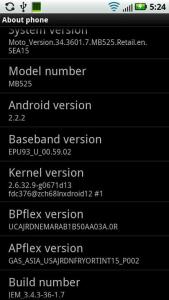
i pressed pwr/vol- and get this screen.

means i have to press again to go recovery?


i'm really not familiar, thats why need help notworthy.gif

p/s: but it dont work, it will still stuck at the screen forever until battery is taken off

This post has been edited by [ r u g a ]: Jun 17 2012, 09:19 AM
blackwhitechipsKL
post Jun 17 2012, 10:56 AM

Casual
***
Junior Member
330 posts

Joined: May 2010


you can't be running Eclair? take a pic and post up?
[ r u g a ]
post Jun 17 2012, 11:24 AM

On my way
****
Senior Member
661 posts

Joined: Aug 2005


QUOTE( r u g a @ Jun 9 2012, 11:13 PM)
guys can tolong me see something? icon_question.gif

I'm having this phone with a custom rom in already when bought 2nd hand.

I do not know what's what.

I'm trying to put in a better rom to use it as a main phone, this rom just won't do.

please help me recommend a best rom to date in terms of speed, efficient on battery and user friendly. gps+wifi signal must be good too.

flex.gif

p/s: also i check with log and it has this camera module SOC green lens.
       can this go with ICS or Gingerbread is the max already?
*
blackwhitechipsKL

is this the screen you wanted to see?

http://forum.lowyat.net/index.php?act=Atta...post&id=2884417

edit:

latest screenie attach

This post has been edited by [ r u g a ]: Jun 17 2012, 05:28 PM


Attached thumbnail(s)
Attached Image
blackwhitechipsKL
post Jun 17 2012, 10:02 PM

Casual
***
Junior Member
330 posts

Joined: May 2010


your earlier post shows that you are on 2.2.1 and this post shows you're on 2.2.2

did you do anything? i think best would be for you to install 2nd-init first. from there, the world of possibilities opens up, since installing a new rom is as easy as clicking install.

to install 2nd-init, go to this link, download the apk and run it. make sure USB debugging is on.
http://forum.xda-developers.com/showthread.php?t=1032212

i attach the 1st page info for you. you should go read the info there. start from intall 2nd-init since you should already be rooted. and, get your own ROM that you want to install. CM7 not many ppl use. at least CM7.2 stable now, or MIUI or WIUI or CM9. Others, i think really not worth it

How to install CM7 Beta 6?
- First flash any Froyo leak of your choice (see 1)
- Turn USB Debugging ON
- Root via SuperOneClick
- Reboot
- Install 2nd Init Recovery Installer 1.4(see 12)
- Turn USB Debugging OFF
- Reboot your device 2 times
- Copy CM7 Beta 6, Google Apps 2.3.4(market, gtalk, etc.) and FixBrightness.zip to your SD Card
- Reboot your device, when the blue led lights at Motorola logo, press Volume Down to enter Bootmenu
- Go to "Set Default Bootmode" then select [2ND-INIT]
- Go to "[Custom Recovery] start"
- Select "wipe cache partition" then "wipe data/factory reset"
- Select "install zip from sdcard", "choose zip from sdcard", then select "update-cm-7.1.0-jordan-beta6-signed"
- Select "choose zip from sdcard", then select "gapps-gb-20110503-signed.zip"
- Select "choose zip from sdcard", then select "FixBrightness.zip"
- Select "+++++Go Back++++++" then "reboot your system now"
[ r u g a ]
post Jun 17 2012, 11:11 PM

On my way
****
Senior Member
661 posts

Joined: Aug 2005


QUOTE(blackwhitechipsKL @ Jun 17 2012, 11:02 PM)
your earlier post shows that you are on 2.2.1 and this post shows you're on 2.2.2

did you do anything? i think best would be for you to install 2nd-init first. from there, the world of possibilities opens up, since installing a new rom is as easy as clicking install.

to install 2nd-init, go to this link, download the apk and run it. make sure USB debugging is on.
http://forum.xda-developers.com/showthread.php?t=1032212

i attach the 1st page info for you. you should go read the info there. start from intall 2nd-init since you should already be rooted. and, get your own ROM that you want to install. CM7 not many ppl use. at least CM7.2 stable now, or MIUI or WIUI or CM9. Others, i think really not worth it

How to install CM7 Beta 6?
- First flash any Froyo leak of your choice (see 1)
- Turn USB Debugging ON
- Root via SuperOneClick
- Reboot
- Install 2nd Init Recovery Installer 1.4(see 12)
- Turn USB Debugging OFF
- Reboot your device 2 times
- Copy CM7 Beta 6, Google Apps 2.3.4(market, gtalk, etc.) and FixBrightness.zip to your SD Card
- Reboot your device, when the blue led lights at Motorola logo, press Volume Down to enter Bootmenu
- Go to "Set Default Bootmode" then select [2ND-INIT]
- Go to "[Custom Recovery] start"
- Select "wipe cache partition" then "wipe data/factory reset"
- Select "install zip from sdcard", "choose zip from sdcard", then select "update-cm-7.1.0-jordan-beta6-signed"
- Select "choose zip from sdcard", then select "gapps-gb-20110503-signed.zip"
- Select "choose zip from sdcard", then select "FixBrightness.zip"
- Select "+++++Go Back++++++" then "reboot your system now"
*
Thanks bro.

I'm merely touching the iceberg tips only now.

The 2.2.2 is flash earlier using RSD Lite as I go across on XDA.

coz I asked for a Flashing 101 steps there. as I don't really get how does an Android system works.
much to be known like what sits on top of what.

our Defy based is on a bootloader, then it comes to recovery mod, then it comes to a base rom right?


Btw, any chance you can share with me what is the screen about, like Baseband Version and Kernel Version.
What kinda of info can I get from it?


42 Pages « < 21 22 23 24 25 > » Top
 

Change to:
| Lo-Fi Version
0.0380sec    0.56    6 queries    GZIP Disabled
Time is now: 14th December 2025 - 02:19 AM