

no wonder my line keep dropping!!!!

is there any method to make my line stable wihout calling stup** tm.nuts helpdesk?
tq for helping.
Streamyx Streamyx SNR Margin, --Read here if you face disconnections--
|
|
 Apr 20 2009, 10:29 PM Apr 20 2009, 10:29 PM
|
 
Junior Member
316 posts Joined: Dec 2007 From: Kuala Lumpur  
|
mine was like dis...arhhhhhhhhhh
no wonder my line keep dropping!!!! is there any method to make my line stable wihout calling stup** tm.nuts helpdesk? tq for helping. |
|
|
|
|
|
Apr 21 2009, 11:43 PM
|

Senior Member
595 posts Joined: Apr 2006 From: sunway
|
Link Status Connected
Us Rate (Kbps) 512 Ds Rate (Kbps) 2048 US Margin 18 DS Margin 4 Modulation MMODE LOS Errors 0 DS Line Attenuation 57 US Line Attenuation 59 Path Mode Interleaved i still confuse about checking the cable ~ cable checking izit the line which connect the modem to the telephone line ? |
|
|
Apr 22 2009, 12:35 AM
|

Junior Member
265 posts Joined: Mar 2005 From: Bangi Lamo........... 
|
Downstream Upstream
SNR Margin (dB): 33.0 25.0 Attenuation (dB): 2.0 1.0 Output Power (dBm): 12.3 4.9 Attainable Rate (Kbps): 10784 1248 Rate (Kbps): 1024 512 how about my connection plz comment |
|
|
Apr 22 2009, 04:04 PM
|
|
Junior Member
316 posts Joined: Dec 2007 From: Kuala Lumpur
|
QUOTE(shenmui @ Apr 22 2009, 12:35 AM) Downstream Upstream base on comments here, your line quite stable.SNR Margin (dB): 33.0 25.0 Attenuation (dB): 2.0 1.0 Output Power (dBm): 12.3 4.9 Attainable Rate (Kbps): 10784 1248 Rate (Kbps): 1024 512 how about my connection plz comment  |
|
|
Apr 22 2009, 06:10 PM
|

Senior Member
1,192 posts Joined: Jan 2009 From: Malaysia 
|
how to check? for zyxel?
|
|
|
Apr 22 2009, 11:58 PM
|
|
Senior Member
595 posts Joined: Apr 2006 From: sunway
|
QUOTE(stormyz @ Apr 21 2009, 11:43 PM) Link Status Connected anyone can answer my question ?Us Rate (Kbps) 512 Ds Rate (Kbps) 2048 US Margin 18 DS Margin 4 Modulation MMODE LOS Errors 0 DS Line Attenuation 57 US Line Attenuation 59 Path Mode Interleaved i still confuse about checking the cable ~ cable checking izit the line which connect the modem to the telephone line ? |
|
|
|
|
|
Apr 23 2009, 10:21 PM
|

Junior Member
16 posts Joined: Feb 2009 From: Johor Bahru 
|
ur ds margin quite low .. need more than 12db
|
|
|
Apr 27 2009, 12:17 PM
|
|
Junior Member
6 posts Joined: Jan 2009
|
DSL Parameters and Status
Vendor ID: 00B5GSPN Revision Number: E.37.5.49 Serial Number: 123456789abcdx Local Tx Power: 11.4 dB Remote Tx Power: 11.5 dB Local Line Atten.: 4.0 dB Remote Line Atten.: 2.5 dB Local SNR Margin: 29.0 dB Remote SNR Margin: 26.0 dB Self Test: Passed DSL Standard: G.dmt Profile: MII Tx Line Rate: 512 Kbps Rx Line Rate: 2048 Kbps Framing Structure: Framing-3 Trellis Coding: Enable Power Management Mode: L2, L3 Both Allowed I'm using Combo package Combo 3 1Mbps RM110 but i used almost 1 year and it keep disconnecting, even my MSN i cant play any online game bcoz it always disconnect in the middle of the game i'm using riger DB102 modem, this is actually the 3rd modem the last 2 modem always hang and this modem also hang but i dont want to tell them anymore, they keep giving me "hang-able" modem 1, frustrated and any1 plz comment on my snr margin? |
|
|
Apr 29 2009, 08:46 PM
|

Senior Member
1,144 posts Joined: Jan 2003 From: Republik Of Kelantanese
|
QUOTE(venomjason @ Apr 27 2009, 12:17 PM) DSL Parameters and Status My modem info -DB102 RigerVendor ID: 00B5GSPN Revision Number: E.37.5.49 Serial Number: 123456789abcdx Local Tx Power: 11.4 dB Remote Tx Power: 11.5 dB Local Line Atten.: 4.0 dB Remote Line Atten.: 2.5 dB Local SNR Margin: 29.0 dB Remote SNR Margin: 26.0 dB Self Test: Passed DSL Standard: G.dmt Profile: MII Tx Line Rate: 512 Kbps Rx Line Rate: 2048 Kbps Framing Structure: Framing-3 Trellis Coding: Enable Power Management Mode: L2, L3 Both Allowed I'm using Combo package Combo 3 1Mbps RM110 but i used almost 1 year and it keep disconnecting, even my MSN i cant play any online game bcoz it always disconnect in the middle of the game i'm using riger DB102 modem, this is actually the 3rd modem the last 2 modem always hang and this modem also hang but i dont want to tell them anymore, they keep giving me "hang-able" modem 1, frustrated and any1 plz comment on my snr margin? Vendor ID : 0039 Revision Number : E.37.5.5 Serial number : 123456789abcdx Self Test : Passed Standard : T1.413 Local Tx. Power(dB) : 11.5 Local Line Atten(dB) : 8.0 Local SNR Margin(dB) : 33.0 Tx Line Rate(kbps) : 512 Up SValue : 1 Up DValue : 1 Data Boost : Disabled Framing Structure : Framing-3 Trellis Coding : Enable Remote Tx.Power(dB) : 7.8 Remote Line Atten(dB) : 1.5 Remote SNR Margin(dB) : 22.0 Rx Line Rate(kbps) : 1024 Down SValue : 1 Down DValue : 1 Max Att. DnS LR(kbps) : - seems u got problem like me. this week my DB102 got lot of problem. like getting disconnected and hang connection. sighs..time to change new modem..... |
|
|
Apr 30 2009, 09:50 PM
|

Junior Member
431 posts Joined: Dec 2008
|
ADSL Link Downstream Upstream
Connection Speed 1024 kbps 512 kbps Line Attenuation 5.5 db 1.0 db Noise Margin 28.5 db 12 db |
|
|
May 7 2009, 01:22 PM
|
|
Junior Member
9 posts Joined: Jun 2006
|
hi guys. how bout my statistics?is it ok?since lately, downloading from deposit files or megaupload or even netload (a good connection for me until now) seems to be very2 slow..it register only 6kb the most,couldnt even get up til 7...here's my data:
Data Rate: Up Stream: 508 (Kbps.) Down Stream :2045 (Kbps.) noise margin: upstream: 9, downstream: 31 attenuation: upstream: 1db, downstream: 5db thans  |
|
|
May 10 2009, 06:29 PM
|
|
Junior Member
278 posts Joined: Aug 2008
|
downstream margin ok (good) but for upstream not ok.
slow download from file hosting (even premium user) are not effected by margin status, its because our ISP. |
|
|
May 13 2009, 06:28 PM
|

Junior Member
315 posts Joined: Sep 2006
|
I'm wondering, I have a line attenuation of around 43dB and an SNR margin of around 20dB.
Is this normal? |
|
|
|
|
|
May 13 2009, 07:22 PM
|
|
Senior Member
1,068 posts Joined: Dec 2004 From: Madrid
|
I was having frequent disconnection earlier today but after the TM technician came (dialed 100 to report), uptime seems to be extending, which is good
 SNR margin was at 17dB but can get as low as 6dB. Seems to be ok for now. Nothing much he did except testing the phone line and made some calls. I guess the phonecall did make a difference. |
|
|
May 13 2009, 08:58 PM
|

Senior Member
1,994 posts Joined: Apr 2006 From: Sien Ga Lin 
|
Browsing is too painful
Downloading (not p2p) also stopped halfway any way to improve? esp on the SNR Added on May 14, 2009, 11:27 ami called tm twice to reduce the Rx line they claimed they kenot reduce the Rx line rate from their side how do i reduce it? This post has been edited by aichiban: May 14 2009, 11:27 AM Attached thumbnail(s) 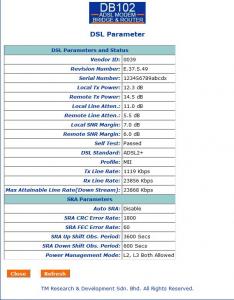
|
|
|
May 16 2009, 05:15 AM
|

Senior Member
2,330 posts Joined: Jan 2003 From: 192.168.1.2
|
QUOTE(aichiban @ May 13 2009, 08:58 PM) Browsing is too painful U have changed to G.dmt right ?Downloading (not p2p) also stopped halfway any way to improve? esp on the SNR Added on May 14, 2009, 11:27 ami called tm twice to reduce the Rx line they claimed they kenot reduce the Rx line rate from their side how do i reduce it? Did your SNR margin increase. Please connect your telephone cable to modem only > restart modem > and upload the SNR margin again. Attention to all Users, Your SNR margin must at least 12dB. higher better. What caused Disconnection, DSL light Blinking, / How to increase my SNR margin 1. Bad Internal Cable wiring, ( example, your house > 10 years, please change your house telephone wiring ) 2. Bad External Phone Wiring. ( Rewiring ) 3. Your Phone line got noise - call 100 to fix it. 4. Your Phone has alarm system - apply for another line. 5. Request other brand of Modem to test ( borrow from frd ) 6. Use shortest telephone line. avoid using old phone line, avoid using long phone line 7. Remove Spliter, Remove all phone cable, Remove Surge protector. FAQ: Q: I got SNR Margin below 12dB, what can i do. A: First, Is your connection stable? (Yes, nth i can do ) (No, Please read above) Q: I got SNR Margin above 12dB, but always disconnect, What can i do. A: Make sure u connect your phone line directly from Phone socket to Modem. Q: I apply for 512kbps package, but i check in Modem, it stated 2048kbps or 1536kbps. A: 1. Is your SNR margin below 12dB, and frequently disconnect ? Yes, Request TM technician to lower the speed capped at the DSLAM. once they did, your modem will state. as your package speed. Rate my post if this is usefully. Thanks. suk This post has been edited by Suk: May 16 2009, 05:29 AM |
|
|
May 16 2009, 10:08 AM
|
|
Senior Member
1,994 posts Joined: Apr 2006 From: Sien Ga Lin
|
After changed to G.dmt
remote SNR is still very low Attached thumbnail(s) 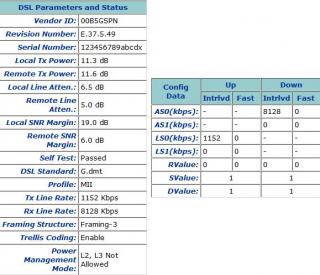
|
|
|
May 16 2009, 11:44 AM
|

Junior Member
277 posts Joined: Aug 2008
|
QUOTE(aichiban @ May 16 2009, 10:08 AM) After changed to G.dmt i think this manual would help u to tweak the modemremote SNR is still very low » Click to show Spoiler - click again to hide... « Preliminary Viking™ Chip Set Family CLI Reference Manual if not mistaken, there is a command to cap ur modem manually, but i don't sure it works or not this guide maybe the key to reduce the Rx line rate from your side This post has been edited by leopardus: May 16 2009, 11:48 AM |
|
|
May 16 2009, 02:48 PM
|
|
Senior Member
1,994 posts Joined: Apr 2006 From: Sien Ga Lin
|
QUOTE(leopardus @ May 16 2009, 11:44 AM) i think this manual would help u to tweak the modem phew...so thickPreliminary Viking™ Chip Set Family CLI Reference Manual if not mistaken, there is a command to cap ur modem manually, but i don't sure it works or not this guide maybe the key to reduce the Rx line rate from your side didnt manage to find rx line reducing though. thanks This post has been edited by aichiban: May 16 2009, 06:40 PM |
|
|
May 16 2009, 05:41 PM
|
|
Senior Member
2,330 posts Joined: Jan 2003 From: 192.168.1.2
|
QUOTE(aichiban @ May 16 2009, 02:48 PM) phew...so think Aichiban what is your connection problem? didnt manage to find rx line reducing though. thanks Slow or DC ? try to ping 192.168.1.1 and www.tm.net.my Guide : Vista start > type cmd > type "ping 192.168.1.1" XP : Start > run > cmd > type "ping 192.168.1.1" |
| Change to: |  0.0290sec 0.0290sec
 0.59 0.59
 6 queries 6 queries
 GZIP Disabled GZIP Disabled
Time is now: 9th December 2025 - 11:47 AM |
 Quote
Quote