Welcome Guest ( Log In | Register )

87 Pages « < 71 72 73 74 75 > » Bottom

Outline · [ Standard ] · Linear+

Streamyx Streamyx SNR Margin, --Read here if you face disconnections--

views
     
aichiban
post May 16 2009, 06:43 PM

pot yia thee keh tai lang!!
******
Senior Member
1,994 posts

Joined: Apr 2006
From: Sien Ga Lin


QUOTE(Suk @ May 16 2009, 05:41 PM)
Aichiban what is your connection problem?
Slow or DC ?

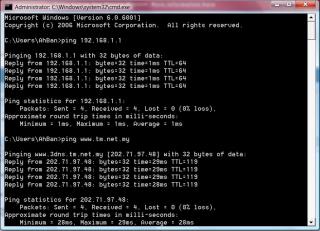
try to ping 192.168.1.1 and www.tm.net.my

Guide :
Vista
start > type cmd > type "ping 192.168.1.1"

XP :
Start > run > cmd > type "ping 192.168.1.1"
*
slow connection

slower than my dish network, 512 package with over 1k ping

This post has been edited by aichiban: May 16 2009, 06:44 PM


Attached thumbnail(s)
Attached Image
leopardus
post May 17 2009, 03:12 PM

Getting Started
**
Junior Member
277 posts

Joined: Aug 2008


QUOTE(aichiban @ May 16 2009, 02:48 PM)
phew...so thick
didnt manage to find rx line reducing though.
thanks
*
refer Topic 3.272 modify dsl config
Page 496-500

maxdnrate <hexvalue>


but before that ,i need ur dsl config parameters.

if u don't know yet, here is the steps:

1) Run command prompt OR start menu>run>cmd

2) telnet

3) open <your modem ip> e.g: open 192.168.1.1

4) enter login and password

5) then, you can run any command from the 'thick text book'. to get the parameters, type

get dsl config

6) then, paste the results here...

Disclaimer: there are some commands that risk ur modem, i will be not responsible for any damages in your peripherals..

This post has been edited by leopardus: May 17 2009, 03:13 PM
aichiban
post May 18 2009, 01:34 AM

pot yia thee keh tai lang!!
******
Senior Member
1,994 posts

Joined: Apr 2006
From: Sien Ga Lin


QUOTE(leopardus @ May 17 2009, 03:12 PM)
refer Topic 3.272 modify dsl config
Page 496-500

maxdnrate <hexvalue>
but before that ,i need ur dsl config parameters.
» Click to show Spoiler - click again to hide... «

*
i cant get pass command promt, not even step 2, or skipping step 2
btw Im using riger db102
sorry coz im a layman in this matters

telnet, open and get; not recognised

This post has been edited by aichiban: May 18 2009, 01:36 AM
dinomo
post May 18 2009, 11:14 AM

New Member
*
Newbie
1 posts

Joined: May 2009
Amazing that this disconnection issue has been going on since 2005 ...

All Mont Kiara customers are facing this same problem of a cyclical disconnect every 8-10 minutes. This completely interrupts any use of your broadband connection for basic purposes such as streaming, VPN, bittorent (which is not a bad word, as many software companies already rely on BT for legal software distribution), IM, Video Chat etc.

Problem has been identified to likely be due to some incompatible backend machines.

Was told they are speaking to their equipment vendor in the coming week (...hmmm ...) to raise this problem.

Irresponsible, as I am sure this is not a new incident.


leopardus
post May 18 2009, 09:10 PM

Getting Started
**
Junior Member
277 posts

Joined: Aug 2008


QUOTE(aichiban @ May 18 2009, 01:34 AM)
i cant get pass command promt, not even step 2, or skipping step 2
btw Im using riger db102
sorry coz im a layman in this matters

telnet, open and get; not recognised
*
ooh it should be ok,
oh well just wait for tmnut then blink.gif
jimmydotnet
post May 20 2009, 08:16 PM

Jimbo da Riverian
*****
Senior Member
766 posts

Joined: Nov 2005
From: Slim Shady Town


i have 2 phone line at home...both can be used to connect to streamyx but
-------
line A
-------
* snr margin = <10db download
<5db upload
* stream rate= >4mb download
>512kb upload
-------
line B
-------
* snr margin = >30db download
>28db upload
* stream rate = = 1mb download
= 384kb upload

im on 1mb line...wat is wrong with both line
line a has higher rate but low SNR
line b has lower rate but high SNR
DrOzzz
post May 22 2009, 07:36 PM

Casual
***
Junior Member
337 posts

Joined: Jun 2008
From: Malaysia


QUOTE
Modem Status
Connection Status  Connected
Us Rate (Kbps)  512
Ds Rate (Kbps)  1024
US Margin  24
DS Margin  18
Trained Modulation  ADSL_G.dmt
LOS Errors  0
DS Line Attenuation  38
US Line Attenuation  22
Peak Cell Rate  1207 cells per sec
CRC Rx Fast  0
CRC Tx Fast  0
CRC Rx Interleaved  3
CRC Tx Interleaved  0
Path Mode  Interleaved


DSL Statistics
Near End F4 Loop Back Count  0
Near End F5 Loop Back Count  0


What about my modem status ?? izit ok ????
spirix
post May 22 2009, 10:51 PM

New Member
*
Junior Member
36 posts

Joined: Jan 2003
From: Kuching


QUOTE(amadeo @ Nov 27 2005, 01:56 AM)
For SNR Margin and other modem status readings, pls refer to http://forum.lowyat.net/index.php?showtopi...dpost&p=4561212
*
SNR Margin 31 23 dB
Line Attenuation 11 4 dB
Data Rate 2044 510 kbps


i frm kch.

how to fix line attenuation?
eltaria
post May 28 2009, 03:50 PM

GO GO GO
******
Senior Member
1,040 posts

Joined: Apr 2005


Hi, I need some help.

My SNR is pretty bad
Line 1
Down Stream
SNR Margin - 6db
Line Attenuation - 63.5db


UpStream
SNR - 13db
LA - 31db


Line2
Down Stream
SNR Margin - 5db
Line Attenuation - 63.0db
Attainable Line Rate - 736kbps

UpStream
SNR - 19db
LA - 31.5db
A Line Rate - 992kbps


Line3
Down Stream
SNR Margin - 17.7db
Line Attenuation - 54.0db

UpStream
SNR - 15db
LA - 31.3db

Pretty shitty results eh?
Just wondering on our end, what is the 'perfect' environment that I can give our streamyx line?

Longer phone extension from the socket to our modem is bad, but how bad would it be? 2-3 feet longer would make any difference?
The type of phone line used, will it make any difference?
If the phone lines are nearby other electric cables, (interference?) would it have a negative impact?

Basically, I would like to ensure that on our end, I've done every single thing that I can to ensure our streamyx would be in the best possible condition.

We have a lot of slowmyx threads, why not a 'What you can do to ensure the best possible environment for your Streamyx' topic?

Anyway, come to think about it, I have another line which has pretty bad SNR/LA too which is like 1km from the location with the above 3 lines....

1) Using a standard phone line from the socket to the modem (shortest possible phone line)
2) I guess not much..
3) There's no electric cables there..
4) The phone cables there on the telephone poles are relatively new, the housing area are 10 years ago?.

And things are only marginally better.. maybe that location is nearer to their exchange.
And so... I think i just answered my own question, nothing much can be done personally on our end to improve SNR or Line Attenuation sad.gif


Added on May 28, 2009, 4:38 pm
QUOTE(roy_pck @ Apr 16 2009, 12:08 AM)
not to show off here but just wanna share. this is my current DSL status. got this after i changed the modulation mode from multimode to G.dmt. rclxm9.gif  rclxm9.gif

DSL Status: Connected
DSL Modulation Mode: G.dmt
DSL Path Mode: Interleaved
Downstream Rate: 4096 kbps
Upstream Rate: 512 kbps
Downstream Margin: 31 db
Upstream Margin: 30 db
Downstream Line Attenuation: 0 db
Upstream Line Attenuation: 1.5 db
Downstream Transmit Power: 11 db
Upstream Transmit Power: 12 db

FYI I never face any disconnection before thumbup.gif  thumbup.gif  thumbup.gif
*
Hi, thanks for the tip, but it didn't work sad.gif

This post has been edited by eltaria: May 28 2009, 04:38 PM

love4nothing
post Jun 9 2009, 04:24 PM

Getting Started
**
Junior Member
170 posts

Joined: Dec 2008


Modem Status
Modem Status
Connection Status Connected
Us Rate (Kbps) 512
Ds Rate (Kbps) 1536
US Margin 25
DS Margin 4
Trained Modulation ADSL_G.dmt
LOS Errors 0
DS Line Attenuation 52
US Line Attenuation 31
Peak Cell Rate 1207 cells per sec
CRC Rx Fast 386
CRC Tx Fast 30
CRC Rx Interleaved 0
CRC Tx Interleaved 0
Path Mode Fast Path


DSL Statistics
Near End F4 Loop Back Count 0
Near End F5 Loop Back Count 0


how about mine ??
my DS Margin Will Drop 1
Start From 23 To 4
skng03
post Jun 11 2009, 09:53 PM

Regular
******
Senior Member
1,450 posts

Joined: Oct 2008


spend few hours to read all pinned thread here,


when i use Riger DB102 modem, i still manage to connect but faced frequent DC

DSL Parameters and Status
Vendor ID: 00B5GSPN
Revision Number: E.37.5.49
Serial Number: 123456789abcdx
Local Tx Power: 12.1 dB
Remote Tx Power: 14.0 dB
Local Line Atten.: 58.0 dB
Remote Line Atten.: 31.5 dB
Local SNR Margin: 8.0 dB
Remote SNR Margin: 17.0 dB
Self Test: Passed
DSL Standard: G.dmt
Profile: MII
Tx Line Rate: 512 Kbps
Rx Line Rate: 1024 Kbps
Framing Structure: Framing-3
Trellis Coding: Enable
Power Management Mode: L2, L3 Both Allowed


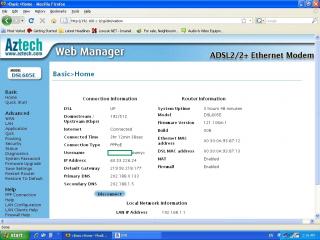
when i use Aztech DSL605E, the dsl led keep blinking like no tomorrow vmad.gif vmad.gif

Modem Status
Modem Status
Connection Status Connected
Us Rate (Kbps) 512
Ds Rate (Kbps) 480
US Margin 18
DS Margin 6
Trained Modulation ADSL_G.dmt
LOS Errors 0
DS Line Attenuation 57
US Line Attenuation 31
Peak Cell Rate 1207 cells per sec
CRC Rx Fast 244
CRC Tx Fast 3
CRC Rx Interleaved 0
CRC Tx Interleaved 0
Path Mode Fast Path


DSL Statistics
Near End F4 Loop Back Count 0
Near End F5 Loop Back Count 0

i get shit speed when using the dsl605e, see the attachment!!


NEED EXPERT to HELP icon_question.gif icon_question.gif


Attached thumbnail(s)
Attached Image
blacktubi
post Jun 16 2009, 09:42 AM

-
Group Icon
Elite
8,401 posts

Joined: Jul 2008

DSL Status: Connected
DSL Modulation Mode: MultiMode
DSL Path Mode: Fast
Downstream Rate: 1536 kbps
Upstream Rate: 512 kbps
Downstream Margin: 21 db
Upstream Margin: 21 db
Downstream Line Attenuation: 52 db
Upstream Line Attenuation: 15.5 db
Downstream Transmit Power: 11 db
Upstream Transmit Power: 16 db

Mine is like that, is this ok? Why my downstream line attenuation is so high?
corad
post Jun 17 2009, 01:30 PM

Hard to see, the dark side is.
*******
Senior Member
2,401 posts

Joined: Jan 2003
From: Sarawak / United Kingdom

How's this ?

ADSL
Type Fast Path
Status SHOWTIME
Downstream Upstream

Data rate(Kbps) 1536Kb 512Kb

Noise Margin 21 19

Output power(dBm) 123 171

Attenuation(dB) 53 30


syazwanreno
post Jun 17 2009, 07:59 PM

Won (*3*) Chu Kiss Me?
******
Senior Member
1,269 posts

Joined: Apr 2007
From: Shah Alam


how's this?? ( i have frequent dc and cannot even post in lyn.net, now at cc )

Attached Image
Elmo
post Jul 3 2009, 07:17 AM

Getting Started
**
Junior Member
282 posts

Joined: Jan 2003
Belkin Wireless G+Mimo ADSL2+ Modem Router
ADSL
Type Fast
Status No Defect

Downstream Upstream
Data Rate(Kbps) 1536 512
Noise margin (dB) 30.3 26.0
Output power (dBm) 12.1 17.7
Attenuation (dB) 28.0 13.5

This is my normal readings for router
after some time noise margin drops significantly
reset router (hard or soft) -- sometimes few times -- returns to normal

what's the problem? line or router?
twL
post Jul 5 2009, 06:44 PM

Photographer
******
Senior Member
1,146 posts

Joined: Jun 2008
From: Damansara


currently im using modem+wireless router to connect streamyx, but nowadays im always facing a problem: i cant connect to streamyx on the next time i wan 2 connect again after few hours(mayb no body use or raining, so i switch off all), when i call to streamyx, they said is my 'streamyx system' hang, they will reset for me and it's really work.

but my question is: is it i have to call them every time or every week or everyday to reset the system? is it any solutions? im facing this problem more than 1 month, but they always asked me to try, if these problem appear again, i should call them again, it's waste my time to make the calls always.

they asked me to switch off my modem before shut down the computer, but the problem is still appear.

what should i do?

hope to get a solution here, thanks!
saladin7
post Aug 3 2009, 06:51 PM

Getting Started
**
Junior Member
212 posts

Joined: Aug 2005
QUOTE(Elmo @ Jul 3 2009, 07:17 AM)
Belkin Wireless G+Mimo ADSL2+ Modem Router
ADSL      
Type  Fast  
Status  No Defect

                               Downstream     Upstream
Data Rate(Kbps)           1536                    512
Noise margin (dB)         30.3                    26.0
Output power (dBm)      12.1                    17.7
Attenuation (dB)            28.0                    13.5

This is my normal readings for router
after some time noise margin drops significantly
reset router (hard or soft) -- sometimes few times -- returns to normal

what's the problem? line or router?
*
Sorry read it wrongly

This post has been edited by saladin7: Aug 3 2009, 06:54 PM
pirateguy
post Aug 6 2009, 12:34 PM

Regular
******
Senior Member
1,409 posts

Joined: Jan 2005


QUOTE
Modem Status
Connection Status          Connected
Us Rate (Kbps)              508
Ds Rate (Kbps)              2045
US Margin                    11
DS Margin                    31
Trained Modulation        ADSL_2plus
LOS Errors                    0
DS Line Attenuation      7
US Line Attenuation      2
Peak Cell Rate              1198 cells per sec


I'm actually on 512kbps.

Is it ok?
rea0056
post Aug 6 2009, 06:20 PM

New Member
*
Newbie
1 posts

Joined: Jul 2009
yes....

my snr margin is 32dB...huhuhu...very high biggrin.gif
my line attenuation is 7dB....... biggrin.gif
Harapan
post Aug 6 2009, 07:41 PM

Getting Started
**
Junior Member
159 posts

Joined: Mar 2008


QUOTE(roy_pck @ Apr 16 2009, 12:08 AM)
not to show off here but just wanna share. this is my current DSL status. got this after i changed the modulation mode from multimode to G.dmt. rclxm9.gif  rclxm9.gif

FYI I never face any disconnection before thumbup.gif  thumbup.gif  thumbup.gif
*
How did you change the modulation mode?

87 Pages « < 71 72 73 74 75 > » Top
 

Change to:
| Lo-Fi Version
0.0347sec    0.34    6 queries    GZIP Disabled
Time is now: 2nd December 2025 - 10:55 AM