


my hdd too hot ? i heard the best temp is below 40
how to make hdd cooler ? beside physical tweak
All About Harddisk Thread V4
|
|
 May 21 2012, 05:31 PM May 21 2012, 05:31 PM
|
 
Senior Member
759 posts Joined: Jan 2011 From: Izumi's Residence 
|
my hdd too hot ? i heard the best temp is below 40 how to make hdd cooler ? beside physical tweak |
|
|
|
|
|
May 21 2012, 10:36 PM
|

Senior Member
3,591 posts Joined: Feb 2008
|
QUOTE(kona|kona @ May 21 2012, 05:31 PM) how to make hdd cooler ? beside physical tweak First, install a fan right in front of your HDDs if your casing allows for it. Second, get an air-conditioner for the room the computer is in and set it to freeze. |
|
|
May 21 2012, 11:43 PM
|
|
Senior Member
759 posts Joined: Jan 2011 From: Izumi's Residence
|
QUOTE(everling @ May 21 2012, 10:36 PM) First, install a fan right in front of your HDDs if your casing allows for it. Second, get an air-conditioner for the room the computer is in and set it to freeze. meaning new casing ftw ? |
|
|
May 22 2012, 12:06 AM
|
|
Senior Member
3,591 posts Joined: Feb 2008
|
QUOTE(kona|kona @ May 21 2012, 11:43 PM) meaning new casing ftw ? That's up to your casing and your budget. Personally, 40°C isn't a bad temperature and I wouldn't bother going to the hassle of migrating my hardware, unless the casing was due for a replacement and I have been salivating after another case. I've replaced my six-year old cap ayam casing for a sweet little Bitfenix Shinobi case only last year, despite having plenty of spare cash for most of that period. |
|
|
May 22 2012, 12:16 AM
|
|
Senior Member
759 posts Joined: Jan 2011 From: Izumi's Residence
|
QUOTE(everling @ May 22 2012, 12:06 AM) That's up to your casing and your budget. Personally, 40°C isn't a bad temperature and I wouldn't bother going to the hassle of migrating my hardware, unless the casing was due for a replacement and I have been salivating after another case. I've replaced my six-year old cap ayam casing for a sweet little Bitfenix Shinobi case only last year, despite having plenty of spare cash for most of that period. lol just wandering . sked the hdd died . sooo many important thing  |
|
|
May 22 2012, 12:24 AM
|
|
Senior Member
3,591 posts Joined: Feb 2008
|
QUOTE(kona|kona @ May 22 2012, 12:16 AM) lol just wandering . sked the hdd died . sooo many important thing If that is your reason, there is only one real solution to it, a mirror image in another HDD. Perhaps in an external HDD to make offline backups easier. All these temperature, vibration, voltage regulation control methods simply cannot preserve your data better than an actual backup copy. |
|
|
|
|
|
May 22 2012, 12:27 AM
|
|
Senior Member
759 posts Joined: Jan 2011 From: Izumi's Residence
|
QUOTE(everling @ May 22 2012, 12:24 AM) If that is your reason, there is only one real solution to it, a mirror image in another HDD. Perhaps in an external HDD to make offline backups easier. All these temperature, vibration, voltage regulation control methods simply cannot preserve your data better than an actual backup copy. backup 1tb data need how much external space ? how long to do that ? 1 day ? |
|
|
May 22 2012, 12:37 AM
|

Senior Member
1,017 posts Joined: Jun 2010
|
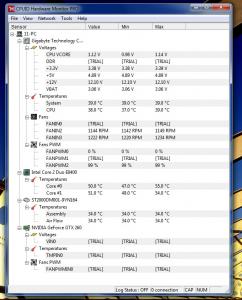
is that my hdd normal ? This post has been edited by mr11: May 22 2012, 12:39 AM |
|
|
May 22 2012, 12:39 AM
|
|
Senior Member
759 posts Joined: Jan 2011 From: Izumi's Residence
|
QUOTE(mr11 @ May 22 2012, 12:37 AM) is that my hdd normal ? so many fan your proc still more than 50C ? |
|
|
May 22 2012, 02:20 AM
|
|
Senior Member
3,591 posts Joined: Feb 2008
|
QUOTE(kona|kona @ May 22 2012, 12:27 AM) backup 1tb data need how much external space ? how long to do that ? 1 day ? Only about 10 hours for USB 2.0.  |
|
|
May 22 2012, 10:07 AM
|

Senior Member
1,127 posts Joined: Feb 2008
|
Er.. I removed one of my HDD from com yesterday and it was hot to hold. Is that bad?
|
|
|
May 22 2012, 10:33 AM
|
|
Junior Member
319 posts Joined: Jan 2008 
|
mechanical hard disk is hot. it is normal. if you have front blower fan in your casing, it can reduce your hdd temp from 50 to 35-40.
|
|
|
May 22 2012, 01:02 PM
|
|
Senior Member
759 posts Joined: Jan 2011 From: Izumi's Residence
|
QUOTE(everling @ May 22 2012, 02:20 AM) Only about 10 hours for USB 2.0. need how much space ? |
|
|
|
|
|
May 22 2012, 02:53 PM
|
|
Senior Member
3,591 posts Joined: Feb 2008
|
QUOTE(kona|kona @ May 22 2012, 01:02 PM) need how much space ? Depends on the size of the data that you wish to backup. If you want to backup an entire 1TB HDD, you would need at least a 1TB external HDD.If by backup, you also intend to compress your data to reduce the space needed, then it really depends on the data that you are backing up. For videos, audios, and pictures, compression will tend to be very poor, and sometimes even be larger than the original size. There may be some programs that can 'successfully' compress such multimedia content, but what they actually did is to permanently reduce the quality of your multimedia content to save space. In short, compressing multimedia content is usually not recommended unless you know what you are doing. |
|
|
May 22 2012, 04:13 PM
|
|
Senior Member
759 posts Joined: Jan 2011 From: Izumi's Residence
|
QUOTE(everling @ May 22 2012, 02:53 PM) Depends on the size of the data that you wish to backup. If you want to backup an entire 1TB HDD, you would need at least a 1TB external HDD. lol not suitable for me . as 90% of my hdd is consist of animu If by backup, you also intend to compress your data to reduce the space needed, then it really depends on the data that you are backing up. For videos, audios, and pictures, compression will tend to be very poor, and sometimes even be larger than the original size. There may be some programs that can 'successfully' compress such multimedia content, but what they actually did is to permanently reduce the quality of your multimedia content to save space. In short, compressing multimedia content is usually not recommended unless you know what you are doing. better buy external as storage device |
|
|
May 22 2012, 10:34 PM
|
|
Junior Member
272 posts Joined: Sep 2008
|
hi...is my hdd normal? i found it quite low on the benchmark...or my setup is wrong? limited the hdd performance..im a noob...can anyone check for me? and i found a'warning' on the health...my hdd is WD caviar black.
thanks   |
|
|
May 22 2012, 11:48 PM
|

Junior Member
140 posts Joined: Sep 2009 From: seremban, negeri sembilan 
|
QUOTE(kamechi @ May 22 2012, 10:34 PM) ...and i found a'warning' on the health...my hdd is WD caviar black. sometime SATA controller, bad sata cable can caused that "warning". sometime it is not because of SATA cable connected to hard drive, but a SATA cable connected to your cd/dvd drive. this caused SATA controller become like this ->  and SMART logged the error as UDMA CRC. and SMART logged the error as UDMA CRC.check your cable and other device connected to the SATA. pull out your cd/dvd drive, just leave hard disk, run the text again. if same "warning" appear, change the SATA cable. |
|
|
May 23 2012, 10:58 AM
|
|
Senior Member
3,591 posts Joined: Feb 2008
|
QUOTE(kona|kona @ May 22 2012, 04:13 PM) lol not suitable for me . as 90% of my hdd is consist of animu You already have a backup if you have a second copy of your data in another location. So simply copying your files to an external storage device qualifies as backing up your data. better buy external as storage device |
|
|
May 23 2012, 01:16 PM
|
|
Senior Member
759 posts Joined: Jan 2011 From: Izumi's Residence
|
QUOTE(everling @ May 23 2012, 10:58 AM) You already have a backup if you have a second copy of your data in another location. So simply copying your files to an external storage device qualifies as backing up your data. lol that will cause a lot |
|
|
May 23 2012, 02:55 PM
|

Junior Member
355 posts Joined: Dec 2011 
|
Need some urgent help here.
My mom recently bought a WD Passport 1TB. I helped her to format her laptop and back up everything important in that HDD. Everything was good, all files accessible without any trouble until today. She couldn't see the drive from My Computer. So I checked for her, I checked device manager, the HDD is detected but it's not working. Disk Management detected but with error. I stick my ear to the HDD and I can hear some spinning follow by "siren" (more like error sound - ****spin****dngg**dngg** ) something like that. Need urgent help. Added on May 23, 2012, 2:56 pm**LED LIGHT ON** Added on May 23, 2012, 2:56 pmUSB connected sound was on too This post has been edited by Qavs: May 23 2012, 02:56 PM |
| Change to: |  0.0369sec 0.0369sec
 0.54 0.54
 6 queries 6 queries
 GZIP Disabled GZIP Disabled
Time is now: 6th December 2025 - 12:43 PM |
 Quote
Quote