Outline ·
[ Standard ] ·
Linear+
HP Pavillion DV6-6XXX series Owners Lounge V5, >9000 owners. Like a boss.
|
creepydslr
|
 Jan 3 2012, 12:59 PM Jan 3 2012, 12:59 PM
|

|
hi all...
Can someone advise me, what HP software need to keep?
And FYI, I already uninstall all of it.
So, I need to know which HP software that will be useful to my beloved dv6001tx and where can I find the software to re-install it back.
|
|
|
|
|
|
lee_what2004
|
Jan 3 2012, 01:08 PM
|
*stare* ji--------

|
^
HP Coolsense
HP Connection thg
HP Support Assistant
|
|
|
|
|
|
united8918
|
Jan 3 2012, 01:08 PM
|
New Member

|
has anyone else had the issue of the HP Truevision HD webcam stop working? I heard it was a loose connection inside the display. Any way to fix besides opening or sending back to HP?
|
|
|
|
|
|
lee_what2004
|
Jan 3 2012, 01:09 PM
|
*stare* ji--------
|
If its a loose connection, then need to open it up..
|
|
|
|
|
|
TSAcid_RuleZz
|
Jan 3 2012, 01:17 PM
|
|
|
QUOTE(united8918 @ Jan 3 2012, 01:08 PM) has anyone else had the issue of the HP Truevision HD webcam stop working? I heard it was a loose connection inside the display. Any way to fix besides opening or sending back to HP? Me, but it works on my Linux OS so i ruled out loose connection/hardware problem. |
|
|
|
|
|
united8918
|
Jan 3 2012, 01:19 PM
|
New Member
|
QUOTE(Acid_RuleZz @ Jan 3 2012, 01:17 AM) Me, but it works on my Linux OS so i ruled out loose connection/hardware problem. registry error or fix? I've uninstalled and reinstalled the drivers. Updated the BIOS. Tech support suggested a system restore. Really would like to avoid a factory wipe |
|
|
|
|
|
TSAcid_RuleZz
|
Jan 3 2012, 01:28 PM
|
|
|
Still haven't fix mine in windows. Have u try startup repair?
|
|
|
|
|
|
amie_the_fakes3
|
Jan 3 2012, 02:01 PM
|
Getting Started
|
QUOTE(united8918 @ Jan 3 2012, 01:08 PM) has anyone else had the issue of the HP Truevision HD webcam stop working? I heard it was a loose connection inside the display. Any way to fix besides opening or sending back to HP? yah...same like mine...sudenly stopped couse catalys stop working... |
|
|
|
|
|
vincentlaw
|
Jan 3 2012, 02:11 PM
|
|
|
ahhh... seems that my graphic card is stuck with the Intel HD3000 all the way now even i set it to high performance in switchable graphic setting.....
problem persist even i set 'FIXED' in bios and then 'PERFORMANCE' in the switchable graphic setting
wat is the step by step to uninstall/reinstall everythg? the proper way? what to uninstall and wat to install?
i start to hate ATI/AMD more now...
This post has been edited by vincentlaw: Jan 3 2012, 02:21 PM
|
|
|
|
|
|
TSAcid_RuleZz
|
Jan 3 2012, 02:24 PM
|
|
|
^ What game u tried after u set it on High Performance?
|
|
|
|
|
|
vincentlaw
|
Jan 3 2012, 02:42 PM
|
|
|
QUOTE(Acid_RuleZz @ Jan 3 2012, 02:24 PM) ^ What game u tried after u set it on High Performance? World of Warcraft Hmmm anyway i've fried uninstall ATI --> use ATIman uninstaller --> install back the ATI 7690M + HD3000 bundle driver (330MB+) from HP.... and it seems to be fixed now... thanks anyway |
|
|
|
|
|
elco-ph
|
Jan 3 2012, 03:06 PM
|
New Member
|
I checked my "Control Panel\All Control Panel Items\Performance Information and Tools\Advanced Tools" and saw the attached error message. What could it mean? Attached thumbnail(s)
|
|
|
|
|
|
lee_what2004
|
Jan 3 2012, 03:08 PM
|
*stare* ji--------
|
Need 1.1 seconds to wake up the graphic card..
|
|
|
|
|
|
TSAcid_RuleZz
|
Jan 3 2012, 03:31 PM
|
|
|
The mother of most BSODs..
|
|
|
|
|
|
elco-ph
|
Jan 3 2012, 03:39 PM
|
New Member
|
I know my DV6-6168TX comes with a i7-2670QM processor. CPU-Z seems to incorrectly report my processor. Please see the attached image. This post has been edited by elco-ph: Jan 3 2012, 04:50 PM Attached thumbnail(s)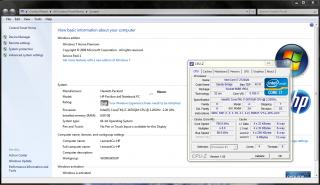
|
|
|
|
|
|
creepydslr
|
Jan 3 2012, 05:16 PM
|
|
|
QUOTE(lee_what2004 @ Jan 3 2012, 01:08 PM) ^ HP Coolsense HP Connection thg HP Support Assistant So, where can i find the software? QUOTE(united8918 @ Jan 3 2012, 01:08 PM) has anyone else had the issue of the HP Truevision HD webcam stop working? I heard it was a loose connection inside the display. Any way to fix besides opening or sending back to HP? Hmm how to on and use the webcam? |
|
|
|
|
|
vincentlaw
|
Jan 3 2012, 05:54 PM
|
|
|
QUOTE(elco-ph @ Jan 3 2012, 03:39 PM) I know my DV6-6168TX comes with a i7-2670QM processor. CPU-Z seems to incorrectly report my processor. Please see the attached image. try with the latest CPU-Z...... ver 1.59 |
|
|
|
|
|
TSAcid_RuleZz
|
Jan 3 2012, 06:09 PM
|
|
|
Meh.. i'm tired troubleshooting the webcam problem. QUOTE(creepydslr @ Jan 3 2012, 05:16 PM) So, where can i find the software? Hmm how to on and use the webcam? All can be found in the start menu. For the webcam, you can use Youcam in the start menu or install ManyCam. This post has been edited by Acid_RuleZz: Jan 3 2012, 06:48 PM |
|
|
|
|
|
dae
|
Jan 3 2012, 06:33 PM
|
New Member
|
got mine yesterday. already played crysis 2. but it become very hot al pulak . i just wanna know what cooler most of u guys use.
|
|
|
|
|
|
elco-ph
|
Jan 3 2012, 07:17 PM
|
New Member
|
QUOTE(Acid_RuleZz @ Jan 3 2012, 03:31 PM) The mother of most BSODs.. Will installing leshcat's drivers solve my problem?  |
|
|
|
|



 Quote
Quote


 0.0315sec
 0.59
0.59
 6 queries
 GZIP Disabled