Outline ·
[ Standard ] ·
Linear+
HP Pavillion DV6-6XXX series Owners Lounge V5, >9000 owners. Like a boss.
|
elco-ph
|
 Dec 23 2011, 01:14 PM Dec 23 2011, 01:14 PM
|
New Member


|
Having problems updating video driver on my 6168TX.
I downloaded sp55092.exe from the HP website and tried to install it. A message came out saying "your screen will blink or go dark..."
It went dark. Absolutely dark. And stayed this way for several HOURS.
I forced a shutdown by keeping the power button pressed. Then went to Windows startup options and selected "last known good" settings. The laptop is now working normally, but with old drivers.
Any tips/info on how I can update my video driver successfully?
|
|
|
|
|
|
elco-ph
|
Dec 23 2011, 01:50 PM
|
New Member
|
QUOTE(Acid_RuleZz @ Dec 23 2011, 01:20 PM) Was u on Fixed switching and use HD6770M when u installing? Nope, it was not on "fixed." On the bios, it was on "dynamic." Should I put it on "fixed?" Addendum: I just got a bluescreen after using VLC player to play a downloaded DVDRip. The bluescreen pointed to "atikmpag.sys" as the culprit. I guess I really need to update my video drivers... This post has been edited by elco-ph: Dec 23 2011, 01:52 PM |
|
|
|
|
|
elco-ph
|
Dec 23 2011, 04:04 PM
|
New Member
|
QUOTE(Acid_RuleZz @ Dec 23 2011, 01:59 PM) Yeah, try put it on Fixed and use HD6770M when u updating the driver. Don't worry so much about "atikmpag.sys" BSOD.. we all experienced that at least once.. try to turn off DXVA in VLC. Did what you said. The new drivers installed without problems. Now running VLC also without problems. The new drivers also work well in "fixed" mode, with a popup window telling me that the GPU will switch when I unplug the charger. Nice!  Thanks very much! |
|
|
|
|
|
elco-ph
|
Dec 23 2011, 04:49 PM
|
New Member
|
QUOTE(Acid_RuleZz @ Dec 23 2011, 04:13 PM) Cool..  fyi you can set a hotkeys to switch the graphic too. That's nice to know. How do you set the hotkey? Could you point me to a link to the instructions? Thanks!  |
|
|
|
|
|
elco-ph
|
Dec 23 2011, 05:00 PM
|
New Member
|
QUOTE(Acid_RuleZz @ Dec 23 2011, 04:56 PM) Open "Catalyst Control Panel", click "Preferences" on top right of the window and select "Hotkeys".
Click "According to" drop down and select Switchable Graphics. I found it. Thanks for your help! |
|
|
|
|
|
elco-ph
|
Dec 28 2011, 03:34 PM
|
New Member
|
Techie question: I have a USB device using an unsigned driver that works fine in Windows XP x86 (32-bit) and Windows 7 x86 (32-bit). The software works without problems and is able to communicate with the USB device via the unsigned driver. I tried installing the same software in Windows 7 x64 (my DV6-6168TX). After I plug in the USB device, the software quits after I double-click it. So I tried VMWare Player and installed a fresh copy of Windows XP Pro x86 (32-bit) inside it. Then I installed the USB device software inside XP Pro. Then I plugged-in the USB device. The software no longer quits after I run it, but it cannot find the USB device. Any tips on how to make XP Pro in VMWare recognize a USB device that uses an unsigned driver running in Windows 7 x64? Thanks in advance. |
|
|
|
|
|
elco-ph
|
Dec 29 2011, 02:02 AM
|
New Member
|
QUOTE(Acid_RuleZz @ Dec 28 2011, 04:17 PM) ^ instead of using VMWare, have u tried booting with Force Disable Driver Signature Enforcement and set the software compatibility to Windows XP SP3? Sadly my DV6-6168TX is running Windows7x64HomePremium and I am not able to run GPEDIT.MSC to disable driver signature enforcement. Any tips? |
|
|
|
|
|
elco-ph
|
Jan 2 2012, 01:26 PM
|
New Member
|
|
|
|
|
|
|
elco-ph
|
Jan 2 2012, 01:33 PM
|
New Member
|
QUOTE(Acid_RuleZz @ Jan 2 2012, 01:30 PM) ^ you don't need to download and install Intel graphic driver because AMD driver from HP already have that included. Thanks!  Next question: In the BIOS, Under "System Configuration," there is a choice to enable or disable "Virtualization Technology." In my DV6, it is "disabled." I run Windows XP 32-bit in VMWare Player often. Do I need to enable Virtualization? |
|
|
|
|
|
elco-ph
|
Jan 2 2012, 04:47 PM
|
New Member
|
QUOTE(Acid_RuleZz @ Jan 2 2012, 01:30 PM) ]If you the type that want everything on the latest version.. you can try Leshcat's driver. You don't need to install HP driver, just remove everything and install his driver. I see.. You mean remove all ATI drivers with driver sweeper? |
|
|
|
|
|
elco-ph
|
Jan 2 2012, 05:34 PM
|
New Member
|
QUOTE(Acid_RuleZz @ Jan 2 2012, 05:08 PM) Yes.. before u use Driversweeper, download extract filter.xml from attachment into DriverSweeper directory(default = ..\Program Files (x86)\Phyxion.net\Driver Sweeper\). Overwrite the file if it already there. [attachmentid=2618403] With this you'll have an option to clean Intel HD files and registry too. » Click to show Spoiler - click again to hide... « Remember only to tick AMD - Display + Intel HD Graphics.. not Intel - Chipset. credit to Leshcat for the filter. Got it. Thanks! Just curious, what will happen if I install Leshcat's driver over my existing drivers without first removing them with DriverSweeper? Will Leshcat's drivers still work properly? |
|
|
|
|
|
elco-ph
|
Jan 3 2012, 03:06 PM
|
New Member
|
I checked my "Control Panel\All Control Panel Items\Performance Information and Tools\Advanced Tools" and saw the attached error message. What could it mean? Attached thumbnail(s)
|
|
|
|
|
|
elco-ph
|
Jan 3 2012, 03:39 PM
|
New Member
|
I know my DV6-6168TX comes with a i7-2670QM processor. CPU-Z seems to incorrectly report my processor. Please see the attached image. This post has been edited by elco-ph: Jan 3 2012, 04:50 PM Attached thumbnail(s)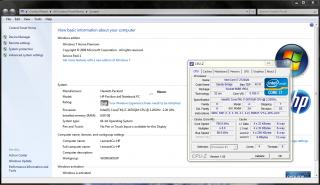
|
|
|
|
|
|
elco-ph
|
Jan 3 2012, 07:17 PM
|
New Member
|
QUOTE(Acid_RuleZz @ Jan 3 2012, 03:31 PM) The mother of most BSODs.. Will installing leshcat's drivers solve my problem? |
|
|
|
|
|
elco-ph
|
Jan 4 2012, 01:36 AM
|
New Member
|
QUOTE(Acid_RuleZz @ Jan 3 2012, 07:55 PM) Sry, i have no idea.  Did you get it a lot? Unfortunately yes. Between meetings I hibernate my laptop before I put it in the bag. Out of 10 restarts, i get 3 blue screen with "atikmpag.sys" as the culprit. So i have to long-press the power button to force power off. But it usually works ok When I restart it. Will install leshcat's drivers today. Will let you know how it goes. This post has been edited by elco-ph: Jan 4 2012, 01:38 AM |
|
|
|
|
|
elco-ph
|
Jan 4 2012, 09:07 PM
|
New Member
|
QUOTE(FameMoon @ Jan 4 2012, 08:22 PM) Hello..my laptop not reach 2 months with me,yet I have format it twice..yesterday while facebooking,my laptop suddenly hang(ultimate hang,cannot use Ctrl Alt Del)..after off using power button and turn on again,the problem is about startup..what is the source of problem actually?hmm...  Happened to me while watching a YouTube video. Seems like the problem is the video driver. |
|
|
|
|
|
elco-ph
|
Jan 4 2012, 10:56 PM
|
New Member
|
Honestly, I'd reformat with Windows 7 32-bit if only it could address more than 4GB of memory.
Windows Server 32-bit can address up to 64GB! No idea why Windows 7 32-bit cannot do this...
|
|
|
|
|
|
elco-ph
|
Jan 5 2012, 10:32 AM
|
New Member
|
QUOTE(Acid_RuleZz @ Jan 5 2012, 01:54 AM) Whats wrong with 64-bit Window 7? Hangs too often. Hehe.. |
|
|
|
|
|
elco-ph
|
Jan 6 2012, 01:08 PM
|
New Member
|
QUOTE(simsim @ Jan 6 2012, 12:15 PM) Hi everyone, i am looking for a laptop now, and have been considering the dv6-6c12TX. do you guys think its good enough to do some auto cad designing work? you guys dont talk about the 12TX here. need some input from you guys before i pull the trigger its around the same price as the envy 17, so im quite confused about that as well. For CAD work, I would probably go with the Envy17 and use it as a desktop replacement. I believe the Envy17 comes with a 1920x1080 full-HD display? My opinion is this would be better for CAD work compared with the 1366x768 resolution of the dv6-6c12TX. If you need something portable that you can bring around with a full-HD display, the dv6-6168tx is the way to go. It's got a bright and sharp 15.6-inch 1920x1080 display that (for me) renders lines and colors nicely. |
|
|
|
|
|
elco-ph
|
Jan 6 2012, 03:28 PM
|
New Member
|
If the Envy17 was the same size as the MacBook Pro 17, that's what I would have gotten. The metal bracelet of my watch is scratching the dark umber finish to the left of the trackpad. Has anyone here tried applying protective clear stickers to this area? Like a cellphone screen protector? |
|
|
|
|



 Quote
Quote


 0.0588sec
 0.54
0.54
 7 queries
 GZIP Disabled