

QUOTE(gahkin @ Apr 8 2012, 10:18 PM)
Any idea can remove the 6code ??

The glitch code also affected the EPG. (when restart decoder) 
Astro B.yond Episode IV (Version 9.0), The New World of Entertainment
|
|
 Apr 8 2012, 10:48 PM Apr 8 2012, 10:48 PM
|
 
Senior Member
6,103 posts Joined: Apr 2009 From: Marang, Terengganu   
|
QUOTE(gahkin @ Apr 8 2012, 10:18 PM) Any idea can remove the 6code ?? The glitch code also affected the EPG. (when restart decoder) |
|
|
|
|
|
Apr 8 2012, 10:54 PM
|

Senior Member
735 posts Joined: Jan 2003 From: Selayang , Kepong
|
Now I watching ch831 the code is gone ....
|
|
|
Apr 8 2012, 10:55 PM
|

Senior Member
1,602 posts Joined: Jun 2007
|
QUOTE(gahkin @ Apr 8 2012, 10:54 PM) Now I watching ch831 the code is gone .... yea even ESPN no more code... zzz |
|
|
Apr 8 2012, 11:18 PM
|
|
Senior Member
6,103 posts Joined: Apr 2009 From: Marang, Terengganu
|
QUOTE(kaspersky-fan @ Apr 8 2012, 10:55 PM) yea even ESPN no more code... zzz Check all sport channels.  |
|
|
Apr 8 2012, 11:32 PM
|
|
Senior Member
1,602 posts Joined: Jun 2007
|
QUOTE(Qash-M @ Apr 8 2012, 11:18 PM) Check all sport channels. I think all gone for now? Wonder what they are up to... |
|
|
Apr 8 2012, 11:46 PM
|
|
Senior Member
6,103 posts Joined: Apr 2009 From: Marang, Terengganu
|
QUOTE(kaspersky-fan @ Apr 8 2012, 11:32 PM) I think all gone for now? Wonder what they are up to... Not really dissapear. Since when Astro become so good of fakap the "red button" fuction with coding? |
|
|
|
|
|
Apr 9 2012, 12:09 AM
|
|
Senior Member
1,602 posts Joined: Jun 2007
|
QUOTE(Qash-M @ Apr 8 2012, 11:46 PM) Not really dissapear. Since when Astro become so good of fakap the "red button" fuction with coding? I should go question my friend on that =p |
|
|
Apr 9 2012, 11:02 AM
|

Junior Member
405 posts Joined: Apr 2006
|
"Copy Protection Failed"
Guys, any idea how to remove it? Attached thumbnail(s) 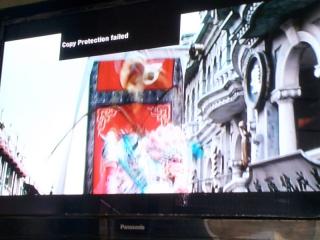
|
|
|
Apr 9 2012, 04:17 PM
|
|
Senior Member
6,103 posts Joined: Apr 2009 From: Marang, Terengganu
|
QUOTE(Max204 @ Apr 9 2012, 11:02 AM) "Copy Protection Failed" Re-adjust the cable position? Guys, any idea how to remove it?  |
|
|
Apr 9 2012, 05:54 PM
|

Senior Member
684 posts Joined: Apr 2010
|
QUOTE(Max204 @ Apr 9 2012, 11:02 AM) "Copy Protection Failed" Guys, any idea how to remove it? When you asked a question using only 3 words message, it will not be easy for people to answer... so more info is needed. So... with only the 3 words "Copy Protection Failed" message ... I can only guess the reason but I will try my best. I guess that you did not use HDMI and have chosen to use either (1) or (2) cable connection from Byond direct to TV... 1) Component Video (Red, Green, Blue) cable 2) Composite (RCA Yellow) cable IF you used (1)... try using (2) because AACS content protection may have caused the message when (1) was used. Component Video can accept a maximum HD 1080i but... in future... this will be totally blocked and we are forced to use HDMI only. Blu-ray players after 2010 is now coming out with such block when HDMI can be used for HD video and Component Video (Red, Green, Blue) is blocked. Mmm... maybe in future, even Composite (RCA Yellow) output will be blocked when HD is played. You will lose video quality at SD when Composite (RCA Yellow) is used. This "problem" occur for satellite signals received from ALL Satellite TV providers which included Astro, DirecTV and others. You cannot just blame Astro only. The "copy protection failed" is caused by AACS content protection of video which stops, interfere or blocks video signal output from (1) or (2) when HDMI out is used. This means only 1 output is allowed from HDMI for High Definition only. No problem if the source signal (from Satellite TV or Bluray Players) is only Standard Definition. NO such block for "SD Only" videos. I think Astro presently did not comply fully with the international standard or I guess Astro did not manage to "unlock" the protection fully which caused the message from component video. Starting from 2010, all video playback equipment such as blu-ray players, satellite decoder boxes (Byond), mediaplayers must comply with the AACS protection which do NOT allow output from Component Video (Red, Blue, Green) when HD video is watched... from blu-ray/DVD players, from Mediaplayers, from Sat TV channels, etc ! You can find many sites mentioning this. You can also refer to the links at the bottom of my post here. Most of the TV (LCD, LED) today already have HDCP chip which detects the AACS protection. Older TVs without HDCP will be blocked and cannot watch the AACS protected video. This happens also with Blu-ray Players. I will give you an example... I used my Oppo Blu-ray/Media Player to play an AACS protected blu-ray movie "Transformers : Dark of the moon". I connected from Oppo to 2 TVs. One is HDMI cable to my LCD TV and another using RCA (Yellow) cable to another TV. When I play the BD video to watch same video from 2 TVs... first TV using HDMI is perfect BUT the 2nd TV is only black !! So most (maybe all) blu-ray discs and satellite TV signals have this AACS protection. Ok... I can explain a LOT more about this but I think I will keep it short in my post here. I think that you did not use HDMI cable from your Byond to your LCD TV. Many people also connected 2 TVs to the same Byond box. If you used only 1 old TV with no HDMI, then maybe your old TV do not have HDCP chip in it so this problem cannot be fixed. Buy a new TV. Almost all newer LCD and LED TVs have HDMI input. This problem is also caused by the Byond settings. Change the settings to "Standard Definition" and resolution at "576i". People who connected 1 Byond box to 2 TVs can only have ONE of this two choices... a) Set Byond to "High Definition" and resolution at "1080i". The first LCD TV using HDMI can receive everything okay. The second TV using Composite (RCA Yellow) cable will... ah-hem... "enjoy" the "extra" subtitle called "Copy Protection Failed" b) Set Byond to "Standard Definition" and resolution at "576i". The first LCD using HDMI will receive... ah-hem.. poor quality SD picture. The second TV using Composite (RCA Yellow) cable will not show the "Copy Protection Failed" message. I am 100% sure about the AACS Protection BUT I am not sure that setting to (b) can or cannot fix the problem so you can try it. The only problem with (b) is that you lose the picture quality with using SD !! There are other ways to fix your problem it cost money to buy HDMI converters and others but i can't explain here because its too long to post. Don't blame Astro... blame the AACS used by the international A**-H*LE groups which includes the Blu-ray Consortium, AMPAS, etc which forced the AACS on us to stop piracy BUT everyone knows that its mostly to make more big fat profits. I can "really" write many many pages on this to explain my reasons why these group are money sucking sharks ! Again, too long to write here. Whether all the Byond outputs can be used to many TVs also depends on different situations. Example... if you did not subscribe to HD service, then there may be no output from Byond HDMI. Also... when (b) is used, this problem may NOT be fixed too if the Byond box still continue to use HD to "convert" to SD... because I think the Byond output may unlock only part of the AACS protection which caused the irritating message appear. The only way out for you is use HDMI and newer TV with HDCP... or use back your same old cables and use black cloth to cover the irritating "Copy Protection Failed" message. Black cloth .... joking only. I usually believe... when AACS is activated, got picture from HDMI but should be completely no picture for Composite. Mmm... may be the 2nd TV is not HDCP (without the chip) ready ? I am not sure about this but, if possible, you can try switching using composite (RCA Yellow) cable from 2nd TV to the 1st TV and check. If the message did not appear now, then I suspect that the 2nd TV is not HDCP ready. I am only guessing because you did not give enough detailed info when you used only 3 words (Copy Protection Failed). I think I can be sure that your problem is because you did not use HDMI cable ! Here are some links with more info... http://www.audioholics.com/news/industry-news/aacs-hdmi-kill-component-2010 http://en.wikipedia.org/wiki/Advanced_Access_Content_System http://www.sevenforums.com/music-pictures-video/61955-understanding-hdcp-blu-ray-copy-protection-its-h.html AACS : Advanced Access Content System HDCP : High-Definition Copy Protection * Please do not be confused with AACS Copy Protection used in DVD or Bluray discs which worked in a different way. ADDITION For other people ... mmm... I read a few posts such as... one which complained about the temporary 6 digit watermark, no "subtitles" in HD channels, etc... which I feel... mmm... are "very interesting" personal opinions. I do have "different" opinions. Short examples... someone complained about IR (or phosphor burning) damage on plasma TV from the temporary 6 digit characters that appeared in sports channels BUT did not complain when ALL TV channels, including RTM, TV3, NTV7, CNN, Fox Movies Premium, etc, have their permanent logos on top left or right. Second example... assuming that the temporary 6 digit characters in sports channels may be "to identify who's recorder is recorded from"... when Astro don't need such methods... when Astro can use the already existing lock from the smartcard 12 digit ID combined with Decoder box ID 16 digit number which can be easily detected. And it should not be possible for Astro to detect our decoder because our dish is not big enough to send signal back to satellite AND the LNB we used is a receiver, not a receiver/transmitter. In order for the satellite to identify us, a signal have to be sent back. We can relay from our mobile phone towers to a ground sub-station which can transmit to satellite. BUT Astro only used direct transmission from sat to our Byond box. We need a transmitter similar in some ways to our internet WiFi Modem Router. Many people also did not understand correctly how GPS tracking works from our handphone too... wrongly thinking that our phone can "send signal" directly back to the satellite. Many also didn't understand that the location detection is through triangulation from 3 satellites location detected and received by the phone... the software from the phone calculates our handphone location using the coordinates received from 3 sats... the phone did not send any direct signals back to the satellite... the mobile phone can only send signal to the nearest land-based phone tower. Astro did not use such towers yet because its too expensive to use it just to check the identity of each decoder. I also "see" other interesting posts too but I don't have much free time to post. I always welcome anyone to correct me if I am wrong so no problem for me as I can learn from my mistakes. This post has been edited by jamesleetech: Apr 10 2012, 04:23 AM |
|
|
Apr 9 2012, 10:29 PM
|

Senior Member
1,715 posts Joined: May 2005 From: Klang
|
QUOTE(jamesleetech @ Apr 9 2012, 05:54 PM) ( lots off stuff ) I beg to differ. Not sure if the issue Max204 facing is due to new FW, but when I upgraded to bae-yong in December 2009 (my last year before cancel), I had HDMI going to TV and Composite (yellow-red-white cable) going to old VCR (yes, I still use one to play back old archival tapes and make archival recording at that time). Never had that issue. The error only cropped up when I tried to experiment and connected the Assteruk bae-yong directly to a BlackMagic Intensity Pro card on my MCPC (My MCPC has 5.1 channel surround speaker and 1080p display! At that time Assteruk not yet release PVR function yet, which is one of my motives for integrating Assteruk to MCPC- want PVR function and use 5.1 speaker kit), which of course is programmed to deny HDCP copy-once and copy-never signal. Also, Assteruk bae-yong Component (RGB/YPbPr) is already adhering to analog sunset, can only output 576i signal one. Last I checked HD video is downscaled to 576i and simultaneously output with HDMI. It could be his TV acting up (HDCP chip fry?) or simply, his assteruk decoder HDCP fry (lightning? since most people dun turn off and unplug even when lightning, I'm inclined to think it a possibility), or simply cable loose or oxidization of HDMI cable contacts on either end. If he has a HDCP splitter or HDCP wireless transceiver, it could be that fry too. My advice would be to try a different TV using HDMI, and if that fails, call Assteruk. My experience with bae-yong was over 2 years ago tho. Maybe newer firmware blocks analog out. Either way, I dun care, Assteruk already step on my toe, not dealing with them ever again. This post has been edited by RAMChYLD: Apr 9 2012, 10:38 PM |
|
|
Apr 10 2012, 02:56 AM
|
|
Senior Member
684 posts Joined: Apr 2010
|
QUOTE(RAMChYLD @ Apr 9 2012, 10:29 PM) I beg to differ. Not sure if the issue Max204 facing is due to new FW, but when I upgraded to bae-yong in December 2009 (my last year before cancel), I had HDMI going to TV and Composite (yellow-red-white cable) going to old VCR (yes, I still use one to play back old archival tapes and make archival recording at that time). Never had that issue. The error only cropped up when I tried to experiment and connected the Assteruk bae-yong directly to a BlackMagic Intensity Pro card on my MCPC (My MCPC has 5.1 channel surround speaker and 1080p display! At that time Assteruk not yet release PVR function yet, which is one of my motives for integrating Assteruk to MCPC- want PVR function and use 5.1 speaker kit), which of course is programmed to deny HDCP copy-once and copy-never signal. Also, Assteruk bae-yong Component (RGB/YPbPr) is already adhering to analog sunset, can only output 576i signal one. Last I checked HD video is downscaled to 576i and simultaneously output with HDMI. It could be his TV acting up (HDCP chip fry?) or simply, his assteruk decoder HDCP fry (lightning? since most people dun turn off and unplug even when lightning, I'm inclined to think it a possibility), or simply cable loose or oxidization of HDMI cable contacts on either end. If he has a HDCP splitter or HDCP wireless transceiver, it could be that fry too. My advice would be to try a different TV using HDMI, and if that fails, call Assteruk. My experience with bae-yong was over 2 years ago tho. Maybe newer firmware blocks analog out. Either way, I dun care, Assteruk already step on my toe, not dealing with them ever again. I appreciate your feedback. I have never been shy to admit my mistakes. I DID make some mistakes when I mixed some facts with my assumptions in my rush to reply. The AACS sunset rules is already explained from the links I posted earlier which specifically mentioned about downscaling to SD when both analog (composite) and digital (HDMI) are both output simultaneously. I wish to correct my mistake. There is still output from analog connection (composite & Component video) when HDMI is also used at the same time. If the AACS riule is strictly followed, the video should be downscaled from HD to SD for HDMI connection when another analog output is also used together. If any of the equipment is not HDCP ready, have faulty HDCP chip or have handshaking problems, then there will be no video display. Such equipment include the TV, DVD player, BD player or Mediaplayer. I actually checked again using my Byond to 2 TVs and found out that there is picture from HDMI to 1st TV and also from Composite (yellow) to 2nd TV. No "Copy Protection Failed" message on both TVs. » Click to show Spoiler - click again to hide... « I think I can safely guess that we both can agree that HDCP can cause problems due to various reasons such as faulty HDCP chip, handshaking problems, loose connections, etc. If Max204 used 2 HDTVs which are already HDCP ready, I did suggested that the cables be switched between the 2 TVs to check whether a faulty HDCP chip is the cause or not. Refer to part of my reply inside spoiler... » Click to show Spoiler - click again to hide... « Anyway, from what I noticed from the picture posted by Max204, the Panasonic HDTV should be HDCP compliant. When Max204 posted for help with only "Copy Protection Failed" messsage and a picture, I think you can agree with me that Max204 gave too little info. He did not mention whether he used Byond or Byond PVR or whether 1 or 2 TVs is used. He did not mention what actually happened before the message appeared. That's why I did earlier mentioned that I am guessing with so little info provided. I should have checked my "facts" first before I replied. And I should have requested Max204 to provide more detailed info before I gave my opinions. Maybe Max204 is only using 1 HDTV with Byond PVR (with internal harddisk). I phoned to my installer friend and he also don't know the actual reason. He told me a few things... could it be that he have Byond PVR and switched off power completely (not standby) with live rewind still in use ? I am lazy to check what its actually called so I used "live rewind". Example.... this PVR function allows user to immediately rewind to watch a missed goal while watching a Live Telecast of a football match. This means the PVR is actually recording the Live match to harddisk while we are still watching the match. My friend told me that switching PVR totally off immediately without first putting on standby may cause problems and the PVR should always be in standby because switching off may have caused failure to add copy protection to recorded files which may be why the PVR shows the message. Max204 problem may not be due to HDCP. My friend told me correctly that he can only make assumptions and guesses only. I totally agree when my friend also said... "Why didn't Max204 contact Astro Customer Support first because they are the best party to ask for professional help when Astro spent lots of money in customer support ? Using a forum should not be the first party especially when he provided so little info. Through the phone is different because questions can be asked immediately from the support person and if required, a technician can take over in helping fix any problem." I did also mention this before in my previous post some time ago. Thanks, RAMChYLD, for correcting my mstake. Yes, its truly unfortunate that Assteruk unfairly and wrongly threw the threatening letter to ask for the recovery payment of RM 80 without first checking their own records properly. If I were you, I would have continued further with a complaint to the Malaysian Bar Council but you have the right to make your own decision not to continue further so I fully respect it. If I had cancelled my Astro account and received the same type of letter, I will also act the same way as you and will NEVER go back to Assteruk ever again! To Max204... if not yet call Astro Customer Support... please do it first and explain your problem in detail. Thanks. Peace  This post has been edited by jamesleetech: Apr 10 2012, 06:43 AM |
|
|
Apr 10 2012, 09:04 AM
|
|
Senior Member
1,602 posts Joined: Jun 2007
|
QUOTE(jamesleetech @ Apr 9 2012, 05:54 PM) When you asked a question using only 3 words message, it will not be easy for people to answer... so more info is needed. Hey james, imho i agree with you on astro not sending back the signal to the satellite. The intention of having that code being visible is so that when someone pirates from the decoder box, and mass produce it, with the code, they would be able to tell which smart card and decoder box that code belongs to and trace from there. This is what my friend informed me of. [However, with a simple video edit of adding a black box to the code area to make the code not readable would have easily solved this lol]So... with only the 3 words "Copy Protection Failed" message ... I can only guess the reason but I will try my best. I guess that you did not use HDMI and have chosen to use either (1) or (2) cable connection from Byond direct to TV... 1) Component Video (Red, Green, Blue) cable 2) Composite (RCA Yellow) cable IF you used (1)... try using (2) because AACS content protection may have caused the message when (1) was used. Component Video can accept a maximum HD 1080i but... in future... this will be totally blocked and we are forced to use HDMI only. Blu-ray players after 2010 is now coming out with such block when HDMI can be used for HD video and Component Video (Red, Green, Blue) is blocked. Mmm... maybe in future, even Composite (RCA Yellow) output will be blocked when HD is played. You will lose video quality at SD when Composite (RCA Yellow) is used. This "problem" occur for satellite signals received from ALL Satellite TV providers which included Astro, DirecTV and others. You cannot just blame Astro only. The "copy protection failed" is caused by AACS content protection of video which stops, interfere or blocks video signal output from (1) or (2) when HDMI out is used. This means only 1 output is allowed from HDMI for High Definition only. No problem if the source signal (from Satellite TV or Bluray Players) is only Standard Definition. NO such block for "SD Only" videos. I think Astro presently did not comply fully with the international standard or I guess Astro did not manage to "unlock" the protection fully which caused the message from component video. Starting from 2010, all video playback equipment such as blu-ray players, satellite decoder boxes (Byond), mediaplayers must comply with the AACS protection which do NOT allow output from Component Video (Red, Blue, Green) when HD video is watched... from blu-ray/DVD players, from Mediaplayers, from Sat TV channels, etc ! You can find many sites mentioning this. You can also refer to the links at the bottom of my post here. Most of the TV (LCD, LED) today already have HDCP chip which detects the AACS protection. Older TVs without HDCP will be blocked and cannot watch the AACS protected video. This happens also with Blu-ray Players. I will give you an example... I used my Oppo Blu-ray/Media Player to play an AACS protected blu-ray movie "Transformers : Dark of the moon". I connected from Oppo to 2 TVs. One is HDMI cable to my LCD TV and another using RCA (Yellow) cable to another TV. When I play the BD video to watch same video from 2 TVs... first TV using HDMI is perfect BUT the 2nd TV is only black !! So most (maybe all) blu-ray discs and satellite TV signals have this AACS protection. Ok... I can explain a LOT more about this but I think I will keep it short in my post here. I think that you did not use HDMI cable from your Byond to your LCD TV. Many people also connected 2 TVs to the same Byond box. If you used only 1 old TV with no HDMI, then maybe your old TV do not have HDCP chip in it so this problem cannot be fixed. Buy a new TV. Almost all newer LCD and LED TVs have HDMI input. This problem is also caused by the Byond settings. Change the settings to "Standard Definition" and resolution at "576i". People who connected 1 Byond box to 2 TVs can only have ONE of this two choices... a) Set Byond to "High Definition" and resolution at "1080i". The first LCD TV using HDMI can receive everything okay. The second TV using Composite (RCA Yellow) cable will... ah-hem... "enjoy" the "extra" subtitle called "Copy Protection Failed" b) Set Byond to "Standard Definition" and resolution at "576i". The first LCD using HDMI will receive... ah-hem.. poor quality SD picture. The second TV using Composite (RCA Yellow) cable will not show the "Copy Protection Failed" message. I am 100% sure about the AACS Protection BUT I am not sure that setting to (b) can or cannot fix the problem so you can try it. The only problem with (b) is that you lose the picture quality with using SD !! There are other ways to fix your problem it cost money to buy HDMI converters and others but i can't explain here because its too long to post. Don't blame Astro... blame the AACS used by the international A**-H*LE groups which includes the Blu-ray Consortium, AMPAS, etc which forced the AACS on us to stop piracy BUT everyone knows that its mostly to make more big fat profits. I can "really" write many many pages on this to explain my reasons why these group are money sucking sharks ! Again, too long to write here. Whether all the Byond outputs can be used to many TVs also depends on different situations. Example... if you did not subscribe to HD service, then there may be no output from Byond HDMI. Also... when (b) is used, this problem may NOT be fixed too if the Byond box still continue to use HD to "convert" to SD... because I think the Byond output may unlock only part of the AACS protection which caused the irritating message appear. The only way out for you is use HDMI and newer TV with HDCP... or use back your same old cables and use black cloth to cover the irritating "Copy Protection Failed" message. Black cloth .... joking only. I usually believe... when AACS is activated, got picture from HDMI but should be completely no picture for Composite. Mmm... may be the 2nd TV is not HDCP (without the chip) ready ? I am not sure about this but, if possible, you can try switching using composite (RCA Yellow) cable from 2nd TV to the 1st TV and check. If the message did not appear now, then I suspect that the 2nd TV is not HDCP ready. I am only guessing because you did not give enough detailed info when you used only 3 words (Copy Protection Failed). I think I can be sure that your problem is because you did not use HDMI cable ! Here are some links with more info... http://www.audioholics.com/news/industry-news/aacs-hdmi-kill-component-2010 http://en.wikipedia.org/wiki/Advanced_Access_Content_System http://www.sevenforums.com/music-pictures-video/61955-understanding-hdcp-blu-ray-copy-protection-its-h.html AACS : Advanced Access Content System HDCP : High-Definition Copy Protection * Please do not be confused with AACS Copy Protection used in DVD or Bluray discs which worked in a different way. ADDITION For other people ... mmm... I read a few posts such as... one which complained about the temporary 6 digit watermark, no "subtitles" in HD channels, etc... which I feel... mmm... are "very interesting" personal opinions. I do have "different" opinions. Short examples... someone complained about IR (or phosphor burning) damage on plasma TV from the temporary 6 digit characters that appeared in sports channels BUT did not complain when ALL TV channels, including RTM, TV3, NTV7, CNN, Fox Movies Premium, etc, have their permanent logos on top left or right. Second example... assuming that the temporary 6 digit characters in sports channels may be "to identify who's recorder is recorded from"... when Astro don't need such methods... when Astro can use the already existing lock from the smartcard 12 digit ID combined with Decoder box ID 16 digit number which can be easily detected. And it should not be possible for Astro to detect our decoder because our dish is not big enough to send signal back to satellite AND the LNB we used is a receiver, not a receiver/transmitter. In order for the satellite to identify us, a signal have to be sent back. We can relay from our mobile phone towers to a ground sub-station which can transmit to satellite. BUT Astro only used direct transmission from sat to our Byond box. We need a transmitter similar in some ways to our internet WiFi Modem Router. Many people also did not understand correctly how GPS tracking works from our handphone too... wrongly thinking that our phone can "send signal" directly back to the satellite. Many also didn't understand that the location detection is through triangulation from 3 satellites location detected and received by the phone... the software from the phone calculates our handphone location using the coordinates received from 3 sats... the phone did not send any direct signals back to the satellite... the mobile phone can only send signal to the nearest land-based phone tower. Astro did not use such towers yet because its too expensive to use it just to check the identity of each decoder. I also "see" other interesting posts too but I don't have much free time to post. I always welcome anyone to correct me if I am wrong so no problem for me as I can learn from my mistakes. They also enable that code because some retail shop owners would subscribe to home user astro license to be displayed in their shop/bar/mamak. By right they should be subscribing to the commercial license, which would cost much more. With those codes as well, they would be able to find out if they are illegally subscribing the wrong license type. |
|
|
|
|
|
Apr 10 2012, 02:35 PM
|
|
Senior Member
1,715 posts Joined: May 2005 From: Klang
|
QUOTE(jamesleetech @ Apr 10 2012, 02:56 AM) When Max204 posted for help with only "Copy Protection Failed" messsage and a picture, I think you can agree with me that Max204 gave too little info. He did not mention whether he used Byond or Byond PVR or whether 1 or 2 TVs is used. He did not mention what actually happened before the message appeared. Yeah, that's true. I agree.QUOTE(jamesleetech @ Apr 10 2012, 02:56 AM) Maybe Max204 is only using 1 HDTV with Byond PVR (with internal harddisk). I phoned to my installer friend and he also don't know the actual reason. He told me a few things... could it be that he have Byond PVR and switched off power completely (not standby) with live rewind still in use ? I am lazy to check what its actually called so I used "live rewind". Example.... this PVR function allows user to immediately rewind to watch a missed goal while watching a Live Telecast of a football match. This means the PVR is actually recording the Live match to harddisk while we are still watching the match. My friend told me that switching PVR totally off immediately without first putting on standby may cause problems and the PVR should always be in standby because switching off may have caused failure to add copy protection to recorded files which may be why the PVR shows the message. Max204 problem may not be due to HDCP. Interesting observation Peace Yeah, I dun know about that. As mentioned, my last experience with bae-yong was between December 2009 and December 2010.This post has been edited by RAMChYLD: Apr 10 2012, 02:36 PM |
|
|
Apr 10 2012, 03:46 PM
|

Senior Member
1,007 posts Joined: Oct 2006 From: island up north
|
QUOTE(jamesleetech @ Apr 10 2012, 02:56 AM) I wish to correct my mistake. There is still output from analog connection (composite & Component video) when HDMI is also used at the same time. If the AACS riule is strictly followed, the video should be downscaled from HD to SD for HDMI connection when another analog output is also used together. If any of the equipment is not HDCP ready, have faulty HDCP chip or have handshaking problems, then there will be no video display. Such equipment include the TV, DVD player, BD player or Mediaplayer. I'm still able to watch using HDMI output and record using component output simultaneously. HD channels would show up in letterbox format at component out and HD on HDMI out (no downscaling). |
|
|
Apr 10 2012, 05:31 PM
|
|
Senior Member
684 posts Joined: Apr 2010
|
QUOTE(kimyee73 @ Apr 10 2012, 03:46 PM) I'm still able to watch using HDMI output and record using component output simultaneously. HD channels would show up in letterbox format at component out and HD on HDMI out (no downscaling). Yea, I know. You quoted and pointed to the following sentence from me... If the AACS rule is strictly followed, the video should be downscaled from HD to SD for HDMI connection when another analog output is also used together. The next paragraph below the quoted sentence, I did mention this... I actually checked again using my Byond to 2 TVs and found out that there is picture from HDMI to 1st TV and also from Composite (yellow) to 2nd TV. This means that I already knew that the HDMI is still in HD resolution... eventhough I did not mention anything about this. According to the AACS compliance requirement on or after 2010, such downscaling as mentioned must be followed. This does not mean that everyone has complied. However, I can only guess that many companies did not follow this strictly yet at the present time... maybe for some reasons that I don't know such as (for example) extension of time for making manufacturing changes to the blu-ray player products. Blu-ray players are also included under AACS control. I don't even know if Satellite TV broadcast is required or not to strictly follow the AACS rule or whether the rule is relaxed. Or whether some extension of time was given for Sat TV broadcasters to upgrade their broadcasting equipment. I do know that its a fact that AACS compliance rules have changed since 2010 and will further change to more stricter rules after 2013. IF the new 2013 rules is confirmed later... then all TVs, DVD and Blu-ray Players will either (1) completely not have any composite (RCA red-white-yellow) output connection or (2) completely no output for composite (RCA red-white-yellow) when HD videos are played. Well... 2013 is still the future eventhough its only next year. With my limited knowledge and with so many "maybes", "ifs", "assumptions", "guesses" and "future time"... this was why I mentioned this (as you have pointed it)... "IF the AACS rule is strictly followed". I have chosen to use the word "IF" because I found out that Astro did not follow the downsampling compliance. I should have added another sentence like this... If the AACS rule is strictly followed, the video should be downscaled from HD to SD for HDMI connection when another analog output is also used together. But I think Astro did NOT follow such a rule when I tested and found that HDMI output is still in HD. Thanks for your feedback. I can confirm for myself that there is no downsampling of HD from HDMI. Together with your confirmation, I am more confident that its correct. |
|
|
Apr 10 2012, 09:57 PM
|
|
Senior Member
684 posts Joined: Apr 2010
|
QUOTE(kaspersky-fan @ Apr 10 2012, 09:04 AM) Hey james, imho i agree with you on astro not sending back the signal to the satellite. The intention of having that code being visible is so that when someone pirates from the decoder box, and mass produce it, with the code, they would be able to tell which smart card and decoder box that code belongs to and trace from there. This is what my friend informed me of. [However, with a simple video edit of adding a black box to the code area to make the code not readable would have easily solved this lol] They also enable that code because some retail shop owners would subscribe to home user astro license to be displayed in their shop/bar/mamak. By right they should be subscribing to the commercial license, which would cost much more. With those codes as well, they would be able to find out if they are illegally subscribing the wrong license type. For everyone who read my post here... please treat everything mentioned by me as chit-chat kopitiam discussion with facts mixed with sugar, milk and teh tarik ! Please use spoilers or just mention my ID name if you or anyone wish to reply my "book" here, thanks. Thanks for clarifying. Yes, since long time ago I had already believed that they have employees posing as ordinary customers working as "spies". However, honestly I did not realise that they can use such people to check on these places using the trace codes that appeared on the TV screen. Yes, your explanation makes sense. In the same way our decoder box responds to signal received which block access to channels that are not subscribed... after responding to additional signal received... our decoder box can also generate a unique code combined from the smartcard ID number and the "additional signal" and then display the unique code on the TV screen. I am only guessing but it makes sense and is logical in my opinion. As far as piracy is concerned, I am not sure how effective such codes help in reducing Astro TV channels from being pirated. For many years, even before Byond was launched, I have already gotten used to seeing the "codes" appearing in all the channels and only recently that such "codes" no longer appear. As you already knew, previously such "codes" continue to change using a few sets of codes but recently the "codes" that appeared in sports channels are "fixed". Anyway, it appeared only temporarily for a few days. Only my opinion because I am guessing... If Astro wanted to continue using such "codes" to fight piracy then they should have continued using it on all channels including AOD. When Astro stopped using such "codes", I suspect that such method fail to stop or reduce piracy of their TV channels. I personally believe using such "codes" can never stop such piracy and I think Astro realised it. Why did it fail ? Even if Astro found out where the pirated TV program came from which subscriber, Astro can only terminate the subscription and could not go further to sue for copyright infringement on the subscriber because Astro could not prove a direct factual sequence of events and intent from recording to distribution on websites. In order to have strong grounds to prove a piracy case, there should be material proof or witness that a defendant have directly commited the illegal act. When a person recorded a TV show, stored it in a harddisk, and then uploads to a website for others to download... it is piracy. However, in order to prove such piracy, more proof are needed such as proof of uploading for distribution using IP detection which points to the defendant AND include proof that the illegal file is found in possession by the defendant. The pirates are not stupid and can go through many ways to avoid being identified by IP and is also not stupid to keep external harddisk with the illegal files in the same location. I didn't say that it cannot be proven, only that its difficult. I believe that ONLY using such "codes" to catch a pirate subscriber is just not enough loh ! Hehe... I am lawyer buruk lah so only my opinion ! Until today, I am not aware and have not heard of any piracy case brought to court by Astro against any subscriber where a pirated file was found with the "code" which points to that particular subscriber. Mmm... I hope others here who knows of such cases to let me know. I am just curious and will definitely enjoy reading the details of such cases, hehe. I suspect that Astro already knew that using such "codes" do not help to stop such piracy and that I believe (not sure) that is why Astro stopped using the "codes" in all the channels. Only recently, fixed codes were used in some channels for a short period which I think is not to catch pirates. I think Astro already knew as much as I do that there are many different sources to record a TV channel and then distribute the pirated file. AOD is just one commonly used source so its not necessarily the only one. For example... pirates can record from TVB Pearl HD for a TV drama series. Actually, at first I did not believe it when a vietnamese friend of my friend told me that its true that he can get 720p HD MKV video downloaded from an "ah-hem" site for the latest episode of TVB drama and don't prefer the low quality AOD ones which are only SD. As usual, lousy english but I can still understand the vietnamese guy. Hehe... I actually watch one video from his notebook, a 720p MKV pirated video from TVB Pearl HD channel where the audio is dubbed in vietnamese language... and it sounds funny when the original cantonese is not used. The vietnamese came to Malaysia for tour, visited my friend and have already returned home a few days ago. Through my friend, I asked that guy to send a few screenshots image by email to help me explain in this post, hehe. Here's 2 sample screenshot images sent from that guy... » Click to show Spoiler - click again to hide... « I remember about what my Astro installer friend told me last year when he attended a big meeting for installers. He informed the Astro executives there that he received many requests from subscribers for Astro to launch AOD HD channels. One of the exec answered... "Not possible for AOD HD to prevent piracy of HD for TVB dramas". Mmm... nothing new, all of us already knew about piracy. I know the exec reply was not an official statement from Astro. I do agree that AOD piracy still continue to exist. But to prevent piracy of high quality HD from AOD HD ? In my opinion... I think pirated files can still be recorded from other sources even if AOD completely close shop. No AOD HD, can record from TVB in Hong Kong... got AOD HD, can record from Astro... so the only difference is how many source is available. As I have shown in my post here, there are still other available sources to record and produce the pirated files. Right or wrong, I personally have the view that launching AOD HD may possibly help to increase more chinese subscribers to this package and also possibly at the same time help to reduce people downloading pirated AOD SD files. Not everyone have the time to download pirated HD files because of the time needed for the much larger HD file size. Thanks for spending the time to read my "book" here, hehe. Oh... please don't ask me for the links to the "ah-hem" sites because my mummy told me to be a good boy. What I don't do illegally... I won't help others to do it. Vietnamese Coffee... » Click to show Spoiler - click again to hide... « Declaration of fair use of the 2 screenshot images from jamesleetech (inside spoiler)... » Click to show Spoiler - click again to hide... « This post has been edited by jamesleetech: Apr 10 2012, 11:36 PM |
|
|
Apr 10 2012, 10:57 PM
|

Junior Member
213 posts Joined: Oct 2010 From: Kedah
|
James, I wonder what are you doing now? All your post here are always impressive. Maybe Astro should employ you as their Head of Customer Service..... Ha ha just joking....
This post has been edited by chikana: Apr 10 2012, 10:58 PM |
|
|
Apr 10 2012, 11:05 PM
|
|
Senior Member
684 posts Joined: Apr 2010
|
QUOTE(chikana @ Apr 10 2012, 10:57 PM) James, I wonder what are you doing now? All your post here are always impressive. Maybe Astro should employ you as their Head of Customer Service..... Ha ha just joking.... Goodness gracious ! I wouldn't want to work for Assteruk Customer Service ! My life will be shortened many years or die of heart attack from handling many complaints from all of you. I don't want to be stuck in the middle between Assteruk who shoots at me for listening to customers and then the customers who shoots at me for not listening to their problems ! Ya... I know you are joking and I am also doing the same here, heha... heha... heheha. |
|
|
Apr 10 2012, 11:31 PM
|
|
Senior Member
6,103 posts Joined: Apr 2009 From: Marang, Terengganu
|
So, the next question is... Is Astrow beeyond HD channel bitrate as par as India HD channel?
Bigtv HD  Sun DTH  Tatasky HD  Videocon D2H HD  If only we have the tools to analyze b.yond hd channels bitrate... p.s note: taken from india satforum. This post has been edited by Qash-M: Apr 11 2012, 12:07 AM |
|
Topic ClosedOptions
|
| Change to: |  0.0328sec 0.0328sec
 0.78 0.78
 6 queries 6 queries
 GZIP Disabled GZIP Disabled
Time is now: 1st December 2025 - 03:53 PM |
 Quote
Quote


