Outline ·
[ Standard ] ·
Linear+
Tp Link TL-MR3420 3G/3.75G router owner club V1
|
digilife
|
 Apr 18 2012, 08:58 PM Apr 18 2012, 08:58 PM
|

|
QUOTE(chuahcs79 @ Apr 18 2012, 08:47 PM) E372 wins hands down, cause its an "open" modem compared to MF680 which is simlock, and E372 cost is much higher compared to MF680, and this explains why Umobile also ceased to bundle E372 with their signs up you guys just need to pay rm350 and signup a MB68 package, and if u stay for 5 mths , you get rebates of rm20X5=rm100, meaning the modem cost is rm350-rm100=rm250, whereas E372 cost rm450 from a authorised distro from TenTen Malaysia , see the difference  and FYI, whoever wan to signup this rm350 modem bundled package from UM, can PM me as i have stocks of MF680 (simlocked to UM) |
|
|
|
|
|
TSchuahcs79
|
Apr 18 2012, 09:31 PM
|
Look at all my stars!!

|
Sim locked is not that interesting as ZTE newer modem facing some unlock difficulty though
|
|
|
|
|
|
cucubud
|
Apr 19 2012, 10:57 AM
|
|
|
QUOTE(fruitie @ Apr 2 2012, 10:58 AM) Er, I don't turn on my WiFi on my laptop.  Pure LAN only because WiFi is slower compared to LAN. Hehe. I thought this router has a LAN port speed of 100Mbps and Wireless N speed of 300Mbps or worse 150Mbps? |
|
|
|
|
|
fruitie
|
Apr 19 2012, 11:01 AM
|
Rise and Shine

|
QUOTE(cucubud @ Apr 19 2012, 10:57 AM) I thought this router has a LAN port speed of 100Mbps and Wireless N speed of 300Mbps or worse 150Mbps? I believe it is my network card's issue. |
|
|
|
|
|
KKW
|
Apr 19 2012, 11:30 AM
|
|
|
Hmm.. I had tried cat5, cat5e and cat6 lan cable on this router to my mac. In term of internet connection, it doesn't seem any different In term of sharing file from pc to pc, yes.. cat5e and cat6 has significant faster and max out the transferring rate which is 95mbps out of 100mbps which support on my pc..  |
|
|
|
|
|
frey_zero
|
Apr 19 2012, 05:49 PM
|
|
|
Tplink Mr3420 OpenWrtThis is some tutorial to flashing router to DD-WRT
|
|
|
|
|
|
digilife
|
Apr 19 2012, 08:06 PM
|
|
|
peak hour traffic mr3420+huawei e220  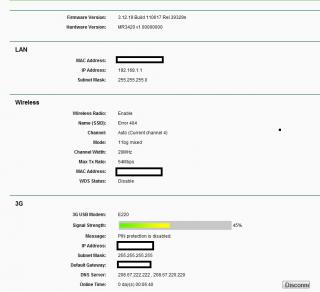
note; Solid Modem that cost rm1299.00 a few years ago, 2006 to be exactThis post has been edited by digilife: Apr 19 2012, 08:09 PM |
|
|
|
|
|
TSchuahcs79
|
Apr 20 2012, 01:56 AM
|
Look at all my stars!!
|
QUOTE(KKW @ Apr 19 2012, 11:30 AM) Hmm.. I had tried cat5, cat5e and cat6 lan cable on this router to my mac. In term of internet connection, it doesn't seem any different In term of sharing file from pc to pc, yes.. cat5e and cat6 has significant faster and max out the transferring rate which is 95mbps out of 100mbps which support on my pc.. after all cat 5e and cat 6 really making a different on Data transfer Rate  |
|
|
|
|
|
se3333
|
Apr 22 2012, 11:59 AM
|
New Member

|
QUOTE(digilife @ Apr 18 2012, 07:32 PM) i can confirm that MR3420 support Umobile 7.2Mbps modem ( the ZTE MF190 ) for the 42Mbps, Huawei E372 is supported ( Umobile earlier Bundled 42Mbps modem ) but this latest ZTE MF680, i am not sure. i have more than 30modems in my stable of modems, u can listen to me on this dun ask me why i have so many modems, as i am a sial modem collector like ppl like to collect China Dolls and so on........... thanks for your reply bro May I know is the any page i can find tutorial to set up this MR3420 with Umobile 7.2mbps 3G modem ? or any expert here can guide me for that ? Sorry i'm not familiar with networking stuff  thanks in advanced !!  Btw, is that ok if i can get average speed around 3.2 ~3.3mbps (speedtest.net) at my area using Umobile 7.2mbps 3G modem ? TQ This post has been edited by se3333: Apr 22 2012, 12:02 PM |
|
|
|
|
|
wanttobuylaptop
|
Apr 22 2012, 01:07 PM
|
|
|
QUOTE(se3333 @ Apr 22 2012, 11:59 AM) thanks for your reply bro May I know is the any page i can find tutorial to set up this MR3420 with Umobile 7.2mbps 3G modem ? or any expert here can guide me for that ? Sorry i'm not familiar with networking stuff thanks in advanced !! Btw, is that ok if i can get average speed around 3.2 ~3.3mbps (speedtest.net) at my area using Umobile 7.2mbps 3G modem ? TQ it's too ok already.....i get only 2mb +- on huawei e367... u're so lucky... |
|
|
|
|
|
fruitie
|
Apr 22 2012, 01:18 PM
|
Rise and Shine
|
|
|
|
|
|
|
se3333
|
Apr 22 2012, 02:37 PM
|
New Member
|
QUOTE(wanttobuylaptop @ Apr 22 2012, 01:07 PM) it's too ok already.....i get only 2mb +- on huawei e367... u're so lucky... Maybe because of my area are @ Red color zone on Umobile map...? That day I ask my friend to bring his notebook and modem to test on my place to check the speed for me before i apply Umobile service.... actually is for my parents house..... Btw, is anyone can guide my how to set up MR3420 with Umobile 7.2mpbs modem ? thanks again:) |
|
|
|
|
|
fruitie
|
Apr 22 2012, 02:45 PM
|
Rise and Shine
|
QUOTE(se3333 @ Apr 22 2012, 02:37 PM) Maybe because of my area are @ Red color zone on Umobile map...? That day I ask my friend to bring his notebook and modem to test on my place to check the speed for me before i apply Umobile service.... actually is for my parents house..... Btw, is anyone can guide my how to set up MR3420 with Umobile 7.2mpbs modem ? thanks again:) I'm not sure which modem U Mobile supplied to you but I assume it is a ZTE modem. So, please refer to the first post. It has all the info you need for ZTE modems. |
|
|
|
|
|
digilife
|
Apr 22 2012, 04:47 PM
|
|
|
QUOTE(fruitie @ Apr 22 2012, 01:18 PM) you make us jelly la...... btw, wat if on E367? |
|
|
|
|
|
TSchuahcs79
|
Apr 22 2012, 05:59 PM
|
Look at all my stars!!
|
QUOTE(digilife @ Apr 22 2012, 04:47 PM) you make us jelly la...... btw, wat if on E367? may be E367 pancit kot ? |
|
|
|
|
|
fruitie
|
Apr 22 2012, 06:56 PM
|
Rise and Shine
|
QUOTE(digilife @ Apr 22 2012, 04:47 PM) you make us jelly la...... btw, wat if on E367? It's the same for me, not much difference in term of speed. |
|
|
|
|
|
se3333
|
Apr 22 2012, 10:43 PM
|
New Member
|
QUOTE(fruitie @ Apr 22 2012, 02:45 PM) I'm not sure which modem U Mobile supplied to you but I assume it is a ZTE modem. So, please refer to the first post. It has all the info you need for ZTE modems. thanks for your reply.... i never notice there is guide on 1st page what i understand from reading 1st post is 1st i have to disable the auto run then i plug umobile modem in to MR3420 it will run automatic without further setting/configuration ? TQ This post has been edited by se3333: Apr 22 2012, 10:44 PM |
|
|
|
|
|
fruitie
|
Apr 22 2012, 10:50 PM
|
Rise and Shine
|
QUOTE(se3333 @ Apr 22 2012, 10:43 PM) thanks for your reply.... i never notice there is guide on 1st page what i understand from reading 1st post is 1st i have to disable the auto run then i plug umobile modem in to MR3420 it will run automatic without further setting/configuration ? TQ I believe so. Else, the settings are very easy. People like me who have no networking knowledge also can get it done. |
|
|
|
|
|
MPK
|
Apr 23 2012, 02:04 PM
|
Getting Started
|
Hi guys, my current set up is u mobile zte 190 with this router but having problem of delaying send in & out email and file such as .pdf and .doc download with remark " file corrupted". I have no problem when using unifi but u mobile always give such problem. Anyone know what is the root cause ? Can YES DoGgle support this router ? Thanks for reply in advance.
|
|
|
|
|
|
hsunl
|
Apr 23 2012, 05:04 PM
|
Getting Started
|
Tomorrow going to receive my MR3420 router. Do i need to do any setting on my E1762 Modem before using it to MR3420? This modem is a gift from Maxis. Whenever i plug in my laptop it will autorun and pop up. Thanks for the help  This post has been edited by hsunl: Apr 23 2012, 05:09 PM
 |
|
|
|
|



 Quote
Quote




 0.0377sec
 0.69
0.69
 6 queries
 GZIP Disabled