

any difference fr u guys?
This post has been edited by digilife: Apr 2 2012, 12:35 AM
Tp Link TL-MR3420 3G/3.75G router owner club V1
|
|
 Apr 2 2012, 12:33 AM Apr 2 2012, 12:33 AM
|
 
Senior Member
8,025 posts Joined: Feb 2005 From: Planet Boleland  
|
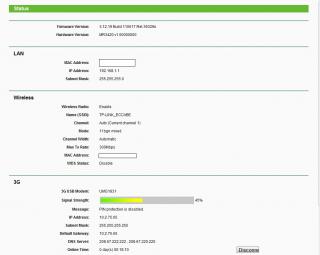
this is how my mr3420 looks
any difference fr u guys?
This post has been edited by digilife: Apr 2 2012, 12:35 AM |
|
|
|
|
|
Apr 2 2012, 08:12 AM
|
 
Elite
6,931 posts Joined: Apr 2011 From: Bolehland for sure ^_^
|
QUOTE(digilife @ Apr 2 2012, 12:33 AM) this is how my mr3420 looks mine quite the same too other than the modem is E353 and signal bar higher a bit, the rest is same, the wifi issue drop off after a while probably come from the auto channel, may be we need to select proper channel so our wifi wont crash with our neighbour,. any difference fr u guys?
  |
|
|
Apr 2 2012, 08:30 AM
|

Senior Member
2,240 posts Joined: Mar 2007 From: Johor
|
i use wifi analyser on android to determine the best channel settings for me.
|
|
|
Apr 2 2012, 08:52 AM
|
|
Senior Member
8,025 posts Joined: Feb 2005 From: Planet Boleland
|
QUOTE(chuahcs79 @ Apr 2 2012, 08:12 AM) mine quite the same too other than the modem is E353 and signal bar higher a bit, the rest is same, the wifi issue drop off after a while probably come from the auto channel, may be we need to select proper channel so our wifi wont crash with our neighbour,. is Auto better?or a special Value better? btw, is your FW version the same? do u think it will support E372? meanwhile speed still strong as for now (on for more than 8 hrs)  This post has been edited by digilife: Apr 2 2012, 08:55 AM |
|
|
Apr 2 2012, 08:58 AM
|

Senior Member
4,582 posts Joined: Jan 2003 From: West johor
|
QUOTE(wkkm007 @ Apr 1 2012, 11:27 PM) conclusion: TP Link TL-MR3420/3220 have good OpenWrt firmware support.Aztech HW550 better; less wifi issue Tp Link TL-MR3420 better: more model modem detection 42mbps modem will this work on these 3G ready router? |
|
|
Apr 2 2012, 09:05 AM
|
|
Senior Member
8,025 posts Joined: Feb 2005 From: Planet Boleland
|
QUOTE(fat16 @ Apr 2 2012, 08:58 AM) TP Link TL-MR3420/3220 have good OpenWrt firmware support. what is OpenWrt for? |
|
|
|
|
|
Apr 2 2012, 10:35 AM
|
 
Staff
72,888 posts Joined: Sep 2005 From: KUL 
|
I noticed that Channel 9 is not working that well for me. It is better than the earlier one but it still stops after a while of inactivation. Any other suggested channel?
This post has been edited by fruitie: Apr 2 2012, 10:36 AM |
|
|
Apr 2 2012, 10:44 AM
|

Senior Member
2,954 posts Joined: Apr 2008
|
QUOTE(fruitie @ Apr 2 2012, 10:35 AM) I noticed that Channel 9 is not working that well for me. It is better than the earlier one but it still stops after a while of inactivation. Any other suggested channel? Only happen on iPad? How about computer? |
|
|
Apr 2 2012, 10:58 AM
|
|
Staff
72,888 posts Joined: Sep 2005 From: KUL
|
QUOTE(KKW @ Apr 2 2012, 10:44 AM) Only happen on iPad? How about computer? Er, I don't turn on my WiFi on my laptop.  Pure LAN only because WiFi is slower compared to LAN. Hehe. |
|
|
Apr 2 2012, 11:11 AM
|
|
Senior Member
2,954 posts Joined: Apr 2008
|
QUOTE(fruitie @ Apr 2 2012, 10:58 AM) Er, I don't turn on my WiFi on my laptop. Oh ok. It seem no different on my mac Pure LAN only because WiFi is slower compared to LAN. Hehe. Did you try to change your mtu? Did you use any extended cable to connect to modem? |
|
|
Apr 2 2012, 11:29 AM
|
|
Staff
72,888 posts Joined: Sep 2005 From: KUL
|
QUOTE(KKW @ Apr 2 2012, 11:11 AM) Oh ok. It seem no different on my mac Still the MTU I tested the other day, will try again. Did you try to change your mtu? Did you use any extended cable to connect to modem? Nope, no extended cable. Straight plug to my router. This post has been edited by fruitie: Apr 2 2012, 11:29 AM |
|
|
Apr 2 2012, 11:43 AM
|
|
Senior Member
8,025 posts Joined: Feb 2005 From: Planet Boleland
|
QUOTE(fruitie @ Apr 2 2012, 10:58 AM) Er, I don't turn on my WiFi on my laptop. Use LAN and wifi together will be much smoother Pure LAN only because WiFi is slower compared to LAN. Hehe. |
|
|
Apr 2 2012, 12:20 PM
|
|
Senior Member
2,954 posts Joined: Apr 2008
|
QUOTE(fruitie @ Apr 2 2012, 11:29 AM) Still the MTU I tested the other day, will try again. Try put as default MTU.. Nope, no extended cable. Straight plug to my router. |
|
|
|
|
|
Apr 2 2012, 01:54 PM
|
|
Staff
72,888 posts Joined: Sep 2005 From: KUL
|
QUOTE(digilife @ Apr 2 2012, 11:43 AM) Use LAN and wifi together will be much smoother Mine seems to give priority to WiFi and hence slower for me...QUOTE(KKW @ Apr 2 2012, 12:20 PM) Try put as default MTU.. I tried earlier, no big difference.  OK la, will try at night again. |
|
|
Apr 2 2012, 08:21 PM
|

Junior Member
4 posts Joined: Jul 2007
|
helllo guys, how do i set Tp Link TL-MR3420 to run WDCMA ONLY ?
coz i wanted to get highspeed only at all the times. |
|
|
Apr 2 2012, 08:31 PM
|
|
Junior Member
384 posts Joined: Jan 2006 From: Penang 
|
Apple products are known to have WiFi incompatibility with certain wireless routers. Only "certified" Apple routers will have less issues. I have the same issue using iPod Touch, iPhone or iPad with MR3420 on factory firmware. The issue is fixed after I started using OpenWRT firmware on MR3420, works on any channels. Must be some sort of algorithm differences among the 2 firmwares. Anyway, whatever works.
 |
|
|
Apr 2 2012, 08:58 PM
|

Senior Member
3,965 posts Joined: Nov 2006
|
My MBP works very well with this router, never experience any drop WIFI issue.
Router on default setup and still running on factory firmware.  |
|
|
Apr 2 2012, 10:43 PM
|
|
Senior Member
2,954 posts Joined: Apr 2008
|
QUOTE(piscesguy @ Apr 2 2012, 08:58 PM) My MBP works very well with this router, never experience any drop WIFI issue. Same on my mac Router on default setup and still running on factory firmware.  Btw, I just check my router.. I was shock when I saw this  
|
|
|
Apr 2 2012, 11:54 PM
|
|
Senior Member
8,025 posts Joined: Feb 2005 From: Planet Boleland
|
QUOTE(KKW @ Apr 2 2012, 10:43 PM) Same on my mac u guys are lucky to have such nice signal as i believe you guys live very close to the tower/base stationBtw, I just check my router.. I was shock when I saw this
how is your speedtest? |
|
|
Apr 3 2012, 12:03 AM
|
|
Staff
72,888 posts Joined: Sep 2005 From: KUL
|
I think after some observations, my iPad is working fine. Will monitor for another day.
|
|
Topic ClosedOptions
|
| Change to: |  0.0220sec 0.0220sec
 1.41 1.41
 6 queries 6 queries
 GZIP Disabled GZIP Disabled
Time is now: 19th December 2025 - 02:58 AM |
 Quote
Quote