Welcome Guest ( Log In | Register )

Bump Topic Topic Closed RSS Feed
131 Pages « < 19 20 21 22 23 > » Bottom

Outline · [ Standard ] · Linear+

 Tp Link TL-MR3420 3G/3.75G router owner club V1

views
     
fruitie
post Apr 4 2012, 01:15 AM

Rise and Shine
Group Icon
Staff
72,842 posts

Joined: Sep 2005
From: KUL

QUOTE(digilife @ Apr 4 2012, 01:11 AM)
1) wat was the main problem/culprit?

2) you setup your Co's VPN into this Router and surf/DL with 50Mbps?
*
1) The idle time thingy

2) No la. sweat.gif I connect to company's server using VPN to do work la, speed still retains Maxis' speed.
TSchuahcs79
post Apr 4 2012, 01:18 AM

Look at all my stars!!
Group Icon
Elite
6,931 posts

Joined: Apr 2011
From: Bolehland for sure ^_^


QUOTE(digilife @ Apr 4 2012, 01:11 AM)
1) wat was the main problem/culprit?

2) you setup your Co's VPN into this Router and surf/DL with 50Mbps?
*
LOL, if company VPN 50Mbps, then fruitie can campak maxis into Laut Dah, ha ha rclxms.gif


Added on April 4, 2012, 1:20 am
QUOTE(fruitie @ Apr 4 2012, 01:15 AM)
1) The idle time thingy

2) No la. sweat.gif I connect to company's server using VPN to do work la, speed still retains Maxis' speed.
*
wow , so no more regret on getting tl-mr3420 right ? see at the end still beat down the aztech, LOL hmm.gif

This post has been edited by chuahcs79: Apr 4 2012, 01:20 AM
digilife
post Apr 4 2012, 01:24 AM

The MNP guy, its me yeah.
*******
Senior Member
8,025 posts

Joined: Feb 2005
From: Planet Boleland


QUOTE(fruitie @ Apr 4 2012, 01:15 AM)
1) The idle time thingy

2) No la. sweat.gif I connect to company's server using VPN to do work la, speed still retains Maxis' speed.
*
So wat idle value u set?

from where u access the idel value?

i wan to check mine too
fruitie
post Apr 4 2012, 01:47 AM

Rise and Shine
Group Icon
Staff
72,842 posts

Joined: Sep 2005
From: KUL

QUOTE(chuahcs79 @ Apr 4 2012, 01:18 AM)
LOL, if company VPN 50Mbps, then fruitie can campak maxis into Laut Dah, ha ha rclxms.gif


Added on April 4, 2012, 1:20 am

wow , so no more regret on getting tl-mr3420 right ? see at the end still beat down the aztech, LOL  hmm.gif
*
Yeah, then none of us will need to subscribe for high speed Internet and company doesn't even need to subsidize our broadband. tongue.gif

Err, I still need few days of observations before come to a conclusion. tongue.gif

QUOTE(digilife @ Apr 4 2012, 01:24 AM)
So wat idle value u set?

from where u access the idel value?

i wan to check mine too
*
0 because it means remain active at all times.
By default it is 15 minutes. doh.gif sweat.gif

Go to http://192.168.1.1 page then navigate to Network and collapse the branch out to 3G. From there, you can see it under Connection mode.
digilife
post Apr 4 2012, 01:58 AM

The MNP guy, its me yeah.
*******
Senior Member
8,025 posts

Joined: Feb 2005
From: Planet Boleland


QUOTE(fruitie @ Apr 4 2012, 01:47 AM)
Yeah, then none of us will need to subscribe for high speed Internet and company doesn't even need to subsidize our broadband. tongue.gif

Err, I still need few days of observations before come to a conclusion. tongue.gif
0 because it means remain active at all times.
By default it is 15 minutes. doh.gif sweat.gif

Go to http://192.168.1.1 page then navigate to Network and collapse the branch out to 3G. From there, you can see it under Connection mode.
*
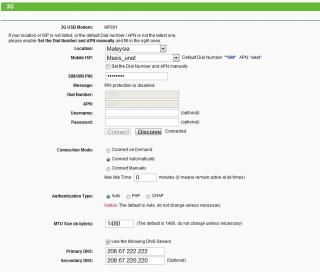
This is how mine look, no wonder i dun have the prob that u are facing, btw, it came as default, i din do any settings to it....... smile.gif

Attached Image
TSchuahcs79
post Apr 4 2012, 02:25 AM

Look at all my stars!!
Group Icon
Elite
6,931 posts

Joined: Apr 2011
From: Bolehland for sure ^_^


QUOTE(fruitie @ Apr 4 2012, 01:47 AM)
Yeah, then none of us will need to subscribe for high speed Internet and company doesn't even need to subsidize our broadband. tongue.gif

Err, I still need few days of observations before come to a conclusion. tongue.gif
0 because it means remain active at all times.
By default it is 15 minutes. doh.gif sweat.gif

Go to http://192.168.1.1 page then navigate to Network and collapse the branch out to 3G. From there, you can see it under Connection mode.
*
0 = good, otherwise after 15 min, wifi gone haywire,.. happen to mylaptop wifi too,. my laptop is hp,. doh.gif
fruitie
post Apr 4 2012, 08:16 AM

Rise and Shine
Group Icon
Staff
72,842 posts

Joined: Sep 2005
From: KUL

OK, I take back my words. Looks like the problem still persists and now happens on my company's laptop also which is a DELL. The WiFi signal will lose somewhere. I really need to find out a solution.

Currently using Channel 9, any other thing that you guys can suggest?
pcbase
post Apr 4 2012, 09:00 AM

Regular
******
Senior Member
1,411 posts

Joined: Dec 2004
From: Batu Pahat


Flash to OpenWrt firmware. kaskus have good tutorial plus mod firmware.
digilife
post Apr 4 2012, 09:16 AM

The MNP guy, its me yeah.
*******
Senior Member
8,025 posts

Joined: Feb 2005
From: Planet Boleland


QUOTE(fruitie @ Apr 4 2012, 08:16 AM)
OK, I take back my words. Looks like the problem still persists and now happens on my company's laptop also which is a DELL. The WiFi signal will lose somewhere. I really need to find out a solution.

Currently using Channel 9, any other thing that you guys can suggest?
*
could it be network problem?

i was using direct connection just now, one minute it was blazing highspeed of >4Mbps, the next min, although it shows connected , there is "no internet access" when checked on the "IPv4 Connectivity" status

now i am using MF600 and although the speed is much slower, atleast i am still "connected" with internet connectivity

user posted image

could it be network issue that is affecting your connection and can your laptop surf when there is packet loss via MR3420 wifi to your iPAD?

btw, abt flashing to OpenWRT firmware, where is kaskus ?

fruitie
post Apr 4 2012, 10:19 AM

Rise and Shine
Group Icon
Staff
72,842 posts

Joined: Sep 2005
From: KUL

QUOTE(pcbase @ Apr 4 2012, 09:00 AM)
Flash to OpenWrt firmware. kaskus have good tutorial plus mod firmware.
*
I'm just afraid I can't use it with my E353.

QUOTE(digilife @ Apr 4 2012, 09:16 AM)
could it be network problem?

i was using direct connection just now, one minute it was blazing highspeed of >4Mbps, the next min, although it shows connected , there is "no internet access" when checked on the "IPv4 Connectivity" status

now i am using MF600 and although the speed is much slower, atleast i am still "connected" with internet connectivity

user posted image

could it be network issue that is affecting your connection and can your laptop surf when there is packet loss via MR3420 wifi to your iPAD?

btw, abt flashing to OpenWRT firmware, where is kaskus ?
*
Nope, it is not connection issue I presume. hmm.gif
I don't know la, have to find out a solution which I think I can.

Kaskus is an Indonesian forum but then earlier in few pages, someone did share the tutorial. smile.gif
KKW
post Apr 4 2012, 10:33 AM

Look at all my stars!!
*******
Senior Member
2,954 posts

Joined: Apr 2008


QUOTE(fruitie @ Apr 4 2012, 08:16 AM)
OK, I take back my words. Looks like the problem still persists and now happens on my company's laptop also which is a DELL. The WiFi signal will lose somewhere. I really need to find out a solution.

Currently using Channel 9, any other thing that you guys can suggest?
*
Did you try restore your router?
btw, do you guys remember that I complain before about the router hang?
I upgrade my e1762 firmware it solve the problem
Can you access the router page when the problem happen?

This post has been edited by KKW: Apr 4 2012, 10:35 AM
fruitie
post Apr 4 2012, 10:37 AM

Rise and Shine
Group Icon
Staff
72,842 posts

Joined: Sep 2005
From: KUL

QUOTE(KKW @ Apr 4 2012, 10:33 AM)
Did you try restore your router?
btw, do you guys remember that I complain before about the router hang?
I upgrade my e1762 firmware it solve the problem
Can you access the router page when the problem happen?
*
Yes, can access. smile.gif
KKW
post Apr 4 2012, 11:09 AM

Look at all my stars!!
*******
Senior Member
2,954 posts

Joined: Apr 2008


QUOTE(fruitie @ Apr 4 2012, 10:37 AM)
Yes, can access. smile.gif
*
That's mean not hang problem.. smile.gif
Maybe try your luck on e353 modem

This post has been edited by KKW: Apr 4 2012, 11:09 AM
TSchuahcs79
post Apr 4 2012, 11:30 AM

Look at all my stars!!
Group Icon
Elite
6,931 posts

Joined: Apr 2011
From: Bolehland for sure ^_^


QUOTE(digilife @ Apr 4 2012, 09:16 AM)
could it be network problem?

i was using direct connection just now, one minute it was blazing highspeed of >4Mbps, the next min, although it shows connected , there is "no internet access" when checked on the "IPv4 Connectivity" status

now i am using MF600 and although the speed is much slower, atleast i am still "connected" with internet connectivity

user posted image

could it be network issue that is affecting your connection and can your laptop surf when there is packet loss via MR3420 wifi to your iPAD?

btw, abt flashing to OpenWRT firmware, where is kaskus ?
*
i myself always have this router wifi issue, connected but it wont last long before zero data traffic,.. happen to my laptop always,. been using Lan cable since then,. hmm.gif
totally_skint
post Apr 4 2012, 08:00 PM

Regular
******
Senior Member
1,186 posts

Joined: Mar 2007


Anybody here got experience with NAS on OpenWRT on the TP-Link?

This post has been edited by totally_skint: Apr 6 2012, 01:16 AM
Praetor
post Apr 10 2012, 05:40 PM

<insert custom member title here>
******
Senior Member
1,794 posts

Joined: Jan 2003
From: int lo0/0


Hi, I just bought this router. Any idea where I can get the SIM/UIM PIN? I'm on Maxis Broadband with the 3G USB modem which is plug and play. So how do I find out about the SIM/UIM PIN?

Thanks
KKW
post Apr 10 2012, 06:58 PM

Look at all my stars!!
*******
Senior Member
2,954 posts

Joined: Apr 2008


QUOTE(Praetor @ Apr 10 2012, 05:40 PM)
Hi, I just bought this router. Any idea where I can get the SIM/UIM PIN? I'm on Maxis Broadband with the 3G USB modem which is plug and play. So how do I find out about the SIM/UIM PIN?

Thanks
*
Did you set any pin before when you connect on pc?
If no, just ignore that smile.gif
digilife
post Apr 10 2012, 07:18 PM

The MNP guy, its me yeah.
*******
Senior Member
8,025 posts

Joined: Feb 2005
From: Planet Boleland


QUOTE(Praetor @ Apr 10 2012, 05:40 PM)
Hi, I just bought this router. Any idea where I can get the SIM/UIM PIN? I'm on Maxis Broadband with the 3G USB modem which is plug and play. So how do I find out about the SIM/UIM PIN?

Thanks
*
use the sim on a phone to disable the simcard pin , by default it should be 0123 for maxis and 1234 for celcom
Skylinestar
post Apr 11 2012, 03:06 AM

Mega Duck
********
All Stars
10,476 posts

Joined: Jan 2003
From: Sarawak
QUOTE
NOTE
for ZTE USB MODEM, u need to disable the auto run first before plug into router, otherwise the router wont recognize your modem.

For window xp :

-> plug in your zte modem in pc/laptop
-> wait for your pc/laptop to recognize your modem ( close the dialer if it pop up )
-> click start
-> click run
-> type in CMD ( comand prompt )
-> type in AT+ZCDRUN=8 (Disable cd /flashdrive autorun )
-> press enter
-> done ( u will see a message showing that autorun is diable now )
-> unplug your modem from pc now
-> plug it into TP Link 3G router
-> router will auto recognize it now and start dialer your ZTE modem

For window 7:

->plug your ZTE modem into your pc/laptop
-> wait for pc/laptop to recognise it ( close the dialer if it pop up )
-> click start
-> enter CMD in search column
-> type in AT+ZCDRUN=8 (Disable cd /flashdrive autorun )
-> press enter
-> done ( u will see a message showing u that autorun is disable )
-> unplug the modem from pc
-> plug it in your TP Link 3G router
-> router will auto recognize it now and start dialer your ZTE modem
for this method, is it permanently disabling the autorun of all my flashdrive like usb pendrive?or it only disable the autorun for the ZTE usb modem?

will my celcom dialer for the ZTE MF190 still work like normal after i disable the autorun? sometimes i need to bring the usb dongle to my workplace and use it on other notebook to online.
maxcheam
post Apr 11 2012, 07:13 AM

Casual
***
Junior Member
384 posts

Joined: Jan 2006
From: Penang


QUOTE(Praetor @ Apr 10 2012, 05:40 PM)
Hi, I just bought this router. Any idea where I can get the SIM/UIM PIN? I'm on Maxis Broadband with the 3G USB modem which is plug and play. So how do I find out about the SIM/UIM PIN?

Thanks
*
I have the TP-Link firmware that supports entering the PIN number via the web UI if you're interested. Manage to download it before TP-Link pulled it out from their servers. I'm not sure why they did that though. The only difference I noticed is that this version allows you to use a PIN-locked modem. So, use it at your own risks!! sweat.gif

Version of the firmware:
TL-MR3420_V1_110617

PM me to get the file. icon_rolleyes.gif

-----------------------------------------
I've just uploaded it to the following file server:
http://www.2shared.com/file/b-1MclFW/TL-MR..._V1_110617.html

Mods, kindly remove the link if it's not allowed. Thanks!

This post has been edited by maxcheam: Apr 11 2012, 07:20 AM

131 Pages « < 19 20 21 22 23 > » Top
Topic ClosedOptions
 

Change to:
| Lo-Fi Version
0.0194sec    0.71    6 queries    GZIP Disabled
Time is now: 14th December 2025 - 11:25 AM