Outline ·
[ Standard ] ·
Linear+
Tp Link TL-MR3420 3G/3.75G router owner club V1
|
rifle_m16
|
 Nov 4 2012, 08:15 AM Nov 4 2012, 08:15 AM
|

|
I've discovered something funny this morning. I have 1 CAT6 network cable, the length is 2 metres. The other 1 is standard CAT5 cable, length is about 1 metre, that comes with TP-LINK 3420 V2. Been trying both cables, plug in, plug out for several times for 3-4 minutes and seems like the CAT5 cable gave me better pings than the CAT6. Is it because of the length or what?  Pings with CAT5 Pings with CAT5 Pings with CAT6
 This post has been edited by rifle_m16: Nov 4 2012, 08:16 AM
 |
|
|
|
|
|
digilife
|
Nov 4 2012, 08:21 AM
|
|
|
QUOTE(rifle_m16 @ Nov 4 2012, 08:15 AM) I've discovered something funny this morning. I have 1 CAT6 network cable, the length is 2 metres. The other 1 is standard CAT5 cable, length is about 1 metre, that comes with TP-LINK 3420 V2. Been trying both cables, plug in, plug out for several times for 3-4 minutes and seems like the CAT5 cable gave me better pings than the CAT6. Is it because of the length or what? Pings with CAT5
Pings with CAT6
try to gulung the Cat6, i dun even touch the Cat5 that came with the mr3420, terus use Cat6 and its 3 meters long too |
|
|
|
|
|
rifle_m16
|
Nov 4 2012, 08:27 AM
|
|
|
QUOTE(digilife @ Nov 4 2012, 08:21 AM) try to gulung the Cat6, i dun even touch the Cat5 that came with the mr3420, terus use Cat6 and its 3 meters long too It's bergulung all the times because my router is sitting beside my laptop. I've also tried to stretch/lengthen the CAT6 and the outcome is still the same.  |
|
|
|
|
|
caterpiez
|
Nov 4 2012, 11:36 AM
|
|
|
QUOTE(kizwan @ Nov 3 2012, 10:31 PM) Please confirm that your settings are correct. Please run two commands in putty & post the screenshot here. Also try ping IP 192.168.1.10 & 192.168.137.1 from putty & post screenshot here.  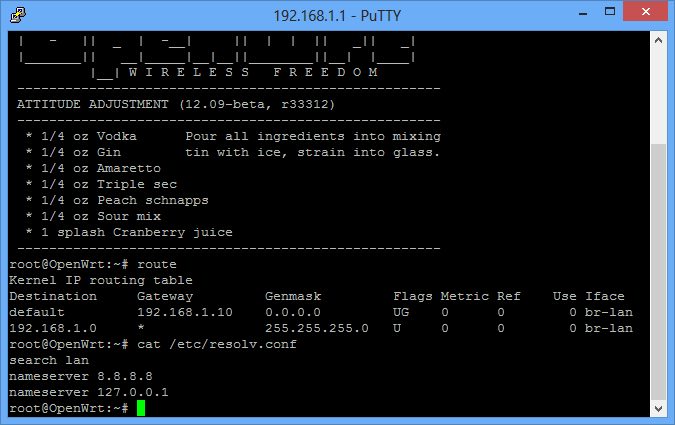 I noticed my interfaced is still br-lan. Maybe this is the main problem I'm using Windows 8 Pro and connecting my modem using MDMA since E367 latest firmware incompatible with HUAWEI dashboard  Regarding the ping IP address, I never got back the replied after 10 minutes waiting  This post has been edited by caterpiez: Nov 4 2012, 11:36 AM This post has been edited by caterpiez: Nov 4 2012, 11:36 AM |
|
|
|
|
|
malaysianbest
|
Nov 4 2012, 02:07 PM
|
Getting Started

|
Hi there ?
Frequent disconnection
Over the last 2 days my connection is always get disconnected after 2
hours and when i try to reconnect it failed then i have to wait 1 or 2
hours to get back online
any solution ?
|
|
|
|
|
|
TSchuahcs79
|
Nov 4 2012, 02:20 PM
|
Look at all my stars!!

|
QUOTE(malaysianbest @ Nov 4 2012, 02:07 PM) Hi there ? Frequent disconnection Over the last 2 days my connection is always get disconnected after 2 hours and when i try to reconnect it failed then i have to wait 1 or 2 hours to get back online any solution ? check with your ISP ,.. as you mention it happen over last 2 days and also what kind of combination device are you using ? |
|
|
|
|
|
digilife
|
Nov 4 2012, 02:24 PM
|
|
|
QUOTE(malaysianbest @ Nov 4 2012, 02:07 PM) Hi there ? Frequent disconnection Over the last 2 days my connection is always get disconnected after 2 hours and when i try to reconnect it failed then i have to wait 1 or 2 hours to get back online any solution ? easy la........... tweet Maxis Listens or call 123 and complain, tell them that you will also write to MCMC and take down his name too |
|
|
|
|
|
malaysianbest
|
Nov 4 2012, 02:26 PM
|
Getting Started
|
QUOTE(chuahcs79 @ Nov 4 2012, 02:20 PM) check with your ISP ,.. as you mention it happen over last 2 days and also what kind of combination device are you using ? ZTE MF 680+TL-MR3420 version 1 |
|
|
|
|
|
TSchuahcs79
|
Nov 4 2012, 02:27 PM
|
Look at all my stars!!
|
QUOTE(digilife @ Nov 4 2012, 02:24 PM) easy la........... tweet Maxis Listens or call 123 and complain, tell them that you will also write to MCMC and take down his name too  i think this is best solution, complain kaw kaw in pro way ,.  |
|
|
|
|
|
malaysianbest
|
Nov 4 2012, 02:38 PM
|
Getting Started
|
QUOTE(chuahcs79 @ Nov 4 2012, 02:27 PM) i think this is best solution, complain kaw kaw in pro way ,. ok i will, tq |
|
|
|
|
|
TSchuahcs79
|
Nov 4 2012, 02:56 PM
|
Look at all my stars!!
|
QUOTE(malaysianbest @ Nov 4 2012, 02:38 PM) your router have you follow the setup like the video tutor in first post ? |
|
|
|
|
|
mushashi87
|
Nov 4 2012, 04:02 PM
|
Getting Started
|
hmm can anyone tell me how do i connect the panel antenna?? Still confuse what it actually do lol.
|
|
|
|
|
|
TSchuahcs79
|
Nov 4 2012, 04:12 PM
|
Look at all my stars!!
|
QUOTE(mushashi87 @ Nov 4 2012, 04:02 PM) hmm can anyone tell me how do i connect the panel antenna?? Still confuse what it actually do lol. |
|
|
|
|
|
mushashi87
|
Nov 4 2012, 04:18 PM
|
Getting Started
|
coool means E367 cant use??? I saw no connector for Antenna!!
|
|
|
|
|
|
aliex87
|
Nov 4 2012, 04:34 PM
|
|
|
QUOTE(mushashi87 @ Nov 4 2012, 04:18 PM) coool means E367 cant use??? I saw no connector for Antenna!! can lah bro....im using e367 with patch antenna 
it gets me from gprs only to 19% hspa+ signal, capable of reaching up to 4mbps, with ping hovering around 65-75ms. when you live somewhere in jeli, kelantan, with elephants and wild boars are common scene, anything faster than tm cdma-evdo is considered superrrrr fastttt!  This post has been edited by aliex87: Nov 4 2012, 04:40 PM This post has been edited by aliex87: Nov 4 2012, 04:40 PM |
|
|
|
|
|
mushashi87
|
Nov 4 2012, 04:40 PM
|
Getting Started
|
QUOTE(aliex87 @ Nov 4 2012, 04:34 PM) can lah bro....im using e367 with patch antenna
it gets me from gprs only to 19% hspa+ signal, capable of reaching up to 4mbps, with ping hovering around 65-75ms. when you live somewhere in jeli, kelantan, with elephants and wild boars are common scene, anything faster than tm cdma-evdo is considered superrrrr fastttt! Ahhh I see after looking at your pict. Only there is something like cover at the side..... |
|
|
|
|
|
TSchuahcs79
|
Nov 4 2012, 04:43 PM
|
Look at all my stars!!
|
QUOTE(mushashi87 @ Nov 4 2012, 04:18 PM) coool means E367 cant use??? I saw no connector for Antenna!! this is the connector convertor |
|
|
|
|
|
aliex87
|
Nov 4 2012, 04:44 PM
|
|
|
QUOTE(mushashi87 @ Nov 4 2012, 04:40 PM) Ahhh I see after looking at your pict. Only there is something like cover at the side..... oh yes, the cover, i forgot to mention that, you have to flip open it then only you can see the connector. btw anyone have any solution for reduce speed while connecting to mr3420? i got 6mbps speed when connected directly from modem to laptop, but got a reduction when connecting thru mr3420 down to 3mbps-4mbps....any solution guys? 
Added on November 4, 2012, 4:46 pmQUOTE(chuahcs79 @ Nov 4 2012, 04:43 PM) this is the connector convertor right now im using the kind of pigtail to convert from the rp-sma to e367 connector, will it be better to use the direct plug converter like the one u use? This post has been edited by aliex87: Nov 4 2012, 04:46 PM |
|
|
|
|
|
TSchuahcs79
|
Nov 4 2012, 04:49 PM
|
Look at all my stars!!
|
QUOTE(aliex87 @ Nov 4 2012, 04:44 PM) oh yes, the cover, i forgot to mention that, you have to flip open it then only you can see the connector. btw anyone have any solution for reduce speed while connecting to mr3420? i got 6mbps speed when connected directly from modem to laptop, but got a reduction when connecting thru mr3420 down to 3mbps-4mbps....any solution guys?
Added on November 4, 2012, 4:46 pmright now im using the kind of pigtail to convert from the rp-sma to e367 connector, will it be better to use the direct plug converter like the one u use? depends on the convertor, mine come with panel antenna whole set from Blacktubi, and the quality is gold plated as well, signal wise i am getting Full RSSI : -51dBm and it never change a bit even heavy raining or lightning your pigtail connector is it gold plated did u fully setup the TL-MR3420 interface ? u can try download modem bin file from tp link websites and test whether your connection is improve This post has been edited by chuahcs79: Nov 4 2012, 04:50 PM |
|
|
|
|
|
wavezard
|
Nov 4 2012, 04:50 PM
|
|
|
mr3420 v1 we can flip it cause it rectangle like chuah pic, but v3 cant i think because of it shape........................V1 OR V2, which u guys vote for long term support(2-5years in the future) ?
|
|
|
|
|



 Quote
Quote




 0.0342sec
 0.50
0.50
 6 queries
 GZIP Disabled