Outline ·
[ Standard ] ·
Linear+
Tp Link TL-MR3420 3G/3.75G router owner club V1
|
mushashi87
|
 Oct 26 2012, 08:07 PM Oct 26 2012, 08:07 PM
|
Getting Started


|
to all sifus i am doing open wrt flashing for my mr3420. Here is the problem i tried to update the update list but it shows bad address. As per first post if the update link failed i change it over to on the first line. #src/gz attitude_adjustment http://downloads.openwrt.org/snapshots/trunk/ar71xx/packagessrc/gz attitude_adjustment http://downloads.openwrt.org/attitude_adju...eneric/packagesPlease help sifu sifu  » Click to show Spoiler - click again to hide... « Holy cow now i click update list nothing appear..... not even bad address appear swt This post has been edited by mushashi87: Oct 26 2012, 08:44 PM |
|
|
|
|
|
mushashi87
|
Oct 26 2012, 09:03 PM
|
Getting Started
|
QUOTE(blacktubi @ Oct 26 2012, 08:56 PM) You guys need an active internet connection through LAN port to continue
Added on October 26, 2012, 8:59 pmhttp://www.myceloteh.com/3g/sharing-your-celcom-broadband-in-easy-waypart-2/ I have internet connection tethering from my mobile phone. is it possible to do like that? |
|
|
|
|
|
mushashi87
|
Oct 26 2012, 09:11 PM
|
Getting Started
|
QUOTE(blacktubi @ Oct 26 2012, 09:07 PM) Possible to wireless bridge but quite complicated. I suggest you get a Windows PC and follow the guide, it is more easy and simple the guide you show is in window xp?? i am using window 7 how do i share my connection tethering from my phone to the router? i do also have the e367 and how do i do it? |
|
|
|
|
|
mushashi87
|
Oct 26 2012, 09:15 PM
|
Getting Started
|
QUOTE(digilife @ Oct 26 2012, 09:14 PM) Get this and you can connect it to your MR3420 to let it download the packages  [attachmentid=3122283] i think there sure other way rather than buying another modem/router just to download the package |
|
|
|
|
|
mushashi87
|
Oct 26 2012, 09:16 PM
|
Getting Started
|
QUOTE(blacktubi @ Oct 26 2012, 09:15 PM) I will do a guide soon or wait for Chuah  Right now my modem cannot be unplugged since I need it sure bro thanks for your help |
|
|
|
|
|
mushashi87
|
Oct 26 2012, 09:50 PM
|
Getting Started
|
QUOTE(kizwan @ Oct 26 2012, 09:17 PM) What you guys need to do are:-
- Connect 3G modem directly to your computer
- Connect computer to TP Link router using network cable. On TP Link connect the cable to LAN port, not WAN port
- Enabled Internet Connection Sharing (ICS) on the 3G adapter
(Win 7: Control Panel\Network and Internet\Network and Sharing Center >> Change adapter settings. Then right-click the 3G adapter >> Properties >> Sharing >> "Allow other network users to connect through this computer's Internet connection". Under "Home networking connection", choose the ethernet/LAN port)
- After ICS is enabled, the ethernet/LAN port will get IP address 192.168.137.1. What you need to do is add secondary IP address, e.g. 192.168.1.10
(Win 7: Control Panel\Network and Internet\Network and Sharing Center >> Change adapter settings. Then right-click the 3G adapter >> Properties >> Networking >> "Internet Protocol Version 4 (TCP/IPv4)" >> Properties >> Advanced >> "IP address" >> "Add..." >> IP address: 192.168.1.10 & Subnet mask: 255.255.255.0)
- Connect to router using Putty (SSH). Just enter IP adress 192.168.1.1 & click Open. It will ask you username & password. Username will be root & password that you set.
- Enter this command (press enter after typing the command):-
CODE route add default gw 192.168.1.10
- Enter this command (press enter after typing the command):-
CODE vi /etc/resolv.conf
- Press "O" button on the keyboard
- Type "nameserver 8.8.8.8" (without quotes)
- Press "ESC" button on the keyboard
- Press ":" & "w" & "q" buttons & press Enter button.
- If you do this correctly, you should now be able to install the packages. Good luck!
 Tried connecting using putty but it says connection timeout. Follow exactly how you guided. |
|
|
|
|
|
mushashi87
|
Oct 26 2012, 10:05 PM
|
Getting Started
|
QUOTE(kizwan @ Oct 26 2012, 10:04 PM) Can you ping 192.168.1.1 from your computer? Did you open http://192.168.1.1 in browser & set the password? tried ping request not found. i did not set any password to 192.168.1.1 i just login to open wrt. I notice if i shared 3g connection i will not be able to access 192.168.1.1 but if i unshared i am able to login back. Ok i did a mistake i change the 3g network rather than lan network that why i am enable to connect lol.......... Ok now done can connect using putty but i tried inputting the command you told me nothing came out now. At first i actually input wrongly will it effect? Not sure did i input correctly from your quite not really understand these step: - Press ":" & "w" & "q" buttons & press Enter button. I tried and update again and its still failed... Downloading http://downloads.openwrt.org/attitude_adju...ges/Packages.gz. wget: bad address 'downloads.openwrt.org' Collected errors: * opkg_download: Failed to download http://downloads.openwrt.org/attitude_adju...ges/Packages.gz, wget returned 1. This post has been edited by mushashi87: Oct 26 2012, 10:43 PM |
|
|
|
|
|
mushashi87
|
Oct 26 2012, 10:44 PM
|
Getting Started
|
QUOTE(kizwan @ Oct 26 2012, 10:40 PM) When you enter first command, it will not display any output. It's ok, just continue with next step. Not sure did i input correctly from your quite not really understand these step: - Press ":" & "w" & "q" buttons & press Enter button. I tried and update again and its still failed... Downloading http://downloads.openwrt.org/attitude_adju...ges/Packages.gz. wget: bad address 'downloads.openwrt.org' Collected errors: * opkg_download: Failed to download http://downloads.openwrt.org/attitude_adju...ges/Packages.gz, wget returned 1. |
|
|
|
|
|
mushashi87
|
Oct 26 2012, 10:54 PM
|
Getting Started
|
QUOTE(kizwan @ Oct 26 2012, 10:48 PM) Press ":" & "w" & "q" buttons are basically like typing ":wq" (without quote). After click ;wq and enter this is what i got. Did i do it correctly? sorry i am no good in linux 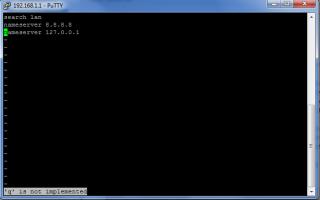 This post has been edited by mushashi87: Oct 26 2012, 10:55 PM
 |
|
|
|
|
|
mushashi87
|
Oct 26 2012, 11:02 PM
|
Getting Started
|
QUOTE(kizwan @ Oct 26 2012, 10:56 PM) You forgot colon ":". It should be ":wq" not ";wq". omg atlast after all the noob hassle. Thanks for your time and help  |
|
|
|
|
|
mushashi87
|
Oct 26 2012, 11:15 PM
|
Getting Started
|
QUOTE(kizwan @ Oct 26 2012, 11:07 PM) Congratulations! After you have installed all the packages, you just need to reboot the router & disabled Internet Connection Sharing on your computer. Ok bro now another problem. For step 7. i don really understand I am using E367 modem and would be maxis broadband. How do i setup. |
|
|
|
|
|
mushashi87
|
Oct 26 2012, 11:46 PM
|
Getting Started
|
i follow most of the option listed there. At firewall there i need to choose /dev/ttyl/USB0 only able to see the connection interface. That means i did it correctly?
|
|
|
|
|
|
mushashi87
|
Oct 27 2012, 04:07 PM
|
Getting Started
|
QUOTE(danieltan @ Oct 27 2012, 03:46 PM) actually found some problem, i stuck to add secondary ip. follow instruction by kizwan stuck in somehwere step 4.  i don see a add button to add your 192.168.1.10 Bro try connect your mobile broadband thru window now mobile partner. I did that and it works. |
|
|
|
|
|
mushashi87
|
Oct 27 2012, 05:06 PM
|
Getting Started
|
QUOTE(danieltan @ Oct 27 2012, 04:21 PM) install comgt  install ◦kmod-usb2  try to install some package, got this error
Added on October 27, 2012, 4:41 pmfinally can update, what problem i found follow kidwan, to set secondary ip adress is on LAN not on 3G connection while I found my OPKG-Configuration, i delete some code, may happen on some problem update the package. thank guy, continue setting for openwrt oh shet that is the error i did earlier too i forgot  |
|
|
|
|
|
mushashi87
|
Nov 2 2012, 09:52 PM
|
Getting Started
|
sorry for noob question. How to check my E367 signal on openwrt?
|
|
|
|
|
|
mushashi87
|
Nov 3 2012, 12:28 AM
|
Getting Started
|
root@OpenWrt:~# gcom sig /etc/ttyUSB1
Trying list of devices
Signal Quality: 19,99
How do i read?
|
|
|
|
|
|
mushashi87
|
Nov 3 2012, 01:04 AM
|
Getting Started
|
ahh shet means mine is damn low....... Thanks for the info bro
|
|
|
|
|
|
mushashi87
|
Nov 3 2012, 02:15 AM
|
Getting Started
|
Bro any idea which length of USB 2.0 Extension should i get from MR3420?? That will not effect the power output. I am doing the Soya Bean box method now directly plug in from modem only seems like signal dropping dramatically.
|
|
|
|
|
|
mushashi87
|
Nov 3 2012, 02:12 PM
|
Getting Started
|
QUOTE(chuahcs79 @ Nov 3 2012, 08:41 AM) is the modem itself quite warm /hot ? temperature will cost signal drop due to reflect signal method also reflect heat at the same time while reflect signal  I have a cooler pad for my MR3420 so its not really that hot. Since i did not open the cover still consider warm. |
|
|
|
|
|
mushashi87
|
Nov 3 2012, 10:00 PM
|
Getting Started
|
Sorry bro whats a panel antenna?? i want consistency also!!
|
|
|
|
|



 Quote
Quote
 0.0527sec
 0.35
0.35
 7 queries
 GZIP Disabled