

my 3420 always take time to detect my E367 modem.sometimes more than 3 minutes.is it normal? is there something i can do about this problem?
Tp Link TL-MR3420 3G/3.75G router owner club V1
Tp Link TL-MR3420 3G/3.75G router owner club V1
|
|
 Oct 16 2012, 06:45 AM Oct 16 2012, 06:45 AM
Return to original view | Post
#1
|
 
Junior Member
334 posts Joined: Dec 2005  
|
my 3420 always take time to detect my E367 modem.sometimes more than 3 minutes.is it normal? is there something i can do about this problem?
|
|
|
|
|
|
Oct 16 2012, 09:21 AM
Return to original view | Post
#2
|
|
Junior Member
334 posts Joined: Dec 2005
|
QUOTE(blacktubi @ Oct 16 2012, 06:53 AM) This is normal, consider upgrading to the latest firmware 1. already upgraded to 230512You can use the BIN file to make the modem identify faster http://www.tp-link.com/en/support/3g/  2. i cant find the BIN file for E367 This post has been edited by caterpiez: Oct 16 2012, 09:22 AM |
|
|
Oct 30 2012, 03:23 PM
Return to original view | Post
#3
|
|
Junior Member
334 posts Joined: Dec 2005
|
QUOTE(chuahcs79 @ Oct 30 2012, 12:50 PM) just flash open wrt and tweak modem -> 33TX , done,. can i flash open wrt and use it with modem E367?  no need patch antenna or strainer @ 33TX..  my speed so awful if using the router.normal modem can get 10Mbps but using router 3420 max only 3Mbps  |
|
|
Oct 30 2012, 03:26 PM
Return to original view | Post
#4
|
|
Junior Member
334 posts Joined: Dec 2005
|
QUOTE(chuahcs79 @ Oct 30 2012, 03:24 PM) all the step is in first post,.. just scared since the tutorial only state E372 and MF680.that why i'm afraid to flash u can tweak / flash try and see   thanks for ur fast reply  |
|
|
Nov 3 2012, 08:59 AM
Return to original view | Post
#5
|
|
Junior Member
334 posts Joined: Dec 2005
|
Got this error when tried to update list
CODE Downloading http://downloads.openwrt.org/attitude_adjustment/12.09-beta/ar71xx/generic/packages/Packages.gz. wget: bad address 'downloads.openwrt.org' Collected errors: * opkg_download: Failed to download http://downloads.openwrt.org/attitude_adjustment/12.09-beta/ar71xx/generic/packages/Packages.gz, wget returned 1. Try changed first line to this also error both 3G connection and extra LAN connection CODE #src/gz attitude_adjustment http://downloads.openwrt.org/snapshots/trunk/ar71xx/packages src/gz attitude_adjustment http://downloads.openwrt.org/attitude_adjustment/12.09-beta/ar71xx/generic/packages After I typed ":", "w", "q" and pressed "Enter" nothing happen only this line appear "root@OpenWrt:~#" with blinking green.Is it ok? |
|
|
Nov 3 2012, 06:55 PM
Return to original view | Post
#6
|
|
Junior Member
334 posts Joined: Dec 2005
|
QUOTE(chuahcs79 @ Nov 3 2012, 09:08 AM) nothing will happen on screen after u type : w q, Still not working.give up already after you type that, u need to straight login 192.168.1.1 in our browser and update list then install packages the video tutor is on first pages, if you follow the step correctly u shouldn't have bad address response   first I thought maybe I refreshed the page after changed the password so maybe the PuTTy effect not taken yet.Tried again this evening by open new tab and login 192.168.1.1 but still same error  |
|
|
|
|
|
Nov 4 2012, 11:36 AM
Return to original view | Post
#7
|
|
Junior Member
334 posts Joined: Dec 2005
|
QUOTE(kizwan @ Nov 3 2012, 10:31 PM) Please confirm that your settings are correct. Please run two commands in putty & post the screenshot here. Also try ping IP 192.168.1.10 & 192.168.137.1 from putty & post screenshot here.  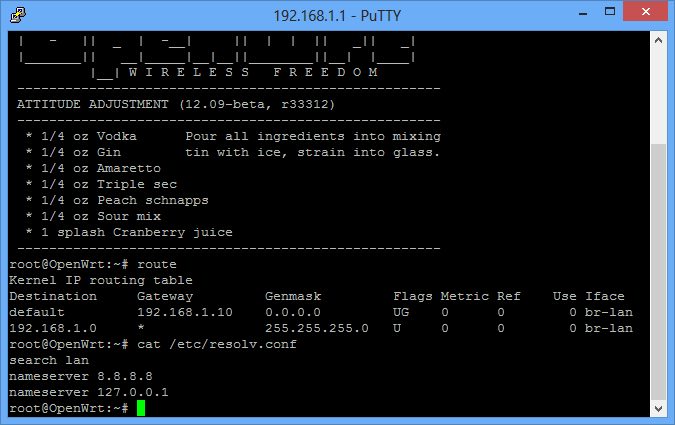 I noticed my interfaced is still br-lan. Maybe this is the main problem  I'm using Windows 8 Pro and connecting my modem using MDMA since E367 latest firmware incompatible with HUAWEI dashboard I'm using Windows 8 Pro and connecting my modem using MDMA since E367 latest firmware incompatible with HUAWEI dashboard  Regarding the ping IP address, I never got back the replied after 10 minutes waiting This post has been edited by caterpiez: Nov 4 2012, 11:36 AM |
|
|
Nov 6 2012, 03:52 PM
Return to original view | Post
#8
|
|
Junior Member
334 posts Joined: Dec 2005
|
QUOTE(chuahcs79 @ Nov 6 2012, 03:46 PM) dont have extra one, how about me? help me flash open wrt also but if u really want, i could help you to get one and flash it with open wrt ready and sent it to you lo |
|
|
Nov 6 2012, 03:56 PM
Return to original view | Post
#9
|
|
Junior Member
334 posts Joined: Dec 2005
|
QUOTE(azim61 @ Nov 6 2012, 03:53 PM) chuahcs79 can open a business already followed already but I'm afraid maybe I'm using win 8 that why ICS not working properly. Will try with Win7 tonight and hopefully can flash openWRT successful just follow chuahcs79 video on youtube, you will flash to openwrt with no hassle This post has been edited by caterpiez: Nov 6 2012, 03:57 PM |
|
|
Nov 7 2012, 09:34 AM
Return to original view | Post
#10
|
|
Junior Member
334 posts Joined: Dec 2005
|
QUOTE(chuahcs79 @ Nov 7 2012, 03:45 AM) Result after open up the Router cover, where's your location? I'm still failed flashing open wrt now the server fan blowing directly to inside board  hope the router dont catch cold,  [attachmentid=3142589] see the bandwidth Bar green color super stable [attachmentid=3142588] noticeable different after open up router cover, performances is much more stable with ZTE MF680 now,. i think issue all these while is my router quite warm inside, that's why Added on November 7, 2012, 3:51 am try to flash again with Openwrt, guess this time lucky confirm will get it done want to cry already  |
|
|
Nov 7 2012, 09:52 AM
Return to original view | Post
#11
|
|
Junior Member
334 posts Joined: Dec 2005
|
QUOTE(aliex87 @ Nov 7 2012, 09:48 AM) why failed? i followed the guide on the first page and one time try only, now up and running smoothly! Not sure.suspect maybe because i'm using win8 and connect 3g using mdma not dashboard.my dashboard doesnt recognized the modem after upgraded the firmware |
|
|
Nov 7 2012, 07:37 PM
Return to original view | Post
#12
|
|
Junior Member
334 posts Joined: Dec 2005
|
Finally managed to flash openWRT with new modem E372 using huawei dashboard
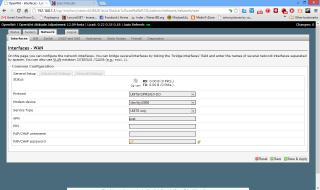
(dont use MDMA for shared connection )Now I got new problem.my router seem can't detect the modem.already followed the video and configured WAN interface to UMTS based on video but still nothing. Look in the picture. Anything that I'm miss? Attached thumbnail(s) 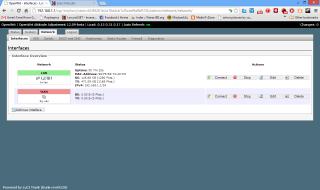

|
|
|
Nov 7 2012, 07:58 PM
Return to original view | Post
#13
|
|
Junior Member
334 posts Joined: Dec 2005
|
QUOTE(chuahcs79 @ Nov 7 2012, 07:54 PM) what modem you are using ? E372. Already tried both USB0 and USB1, reboot, connect WAN interface still 0.00B Modem device: zte mf680 = /dev/ttyUSB1 E372 = /dev/ttyUSB0 if cannot select, reboot the router first system -> reboot -=> performs reboot after reboot, check the modem device setting there, for correct selection USB0 or USB1 |
|
|
Nov 7 2012, 08:13 PM
Return to original view | Post
#14
|
|
Junior Member
334 posts Joined: Dec 2005
|
QUOTE(chuahcs79 @ Nov 7 2012, 08:01 PM) Select CUstom in modem device Successfully after reboot it twice then key in : /dev/ttyUSB0 select save and apply system reboot perform reboot login LuCI interface GUI select modem device with " /dev/ttyUSB0 " in prefix select save and apply, system reboot performs reboot once reboot done login LuCI, it will auto connect thanks to all sifus |
|
|
Nov 17 2012, 06:26 PM
Return to original view | Post
#15
|
|
Junior Member
334 posts Joined: Dec 2005
|
QUOTE(chuahcs79 @ Nov 17 2012, 06:10 PM) my V2 is coming How much u bought for v2?  excited on monday for sure excited on monday for sure |
|
Topic ClosedOptions
|
| Change to: |  0.0247sec 0.0247sec
 0.19 0.19
 7 queries 7 queries
 GZIP Disabled GZIP Disabled
Time is now: 9th December 2025 - 08:18 AM |
 Quote
Quote