Welcome Guest ( Log In | Register )

Bump Topic Topic Closed RSS Feed
131 Pages « < 8 9 10 11 12 > » Bottom

Outline · [ Standard ] · Linear+

 Tp Link TL-MR3420 3G/3.75G router owner club V1

views
     
TSchuahcs79
post Dec 24 2011, 04:49 AM

Look at all my stars!!
Group Icon
Elite
6,931 posts

Joined: Apr 2011
From: Bolehland for sure ^_^


QUOTE(kazibul @ Dec 23 2011, 11:09 PM)
yup..thanks bro..also wondering how..hahaha..does'nt matter as long it work..tq for the step..now enjoy sharing wireless with my brother...using celcom skmm pack..rm25 for unlimited quota..quite okla...can maintain 50~80 kbps for torrent downloading..planning to terminate my u-mobile..huhuhu
*
well, as i always believe "sharing is Caring".. yea, we as consumer will always go for the cheapest and better deal for sure,.. notworthy.gif notworthy.gif notworthy.gif
miloy2k
post Dec 28 2011, 12:33 PM

[[[[[IMPERIAL ARMY]]]]]
********
All Stars
15,773 posts

Joined: Jan 2003
From: Capital Wasteland


QUOTE(fruitie @ Nov 6 2011, 07:25 PM)
Erm, plan to buy this router to use with my E1762. After started using E1762 with my Aztech HW550-3G, I noticed that it is difficult to get it connected. The blue LED on E1762 keeps blinking non-stop and I can't seem to get it connected.

However, when I was using ZTE MF622 such issue did not happen. It got connected easily... hmm.gif

For those using this router with E1762, is it difficult to get it connected? Or it takes long time to be connected?
*
I have this issue for my E1762 (not sure why) doh.gif random disconnection and very slow to reconnect. So for me the fastest way is to reboot the modem (in some cases, I have to power off and on the router).

I notice if the line (maxis) is down (due to bad weather/no signal), it will somehow hang my router doh.gif

Currently using my old K3565, and so far stable for the last 2 weeks.

btw some antenna and it manage to boost up the signal from 10 to 50% smile.gif


TSchuahcs79
post Dec 28 2011, 12:53 PM

Look at all my stars!!
Group Icon
Elite
6,931 posts

Joined: Apr 2011
From: Bolehland for sure ^_^


QUOTE(miloy2k @ Dec 28 2011, 12:33 PM)
I have this issue for my E1762 (not sure why) doh.gif random disconnection and very slow to reconnect. So for me the fastest way is to reboot the modem (in some cases, I have to power off and on the router).

I notice if the line (maxis) is down (due to bad weather/no signal), it will somehow hang my router doh.gif

Currently using my old K3565, and so far stable for the last 2 weeks.

btw some antenna and it manage to boost up the signal from 10 to 50% smile.gif
*
well, if u using maxis, u could try to use MDMA to force your E1762 work on single 3G band 900 or 2100 instead of scanning through out all signal available before can connect,..

u can download it here

refer here

open the file u download, then plug your E1762 in your computer, and go under band config to select single 3G signal u want to use, and then click apply and ok, and unplug it from pc and plug in router,.. ur router will dialer faster than last time,..

hope it helps you outs,.. notworthy.gif
miloy2k
post Dec 28 2011, 03:46 PM

[[[[[IMPERIAL ARMY]]]]]
********
All Stars
15,773 posts

Joined: Jan 2003
From: Capital Wasteland


tq bro, will test out when I reach home smile.gif
fruitie
post Dec 28 2011, 07:45 PM

Rise and Shine
Group Icon
Staff
72,823 posts

Joined: Sep 2005
From: KUL

QUOTE(miloy2k @ Dec 28 2011, 12:33 PM)
I have this issue for my E1762 (not sure why) doh.gif random disconnection and very slow to reconnect. So for me the fastest way is to reboot the modem (in some cases, I have to power off and on the router).

I notice if the line (maxis) is down (due to bad weather/no signal), it will somehow hang my router doh.gif

Currently using my old K3565, and so far stable for the last 2 weeks.

btw some antenna and it manage to boost up the signal from 10 to 50% smile.gif
*
I don't have random disconnection anymore after I flashed to the latest firmware and using RAS (modem) now instead of NDIS. smile.gif

This post has been edited by fruitie: Dec 28 2011, 07:46 PM
wc_how
post Jan 1 2012, 10:09 AM

Regular
******
Senior Member
1,187 posts

Joined: Oct 2009
happy new year everyone.
i face problem to turn off autorun for my MF190
when i connect it with putty, and it just stuck there forvever and nothing happen.
TSchuahcs79
post Jan 2 2012, 10:26 AM

Look at all my stars!!
Group Icon
Elite
6,931 posts

Joined: Apr 2011
From: Bolehland for sure ^_^


QUOTE(wc_how @ Jan 1 2012, 10:09 AM)
happy new year everyone.
i face problem to turn off autorun for my MF190
when i connect it with putty, and it just stuck there forvever and nothing happen.
*
did you install the drivers and wait for your pc to recognize it before you start putty ? hmm.gif
wc_how
post Jan 2 2012, 11:10 AM

Regular
******
Senior Member
1,187 posts

Joined: Oct 2009
yup, i spent with the usb modem for 3months before i move to the router.
and i can see the modem com port in device manager. it just stuck there forever :s
TSchuahcs79
post Jan 2 2012, 11:25 AM

Look at all my stars!!
Group Icon
Elite
6,931 posts

Joined: Apr 2011
From: Bolehland for sure ^_^


QUOTE(wc_how @ Jan 2 2012, 11:10 AM)
yup, i spent with the usb modem for 3months before i move to the router.
and i can see the modem com port in device manager. it just stuck there forever :s
*
did you miss any step ? if u able to see the comport then should be able to turn it off,.. weird hmm.gif
wc_how
post Jan 2 2012, 02:34 PM

Regular
******
Senior Member
1,187 posts

Joined: Oct 2009
plug the modem, wait the dialer, close it
open the putty, setup all the setting, and finally connect.
i guess i never miss a step.
kizwan
post Jan 2 2012, 02:59 PM

BÖw DÖwn TÖ LÖrd PringlËs
*****
Senior Member
826 posts

Joined: Jan 2009


Does com port number is correct? You did check it in Device Manager, right?
TSchuahcs79
post Jan 2 2012, 03:02 PM

Look at all my stars!!
Group Icon
Elite
6,931 posts

Joined: Apr 2011
From: Bolehland for sure ^_^


if everything is correctthe putty should work the way it should though,..
wc_how
post Jan 2 2012, 08:48 PM

Regular
******
Senior Member
1,187 posts

Joined: Oct 2009
i guess everything is correct.
just dont know why it can't connect via putty.
kizwan
post Jan 2 2012, 09:36 PM

BÖw DÖwn TÖ LÖrd PringlËs
*****
Senior Member
826 posts

Joined: Jan 2009


Putty make connection via COM port. So, COM port number must correct for successful connection. Did you check it in Device Manager for the COM port number?
wc_how
post Jan 2 2012, 11:03 PM

Regular
******
Senior Member
1,187 posts

Joined: Oct 2009
yes,i did.
it just stuck there forever.
i tried to unplug the modem, and the result was immediately connection lost from putty.

TSchuahcs79
post Jan 3 2012, 01:04 PM

Look at all my stars!!
Group Icon
Elite
6,931 posts

Joined: Apr 2011
From: Bolehland for sure ^_^


i think is easier to screenshot it and posted here, so we know where u stuck actually.. is weird quite a lot of people go through with every step with putty without any problems,..
wc_how
post Jan 3 2012, 03:55 PM

Regular
******
Senior Member
1,187 posts

Joined: Oct 2009
hmm... i might post a screenshot i am free later.i am on office pc now.

it stuck after i click connect in putty.
the program is whole black page, with a square on top.
cannot click anything or type anything.


Added on January 3, 2012, 7:21 pmThe putty just stuck in here forever.

user posted image

This post has been edited by wc_how: Jan 3 2012, 07:21 PM
ss_izal
post Jan 15 2012, 11:58 PM

On my way
****
Senior Member
591 posts

Joined: Jan 2003
how much is it now? Is it still a good router compare to much newer router released?
digilife
post Jan 16 2012, 08:13 AM

The MNP guy, its me yeah.
*******
Senior Member
8,025 posts

Joined: Feb 2005
From: Planet Boleland


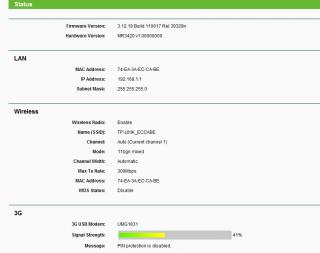
MF691 and UMG1831 is compatible with MR3420

Attached Image

Attached Image
MYstombox
post Jan 17 2012, 06:11 AM

Wired!
*******
Senior Member
2,240 posts

Joined: Mar 2007
From: Johor


The annoying thing about this router is that it can take very long to initialise a modem.

And if the signal is weak it takes even longer.


Added on January 17, 2012, 6:24 am
QUOTE(fruitie @ Dec 28 2011, 07:45 PM)
I don't have random disconnection anymore after I flashed to the latest firmware and using RAS (modem) now instead of NDIS. smile.gif
*
How do I select RAS instead of NDIS?

This post has been edited by MYstombox: Jan 17 2012, 06:24 AM

131 Pages « < 8 9 10 11 12 > » Top
Topic ClosedOptions
 

Change to:
| Lo-Fi Version
0.2727sec    0.75    6 queries    GZIP Disabled
Time is now: 11th December 2025 - 01:35 PM