Welcome Guest ( Log In | Register )

Bump Topic Topic Closed RSS Feed
131 Pages « < 6 7 8 9 10 > » Bottom

Outline · [ Standard ] · Linear+

 Tp Link TL-MR3420 3G/3.75G router owner club V1

views
     
TSchuahcs79
post Dec 16 2011, 04:15 PM

Look at all my stars!!
Group Icon
Elite
6,931 posts

Joined: Apr 2011
From: Bolehland for sure ^_^


QUOTE(ERN2 @ Dec 16 2011, 11:02 AM)
QUOTE(chuahcs79 @ Dec 9 2011, 05:33 PM)


Can I connect my YES Zoom to the WAN port and use it as router and as wifi access point?

If I place my Zoom at 1st floor i can get 3-4 bars, but only 1 bar at ground floor.

So if i place my Zoom at 1st floor and connect it to MR3420 which will be place at ground floor, and use it as wifi hot spot can?

or i connect my notebook via RJ45 to this router.
*
yes u can, u can plug in and use this router as wireless acess point as wan port
shinichi87
post Dec 18 2011, 06:59 PM

Getting Started
**
Junior Member
65 posts

Joined: Jul 2009
hello guys, i am also happy owner of this router.

been using it for around 1 year. 24/7 online with e173 on maxis 3g.

i prefer openwrt firmware, it seems more stable than the stock firmware.

anyone here uses openwrt too? care to share your experience
TSchuahcs79
post Dec 18 2011, 07:12 PM

Look at all my stars!!
Group Icon
Elite
6,931 posts

Joined: Apr 2011
From: Bolehland for sure ^_^


QUOTE(shinichi87 @ Dec 18 2011, 06:59 PM)
hello guys, i am also happy owner of this router.

been using it for around 1 year. 24/7 online with e173 on maxis 3g.

i prefer openwrt firmware, it seems more stable than the stock firmware.

anyone here uses openwrt too? care to share your experience
*
i wanted to try with the open wrt , but i havent try it yet,..

are u using open wrt now ?
shinichi87
post Dec 18 2011, 07:28 PM

Getting Started
**
Junior Member
65 posts

Joined: Jul 2009
yep, been using openwrt firmware for at least 5 months and still using it right now


Added on December 18, 2011, 7:31 pmMy area: wangsa maju

user posted image

This post has been edited by shinichi87: Dec 18 2011, 07:31 PM
kizwan
post Dec 18 2011, 08:21 PM

BÖw DÖwn TÖ LÖrd PringlËs
*****
Senior Member
826 posts

Joined: Jan 2009


Hi,

How to install the openwrt firmware? Can you give instruction to install the firmware?
TSchuahcs79
post Dec 18 2011, 08:34 PM

Look at all my stars!!
Group Icon
Elite
6,931 posts

Joined: Apr 2011
From: Bolehland for sure ^_^


QUOTE(shinichi87 @ Dec 18 2011, 07:28 PM)
yep, been using openwrt firmware for at least 5 months and still using it right now


Added on December 18, 2011, 7:31 pmMy area: wangsa maju

user posted image
*
if we flash it to open wrt, we still can flash it back to stock firmware anytime right ?

wondering how to flash it to open wrt properly too, any guide there for refer ?
kizwan
post Dec 18 2011, 10:37 PM

BÖw DÖwn TÖ LÖrd PringlËs
*****
Senior Member
826 posts

Joined: Jan 2009


The instruction at openwrt website is a bit confusing. However, I managed to install the openwrt firmware on my router. The firmware I use doesn't have Web GUI. To be honest, I don't know it doesn't have Web GUI until it finish updating the firmware. So, I need to install Web GUI manually. The Web GUI sorted out but unfortunately, I can't figure out how to use it with 3G modem.

EDIT: OK, there is one last configuration I need to do before I can use 3G modem with it. In summary:-
  1. Reset router to factory settings.
  2. Install openwrt firmware. (http://wiki.openwrt.org/toh/tp-link/tl-mr3420)
  3. Telnet to router
    CODE
    telnet 192.168.1.1

    Set root password:-
    CODE
    passwd root
  4. Now you can connect to router using SSH (use Putty).
  5. Install Web GUI. (http://wiki.openwrt.org/doc/howto/luci.essentials)
  6. Configure 3G function. (http://wiki.openwrt.org/doc/recipes/3gdongle)
* I didn't configure 3G function yet.

This post has been edited by kizwan: Dec 18 2011, 10:53 PM
TSchuahcs79
post Dec 19 2011, 01:33 AM

Look at all my stars!!
Group Icon
Elite
6,931 posts

Joined: Apr 2011
From: Bolehland for sure ^_^


QUOTE(kizwan @ Dec 18 2011, 10:37 PM)
The instruction at openwrt website is a bit confusing. However, I managed to install the openwrt firmware on my router. The firmware I use doesn't have Web GUI. To be honest, I don't know it doesn't have Web GUI until it finish updating the firmware. So, I need to install Web GUI manually. The Web GUI sorted out but unfortunately, I can't figure out how to use it with 3G modem.

EDIT: OK, there is one last configuration I need to do before I can use 3G modem with it. In summary:-

  1. Reset router to factory settings.
  2. Install openwrt firmware. (http://wiki.openwrt.org/toh/tp-link/tl-mr3420)
  3. Telnet to router
    CODE
    telnet 192.168.1.1

    Set root password:-
    CODE
    passwd root

  4. Now you can connect to router using SSH (use Putty).
  5. Install Web GUI. (http://wiki.openwrt.org/doc/howto/luci.essentials)
  6. Configure 3G function. (http://wiki.openwrt.org/doc/recipes/3gdongle)
* I didn't configure 3G function yet.
*
so complicated,.. rclxub.gif rclxub.gif rclxub.gif

think i will stay with stock firmware,.. sweat.gif sweat.gif
kizwan
post Dec 19 2011, 01:50 AM

BÖw DÖwn TÖ LÖrd PringlËs
*****
Senior Member
826 posts

Joined: Jan 2009


Good call! smile.gif
TSchuahcs79
post Dec 19 2011, 04:38 PM

Look at all my stars!!
Group Icon
Elite
6,931 posts

Joined: Apr 2011
From: Bolehland for sure ^_^


QUOTE(kizwan @ Dec 19 2011, 01:50 AM)
Good call! smile.gif
*
i just dont want to bricks my to-mr 3420 router as i am not very good in those thingy work,. sweat.gif
kizwan
post Dec 19 2011, 05:34 PM

BÖw DÖwn TÖ LÖrd PringlËs
*****
Senior Member
826 posts

Joined: Jan 2009


I tried it last night. I want to see if I get faster speed with openwrt firmware. (Bringing you back to the past; do you remember that my SE phone when connected to the router, speed is slow? Because of this, I didn't use the router, I just plug my SE phone directly to my notebook.) Everything configured except I can't open any website. I can ping, nslookup & everything but I can't open any website. I checked & found out the firewall in the router blocked port 80 (http). Since it's very late when I try this, I didn't tried my best to solved the firewall problem. So, I flashed with original firmware before I go to sleep.

@shinichi87, can you help me solved the firewall issue? Thanks.

This post has been edited by kizwan: Dec 19 2011, 05:36 PM
TSchuahcs79
post Dec 19 2011, 05:46 PM

Look at all my stars!!
Group Icon
Elite
6,931 posts

Joined: Apr 2011
From: Bolehland for sure ^_^


QUOTE(kizwan @ Dec 19 2011, 05:34 PM)
I tried it last night. I want to see if I get faster speed with openwrt firmware. (Bringing you back to the past; do you remember that my SE phone when connected to the router, speed is slow? Because of this, I didn't use the router, I just plug my SE phone directly to my notebook.) Everything configured except I can't open any website. I can ping, nslookup & everything but I can't open any website. I checked & found out the firewall in the router blocked port 80 (http). Since it's very late when I try this, I didn't tried my best to solved the firewall problem. So, I flashed with original firmware before I go to sleep.

@shinichi87, can you help me solved the firewall issue? Thanks.
*
when i plug my SE W705 into my router, speed is normal and everything work fine, just that router dial the phone slow sometimes takes around 15~45sec,.. and the H signal is gone by the time router start dialing,.. doh.gif
kizwan
post Dec 19 2011, 06:08 PM

BÖw DÖwn TÖ LÖrd PringlËs
*****
Senior Member
826 posts

Joined: Jan 2009


You're using original SE USB data cable right?
user posted image

This post has been edited by kizwan: Dec 19 2011, 06:16 PM
shinichi87
post Dec 19 2011, 08:33 PM

Getting Started
**
Junior Member
65 posts

Joined: Jul 2009
well, the easiest way to use openwrt firmware, is to use the one that has already been configured with a web GUI. in my opinion, if you afraid you might brick your router, i suggest to go with this http://eko.one.pl/?p=openwrt-gargoylepl

the only thing that makes your life a lil bit difficult is that, the firmware is not in english, but it is easily configured

i'll post some steps in the next post after getting some screenshots for you guys to view
TSchuahcs79
post Dec 19 2011, 08:35 PM

Look at all my stars!!
Group Icon
Elite
6,931 posts

Joined: Apr 2011
From: Bolehland for sure ^_^


QUOTE(kizwan @ Dec 19 2011, 06:08 PM)
You're using original SE USB data cable right?
user posted image
*
yes. i am using that with router and direct plug with pc,..
shinichi87
post Dec 19 2011, 08:47 PM

Getting Started
**
Junior Member
65 posts

Joined: Jul 2009
1) download openwrt firmware from http://ecco.selfip.net/gargoyle-pl/ar71xx/...hfs-factory.bin

2) upgrade your tl-mr3420 firmware just as you normally do with the openwrt firmware you just downloaded

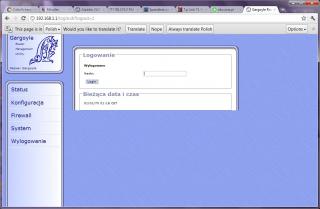
3) you will see your web interface like this

Attached Image

4) the default password for the web GUI is 'password' without the '. after you have enter the password, it will ask for new password you want to use for the web GUI.

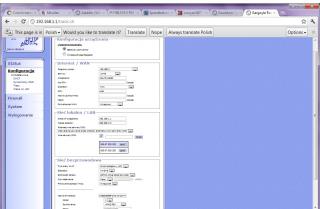
5) next configure your router setting similar like this, 3g UMTS and set your apn / username /password. also configure your wifi as needed, then you're done

Attached Image

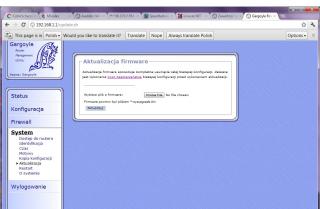
6) if you want to change to stock firmware, you can go to here
Attached Image
TSchuahcs79
post Dec 19 2011, 08:57 PM

Look at all my stars!!
Group Icon
Elite
6,931 posts

Joined: Apr 2011
From: Bolehland for sure ^_^


QUOTE(shinichi87 @ Dec 19 2011, 08:47 PM)
1) download openwrt firmware from http://ecco.selfip.net/gargoyle-pl/ar71xx/...hfs-factory.bin

2) upgrade your tl-mr3420 firmware just as you normally do with the openwrt firmware you just downloaded

3) you will see your web interface like this

Attached Image

4) the default password for the web GUI is 'password' without the '. after you have enter the password, it will ask for new password you want to use for the web GUI.

5) next configure your router setting similar like this, 3g UMTS and set your apn / username /password. also configure your wifi as needed, then you're done

Attached Image

6) if you want to change to stock firmware, you can go to here
Attached Image
*
so does this open wrt support se phone like stock firmware ? or it only support usb modem ?
shinichi87
post Dec 19 2011, 09:01 PM

Getting Started
**
Junior Member
65 posts

Joined: Jul 2009
QUOTE(chuahcs79 @ Dec 19 2011, 08:57 PM)
so does this open wrt support se phone like stock firmware ? or it only support usb modem ?
*
well i dont have experience with that, never tried. but i think it should be able to detect the phone at least, if the stock firmware can. you can always revert to your previous firmware without any problem.
TSchuahcs79
post Dec 19 2011, 09:22 PM

Look at all my stars!!
Group Icon
Elite
6,931 posts

Joined: Apr 2011
From: Bolehland for sure ^_^


QUOTE(shinichi87 @ Dec 19 2011, 09:01 PM)
well i dont have experience with that, never tried. but i think it should be able to detect the phone at least, if the stock firmware can. you can always revert to your previous firmware without any problem.
*
yea i am trying to flash it now,. will try what device it can support, as the stock firmware is really poor,. because most people using open wrt saying comments that it does help on boost performances on modem instead of like mine drag down the performances,.. sweat.gif


Added on December 19, 2011, 10:25 pm
QUOTE(shinichi87 @ Dec 19 2011, 09:01 PM)
well i dont have experience with that, never tried. but i think it should be able to detect the phone at least, if the stock firmware can. you can always revert to your previous firmware without any problem.
*
Just tested with that open wrt,.. too bad it cannot support SE phone,. sweat.gif

and the status pages even show the signal in % and RSSI in -dBm too,. good firmware though,..

but it doesnt make any different in speed, still have to depends on what modem we use,.

summary for people who using this router with SE phone, best is stay with stock firmware,.. hmm.gif

This post has been edited by chuahcs79: Dec 19 2011, 10:25 PM

Erehwon
post Dec 20 2011, 07:42 PM

Getting Started
**
Junior Member
77 posts

Joined: May 2008


I just bought this router and while surfing through TP-Link's website I notice that it has different firmware versions. What is the correct version to use or is it like D-link that says not to upgrade if bought out of South East Asia?

131 Pages « < 6 7 8 9 10 > » Top
Topic ClosedOptions
 

Change to:
| Lo-Fi Version
0.0190sec    0.43    6 queries    GZIP Disabled
Time is now: 7th December 2025 - 01:35 PM