

double post..
This post has been edited by cyberic: Oct 9 2018, 11:37 AM
Enterprise Networking Mikrotik Routers (RouterBoard & RouterOS), User and owner discussion group
Enterprise Networking Mikrotik Routers (RouterBoard & RouterOS), User and owner discussion group
|
|
 Oct 9 2018, 11:35 AM Oct 9 2018, 11:35 AM
|
 
Senior Member
1,131 posts Joined: Jan 2003  
|
double post..
This post has been edited by cyberic: Oct 9 2018, 11:37 AM |
|
|
|
|
|
Oct 9 2018, 02:46 PM
|

Senior Member
920 posts Joined: Oct 2006
|
QUOTE(nitehawk @ Oct 9 2018, 10:29 AM) I have a RB750GL bought back in 2013. Can this support TM UniFi 500Mbps? I'm using this one with TIME 500Mbps. No problem. Should be the same with TM.  However, I updated to latest RouterOS version, reset and found out it has fast path enabled. I don't have VLAN configured like what you might need to do for TM UniFi though (for HyppTV). |
|
|
Oct 9 2018, 04:55 PM
|
|
Senior Member
1,131 posts Joined: Jan 2003
|
You can check out the RB750GL with 500Mbps Unifi below. CPU 98%
https://forum.lowyat.net/topic/4655160/all |
|
|
Oct 9 2018, 05:50 PM
|

All Stars
11,459 posts Joined: Oct 2007 From: KL
|
QUOTE(greyshadow @ Oct 5 2018, 05:19 PM) Bro, can help to recommend a model as replacement for the crappy DLink DIR-842 supplied by Unifi? Am on 100mbps unifi now. Was thinking to grab Tenda AC18, but add on a bit I can get a better Mikrotik, but not sure which model to get basically I'll need stable & powerful wifi, vpn client built in, static route and gigabit port thanks in advance QUOTE(MX510 @ Oct 6 2018, 09:08 AM) hAP AC is not very good. I definitely do not recommend using it as your main router and AP. I did some tests here, https://forum.lowyat.net/topic/4658454, and CPU usage was 50% pushing 400Mbps from Ethernet to wlan. Tested with iPerf3, minimal config as an AP, no routing, and FastPath on. And it’s not cheap.For now, budget choices are: All-in-one: hAP AC2 but only 2x2 MIMO or router only: RB750Gr3 This post has been edited by soonwai: Oct 9 2018, 05:57 PM |
|
|
Oct 9 2018, 07:44 PM
|

Senior Member
4,038 posts Joined: Aug 2005 From: Earth 
|
QUOTE(soonwai @ Oct 9 2018, 05:50 PM) hAP AC is not very good. I definitely do not recommend using it as your main router and AP. I did some tests here, https://forum.lowyat.net/topic/4658454, and CPU usage was 50% pushing 400Mbps from Ethernet to wlan. Tested with iPerf3, minimal config as an AP, no routing, and FastPath on. And it’s not cheap. NotedFor now, budget choices are: All-in-one: hAP AC2 but only 2x2 MIMO or router only: RB750Gr3 |
|
|
Oct 10 2018, 04:14 PM
|

Junior Member
25 posts Joined: Aug 2007
|
Greetings,
I got "TURBO-ed" today, from 100 to 800Mbps. I use a hEX RB750GR3 as first point of connection after GPON. It is running CAPsMAN for a hAP AC2 (that is connected to the hEX and that I connect to via WiFI) and a number of cAP ACs and wAPs. Have tested connection via WiFi and CAT6 and speeds are equivalent. I have tried various combinations of FastTrack, FastPath and enabling and disabling PPPoE encryption. ~14% is the highest I have seen the CPU. 231Mbps down and 153Mbps down is the best result from a single test. I have seen the uploads over 230Mbps but the downloads were terrible at that time. Could anyone with a similar connection please point me in the right direction? Thanks. This post has been edited by Dato: Oct 10 2018, 04:49 PM |
|
|
|
|
|
Oct 10 2018, 05:23 PM
|
|
Junior Member
383 posts Joined: May 2005
|
QUOTE(Dato @ Oct 10 2018, 04:14 PM) Greetings, If the CPU load is that low, that probably means something else is the bottleneck. What device you use to test over the LAN & is it connected directly to the hEX? My friend's old X79 PC struggle to even hit 350mbps with the spectre microcode update & antivirus enabled. Make sure you are connected to the correct LAN port (go check the block diagram) as well, though it shouldn't be that low.I got "TURBO-ed" today, from 100 to 800Mbps. I use a hEX RB750GR3 as first point of connection after GPON. It is running CAPsMAN for a hAP AC (that is connected to the hEX and that I connect to via WiFI) and a number of cAP ACs and wAPs. Have tested connection via WiFi and CAT6 and speeds are equivalent. I have tried various combinations of FastTrack, FastPath and enabling and disabling PPPoE encryption. ~14% is the highest I have seen the CPU. 231Mbps down and 153Mbps down is the best result from a single test. I have seen the uploads over 230Mbps but the downloads were terrible at that time. Could anyone with a similar connection please point me in the right direction? Thanks. If you config the rules from scratch & not sure if you did it correctly, I suggest you temporarily use 1 of your mikrotik device as the guinea pig as a reference. |
|
|
Oct 10 2018, 05:49 PM
|
|
Senior Member
4,038 posts Joined: Aug 2005 From: Earth
|
QUOTE(Dato @ Oct 10 2018, 04:14 PM) Greetings, Did TM adjust ur speed profile?I got "TURBO-ed" today, from 100 to 800Mbps. I use a hEX RB750GR3 as first point of connection after GPON. It is running CAPsMAN for a hAP AC2 (that is connected to the hEX and that I connect to via WiFI) and a number of cAP ACs and wAPs. Have tested connection via WiFi and CAT6 and speeds are equivalent. I have tried various combinations of FastTrack, FastPath and enabling and disabling PPPoE encryption. ~14% is the highest I have seen the CPU. 231Mbps down and 153Mbps down is the best result from a single test. I have seen the uploads over 230Mbps but the downloads were terrible at that time. Could anyone with a similar connection please point me in the right direction? Thanks. BTU which model ? |
|
|
Oct 10 2018, 05:55 PM
|
|
Junior Member
25 posts Joined: Aug 2007
|
QUOTE(jio @ Oct 10 2018, 05:23 PM) If the CPU load is that low, that probably means something else is the bottleneck. What device you use to test over the LAN & is it connected directly to the hEX? My friend's old X79 PC struggle to even hit 350mbps with the spectre microcode update & antivirus enabled. Make sure you are connected to the correct LAN port (go check the block diagram) as well, though it shouldn't be that low. Thank you very much.If you config the rules from scratch & not sure if you did it correctly, I suggest you temporarily use 1 of your mikrotik device as the guinea pig as a reference. QUOTE What device you use to test over the LAN & is it connected directly to the hEX? The CAT6 is directly connected to the hEX, the WiFi is via the hAP AC2 that is directly connected to the hEX. The cables are good as I even made some of my own patch cables an interchanged them.The Mikrotik network has been rock solid here for 3+years. Components have been upgraded as something newer hits the local market. QUOTE If you config the rules from scratch & not sure if you did it correctly, I suggest you temporarily use 1 of your mikrotik device as the guinea pig as a reference. I have been going backwards and forwards through backup configs and testing as and when a feature was added. Even the most basic of setups are getting similar results.QUOTE If the CPU load is that low, that probably means something else is the bottleneck. I was suspecting the CPU usage was that low because of the throughput. What CPU usage would you anticipate with a basic setup? That hEX has a Dual Core 880MHz CPU, so not really weak.QUOTE Make sure you are connected to the correct LAN port (go check the block diagram) as well, though it shouldn't be that low. Thank you this a really good hint. Had a look at the switched and un-switched block diagrams and not too sure what I am looking for, I can see that with switching disabled that the odd numbered ports and the even numbered ports are separate groups (channels) but with switching enabled . I haven't set any of the switch parameters and after exporting the config, I couldn't see any reference to "switch". Is this something I should focus on?Thank you very much for your tips. |
|
|
Oct 10 2018, 05:59 PM
|
|
Junior Member
25 posts Joined: Aug 2007
|
QUOTE(MX510 @ Oct 10 2018, 05:49 PM) Did TM adjust ur speed profile? Confirmed via TM via Twitter it did take them almost three hours to get back to me. Actually I don't know if they adjusted the profile.BTU which model ? The BTU is the Alcatel Lucent I-240G-T. This post has been edited by Dato: Oct 10 2018, 06:00 PM |
|
|
Oct 10 2018, 06:05 PM
Show posts by this member only | IPv6 | Post
#1731
|
|
All Stars
11,459 posts Joined: Oct 2007 From: KL
|
QUOTE(Dato @ Oct 10 2018, 04:14 PM) Greetings, Check your Fasttrack counters to see if your Speedtest is being fasttracked. Perhaps something is preventing it.I got "TURBO-ed" today, from 100 to 800Mbps. I use a hEX RB750GR3 as first point of connection after GPON. It is running CAPsMAN for a hAP AC2 (that is connected to the hEX and that I connect to via WiFI) and a number of cAP ACs and wAPs. Have tested connection via WiFi and CAT6 and speeds are equivalent. I have tried various combinations of FastTrack, FastPath and enabling and disabling PPPoE encryption. ~14% is the highest I have seen the CPU. 231Mbps down and 153Mbps down is the best result from a single test. I have seen the uploads over 230Mbps but the downloads were terrible at that time. Could anyone with a similar connection please point me in the right direction? Thanks. The overall CPU usage remains low for me too when I max out the RB750Gr3 with Fasttrack Off. Check individual CPU threads (/system resource cpu). In my case one of the threads maxes out. Mine is Turbo500. Fasttrack On: DL: 530Mbps UL: 110Mbps Fasttrack Off: DL: 270Mbps UL: 110Mbps 5 simple queues (1 900M queue for the test PC), 19 firewall rules (including the 2 for Fasttrack), no mangles, vlan50 for LAN traffic. After removing the 900M queue for test PC. Fasttrack Off: DL: 350Mbps UL: 110Mbps 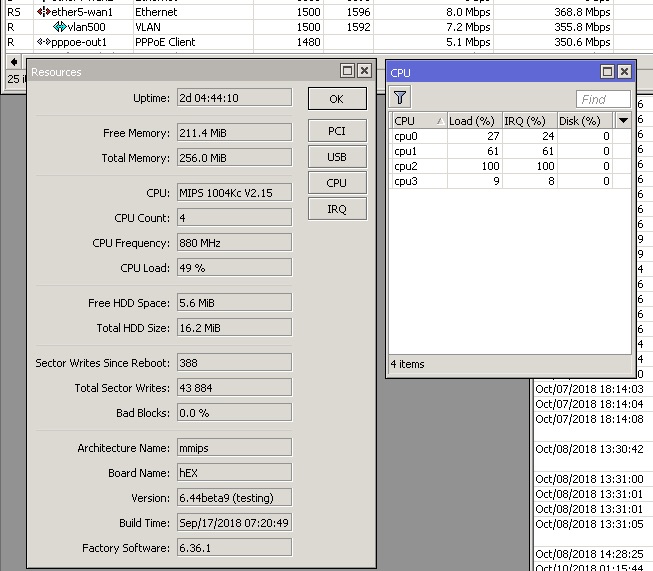 With Fasttrack off. CPU at 50%. One core is maxed out. I'm not using CAPSMAN. I do use VLANs so hardware offload for the switch is off due to that. This post has been edited by soonwai: Oct 10 2018, 06:23 PM |
|
|
Oct 10 2018, 06:05 PM
|
|
Senior Member
699 posts Joined: May 2006
|
QUOTE(MX510 @ Oct 9 2018, 11:12 AM) U can try enable fastpath mode enabled ok? QUOTE(cyberic @ Oct 9 2018, 11:35 AM) I own one but I never tested it because from what I gather, better to get Hex or something else. Processor too slow. Now it is just a simple switch for my wired devices. QUOTE(willaw @ Oct 9 2018, 02:46 PM) I'm using this one with TIME 500Mbps. No problem. Should be the same with TM. Thank you!However, I updated to latest RouterOS version, reset and found out it has fast path enabled. I don't have VLAN configured like what you might need to do for TM UniFi though (for HyppTV). |
|
|
Oct 10 2018, 06:12 PM
|
|
Junior Member
25 posts Joined: Aug 2007
|
QUOTE(soonwai @ Oct 10 2018, 06:05 PM) Check your Fasttrack counters to see if your Speedtest is being fasttracked. Perhaps something is preventing it. Traffic seems to be fasttracked.ip-forward: yes send-redirects: yes accept-source-route: no accept-redirects: no secure-redirects: yes rp-filter: no tcp-syncookies: no max-neighbor-entries: 8192 arp-timeout: 30s icmp-rate-limit: 10 icmp-rate-mask: 0x1818 route-cache: yes allow-fast-path: yes ipv4-fast-path-active: no ipv4-fast-path-packets: 0 ipv4-fast-path-bytes: 0 ipv4-fasttrack-active: yes ipv4-fasttrack-packets: 536551 ipv4-fasttrack-bytes: 591550858 This post has been edited by Dato: Oct 10 2018, 06:15 PM |
|
|
|
|
|
Oct 10 2018, 06:33 PM
Show posts by this member only | IPv6 | Post
#1734
|
|
All Stars
11,459 posts Joined: Oct 2007 From: KL
|
QUOTE(Dato @ Oct 10 2018, 06:12 PM) Traffic seems to be fasttracked. I mean check the Fasttrack dummy rule in /ip firewall. See whether it increases when you do your speedtest. If it does, means it's being fasttracked.ip-forward: yes send-redirects: yes accept-source-route: no accept-redirects: no secure-redirects: yes rp-filter: no tcp-syncookies: no max-neighbor-entries: 8192 arp-timeout: 30s icmp-rate-limit: 10 icmp-rate-mask: 0x1818 route-cache: yes allow-fast-path: yes ipv4-fast-path-active: no ipv4-fast-path-packets: 0 ipv4-fast-path-bytes: 0 ipv4-fasttrack-active: yes ipv4-fasttrack-packets: 536551 ipv4-fasttrack-bytes: 591550858 |
|
|
Oct 10 2018, 06:37 PM
|

Senior Member
1,941 posts Joined: Jan 2003
|

RB4011iGS+RM Looks good! Overkill for home? CODE https://mikrotik.com/product/rb4011igs_rm QUOTE RB4011 series - amazingly powerful routers with ten Gigabit ports, SFP+ 10Gbps interface and IPsec hardware acceleration for a great price! The RB4011 uses a quad core Cortex A15 CPU, same as in our carrier grade RB1100AHx4 unit. The unit is equipped with 1GB of RAM, can provide PoE output on port #10 and comes with a compact and professional looking solid metal enclosure in matte black. RB4011iGS+RM (Ethernet model) includes two rackmount ears that will securely fasten the unit in a standard 1U rack space. |
|
|
Oct 10 2018, 06:41 PM
|
|
Junior Member
25 posts Joined: Aug 2007
|
QUOTE(soonwai @ Oct 10 2018, 06:33 PM) I mean check the Fasttrack dummy rule in /ip firewall. See whether it increases when you do your speedtest. If it does, means it's being fasttracked. Confirmed it does go up. |
|
|
Oct 10 2018, 06:53 PM
Show posts by this member only | IPv6 | Post
#1737
|
|
All Stars
11,459 posts Joined: Oct 2007 From: KL
|
QUOTE(Dato @ Oct 10 2018, 06:41 PM) Confirmed it does go up. Must be something else then. I don’t use capsman so not sure if that affects anything. It shouldn’t if your test pc is connected directly to the rb750gr3. Got another computer to test. Not windows if possible. |
|
|
Oct 10 2018, 11:33 PM
|
|
Senior Member
1,026 posts Joined: Jan 2003 From: Kuala Lumpur, Malaysia
|
Dato hEX RB750GR3 can hit 1,972.2 Mbps base on this test results
https://mikrotik.com/product/RB750Gr3#fndtn-testresults This post has been edited by ldragon: Oct 10 2018, 11:36 PM |
|
|
Oct 10 2018, 11:57 PM
|
|
Senior Member
1,026 posts Joined: Jan 2003 From: Kuala Lumpur, Malaysia
|
QUOTE(thankyou @ Oct 10 2018, 06:37 PM)
RB4011iGS+RM Looks good! Overkill for home? CODE https://mikrotik.com/product/rb4011igs_rm  |
|
|
Oct 11 2018, 12:17 AM
|
|
Junior Member
383 posts Joined: May 2005
|
QUOTE(ldragon @ Oct 10 2018, 11:33 PM) Dato hEX RB750GR3 can hit 1,972.2 Mbps base on this test results You cannot simply use that figure. It is simply useless as it doesn't include the PPPoE overhead. For broadband 500mbps & above*, it is hard to recommend RB750Gr3 over hAP ac2 that just cost a little more. Yes, you can get over 1600mbps on PPPoE with fasttrack, but the moment you tax the cpu with VPN etc, the throughput will tank. So I hope nobody will assume RB750Gr3 can handle that 1G PPPoE routing while making use of VPN/Queue at the same time. I only recommend RB750Gr3 for broadband 300mbps symmetric & below, unless you're ok with using it for routing and some some firewall rules. hAP ac2 is much better performance than RB750Gr3. Above that will be the new RB4011 (probably just under 1K for RM version). I never recommended RB3011 as it was poorly supported with missing hw ipsec support (they finally added it recently) and other issues.https://mikrotik.com/product/RB750Gr3#fndtn-testresults |
| Change to: |  0.0233sec 0.0233sec
 0.54 0.54
 6 queries 6 queries
 GZIP Disabled GZIP Disabled
Time is now: 18th December 2025 - 01:53 AM |
 Quote
Quote