Outline ·
[ Standard ] ·
Linear+
Enterprise Networking Mikrotik Routers (RouterBoard & RouterOS), User and owner discussion group
|
MX510
|
 Feb 13 2018, 12:56 AM Feb 13 2018, 12:56 AM
|

|
QUOTE(lightonokira @ Feb 12 2018, 11:34 PM) Anyone knows any cheap and reliable AP for double story house. Router is at ground floor. Need an AP on the first floor. I'm looking at cAP AC but IDK where I can find them here. It's coming after Chinese new year DM me ur contact i let you know when stock arrived :-) |
|
|
|
|
|
MX510
|
Feb 13 2018, 01:04 AM
|
|
|
QUOTE(dannygoh @ Feb 6 2018, 09:49 PM) Looking for Freelancer to configure RB750 Site to Site VPN HQ - Maxis Fixed IP - Internet - YES Broadband - Warehouse - Securing and Firewall RB750 for both end. - Opening CCTV port and etc for both end. - Warehouse able to fully access accounting system to/from HQ - Only route HQ traffic to VPN, others internet traffic direct to Internet Please PM your services and price. UGPM :-) |
|
|
|
|
|
soonwai
|
Feb 13 2018, 01:08 AM
|
|
|
QUOTE(MX510 @ Feb 12 2018, 06:43 AM) This one is in Botanica in Bangsar South ... I see it's a Unicef event. Seems quite a few United Nations people in town. Probably because of WUF9 (World Urban Forum). Good to be paid in USD even if it's going down a bit.  |
|
|
|
|
|
MX510
|
Feb 14 2018, 10:55 AM
|
|
|
QUOTE(soonwai @ Feb 13 2018, 01:08 AM) I see it's a Unicef event. Seems quite a few United Nations people in town. Probably because of WUF9 (World Urban Forum). Good to be paid in USD even if it's going down a bit. Yeah :-) Yesterday fix a RB1100ahx4 at a new setup bitcoin mining farm which use as a core router 1000 ant miner stacked to the router Can’t take pictures due to security issues So far i have setup 2 mikrotik as a core router for the mining farm Anyway here is the pictures while i do configurations 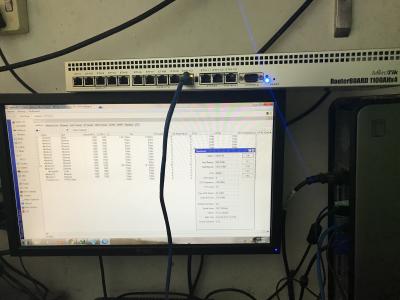
|
|
|
|
|
|
hnr2802
|
Feb 19 2018, 03:53 PM
|
|
|
Hi all, currently im on RouterOS v6.41.1
Trying to configure vlan600 for hypptv but failed. The only issue that im unable to disable the master port on my iptv port ethernet 5
Any ideas?
|
|
|
|
|
|
calvin
|
Feb 20 2018, 04:46 PM
|
|
|
anyone here knows of a contact where I can reach out to perform network cable lining and concealment in a house ? not the hacking type, just conduit ..
|
|
|
|
|
|
lightonokira
|
Feb 22 2018, 11:16 PM
|
|
|
Any news on the cAP Ac?
|
|
|
|
|
|
lightonokira
|
Feb 25 2018, 10:09 PM
|
|
|
Bump
|
|
|
|
|
|
rioven
|
Feb 28 2018, 07:05 PM
|
|
|
QUOTE(MX510 @ Feb 13 2018, 12:56 AM) It's coming after Chinese new year DM me ur contact i let you know when stock arrived :-) since Cap AC is coming to here, i wonder hap ac2 will be release?  (since i do wanna replace my old 951G) |
|
|
|
|
|
jio
|
Feb 28 2018, 10:15 PM
|
|
|
hAP should be available pretty soon. hAP ac2 list price is about 60% of hAP ac. At that price point it is much better value than hEX r3. If the local seller can keep the price below 300myr, then it will be much better choice than hAP ac lite or hEX r3 (with exception of some scenario). Pity it doesn't support 48v & poe out.
|
|
|
|
|
|
lightonokira
|
Mar 2 2018, 12:36 AM
|
|
|
QUOTE(jio @ Feb 28 2018, 10:15 PM) hAP should be available pretty soon. hAP ac2 list price is about 60% of hAP ac. At that price point it is much better value than hEX r3. If the local seller can keep the price below 300myr, then it will be much better choice than hAP ac lite or hEX r3 (with exception of some scenario). Pity it doesn't support 48v & poe out. PoE out is a big deal nowadays. Can't live without those atleast on one port. Wheres my cAP AC. Need to use this PoE port 😜 |
|
|
|
|
|
rioven
|
Mar 2 2018, 08:17 PM
|
|
|
QUOTE(jio @ Feb 28 2018, 10:15 PM) hAP should be available pretty soon. hAP ac2 list price is about 60% of hAP ac. At that price point it is much better value than hEX r3. If the local seller can keep the price below 300myr, then it will be much better choice than hAP ac lite or hEX r3 (with exception of some scenario). Pity it doesn't support 48v & poe out. Most probably hap ac2 will be priced around 350 n below (if our currency can sustain RM4= 1USD). Synchroweb list the price cap ac around 330++ Synchroweb Cap ACbtw they still list as pre-order |
|
|
|
|
|
soonwai
|
Mar 2 2018, 09:57 PM
|
|
|
QUOTE(charymsylyn @ Feb 12 2018, 11:30 PM) Hi all, I previously managed to get IPv6 fully working on 6.40.5 but after upgrading to one of the 6.42rc versions, IPv6 stopped working correctly on clients. I'm now on 6.41.2. The clients can get IPv6 address but there is no IPv6 connectivity (IPv6 test websites shows not working, can't ping IPv6 addresses). I am able to ping IPv6 addresses from the router so the issue must be between the router and clients. Can the masters here look at my IPv6 settings and see what went wrong? Thank you. ... QUOTE(hnr2802 @ Feb 19 2018, 03:53 PM) Hi all, currently im on RouterOS v6.41.1 Trying to configure vlan600 for hypptv but failed. The only issue that im unable to disable the master port on my iptv port ethernet 5 Any ideas? Post a /export. Easier to help that way. QUOTE(calvin @ Feb 20 2018, 04:46 PM) anyone here knows of a contact where I can reach out to perform network cable lining and concealment in a house ? not the hacking type, just conduit .. I usually get any general contractor or an electrical guy to do it. They'll charge less than a network person. In my case, I supplied the Cat5e/6 cables, did the crimping and keystones myself. They did the cabling, conduit or hacking and the holes for the jacks & faceplates. Start off by asking them how much they charge to a pull a telephone cable. That should give you an idea of how low they'll go. This post has been edited by soonwai: Mar 2 2018, 10:05 PM |
|
|
|
|
|
hnr2802
|
Mar 3 2018, 09:54 AM
|
|
|
QUOTE(soonwai @ Mar 2 2018, 09:57 PM) Post a /export. Easier to help that way. I usually get any general contractor or an electrical guy to do it. They'll charge less than a network person. In my case, I supplied the Cat5e/6 cables, did the crimping and keystones myself. They did the cabling, conduit or hacking and the holes for the jacks & faceplates. Start off by asking them how much they charge to a pull a telephone cable. That should give you an idea of how low they'll go. What do you mean “Post a /export.” |
|
|
|
|
|
hnr2802
|
Mar 3 2018, 11:43 AM
|
|
|
Here are my setting screenshot. Currently the hypptv not attached to the router. Interfaces>Interface>ether5 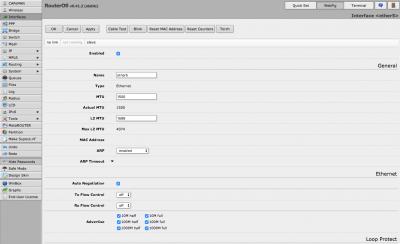
Interfaces>VLAN>vlan600 
Bridge>Bridge>hypptv 
Bridge>Ports>ether5 
Bridge>Ports>vlan600 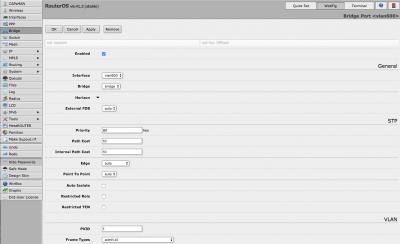
|
|
|
|
|
|
soonwai
|
Mar 3 2018, 11:50 AM
|
|
|
QUOTE(hnr2802 @ Mar 3 2018, 09:54 AM) What do you mean “Post a /export.” Here you go. https://wiki.mikrotik.com/wiki/Manual:Confi...g_ConfigurationBasically a text file of your configuration. Much easier to digest than screenshots. Remember to edit out your usernames or passwords. |
|
|
|
|
|
hnr2802
|
Mar 3 2018, 11:55 AM
|
|
|
CODE
# mar/03/2018 11:59:28 by RouterOS 6.41.2
# software id = IS1P-EK45
#
# model = 2011UAS-2HnD
# serial number = 402602E92990
/interface bridge
add admin-mac=D4:CA:6D:7C:72:B1 auto-mac=no comment=defconf name=bridge
add fast-forward=no name=hypptv
/interface wireless
set [ find default-name=wlan1 ] band=2ghz-onlyn channel-width=20/40mhz-Ce country=malaysia disabled=no distance=indoors frequency=auto mode=ap-bridge ssid=H&M wireless-protocol=\
802.11 wps-mode=disabled
/interface vlan
add interface=ether1 name=vlan500 vlan-id=500
add interface=ether1 name=vlan600 vlan-id=600
/interface pppoe-client
add add-default-route=yes disabled=no interface=vlan500 name=pppoe-out1 password=XXXXXX service-name=unifi user=XXXXX@unifi
/interface list
add comment=defconf name=WAN
add comment=defconf name=LAN
/interface wireless security-profiles
set [ find default=yes ] authentication-types=wpa2-psk mode=dynamic-keys supplicant-identity=MikroTik wpa-pre-shared-key=0172031002 wpa2-pre-shared-key=0172031002
/ip pool
add name=dhcp ranges=192.168.88.10-192.168.88.254
/ip dhcp-server
add address-pool=dhcp disabled=no interface=bridge name=defconf
/ppp profile
set *0 dhcpv6-pd-pool=pppoev6
/interface bridge port
add bridge=bridge comment=defconf interface=ether2
add bridge=bridge comment=defconf interface=ether3
add bridge=bridge comment=defconf interface=ether4
add bridge=hypptv comment=defconf hw=no interface=ether5
add bridge=bridge comment=defconf interface=ether6
add bridge=bridge comment=defconf interface=ether7
add bridge=bridge comment=defconf interface=ether8
add bridge=bridge comment=defconf interface=ether9
add bridge=bridge comment=defconf interface=sfp1
add bridge=bridge comment=defconf interface=wlan1
add bridge=bridge interface=vlan600
/interface list member
add comment=defconf interface=bridge list=LAN
add comment=defconf interface=ether1 list=WAN
add interface=pppoe-out1 list=WAN
/ip address
add address=192.168.88.1/24 comment=defconf interface=ether2 network=192.168.88.0
/ip dhcp-client
add comment=defconf dhcp-options=hostname,clientid interface=ether1
/ip dhcp-server network
add address=192.168.88.0/24 comment=defconf gateway=192.168.88.1
/ip dns
set allow-remote-requests=yes servers=8.8.8.8,8.8.4.4,2001:4860:4860::8888,2001:4860:4860::8844
/ip dns static
add address=192.168.88.1 name=router.lan
/ip firewall filter
add action=accept chain=input comment="defconf: accept established,related,untracked" connection-state=established,related,untracked
add action=drop chain=input comment="defconf: drop invalid" connection-state=invalid
add action=accept chain=input comment="defconf: accept ICMP" protocol=icmp
add action=drop chain=input comment="defconf: drop all not coming from LAN" in-interface-list=!LAN
add action=accept chain=forward comment="defconf: accept in ipsec policy" ipsec-policy=in,ipsec
add action=accept chain=forward comment="defconf: accept out ipsec policy" ipsec-policy=out,ipsec
add action=fasttrack-connection chain=forward comment="defconf: fasttrack" connection-state=established,related
add action=accept chain=forward comment="defconf: accept established,related, untracked" connection-state=established,related,untracked
add action=drop chain=forward comment="defconf: drop invalid" connection-state=invalid
add action=drop chain=forward comment="defconf: drop all from WAN not DSTNATed" connection-nat-state=!dstnat connection-state=new in-interface-list=WAN
/ip firewall nat
add action=masquerade chain=srcnat comment="defconf: masquerade" ipsec-policy=out,none out-interface-list=WAN
/ipv6 address
add from-pool=pppoev6 interface=bridge
/ipv6 dhcp-client
add add-default-route=yes interface=pppoe-out1 pool-name=pppoev6 request=prefix use-peer-dns=no
/ipv6 firewall address-list
add address=::/128 comment="defconf: unspecified address" list=bad_ipv6
add address=::1/128 comment="defconf: lo" list=bad_ipv6
add address=fec0::/10 comment="defconf: site-local" list=bad_ipv6
add address=::ffff:0.0.0.0/96 comment="defconf: ipv4-mapped" list=bad_ipv6
add address=::/96 comment="defconf: ipv4 compat" list=bad_ipv6
add address=100::/64 comment="defconf: discard only " list=bad_ipv6
add address=2001:db8::/32 comment="defconf: documentation" list=bad_ipv6
add address=2001:10::/28 comment="defconf: ORCHID" list=bad_ipv6
add address=3ffe::/16 comment="defconf: 6bone" list=bad_ipv6
add address=::224.0.0.0/100 comment="defconf: other" list=bad_ipv6
add address=::127.0.0.0/104 comment="defconf: other" list=bad_ipv6
add address=::/104 comment="defconf: other" list=bad_ipv6
add address=::255.0.0.0/104 comment="defconf: other" list=bad_ipv6
/ipv6 firewall filter
add action=accept chain=input comment="defconf: accept established,related,untracked" connection-state=established,related,untracked
add action=drop chain=input comment="defconf: drop invalid" connection-state=invalid
add action=accept chain=input comment="defconf: accept ICMPv6" protocol=icmpv6
add action=accept chain=input comment="defconf: accept UDP traceroute" port=33434-33534 protocol=udp
add action=accept chain=input comment="defconf: accept DHCPv6-Client prefix delegation." dst-port=546 protocol=udp src-address=fe80::/16
add action=accept chain=input comment="defconf: accept IKE" dst-port=500,4500 protocol=udp
add action=accept chain=input comment="defconf: accept ipsec AH" protocol=ipsec-ah
add action=accept chain=input comment="defconf: accept ipsec ESP" protocol=ipsec-esp
add action=accept chain=input comment="defconf: accept all that matches ipsec policy" ipsec-policy=in,ipsec
add action=drop chain=input comment="defconf: drop everything else not coming from LAN" in-interface-list=!LAN
add action=accept chain=forward comment="defconf: accept established,related,untracked" connection-state=established,related,untracked
add action=drop chain=forward comment="defconf: drop invalid" connection-state=invalid
add action=drop chain=forward comment="defconf: drop packets with bad src ipv6" src-address-list=bad_ipv6
add action=drop chain=forward comment="defconf: drop packets with bad dst ipv6" dst-address-list=bad_ipv6
add action=drop chain=forward comment="defconf: rfc4890 drop hop-limit=1" hop-limit=equal:1 protocol=icmpv6
add action=accept chain=forward comment="defconf: accept ICMPv6" protocol=icmpv6
add action=accept chain=forward comment="defconf: accept HIP" protocol=139
add action=accept chain=forward comment="defconf: accept IKE" dst-port=500,4500 protocol=udp
add action=accept chain=forward comment="defconf: accept ipsec AH" protocol=ipsec-ah
add action=accept chain=forward comment="defconf: accept ipsec ESP" protocol=ipsec-esp
add action=accept chain=forward comment="defconf: accept all that matches ipsec policy" ipsec-policy=in,ipsec
add action=drop chain=forward comment="defconf: drop everything else not coming from LAN" in-interface-list=!LAN
/ipv6 nd
set [ find default=yes ] advertise-dns=yes interface=bridge mtu=1480
/ipv6 nd prefix default
set preferred-lifetime=1h valid-lifetime=2h
/lcd interface pages
set 0 interfaces=sfp1,ether1,ether2,ether3,ether4,ether5,ether6,ether7,ether8,ether9,ether10
/system clock
set time-zone-name=Asia/Kuala_Lumpur
/tool mac-server
set allowed-interface-list=LAN
/tool mac-server mac-winbox
set allowed-interface-list=LAN
|
|
|
|
|
|
soonwai
|
Mar 3 2018, 12:07 PM
|
|
|
hnr2802
Jut had a quick look since I’m at the coffee shop. But try this.
Vlan600 is currently a port in “bridge”. It should be a port in “hypptv”. So just change that and it should work.
Don’t worry about master/slave ports. Since v6.41, no more master/slave already.
In your list of ss, this one “Bridge>Ports>vlan600”, change bridge from bridge to hypptv.
This post has been edited by soonwai: Mar 3 2018, 12:11 PM
|
|
|
|
|
|
hnr2802
|
Mar 3 2018, 12:23 PM
|
|
|
QUOTE(soonwai @ Mar 3 2018, 12:07 PM) hnr2802Jut had a quick look since I’m at the coffee shop. But try this. Vlan600 is currently a port in “bridge”. It should be a port in “hypptv”. So just change that and it should work. Don’t worry about master/slave ports. Since v6.41, no more master/slave already. Thanks soonwai . my hypptv is working now. but when i test in the hypptv Network Connectivity Test the Multicast Connectivity marked "X" or not not established. should i be worried or can i fix that with mikrotik. running the same test using unifi standard router all the test was ok. |
|
|
|
|
|
soonwai
|
Mar 3 2018, 12:40 PM
|
|
|
QUOTE(hnr2802 @ Mar 3 2018, 12:23 PM) Thanks soonwai . my hypptv is working now. but when i test in the hypptv Network Connectivity Test the Multicast Connectivity marked "X" or not not established. should i be worried or can i fix that with mikrotik. running the same test using unifi standard router all the test was ok. Good question. I didn't know about that test. Let me try on my STB and see what I get. I guess if it works, it shouldn't be anything to worry about. But still it'll be nice to get green check marks for all the tests. hnr2802 just tested on mine and I get the same X for Multicast Connectivity. Try turning on “igmp-snooping” for your HyppTV bridge. See if that helps. I can’t test this on mine as I’m using the switch chip for the vlans and not a software bridge like yours. The switch chip on my RB2011 doesn’t support igmp-snooping. This post has been edited by soonwai: Mar 3 2018, 01:11 PM |
|
|
|
|





 Quote
Quote



 0.0260sec
 0.68
0.68
 6 queries
 GZIP Disabled