Outline ·
[ Standard ] ·
Linear+
Hardware Hackintosh Thread V2.0, The Official OSX86 Thread (Hardware)
|
TSwiraone
|
 Oct 16 2012, 09:32 AM Oct 16 2012, 09:32 AM
|

|
I believe when you were booting using unibeast, the fakeSMC version that was used were the one loaded from unibeast instead of the one that you've installed in your PC.
My suggestion, boot up to your ML using unibeast, don't use easybeast/userdsdt. Instead, select the kexts manually. The FakeSMC is the one that you need to have, it is not optional, without it you can't boot directly from the HD. Install the one from the Multibeast, reboot, if everything running .. then go and work on the audio/ethernet.
|
|
|
|
|
|
samowong
|
Oct 16 2012, 11:06 AM
|
Getting Started

|
» Click to show Spoiler - click again to hide... « QUOTE(wiraone @ Oct 16 2012, 09:32 AM) I believe when you were booting using unibeast, the fakeSMC version that was used were the one loaded from unibeast instead of the one that you've installed in your PC. My suggestion, boot up to your ML using unibeast, don't use easybeast/userdsdt. Instead, select the kexts manually. The FakeSMC is the one that you need to have, it is not optional, without it you can't boot directly from the HD. Install the one from the Multibeast, reboot, if everything running .. then go and work on the audio/ethernet. I've just downloaded the latest Multibeast 5.1.2 (just released today), fiddled with it a bit, realized there is actually fakeSMC kext (standalone) in the Miscellanous drivers. How could i've missed it  Will definitely try installing it tonight. Do i have to install the fakeSMC plugins as well? Thanks This post has been edited by samowong: Oct 16 2012, 11:06 AM |
|
|
|
|
|
TSwiraone
|
Oct 16 2012, 11:30 AM
|
|
|
The plugins is good to have, you can HWMonitor and have it showing all the temp & speed too .. I like it and my status monitor shows the CPU multiplier, so I know most of the time, the CPU is not strained  |
|
|
|
|
|
samowong
|
Oct 16 2012, 11:35 AM
|
Getting Started
|
QUOTE(wiraone @ Oct 16 2012, 11:30 AM) The plugins is good to have, you can HWMonitor and have it showing all the temp & speed too .. I like it and my status monitor shows the CPU multiplier, so I know most of the time, the CPU is not strained Thanks |
|
|
|
|
|
Kenneth85
|
Oct 16 2012, 04:07 PM
|
Getting Started
|
I got a noob question.. where can i buy ori macos snow leopard? or lion.. coz i've search in applestore and it doesn't seem to sell any..
This post has been edited by Kenneth85: Oct 16 2012, 04:08 PM
|
|
|
|
|
|
TSwiraone
|
Oct 16 2012, 04:16 PM
|
|
|
Find a friend with Mac, buy from the online store and create a thumb drive. You need at least a Mac running SL. Else, ebay I guess is the best bet.
|
|
|
|
|
|
Kenneth85
|
Oct 16 2012, 04:30 PM
|
Getting Started
|
If i get mac mini, is it possible to get snow leopard from applestore?
i hope to get hackintosh running with mac XD
|
|
|
|
|
|
TSwiraone
|
Oct 16 2012, 04:33 PM
|
|
|
The latest Mac Mini should come with Mountain Lion, and I've no idea if you could download SL or Lion from Online AppStore anymore.
|
|
|
|
|
|
goolias
|
Oct 16 2012, 07:33 PM
|
|
|
QUOTE(treason @ Oct 14 2012, 11:33 PM) Thanks, do you remember what brand it was or where u got it from please? Also, anyone updated from 10.8 to 10.8.2? Pics attached, generic no brand BT dongle that works. From PC shop at JB few years back. 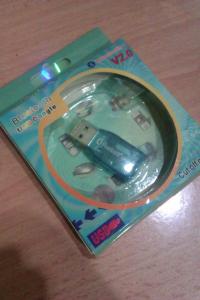
Me updated to 10.8.2 This post has been edited by goolias: Oct 16 2012, 07:35 PM |
|
|
|
|
|
treason
|
Oct 16 2012, 10:01 PM
|
Getting Started
|
QUOTE(goolias @ Oct 16 2012, 07:33 PM) Pics attached, generic no brand BT dongle that works. From PC shop at JB few years back.
Me updated to 10.8.2 Wow ok thanks...I've seen some that are rm10...feel like buying it and just hope that it works..haha..i turned off sleep so that shouldnt be an issue... Any issues updating to 10.8.2? Did it break anything for anyone? |
|
|
|
|
|
TSwiraone
|
Oct 17 2012, 07:00 AM
|
|
|
Any upgrade will surely breaks something, particularly the audio. So, as usual, download latest multibeast and the combo upgrade. Thing that didn't work and cause problem after 10.8.2 will be the old FakeSMC plugins. Run the combo upgrade and then multibeast before rebooting.
|
|
|
|
|
|
samowong
|
Oct 17 2012, 08:54 AM
|
Getting Started
|
Installed fakeSMC from Multibeast 5.1.2. Upon rebooting, managed to get to white screen with Apple logo, then all is blank and monitor goes to sleep. Tried PCIRootUID and GraphicsEnabler commands at chimera bootloader - no help. I think it has booted into OSX because i hear Mac sounds when i randomly press on the keyboard, just that i can't see anything. Here are my specs again if anyone can help. My specs: Gigabyte H61MA-D2V i5-3450 Apacer 8GB 1333Mhz Seagate Barracuda 160GB EVGA GTS 250 Thanks |
|
|
|
|
|
TSwiraone
|
Oct 17 2012, 10:38 AM
|
|
|
Do you need to do anything when booting up using Unibeast? If yes, you need to add the same thing into /Extra/org.chameleon.boot.plist
Set the PCIRootUID to 0 and GraphicsEnabler to Yes for your card.
<key>Kernel Flags</key>
<string>PCIRootUID=0</string>
<key>GraphicsEnabler</key>
<string>Yes</string>
|
|
|
|
|
|
samowong
|
Oct 17 2012, 10:46 AM
|
Getting Started
|
Yes. When booting up with Unibeast, i always have to key in PCIRootUID=0, otherwise the screen goes blank.
If i'm using tonymac's chimera bootloader, it should be /Extra/org.chimera.boot.plist that i'm editing right?
So, just to make sure. Booting at chimera using PCIRootUID and GraphicsEnabler commands won't cut it, the bootloader's plist needs to be edited right?
|
|
|
|
|
|
TSwiraone
|
Oct 17 2012, 10:49 AM
|
|
|
I'm using Chimera but I've only /Extra/org.chameleon.boot.plist ..
|
|
|
|
|
|
skitZo`
|
Oct 17 2012, 01:59 PM
|
|
|
Goolias, Multibeast 5.1.1 with the new FakeSMC from Kozlek's branch sure did fix my boot times, boot times are back to normal and hardware monitor has a new interface!  |
|
|
|
|
|
treason
|
Oct 17 2012, 08:07 PM
|
Getting Started
|
Thanks guys! Im running a LINE 6 USB audio interface for sound so sound shouldnt be an issue, will run the latest Multibeast for the new FakeSMC after...will try tonight! hehe
|
|
|
|
|
|
goolias
|
Oct 17 2012, 08:51 PM
|
|
|
QUOTE(skitZo` @ Oct 17 2012, 01:59 PM) Goolias, Multibeast 5.1.1 with the new FakeSMC from Kozlek's branch sure did fix my boot times, boot times are back to normal and hardware monitor has a new interface! really? cool! I shall give it a try. |
|
|
|
|
|
moonsault
|
Oct 18 2012, 08:15 AM
|
Getting Started
|
QUOTE(samowong @ Oct 15 2012, 04:01 PM) I am now dualbooting ML and Windows 7 in a single HDD. Windows 7 was installed 1st, working well. Proceeded with ML installation via Unibeast (as above post), working well. Upon installing Chimera/Chameleon, it brought me to the screen prompting me to choose OSX /Windows. Booting into Windows is fine. Booting into OSX gets me stuck at a white screen with Apple logo. Ran unibeast again with -v, stuck at ACPI_SMC_PlatformPlugin: :registerLPCDriver - failed to locate SMC driver. Pls point me to the exact kext to install. This is the umphteenth time i installed ML... Thanks Can show me the guidelines of your installation or where you refer to? I'm going to do a dualbooting hackintosh soon but not yet prepare well on installation steps. |
|
|
|
|



 Quote
Quote





 0.0185sec
 0.50
0.50
 6 queries
 GZIP Disabled