Outline ·
[ Standard ] ·
Linear+
Samsung Galaxy TAB Official Thread V2, Best and most portable 7" Android tablet
|
JonSpark
|
 Jun 18 2011, 11:10 PM Jun 18 2011, 11:10 PM
|

|
Problem here I tried to update my TAB from 2.2 to 2.3 using KIES but: I read alot of tutorial and it was mention I need to activate USB settings then KIES mode , but I cant find it......only got tetheringWhen I plug it to my PC, it says Switch to Samsung Kies (PC Studio) mode. The current connection mode is not supported by Kies........how to switch it? Mine is Sprint Wifi-only version  This post has been edited by JonSpark: Jun 18 2011, 11:15 PM This post has been edited by JonSpark: Jun 18 2011, 11:15 PM |
|
|
|
|
|
thekaide
|
Jun 19 2011, 01:41 AM
|
Getting Started

|
QUOTE(edan1979 @ Jun 18 2011, 07:37 PM) you can also try go launcher ex.... it got both ADW and Lancher pro features in it... do you guy wan to share out ur galaxy tab interface pic? like in XDA~ open a new post and share i wan to design my tab make it more look like a "tablet" but no idea haha |
|
|
|
|
|
Darkcity212
|
Jun 19 2011, 02:03 AM
|
|
|
cool galaxy tab casing 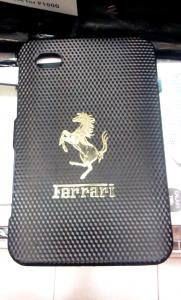
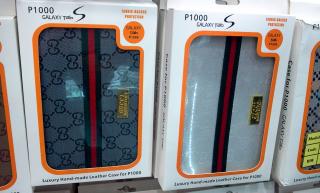
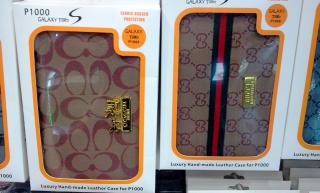
interested do pm me for best price.have a nice day!
Added on June 19, 2011, 2:09 amthe ferrari version got red,white,and black.back surface is not sticker.awesome feel of it with the stainless steel horse.also original samsung tab casing with box This post has been edited by Darkcity212: Jun 19 2011, 02:09 AM |
|
|
|
|
|
JonSpark
|
Jun 19 2011, 02:32 AM
|
|
|
Did some googling.....apparently Sprint/Verizon version does not have KIES mode now how am I supposed to update it to GB 2.3?  |
|
|
|
|
|
enaleni
|
Jun 19 2011, 02:43 AM
|
|
|
QUOTE(JonSpark @ Jun 19 2011, 02:32 AM) Did some googling.....apparently Sprint/Verizon version does not have KIES mode now how am I supposed to update it to GB 2.3? i got other info from this website.... http://www.thegalaxytabforum.com/index.php...or-galaxy-tabs/the SGH-P100 is the sprint version of the tab, right? if thats so, then its a CDMA phone, so Kies wont work with it at all. All software updates on CDMA models are done over the air, so Kies wont allow you to do updates as it is anyway. Samsung don't currently have any date on a version that will, or if one will even be made for Sprint CDMA phones. |
|
|
|
|
|
JonSpark
|
Jun 19 2011, 03:22 AM
|
|
|
Means I got to update the firmware via other methods  How come when I plug to my PC via USB, the TAB is able to detect the connection but I cant enable USB debugging (its pre-selected/ticked but I cant click it)? |
|
|
|
|
|
TSbenny888
|
Jun 19 2011, 07:16 AM
|
Gadget Freak

|
QUOTE(JonSpark @ Jun 19 2011, 03:22 AM) Means I got to update the firmware via other methods How come when I plug to my PC via USB, the TAB is able to detect the connection but I cant enable USB debugging (its pre-selected/ticked but I cant click it)? You have to disconnect the cable from pc to be able to change it |
|
|
|
|
|
JonSpark
|
Jun 19 2011, 11:20 AM
|
|
|
QUOTE(benny888 @ Jun 19 2011, 07:16 AM) You have to disconnect the cable from pc to be able to change it oh wait it works  This post has been edited by JonSpark: Jun 19 2011, 11:50 AM This post has been edited by JonSpark: Jun 19 2011, 11:50 AM |
|
|
|
|
|
JonSpark
|
Jun 19 2011, 12:01 PM
|
|
|
My tab is able to detect im connected, but the PC doesnt......only shows Installing Software/Software Succesfully Installed popup of the taskbar for the 1st time, then later it doesnt show up the next time I connect it except when I select MOUNT USB Mass Storage option.
Is this normal?
This post has been edited by JonSpark: Jun 19 2011, 12:07 PM
|
|
|
|
|
|
enaleni
|
Jun 19 2011, 12:16 PM
|
|
|
QUOTE(JonSpark @ Jun 19 2011, 12:01 PM) My tab is able to detect im connected, but the PC doesnt......only shows Installing Software/Software Succesfully Installed popup of the taskbar for the 1st time, then later it doesnt show up the next time I connect it except when I select MOUNT USB Mass Storage option. Is this normal? for ur info my frenz kies is terrible ly suck.... u will see if u go any samsung thread section advance user will not use it anymore after their pc install driver for the 1st time ur gadget connect with kies.....  |
|
|
|
|
|
JonSpark
|
Jun 19 2011, 12:27 PM
|
|
|
Actually I only need the driver to connect my TAB also.......I dont fancy music and contact syncing  but if my PC does not show its connected (unless i enable MOUNT), is it normal?  |
|
|
|
|
|
enaleni
|
Jun 19 2011, 12:35 PM
|
|
|
QUOTE(JonSpark @ Jun 19 2011, 12:27 PM) Actually I only need the driver to connect my TAB also.......I dont fancy music and contact syncing but if my PC does not show its connected (unless i enable MOUNT), is it normal? i think so..... if u enable usb debugging mode and when u want to mount to pc and then ur pc will detect and open windows to show u what content u have on ur internal sd and external sd.... u good to go what ever u want to copy or paste on ur internal/external sd for ur tab....  |
|
|
|
|
|
JonSpark
|
Jun 19 2011, 12:39 PM
|
|
|
QUOTE(enaleni @ Jun 19 2011, 12:35 PM) i think so..... if u enable usb debugging mode and when u want to mount to pc and then ur pc will detect and open windows to show u what content u have on ur internal sd and external sd.... u good to go what ever u want to copy or paste on ur internal/external sd for ur tab.... actually the reason i wanna connect it is because i wanna root and flash my device, scare something wrong might happen then brick my TAB......kantoi loh  This post has been edited by JonSpark: Jun 19 2011, 12:41 PM This post has been edited by JonSpark: Jun 19 2011, 12:41 PM |
|
|
|
|
|
enaleni
|
Jun 19 2011, 12:46 PM
|
|
|
QUOTE(JonSpark @ Jun 19 2011, 12:39 PM) actually the reason i wanna connect it is because i wanna root and flash my device, scare something wrong might happen then brick my TAB......kantoi loh did u try z4root method 1st??? |
|
|
|
|
|
anglewhite
|
Jun 19 2011, 02:39 PM
|
New Member
|
guy where can i download games Nova?????cant find it
Why i cant play asphalt 5???
This post has been edited by anglewhite: Jun 19 2011, 02:43 PM
|
|
|
|
|
|
enaleni
|
Jun 19 2011, 04:04 PM
|
|
|
QUOTE(anglewhite @ Jun 19 2011, 02:39 PM) guy where can i download games Nova?????cant find it Why i cant play asphalt 5??? |
|
|
|
|
|
JonSpark
|
Jun 19 2011, 04:06 PM
|
|
|
QUOTE(enaleni @ Jun 19 2011, 12:46 PM) did u try z4root method 1st??? Never heard of z4root, SuperOneClick got lah i'll do some reading on it |
|
|
|
|
|
enaleni
|
Jun 19 2011, 04:07 PM
|
|
|
QUOTE(JonSpark @ Jun 19 2011, 04:06 PM) Never heard of z4root, SuperOneClick got lah i'll do some reading on it haha..... reminder ek.... plz read 1st page of this thread my friendz.....  u will find it.... |
|
|
|
|
|
fabianz03
|
Jun 19 2011, 04:23 PM
|
|
|
QUOTE(JonSpark @ Jun 18 2011, 11:10 PM) Problem here I tried to update my TAB from 2.2 to 2.3 using KIES but: I read alot of tutorial and it was mention I need to activate USB settings then KIES mode , but I cant find it......only got tetheringWhen I plug it to my PC, it says Switch to Samsung Kies (PC Studio) mode. The current connection mode is not supported by Kies........how to switch it? Mine is Sprint Wifi-only version 2.3 is released for the P1010 already ?  |
|
|
|
|



 Quote
Quote


 0.0294sec
 0.80
0.80
 6 queries
 GZIP Disabled