

How do I downgrade the firmware on my DIR-615 from 7.09 to 7.05, thanks in advance!
Unifi Official TM UniFi High Speed Broadbrand Thread V10, FREE Installation Fee & SAVE RM200!!!
Unifi Official TM UniFi High Speed Broadbrand Thread V10, FREE Installation Fee & SAVE RM200!!!
|
|
 May 14 2011, 07:06 PM May 14 2011, 07:06 PM
|
 
Senior Member
6,738 posts Joined: Dec 2006 From: Kuala Lumpur, Malaysia | Eau Claire, Wisconsin  
|
How do I downgrade the firmware on my DIR-615 from 7.09 to 7.05, thanks in advance!
|
|
|
|
|
|
May 14 2011, 08:42 PM
|

Senior Member
1,527 posts Joined: Apr 2005 From: Heaven 
|
Anybody knows when they going to implement the bandwith cap?
|
|
|
May 14 2011, 08:52 PM
|
 
Staff
12,089 posts Joined: Dec 2004 From: Malaysia
|
QUOTE(arshad @ May 14 2011, 08:42 PM) Anybody knows when they going to implement the bandwith cap? So far no news yet but if they implement it then I'll switch over to the BIZ5.   |
|
|
May 15 2011, 12:02 AM
|
|
Junior Member
344 posts Joined: Aug 2007
|
hmm...i just install VIP10 and the speed is awesome
but, may i ask...all the channel are not hd right? those hd channel just 1080i? I'm using sharp 40" led |
|
|
May 15 2011, 12:07 AM
|

Senior Member
3,008 posts Joined: Sep 2005 From: T.T.D.I, Bukit Damansara
|
QUOTE(hong1380 @ May 15 2011, 12:02 AM) hmm...i just install VIP10 and the speed is awesome The only free HD channel is Luxe and yes it's 1080i.but, may i ask...all the channel are not hd right? those hd channel just 1080i? I'm using sharp 40" led |
|
|
May 15 2011, 12:28 AM
|

Junior Member
221 posts Joined: May 2010 From: Nilai, N9
|
subang airport got free unifi or not?
|
|
|
|
|
|
May 15 2011, 02:46 AM
|

Senior Member
2,446 posts Joined: Oct 2008 
|
hey guys i would like to do this
http://unifi.athena.my/custom_routers.html but my router firmware is 7.09 do you guys have the file for firmware 7309? Thanks! |
|
|
May 15 2011, 03:01 AM
|
 
Elite
195 posts Joined: Sep 2006 
|
QUOTE(Calvin Seak @ May 15 2011, 02:46 AM) hey guys i would like to do this http://tsd.dlink.com.tw/http://unifi.athena.my/custom_routers.html but my router firmware is 7.09 do you guys have the file for firmware 7309? Thanks! Search for DIR-615, should be there ( Firmware:DIR-615_G2_F/W:7.09 ) |
|
|
May 15 2011, 12:32 PM
|
|
Senior Member
2,446 posts Joined: Oct 2008
|
hey riz! sorry i didnt make my self clear...
I was thinking of making a bridge for my the new dir 615 because my friend suggested your website to me because i get frequent disconnects and its really annoying.. my current firmware for my dir 615 is currently 7.09. I would to do the bridge at using my old router but the file is currently for firmware 7.05 and i couldnt perform anything.. so i tried my luck with the advance but heres how the advance look like in 7.09 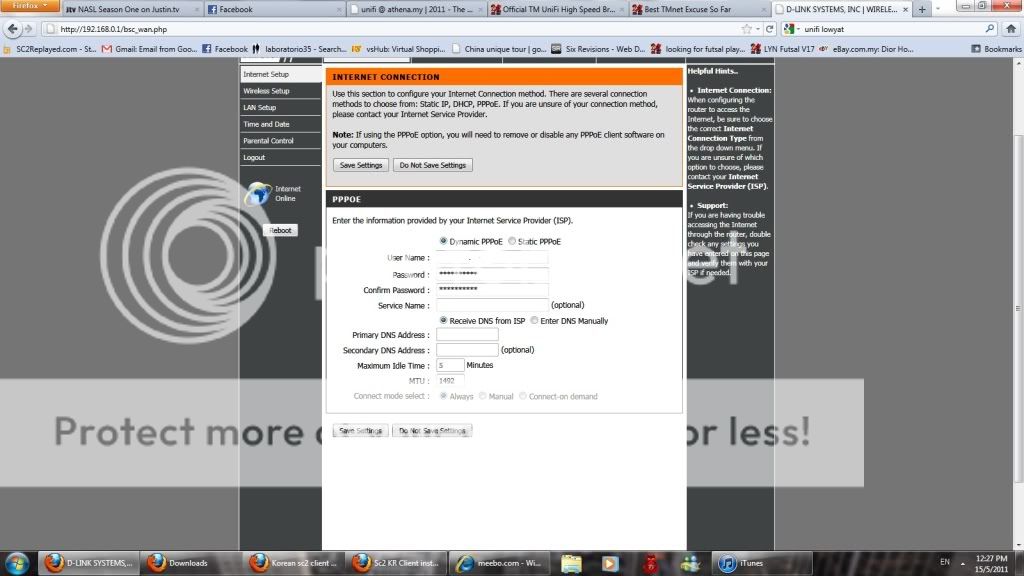 are there any files for the firmware 7.09 so that i could use the easy method rizvanrp? thanks  |
|
|
May 15 2011, 12:37 PM
|

Junior Member
32 posts Joined: Oct 2006 From: Kuala Lumput
|
After submit report via myunifi, their technicians came to resolve iptv pixelling and upload speed slow. All well done .. good and fast response
|
|
|
May 15 2011, 01:42 PM
|
|
Senior Member
3,008 posts Joined: Sep 2005 From: T.T.D.I, Bukit Damansara
|
QUOTE(Calvin Seak @ May 15 2011, 12:32 PM) hey riz! sorry i didnt make my self clear... I thought this guide is clear enough?I was thinking of making a bridge for my the new dir 615 because my friend suggested your website to me because i get frequent disconnects and its really annoying.. my current firmware for my dir 615 is currently 7.09. I would to do the bridge at using my old router but the file is currently for firmware 7.05 and i couldnt perform anything.. so i tried my luck with the advance but heres how the advance look like in 7.09 are there any files for the firmware 7.09 so that i could use the easy method rizvanrp? thanks http://unifi.athena.my/custom_routers.html I've done it with 2 units of TM's DIR615 v7.09 Perhaps you missed this part. QUOTE TM has released the 7.09 firmware for the D-Link 615 G1/G2. This new firmware is a little buggy so you may or may not be able to utilize it for 'VLAN bridging' (as described in Method 2 of this guide). If that is the case, head over to the Downloads section and pick up a copy of the 7.05 or 7.05B firmware for your DIR-615 hardware revision. You should be able to downgrade the firmware to 7.05/7.05B through the stock TM 7.09 firmware interface without needing to boot into Emergency Room mode (which is described in the DD-WRT flashing guide). User carcdm from Lowyat forums has confirmed that this is possible. |
|
|
May 15 2011, 02:21 PM
|
|
Elite
195 posts Joined: Sep 2006
|
QUOTE(Calvin Seak @ May 15 2011, 12:32 PM) but heres how the advance look like in 7.09 Are you logged into the 'operator' account? |
|
|
May 15 2011, 02:24 PM
|
|
Junior Member
278 posts Joined: Apr 2005
|
QUOTE(BlueHeng @ May 14 2011, 12:58 PM) When you're talking about high rise buildings it's NOT as simple as installing fiber optic in normal homes. In normal houses or single storey buildings all you need to do is drag a fiber optic cable into the house and you're set. But for high rise buildings it's dependent on your building's existing wiring as you'll be utilizing VDSL instead of FTTH. thanks man  . nothing can do now . just wait. . nothing can do now . just wait. |
|
|
|
|
|
May 15 2011, 02:25 PM
|

Junior Member
302 posts Joined: Jan 2003 From: Petaling Jaya
|
Hi,
I am happy to report since September 2010 my VIP5 is working excellent & not a single breakdown. Speed is also good & consistent. IPTV is also excellent & has been watching it ever since Astro was unsubscribed. Default equipments & D-link firmware 7.05. About 80% of the time it is on 24/7. Location Bandar Sri Damansara, Selangor. All the equipment are raised about 1/2inch above flat surface using rubber eraser & with a wall fan blowing about 5ft above. I think ventilation is very important & normally all my other audio visual equipments are raised higher even though all comes with rubber stands at the bottom. |
|
|
May 15 2011, 02:42 PM
|

Junior Member
11 posts Joined: Oct 2010 From: Somewhere between the Bit and the Byte
|
Hi Guys, I'm facing custom router problem recently. All the while from October 2010 I been using my custom router and everything works great and smooth. But recently my connection stopped. Seems like TM is blocking something. So I restored my old setting and I can only direct connect via DIR-615 modem. I tried to reset the custom router in athena site, nothing works now... Anyone has the same problem?
|
|
|
May 15 2011, 03:40 PM
|
|
Senior Member
3,008 posts Joined: Sep 2005 From: T.T.D.I, Bukit Damansara
|
Nope. Works perfect.
What router were you using? |
|
|
May 15 2011, 04:20 PM
|
|
Junior Member
322 posts Joined: Jan 2008
|
QUOTE(aftersix @ May 15 2011, 02:42 PM) Hi Guys, I'm facing custom router problem recently. All the while from October 2010 I been using my custom router and everything works great and smooth. But recently my connection stopped. Seems like TM is blocking something. So I restored my old setting and I can only direct connect via DIR-615 modem. I tried to reset the custom router in athena site, nothing works now... Anyone has the same problem? +1Same problem recently. Mine started after a TM maintenance. I know its not the router as the router log is reporting that I have "no connection to the ISP" but I get a router IP address from TM. Which means I am bridged via DIR-615 up to the exchange. Added on May 15, 2011, 4:26 pm QUOTE(jitbeng @ May 15 2011, 02:25 PM) Hi, It depends on the equipment design. Some routers come with a thick piece of heatsink so you can run 24x7 for years even kept inside a cabinet with a glass door I am happy to report since September 2010 my VIP5 is working excellent & not a single breakdown. Speed is also good & consistent. IPTV is also excellent & has been watching it ever since Astro was unsubscribed. Default equipments & D-link firmware 7.05. About 80% of the time it is on 24/7. Location Bandar Sri Damansara, Selangor. All the equipment are raised about 1/2inch above flat surface using rubber eraser & with a wall fan blowing about 5ft above. I think ventilation is very important & normally all my other audio visual equipments are raised higher even though all comes with rubber stands at the bottom. As long as the equipment feels warm to touch its fine. Dust is one of your biggest issue as over time it will reduce the ventilation and heat will build up at the component surfaces. This post has been edited by XPS: May 15 2011, 04:26 PM |
|
|
May 15 2011, 05:21 PM
|
|
Junior Member
20 posts Joined: Oct 2007
|
hi guys. I just applied unifi recently. Just a question, doest anyone have the problem with direct download? I got problem when i dling, the file will stuck half way and wont dl anymore. What is the problem?
|
|
|
May 15 2011, 06:53 PM
|

Senior Member
1,602 posts Joined: Jun 2010 From: Malaysia
|
» Click to show Spoiler - click again to hide... « I also want to say something about my unifi, all is perfect. i can watch iptv upstairs using aztech powerline ethernet. everything works flawlessly, no downs, no crashes, no dc's. router is on for 24/7. |
|
|
May 15 2011, 08:28 PM
|
|
Junior Member
11 posts Joined: Oct 2010 From: Somewhere between the Bit and the Byte
|
QUOTE(XPS @ May 15 2011, 05:20 PM) Same problem recently. Mine started after a TM maintenance. I know its not the router as the router log is reporting that I have "no connection to the ISP" but I get a router IP address from TM. Which means I am bridged via DIR-615 up to the exchange. What do you mean "bridged via DIR-615 up to the exchange"?Added on May 15, 2011, 8:41 pm QUOTE(cannavaro @ May 15 2011, 04:40 PM) Nope. Works perfect. Apple Airport ExtremeWhat router were you using? This post has been edited by aftersix: May 15 2011, 08:41 PM |
|
Topic ClosedOptions
|
| Change to: |  0.0318sec 0.0318sec
 0.47 0.47
 6 queries 6 queries
 GZIP Disabled GZIP Disabled
Time is now: 6th December 2025 - 08:44 AM |
 Quote
Quote